
1. Introduction
This manual provides detailed instructions for the safe and effective use of your Berrcom FC-BP120 Upper Arm Blood Pressure Monitor. Please read this manual thoroughly before using the device and keep it for future reference. This monitor is designed for home use to measure systolic and diastolic blood pressure and pulse rate.
2. What's in the Box
Upon opening the package, please verify that all the following components are included:
- 1 x Berrcom Blood Pressure Monitor
- 1 x Adjustable Arm Cuff (8.66"-16.53" / 22-42cm)
- 1 x User Manual
- 1 x Type-C Charging Cable
- 4 x AAA Batteries
- 1 x Storage Bag

Image: All components included in the Berrcom Blood Pressure Monitor package.
3. Product Overview
The Berrcom FC-BP120 is an automatic digital blood pressure monitor designed for accurate and convenient home use. Key features include:
- Accurate & Easy-to-Use: Provides precise readings with a simple one-touch operation.
- Dual-User Mode with 198 Memory Storage: Supports two users, each with 99 reading memory, allowing for effective tracking of blood pressure trends.
- Large LED Backlit Display with Color Indicators: Ensures clear visibility in various lighting conditions. The display uses a three-color system (Green, Yellow, Red) to instantly categorize blood pressure levels.
- Adjustable Large Cuff: The cuff (8.66"-16.53" / 22-42cm) is designed for comfort and a secure fit across a wide range of arm sizes.
- Dual Power Options: Can be powered by 4 AAA batteries or via the included Type-C charging cable.

Image: Berrcom FC-BP120 Blood Pressure Monitor.
4. Setup
4.1. Powering the Device
Your monitor can be powered by batteries or the Type-C cable.
- Battery Installation: Open the battery compartment cover on the back of the monitor. Insert 4 AAA batteries, ensuring correct polarity (+/-). Close the cover securely.
- Type-C Cable: Alternatively, connect the provided Type-C cable to the monitor's port and a compatible USB power source.

Image: Two power options for the Berrcom Blood Pressure Monitor.
4.2. Connecting the Cuff
Insert the air tube connector from the cuff firmly into the air jack on the side of the monitor.
Video: Official Berrcom product video demonstrating battery installation and cuff connection.
5. Operating Instructions
5.1. Wearing the Arm Cuff
- Spread the armband and wear it on your left upper arm.
- Ensure the cuff is positioned approximately 1-2 fingers above your elbow.
- The cuff should fit snugly, allowing one finger to fit comfortably between your arm and the cuff.
5.2. Taking a Measurement
Once the cuff is correctly positioned, press the 'START/STOP' button to begin the measurement. The cuff will inflate, and the monitor will automatically measure your blood pressure and pulse rate. Remain still and silent during the measurement.

Image: Step-by-step guide for wearing the cuff and starting a measurement.
5.3. Voice Guidance
The monitor features an English voice broadcast for convenience. To adjust the voice setting:
- Press the 'SET' button.
- Press 'SET' again until the 'SP ON' or 'SP OFF' icon appears and flashes.
- Press the 'MEM' button to toggle the voice sound on or off.
5.4. Dual-User Mode
The monitor supports two users, each with 99 memory slots. To switch between User 1 and User 2:
- When the monitor is powered off, long press the 'SET' button for 5 seconds.
- When the user icon flashes, press the 'MEM' button to switch between User 1 and User 2.
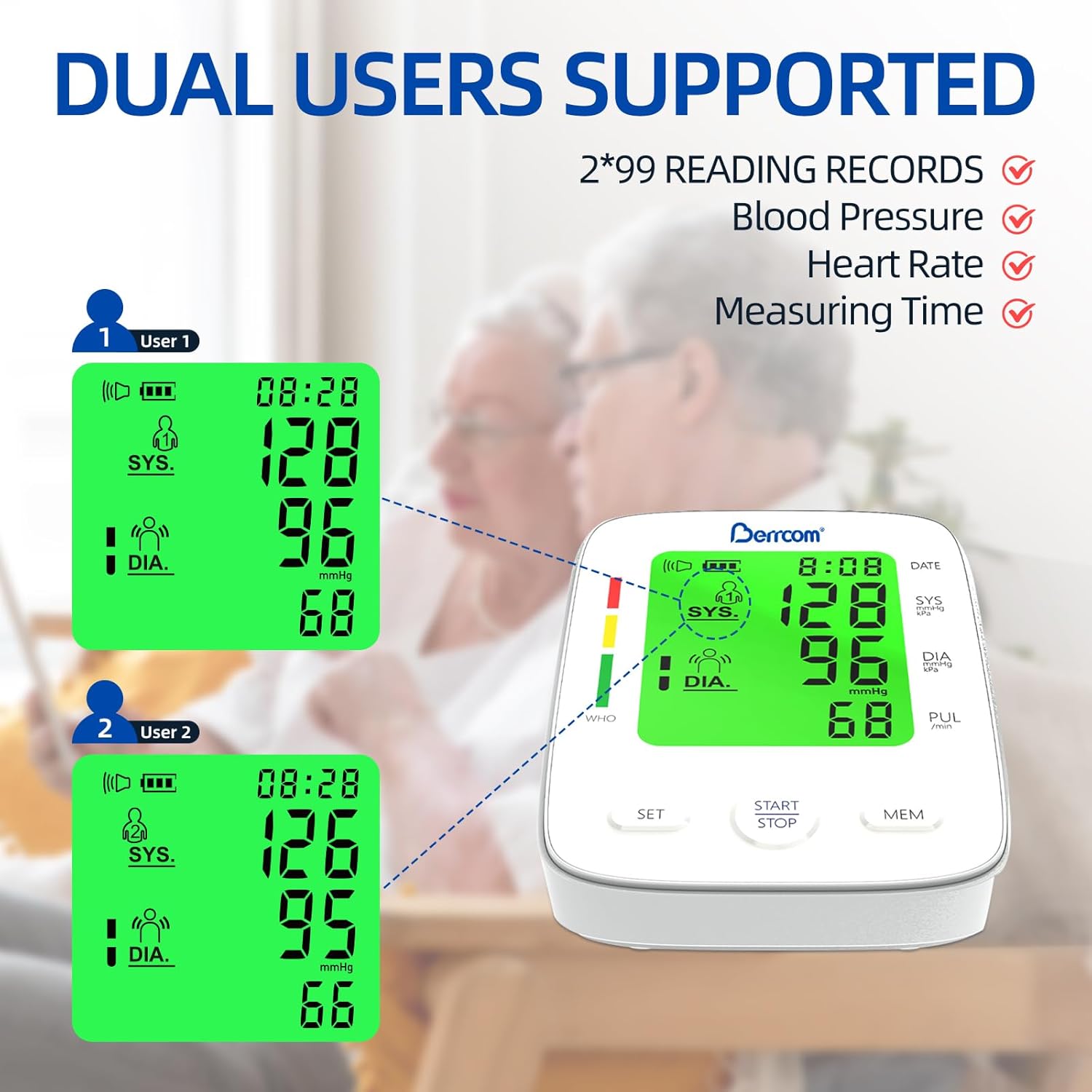
Image: Dual-user mode display.
6. Understanding Your Readings
The large LED backlit display provides clear readings and uses a color indicator bar to help you interpret your blood pressure levels according to World Health Organization (WHO) standards.
- Green: Indicates optimal/normal blood pressure.
- Yellow: Indicates normal-high or Hypertension Type 1.
- Red: Indicates Hypertension Type 2 or Type 3 (serious high blood pressure).

Image: Large LED screen with color indicator bar.

Image: Blood Pressure Classification Chart (WHO Standards).
7. Tips for Use
For accurate and consistent measurements, please follow these guidelines:
- Sit for at least 5 minutes before measurement.
- Wait at least 3 minutes between measurements.
- Measure at least 30 minutes after eating, bathing, or exercising.
- Do not measure within 30 minutes after eating, exercising, smoking, or drinking alcohol.
- Do not wear thick clothes; it is better to wear short sleeves (thickness < 5mm) during measurement.
- Do not compress or restrict the air hose or the cuff when taking measurements.

Image: Important tips for using your blood pressure monitor.
8. Maintenance
To ensure the longevity and accuracy of your Berrcom Blood Pressure Monitor, follow these maintenance guidelines:
- Clean the monitor and cuff with a soft, dry cloth. Do not use abrasive cleaners or immerse the device in water.
- Store the device in the provided storage bag in a cool, dry place, away from direct sunlight and extreme temperatures.
- Remove batteries if the device will not be used for an extended period to prevent leakage.
9. Troubleshooting
If you encounter any issues with your blood pressure monitor, please refer to the following common troubleshooting steps:
- No Power/Display: Check if batteries are inserted correctly and have sufficient charge. If using the Type-C cable, ensure it is properly connected to a power source.
- Inaccurate Readings: Ensure the cuff is correctly positioned and snugly fitted. Avoid talking or moving during measurement. Rest for 5 minutes before taking a reading.
- Error Messages: Refer to the specific error codes in the full user manual for detailed explanations and solutions. Common errors relate to cuff pressure or movement during measurement.
- Voice Not Working: Check the voice setting as described in section 5.3 to ensure it is enabled.
If problems persist, please consult the comprehensive user manual included with your product or contact Berrcom customer support.
10. Specifications
| Feature | Specification |
|---|---|
| Product Dimensions | 3.16 x 2.57 x 0.94 inches |
| Weight | 1.01 Pounds |
| Power Source | 4 AAA batteries (included) or Type-C Cable |
| Display Type | LED Backlit Display |
| Cuff Size | Adjustable (8.66"-16.53" / 22-42cm) |
| Memory Storage | 2 users x 99 readings (198 total) |
| Model Number | FC-BP120 |
| Target Use Body Part | Arm |
11. Warranty and Support
For detailed warranty information and customer support, please refer to the full user manual included in your product package. Berrcom is committed to providing reliable products and assistance.