
Huayu RM-L1726 V2
Huayu Universal Remote Control Instruction Manual
Model: RM-L1726 V2
1. Introduction
This manual provides detailed instructions for the setup, operation, and maintenance of your new Huayu Universal Remote Control, Model RM-L1726 V2. This remote is designed as an upgraded replacement for LG Smart TV remote controls, offering broad compatibility and enhanced features for a seamless viewing experience.
Please read this manual thoroughly before using the remote control to ensure proper function and to maximize its lifespan.
2. Safety Information
- Do not expose the remote control to direct sunlight, high humidity, or extreme temperatures.
- Avoid dropping or subjecting the remote control to strong impacts.
- Do not attempt to disassemble or modify the remote control. This will void the warranty.
- Keep batteries out of reach of children. If swallowed, seek immediate medical attention.
- Dispose of used batteries according to local regulations. Do not mix old and new batteries, or different types of batteries.
3. Package Contents
Upon opening the package, please verify that all items are present and in good condition:
- 1 x Huayu Universal Remote Control (Model: RM-L1726 V2)
Note: AAA batteries are not included and must be purchased separately.
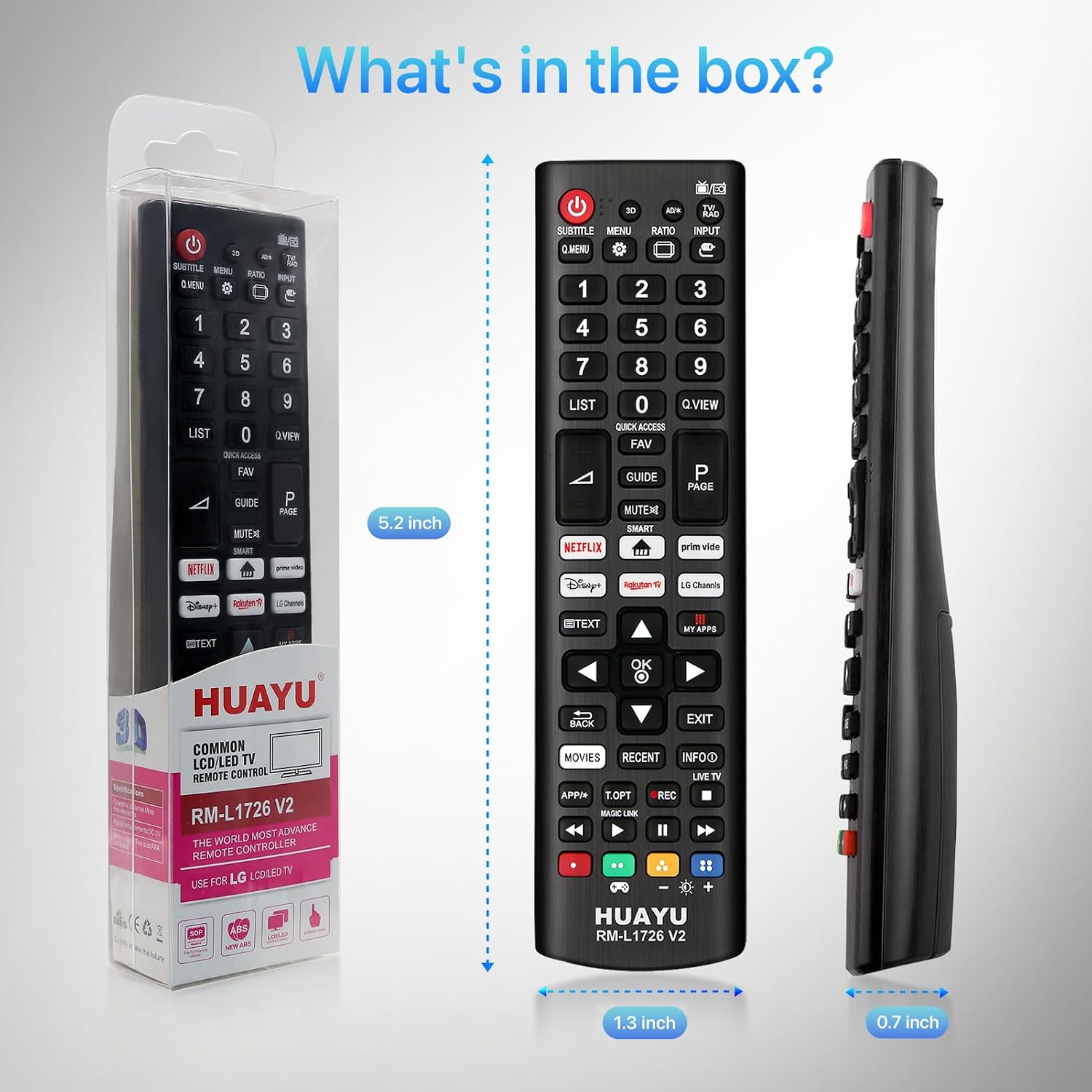
Image: The Huayu Universal Remote Control shown next to its retail packaging, highlighting its dimensions (5.2 inches length, 1.3 inches width, 0.7 inches thickness).
4. Setup
4.1 Battery Installation
- Locate the battery compartment on the back of the remote control.
- Press down on the tab and slide the battery cover downwards to open.
- Insert two (2) AAA batteries, ensuring the positive (+) and negative (-) terminals align correctly with the markings inside the compartment.
- Slide the battery cover back into place until it clicks securely.
The remote control is designed for immediate use with LG TVs upon battery insertion, requiring no programming or setup.

Image: The Huayu Universal Remote Control with its battery compartment open, showing where two AAA batteries are inserted. Accompanying icons illustrate features like 10m/32ft control range, 0.5s response time, support for over 50,000 clicks, and no setup required.
5. Operating Instructions
5.1 Button Functions
Familiarize yourself with the layout and functions of the buttons on your Huayu Universal Remote Control:

Image: A detailed diagram of the Huayu Universal Remote Control, with labels pointing to each button and a corresponding text description of its function. Key functions include Power, Input, Q.MENU, Volume, Programme, Number buttons, REC, MUTE, Navigation buttons, Q.Settings, Back, Control Buttons, and Shortcut Buttons.
- Power: Turns the TV on or off.
- Input: Changes the input source.
- Q. MENU: Quickly accesses common functions and settings without entering the full Main Menu.
- Volume Buttons: Adjusts the volume level.
- Programme Buttons: Scrolls through saved programs.
- OK: Selects menu options or confirms input.
- Number Buttons (0-9): Enters numbers.
- REC: Starts to record and displays record menu (Only TimeMachine supported model).
- MUTE: Mutes all sounds.
- Navigation Buttons (Up/Down/Left/Right): Scrolls through menus or options.
- Q. Settings: Accesses the Quick Settings.
- Back: Returns to the previous level.
- Control Buttons: Control buttons for media content (Play, Pause, Stop, Fast Forward, Rewind).
- Q.VIEW: Instantly switches to the last channel or input source you were watching.
- FAV: Refers to "Favorite", a feature for quickly accessing TV channels that you have marked.
- GUIDE: A shortcut key for the Electronic Program Guide (EPG), used to display information about current and upcoming programs.
- TEXT: Activates the Teletext function on the TV. (Not available in North America).
- MY APPS: For quick access to the application menu on your TV (for LG Smart TV).
- EXIT: Used to exit the current menu interface or function and return to normal TV viewing status.
- MOVIES: Typically used to quickly access movie-related features or content on your TV. Specific features may vary by TV model and regional settings.
- RECENT: Allows you to quickly view and access recently used applications, channels, or input sources.
5.2 Shortcut Buttons
The remote control features six dedicated shortcut buttons for instant access to popular streaming platforms:
- NETFLIX
- Prim Vido (Prime Video)
- Rakute TV (Rakuten TV)
- Disny (Disney+)
- LG Channls (LG Channels)
- MOVES (Movies)
Simply press the desired button to launch the corresponding application directly.

Image: The Huayu Universal Remote Control with its six popular shortcut buttons (Netflix, Prime Video, Rakuten TV, Disney+, LG Channels, Movies) prominently displayed and highlighted, indicating their direct access functionality.
6. Compatibility
This Huayu Universal Remote Control (Model RM-L1726 V2) is designed to be fully compatible with a wide range of LG Smart TV models. It serves as an excellent replacement or backup for most original LG remote controls.
- Compatible LG TV Types: LCD, LED, OLED, UHD, HDTV, 3D, and 4K Smart TV models.
- Specific Series Examples:
- OLED TVs (e.g., A1/A2/B1/C1/C2/C3/G1/G2/Z2 Series)
- UHD TVs (e.g., UQ9000/UQ7070/UQ7570/UQ8000 Series)
- QNED TVs (e.g., QNED980/QNED85/QNED90/QNED99 Series)
- Nanocell TVs (e.g., QNED980/QNED85/QNED90/QNED99 Series)
Important Note:
- This remote control is exclusively for LG Smart TVs.
- It is NOT compatible with other TV brands.
- Please confirm your TV brand before purchasing or using.

Image: The Huayu Universal Remote Control displayed alongside illustrations of different LG TV types (OLED, UHD, QNED, Nanocell), indicating its universal compatibility with these LG models.

Image: The Huayu Universal Remote Control shown next to a collection of various original LG remote controls, illustrating that it can serve as a replacement for these models.
7. Maintenance
7.1 Cleaning
To clean the remote control, gently wipe it with a soft, dry cloth. For stubborn dirt, slightly dampen the cloth with water or a mild, non-abrasive cleaner. Do not use harsh chemicals, solvents, or abrasive cleaning pads, as these can damage the remote's surface or internal components.
7.2 Storage
When not in use for extended periods, remove the batteries to prevent leakage, which can damage the remote control. Store the remote in a cool, dry place away from direct sunlight and extreme temperatures.
8. Troubleshooting
| Problem | Possible Cause | Solution |
|---|---|---|
| Remote control not working. | Batteries are dead or incorrectly inserted. | Replace batteries with new AAA batteries, ensuring correct polarity (+/-). |
| Remote control range is reduced. | Low battery power. Obstruction between remote and TV. | Replace batteries. Ensure a clear line of sight between the remote's IR emitter and the TV's IR receiver. |
| Certain buttons do not respond. | Button malfunction or TV specific function. | Check if the button is stuck. Some functions (e.g., TEXT) may not be supported in all regions or by all TV models. |
| Remote works for some LG TVs but not others. | Compatibility issue. | Ensure the TV is an LG Smart TV. This remote is not compatible with other TV brands. |
9. Specifications
- Model Number: RM-L1726 V2
- Brand: Huayu
- Compatible Devices: LG Television (LCD, LED, OLED, UHD, HDTV, 3D, 4K Smart TV models)
- Connectivity Technology: Infrared (IR)
- Power Source: 2 x AAA Batteries (not included)
- Item Weight: Approximately 2.89 ounces (82 grams)
- Package Dimensions: Approximately 7.8 x 2.05 x 1.02 inches (19.8 x 5.2 x 2.6 cm)
- Special Feature: Universal (for LG TVs)
- Max Number of Supported Devices: 1
10. Warranty and Support
10.1 Premium Service
Huayu is committed to providing a premium customer experience. Our professional service team is available to assist you with any questions or concerns regarding your order or product.
10.2 Contact Information
If you have any questions or require support, please contact us. We aim to respond to all inquiries within 12 hours.
For the most up-to-date contact information, please refer to the seller's page on Amazon or the product packaging.
Ask a question about this manual
Ask about setup, troubleshooting, compatibility, parts, safety, or missing instructions. Manuals+ will review the question and use this page’s manual context to help answer it.