
MECHEN M30
MECHEN M30 HiFi MP3 Player User Manual
Model: M30
Brand: MECHEN
Introduction
The MECHEN M30 HiFi MP3 Player is a high-resolution digital audio music player designed for audiophiles. It features lossless DSD decoding, a 2.0-inch color display, and a durable aluminum alloy shell. This manual provides essential information for setting up, operating, and maintaining your device.
Package Contents
Upon opening the package, please verify that all items are present:
- 1 x MECHEN M30 HiFi Music Player
- 1 x USB Cable
- 1 x 64GB Memory Card (pre-inserted)
- 1 x User Manual (this document)

Image: The MECHEN M30 HiFi MP3 Player shown with its USB cable, 64GB memory card, and user manual, representing the typical package contents.
Product Overview
The MECHEN M30 features a robust design and intuitive controls for an optimal audio experience.

Image: Front and back views of the MECHEN M30 HiFi MP3 Player, highlighting its compact size and sleek design.
Key Features:
- HiFi Lossless Sound Quality: Professional DSP audio IC and dual DAC decoding (WM8965 and TPA6530) for accurate sound reproduction.
- High-Resolution Display: 2.0-inch LCD with 320*240 resolution for clear UI and lyric display.
- Durable Design: High-precision CNC aluminum alloy shell with a unique scroll wheel control.
- Extended Battery Life: 1500 mAh battery provides up to 25 hours of continuous playback after a 2-hour charge.
- Expandable Storage: Supports up to 256GB Micro SD card (64GB card included).
- Line Out Function: Supports both headphone and line output for connection to external amplifiers or audio systems.
Setup
Charging the Device:
Before first use, fully charge the MECHEN M30. Connect the included USB cable to the Micro USB port on the player and the other end to a USB power adapter (not included) or a computer's USB port. The device takes approximately 2 hours to fully charge.

Image: An illustration showing the MECHEN M30 player with indicators for 2.5 hours full charge time, 1500mAh large capacity battery, and 30 hours continuous play.
Inserting the Memory Card:
The MECHEN M30 comes with a 64GB Micro SD card pre-inserted. If you need to replace or insert a new card (up to 256GB), locate the TF Card slot on the side of the player. Gently push the card into the slot until it clicks into place. To remove, push the card again until it springs out.

Image: A close-up view of the side of the MECHEN M30 player, indicating the TF card slot for Micro SD cards and the Micro USB 5-pin port for charging and data transfer.
Transferring Music Files:
Connect the player to your computer using the USB cable. The player will appear as a removable disk. You can then drag and drop your audio files (MP3, WMA, WAV, APE, FLAC, AAC, OGG, DSD) directly onto the inserted Micro SD card. Ensure files are organized in folders for easier navigation.
Supported audio formats include: MP3 (8-48kHz, 8-320kbps), WMA (8-48kHz, 5-384kbps, STD 8-96kHz), WAV (8-192kHz), APE (8-96kHz, high; 8-192kHz, fast), FLAC (8-192kHz, LO-L10), AAC (8-48kHz, 8-320kbps, LC), OGG (8-48kHz), DSD 128 (5.6MHz).

Image: A table detailing the various audio formats supported by the MECHEN M30 player, including MP3, AAC, FLAC, APE, WAV/PCM, AIFF, ALAC, IMA/MS-ADPCM, DSF, DFF, and OGG, along with their respective sampling rates and bitrates.
Operating Instructions
Power On/Off:
Press and hold the power button located on the top right side of the device to turn it on or off.
Navigation:
The MECHEN M30 features a scroll wheel and dedicated buttons for navigation:
- Scroll Wheel: Rotate clockwise or counter-clockwise to browse music tracks, navigate menus, or adjust volume.
- MENU Button: Access the main menu or context-sensitive options.
- BACK Button: Return to the previous screen. Press and hold to quickly return to the main menu.
- Play/Pause Button: Start or pause playback.
- Previous/Next Track Buttons: Skip to the previous or next track.
- Volume Buttons: Adjust the playback volume.

Image: A detailed view of the MECHEN M30 player, highlighting the scroll wheel, menu, back, play/pause, and track navigation buttons for user interaction.
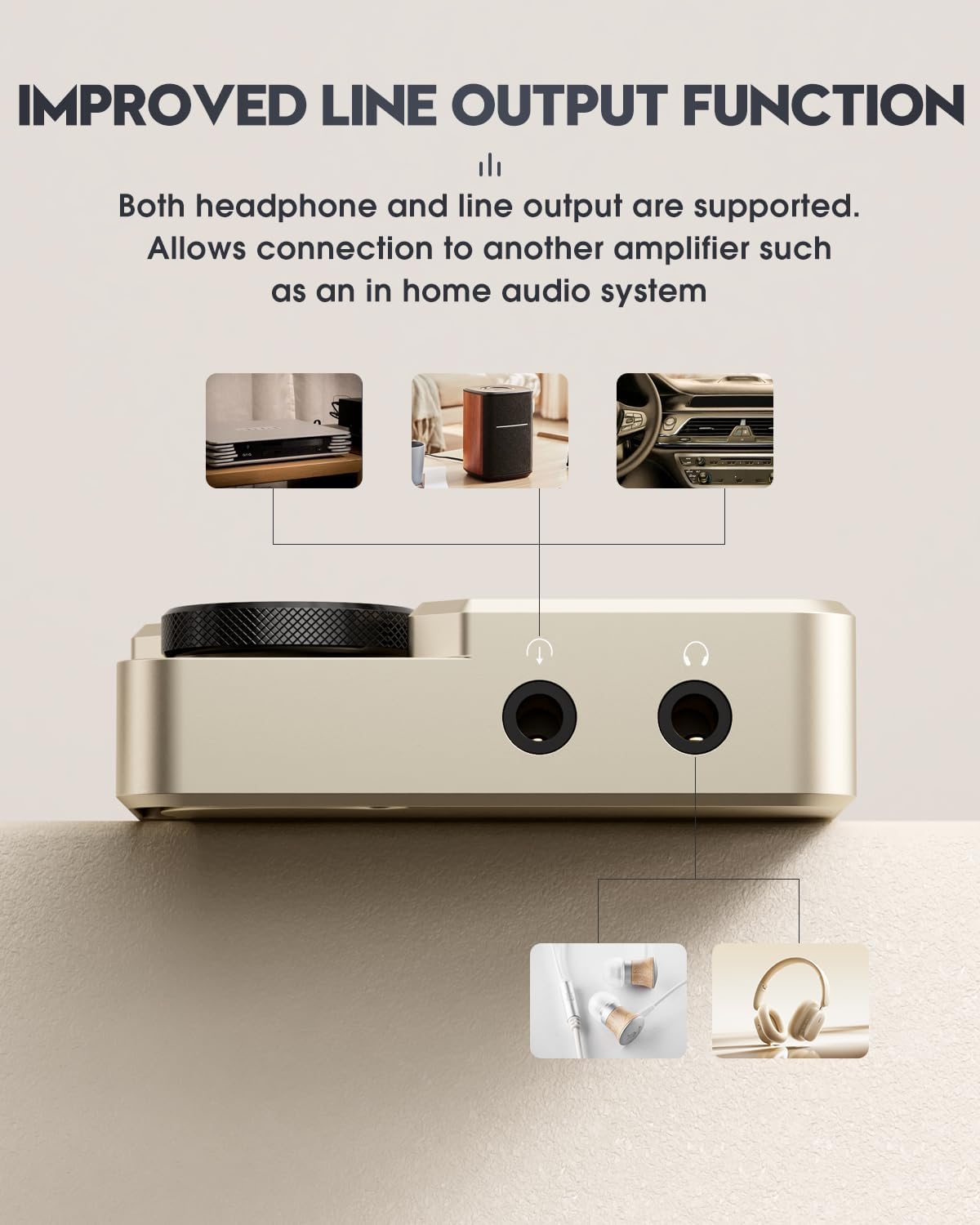
Image: A close-up of the MECHEN M30's scroll wheel, illustrating its 360-degree rotatable function for browsing music tracks or adjusting volume.

Image: A diagram demonstrating how to quickly return to the main menu by pressing and holding the 'BACK' button on the MECHEN M30 player.
Playback Settings:
The player offers various playback settings, including shuffle, repeat, and equalizer adjustments. Access these options through the menu.

Image: A visual representation of the MECHEN M30's customizable equalizer settings, showing various presets like Rock, Pop, Techno, Jazz, Classical, Soft, and a custom 7-segment professional adjustment.
Connecting to External Devices (Line Out):
The MECHEN M30 supports both headphone and line output. Use the line out jack to connect the player to an external amplifier, home audio system, or car audio system for enhanced sound. Ensure the line level is set appropriately in the player's settings to avoid low volume output.
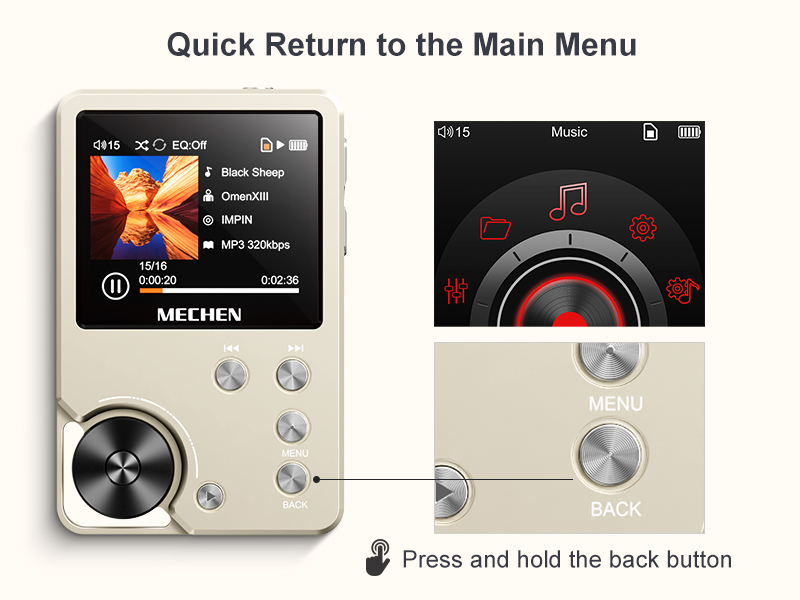
Image: A close-up of the bottom of the MECHEN M30 player, clearly labeling the line out jack and headphone jack, and illustrating connections to a home audio system, a portable speaker, and a car audio system.

Image: A sequence of three screen captures from the MECHEN M30's interface, demonstrating how to navigate to "Play Settings" and adjust "The line level" for optimal audio output when connecting to speaker devices. It recommends setting the line level to 0dB for the loudest output on an amplifier.
Maintenance
Cleaning:
Wipe the device with a soft, dry cloth. Avoid using liquid cleaners or abrasive materials, as they may damage the finish or internal components.
Storage:
Store the player in a cool, dry place away from direct sunlight and extreme temperatures. If storing for an extended period, ensure the battery is partially charged (around 50%) to preserve its lifespan.
Troubleshooting
| Problem | Possible Cause | Solution |
|---|---|---|
| Device does not power on. | Low battery; device frozen. | Charge the device for at least 30 minutes. If still unresponsive, press the reset button (small hole next to volume buttons) with a thin object like a paperclip. |
| No sound or low volume. | Volume too low; headphones not connected properly; incorrect line out setting. | Increase volume. Ensure headphones are fully plugged in. If using line out, check the "The line level" setting in Play Settings and set it to 0dB. |
| Cannot transfer files. | USB connection issue; memory card not recognized. | Ensure USB cable is securely connected. Try a different USB port or cable. Reinsert the Micro SD card. Ensure the card is formatted correctly (FAT32 recommended). |
| Music files not sorted correctly. | Default sorting by save time. | The player defaults to sorting by save time. To sort alphabetically, use a third-party tool like FATSorter on your computer before transferring files to the SD card. |

Image: A comparison showing the default music file sorting on the MECHEN M30 (by save time) versus alphabetical sorting achieved after processing files with a tool like FATSorter.
Specifications
- Model: M30
- Display: 2.0-inch LCD, 320*240 resolution
- Audio Decoding: Professional DSP audio IC, Dual DAC (WM8965, TPA6530)
- Supported Audio Formats: MP3, WMA, WAV, APE, FLAC, AAC, OGG, DSD 128
- Battery: 1500 mAh Lithium Ion
- Charging Time: Approx. 2 hours
- Playback Time: Up to 25 hours (continuous)
- Internal Memory: None (requires Micro SD card)
- Expandable Storage: Up to 256GB Micro SD card
- Connectivity: Micro USB (5-pin) for charging and data transfer
- Output: 3.5mm Headphone Jack, 3.5mm Line Out Jack
- Dimensions: 2.2 x 0.6 x 3.5 inches (approx. 5.6 x 1.5 x 8.9 cm)
- Weight: Approx. 176g (5.4 ounces)
- Material: CNC Aluminum Alloy Shell
Warranty and Support
MECHEN offers a 30-day no-questions-asked return policy and a 1-year exchange service for this product. For any inquiries or support needs, please contact MECHEN customer service via email. They aim to reply within 24 hours.
For further assistance, you may visit the official MECHEN store on Amazon: MECHEN Store.
Official Product Video
Watch the official product video for a visual guide on the MECHEN M30 HiFi MP3 Player's features and operation.
Video: An official video showcasing the MECHEN M30 HiFi lossless player, demonstrating its design, interface, and key functionalities such as the scroll wheel, power button, and various ports.
Related Documents - M30
 |
MECHEN M30 HIFI MP3 Player User Manual Comprehensive user manual for the MECHEN M30 HIFI MP3 Player, covering button functions, charging, data transfer, main features like music playback and equalizer settings, playback settings, and troubleshooting. Includes technical specifications. |
 |
MECHEN M30 MP3 Player User Guidance Comprehensive user guide for the MECHEN M30 MP3 player, covering music playback, settings, file management, equalizer, troubleshooting, and firmware updates. Learn how to manage your music, customize playback, and resolve common issues with this Hi-Res digital audio player. |
 |
MECHEN M30 HiFi MP3 Player User Manual Comprehensive user guide for the MECHEN M30 HiFi Lossless MP3 Player, covering setup, operation, and troubleshooting. |
 |
MECHEN M30 HiFi MP3-Player Bedienungsanleitung Offizielle Bedienungsanleitung für den MECHEN M30 HiFi MP3-Player. Enthält Anweisungen zur Tastenbelegung, Musikwiedergabe, Equalizer-Einstellungen, Firmware-Updates und Fehlerbehebung. |
 |
MECHEN M30 HiFi MP3 Player User Manual Comprehensive user manual for the MECHEN M30 HiFi MP3 Player. Includes setup, operation, troubleshooting, and technical specifications. |
 |
Manuel d'utilisation MECHEN M30 Lecteur MP3 HIFI Guide d'utilisation complet pour le lecteur MP3 HIFI MECHEN M30. Instructions de configuration, chargement, transfert de données et dépannage. |
Ask a question about this manual
Ask about setup, troubleshooting, compatibility, parts, safety, or missing instructions. Manuals+ will review the question and use this page’s manual context to help answer it.