
Introduction
This manual provides detailed instructions for the setup, operation, and maintenance of your new CARMATOR Garage Door Opener Remote. Please read this manual thoroughly before use to ensure proper functionality and safety.
Compatibility
This garage door opener remote is designed to work with Sears Craftsman, LiftMaster, and Chamberlain garage door openers manufactured from 1993 to 1997. Important: This remote is only compatible with garage door openers that have a GREEN learn button. Please verify the color of your opener's learn button before attempting to program.
Compatible models include: 41A4315, 41A4207, 41A4252-6C, 41A4252-6G, 41A4252-7G, 41A4252-7D, 41A4252-12, 41A4252-6B, 41D4374-9C, 41D4674-3C, 41D4674-1G, K1027, HBW0777, HBW1127.
Note: This remote does not have DIP switch functionality and is not compatible with Genie, Overhead, Linear, Raynor, Marantz, Precision, or Legacy brand garage door openers.

Figure 1: Identifying the Green Learn Button on your Garage Door Opener. The image shows a garage door opener unit with an arrow pointing to a green learn button, and a diagram below it indicating where to find the learn button on different opener types.
Package Contents
Upon opening the package, please verify that all components are present and undamaged:
- 2 x Garage Door Opener Remotes (with pre-installed CR2032 batteries)
- 2 x Visor Clips
- 1 x Instruction Manual (this document)

Figure 2: Contents of the CARMATOR Remote Control Package. The image displays two gray remote controls, two silver visor clips, and a document labeled "Manual - 1", all laid out against a background of a garage.
Setup and Programming
Follow these steps to program your new CARMATOR remote control to your garage door opener. Ensure you have access to your garage door opener unit.
- Locate the Learn Button: On your garage door opener unit, locate the green learn button. This button is typically found on the back or side panel of the motor unit. Refer to Figure 1 for visual guidance.
- Press the Learn Button: Press and immediately release the green learn button on your garage door opener. The indicator light on the opener will illuminate, signaling that it is in programming mode. You have approximately 30 seconds to complete the next step.
- Program the Remote: Within 30 seconds of pressing the learn button on the opener, press and hold the desired button on your new CARMATOR remote control.
- Confirm Programming: Continue holding the remote button until the garage door opener's light flashes or you hear two clicks. This indicates successful programming. Release the button on the remote.
- Test the Remote: Press the programmed button on your remote control. The garage door should activate (open or close). If it does not, repeat the programming steps.
Each remote can control up to three garage door openers. Repeat the programming steps for each additional opener you wish to control, assigning a different button on the remote for each.
Operating Instructions
Once programmed, operating your garage door opener with the CARMATOR remote is straightforward:
- Opening/Closing: Press the programmed button on the remote control once to open or close your garage door.
- Stopping: Press the programmed button again while the door is in motion to stop it.
- Visor Clip: Use the included visor clip to conveniently attach the remote to your vehicle's sun visor for easy access.
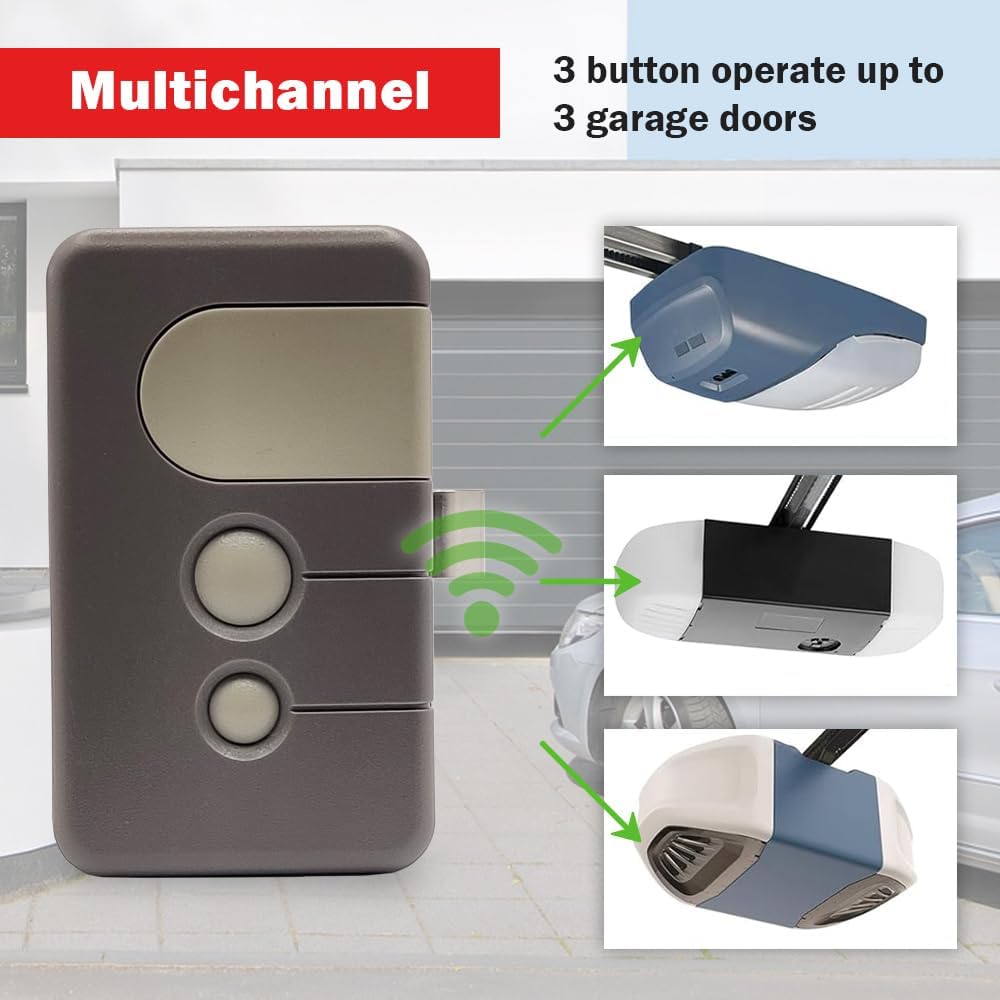
Figure 3: Remote Control Attached to a Car Visor. The image depicts the remote control clipped to a car's sun visor, with a finger pressing one of its buttons, demonstrating its convenient placement for in-car use.

Figure 4: Multichannel Operation. This image visually represents how a single 3-button remote can operate up to three separate garage doors, with lines connecting the remote to three distinct garage door opener units.
Maintenance
The CARMATOR remote control requires minimal maintenance. Follow these guidelines to ensure its longevity:
- Battery Replacement: The remote uses a CR2032 lithium battery. When the remote's range decreases or it stops responding, it's time to replace the battery. To replace, open the remote casing (usually by gently prying it open with a small flathead screwdriver) and replace the old battery with a new CR2032, ensuring correct polarity.
- Cleaning: Wipe the remote with a soft, dry cloth. Avoid using abrasive cleaners or solvents.
- Storage: Store the remote in a dry place, away from extreme temperatures and direct sunlight.
Troubleshooting
| Problem | Possible Cause | Solution |
|---|---|---|
| Remote does not work after programming. | Incorrect programming steps followed; battery low or dead; remote not compatible with opener. |
|
| Remote range is poor. | Low battery; interference from other devices; obstruction between remote and opener. |
|
| Garage door opens/closes unexpectedly. | Accidental button press; interference. |
|
Specifications
- Model Number: 139.53879
- Dimensions: 3.1 x 0.7 x 1.8 inches
- Item Weight: 3.52 ounces
- Battery Type: 1 x CR2032 Lithium (included)
- Compatibility: Garage door openers with GREEN learn button (1993-1997 models)
- Technology: Billion Code series
- Channels: 3 (controls up to 3 openers)
Warranty and Support
For technical support or warranty inquiries, please contact CARMATOR customer service. Refer to the product packaging or the seller's information for contact details.
Technical Support: Available 24/7 as per product features.
For further assistance, you may also refer to the official CARMATOR website: www.carmator.us