
1. Introduction
This manual provides comprehensive instructions for the CARMATOR 3-button garage door opener remote. This remote is designed to operate up to three garage door openers, gate operators, or commercial door operators simultaneously. It features Security+ 390 MHz technology, ensuring a new code with every use for enhanced security.
Please read these instructions carefully before attempting to program or operate your new remote control.
2. Compatibility
The CARMATOR garage door opener remote is compatible with specific garage door opener models. Please verify your opener's learn button color and manufacturing date for proper functionality.
2.1 Compatible Systems
- Sears Craftsman, LiftMaster, and Chamberlain garage door openers manufactured from 1997-2005.
- Crucially, your garage door opener must have a RED or ORANGE learn button.
- Utilizes Security+ 390 MHz code type.
- Compatible with models including: 41A5021, 41A5483, 41A4315-7C, 41A5389, 41A5507, 41A5635A, 41A4315-6D, 41D4674, 41D4674-10H, 41D4674-11, 41D4674-11E, 041A5629.
2.2 Incompatible Systems
- This remote does not have DIP switch functionality and cannot work with systems requiring DIP switches.
- Not compatible with Genie, Overhead, Linear, Raynor, Marantz, Precision, or Legacy brand garage door openers.

Image: Verify your garage door opener has a Red or Orange Learn Button for compatibility. The image displays the location of the learn button on a typical opener unit and confirms compatibility with red or orange buttons.
3. Package Contents
Your CARMATOR remote control package includes the following items:
- 2 x Remote Controls
- 2 x Visor Clips
- Batteries (CR2032, pre-installed in each remote control)
- 1 x Instruction Manual (this document)

Image: The package includes two remote controls, two visor clips, and an instruction manual.
4. Setup and Programming Instructions
Follow these steps to program your CARMATOR remote control to your garage door opener. Ensure you are near your garage door opener unit during this process.
- Locate the Learn Button: On the back panel of your garage door opener motor unit, locate the 'Learn' button. This button will be either RED or ORANGE. Refer to the compatibility section and image above for visual guidance.
- Press the Learn Button: Press and immediately release the 'Learn' button on your garage door opener. The LED indicator light on the opener will illuminate steadily for 30 seconds, indicating it is in programming mode.
- Press Remote Button: Within 30 seconds of pressing the learn button, press and hold the desired button on your new CARMATOR remote control that you wish to program.
- Release Remote Button: Release the remote control button when the garage door opener lights flash or two clicks are heard. This indicates that the remote has been successfully programmed.
- Test the Remote: Press the programmed button on your remote control to test its operation. The garage door should activate.
- Program Additional Remotes/Doors: To program additional remote controls or to program other buttons on the same remote for different garage doors, repeat steps 1-5 for each remote or button.
Note: If your garage door opener has a green or purple learn button, this remote is not compatible.
5. Operating Instructions
Once programmed, operating your CARMATOR remote is straightforward.
- Opening/Closing the Door: Press the programmed button on your remote control. The garage door will open or close. Pressing it again will reverse the door's direction.
- Multichannel Control: Each remote features three buttons, allowing you to program and control up to three different garage door openers or gate operators independently.
- Long Distance Operation: The remote is designed for a long working range, enabling you to activate your garage door from a distance without needing to be directly in front of it.

Image: The 3-button remote can operate up to three separate garage doors or compatible devices.
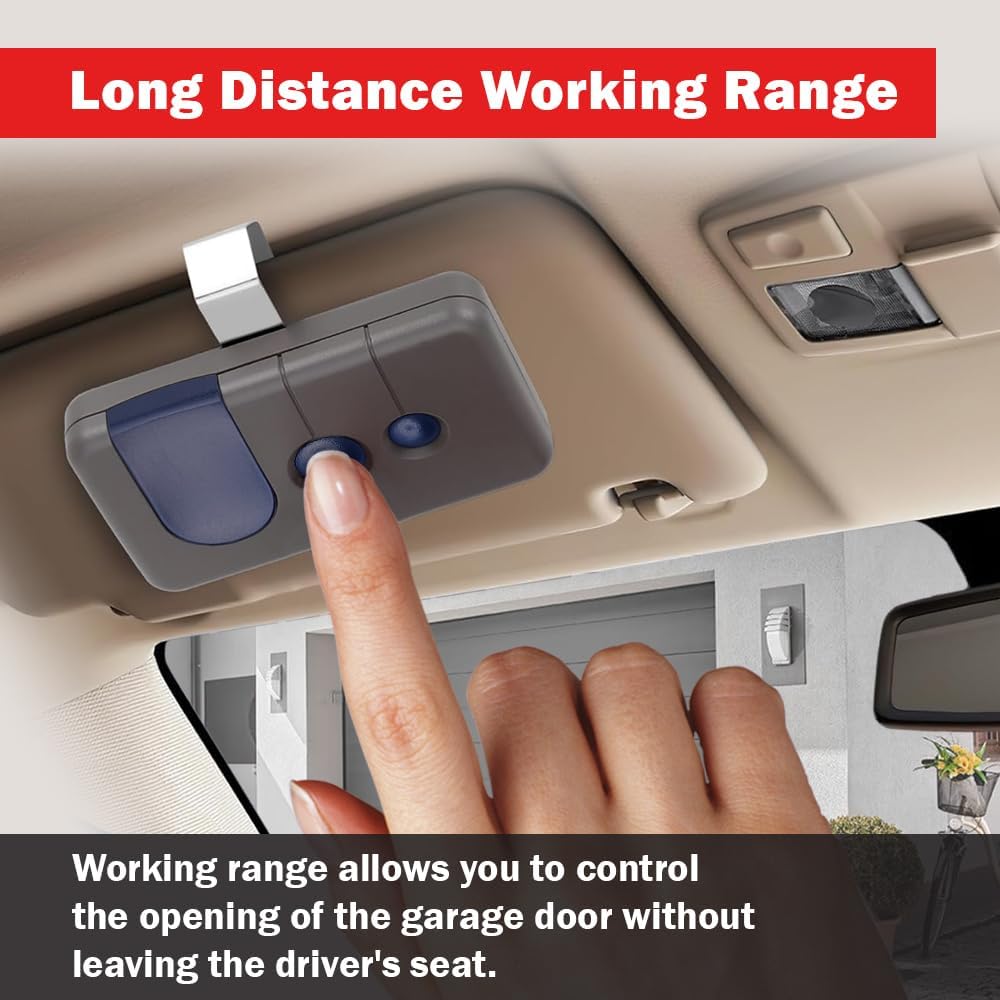
Image: The remote's long working range allows for convenient operation from inside your vehicle.
6. Maintenance
6.1 Battery Replacement
The remote control uses one CR2032 lithium coin cell battery. When the remote's range decreases significantly or the LED indicator on the remote does not light up when a button is pressed, it is time to replace the battery.
- Locate the small notch on the side or bottom of the remote casing.
- Using a small flathead screwdriver or a coin, carefully pry open the remote casing at the notch.
- Remove the old CR2032 battery.
- Insert a new CR2032 battery with the positive (+) side facing up.
- Snap the remote casing back together securely.
- Test the remote to ensure proper function.
6.2 Cleaning
Wipe the remote control with a soft, dry cloth. Avoid using harsh chemicals or abrasive cleaners, as these can damage the casing or internal components.
7. Troubleshooting
If your remote control is not functioning as expected, consider the following common issues and solutions:
- Remote not working after programming:
- Ensure your garage door opener has a RED or ORANGE learn button. This remote is not compatible with other learn button colors.
- Repeat the programming steps carefully. Ensure the learn button on the opener is pressed and released quickly, and the remote button is pressed within 30 seconds.
- Check the remote's battery. Replace it if necessary (refer to Section 6.1).
- Reduced operating range:
- Replace the remote's battery.
- Ensure there are no obstructions between the remote and the garage door opener antenna.
- Check if the garage door opener antenna is hanging freely and not obstructed.
- Remote activates the wrong door:
- This indicates the remote button was programmed to a different opener. Reprogram the desired button to the correct garage door opener.
- Garage door opener not responding to any remote:
- Ensure the garage door opener has power.
- Check if the opener's 'Learn' button is stuck or damaged.
- If multiple remotes are not working, there might be an issue with the garage door opener itself. Consult your opener's manual or a professional technician.
8. Specifications
| Model Number | 139.53681B |
| Compatibility | LiftMaster, Chamberlain, Craftsman (1997-2005) with Red or Orange Learn Button |
| Frequency | 390 MHz (Security+) |
| Number of Buttons | 3 |
| Battery Type | 1 x CR2032 Lithium Coin Cell (included) |
| Product Dimensions | 3.1 x 0.7 x 1.8 inches |
| Item Weight | 3.2 ounces |
9. Warranty and Support
CARMATOR is committed to providing reliable products and customer satisfaction. For any technical assistance or inquiries, please contact our support team.
- Technical Support: 24/7 technical support is available to assist you with any questions or issues you may encounter.
- Please refer to the product packaging or the retailer's website for specific warranty details and contact information.


