
1. Important Safety Instructions
Please read all instructions carefully before using this appliance and retain for future reference. Failure to follow these instructions may result in electric shock, fire, or serious injury.
- Always place the appliance on a firm, level surface to prevent tipping.
- Do not operate the appliance with a damaged cord or plug. Contact customer support for assistance.
- Keep the appliance away from water and other liquids. Do not immerse in water.
- Ensure the power outlet voltage matches the appliance's requirements (110V).
- Do not insert objects into any openings. This may cause electric shock or damage.
- Unplug the appliance when not in use, before cleaning, or before moving.
- Do not cover the air inlet or outlet during operation.
- This appliance is for indoor use only.
- Keep out of reach of children and pets.
- The appliance features tip-over protection and overheating protection. If it tips over or overheats, it will automatically shut off.
2. Product Overview
The Cobuy 4-in-1 Tower Fan and Heater Combo provides cooling, heating, humidification, and fan functions for year-round comfort.

Image: The Cobuy 4-in-1 Tower Fan and Heater Combo unit with its remote control, positioned in a living room setting.
2.1 Components
- Main Unit (Tower Fan/Heater)
- Remote Control
- Water Tank (4L capacity)
- Ice Packs (2 included, for enhanced cooling)
2.2 Control Panel
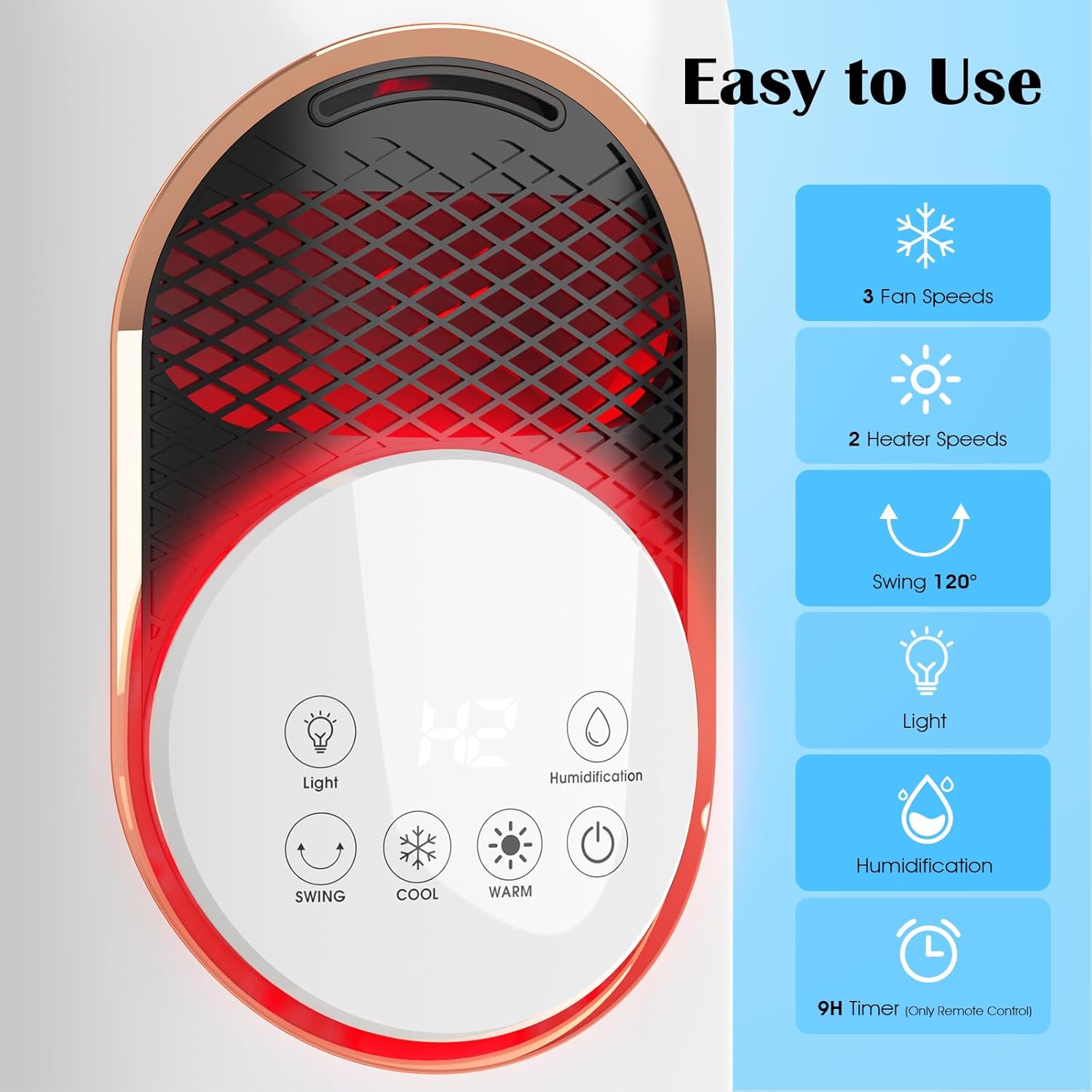
Image: A detailed view of the appliance's touch control panel, showing icons for Light, Swing, Cool, Warm, Humidification, and Power, along with a digital display.
The touch control panel is located on the front of the unit. It includes:
- Power Button: Turns the unit On/Off.
- Cool Button: Activates cooling mode and cycles through 3 fan speeds.
- Warm Button: Activates heating mode and cycles through 2 heating levels.
- Swing Button: Activates/deactivates 120° oscillation.
- Humidification Button: Turns the humidification function On/Off.
- Light Button: Controls the LED light.
- Display: Shows current settings (e.g., temperature, fan speed, timer).
2.3 Remote Control

Image: The appliance shown with its remote control, illustrating its dimensions and the convenience of remote operation.
The remote control allows for convenient operation from a distance. It duplicates all functions available on the touch control panel, including the timer function (up to 12 hours).
3. Setup
3.1 Unpacking
- Carefully remove the appliance from its packaging.
- Check for any damage during transit. If damaged, do not operate and contact customer support.
- Retain packaging for future storage or transport.
3.2 Placement
- Place the unit on a stable, flat, and dry surface.
- Ensure there is adequate clearance (at least 12 inches) around the unit for proper airflow.
- Do not place near curtains, drapes, or other objects that could obstruct airflow or pose a fire hazard.
- Ensure the power cord is not pinched or placed under the unit.
3.3 Filling the Water Tank (for Humidification/Cooling)
The appliance features a 4L water tank for humidification and enhanced cooling with ice packs.
- Turn off and unplug the unit before filling the water tank.
- Locate the water tank access point (typically at the rear or bottom of the unit).
- Carefully remove the water tank.
- Fill the tank with clean, cool tap water. Do not exceed the maximum fill line.
- For enhanced cooling, place the provided ice packs (after freezing) into the water tank.
- Securely replace the water tank into the unit.
4. Operating Instructions
Plug the unit into a standard 110V electrical outlet. You can operate the unit using either the touch control panel or the remote control.
4.1 Power On/Off
- Press the Power Button on the control panel or remote to turn the unit on.
- Press the Power Button again to turn the unit off.
4.2 Cooling Mode (Fan)
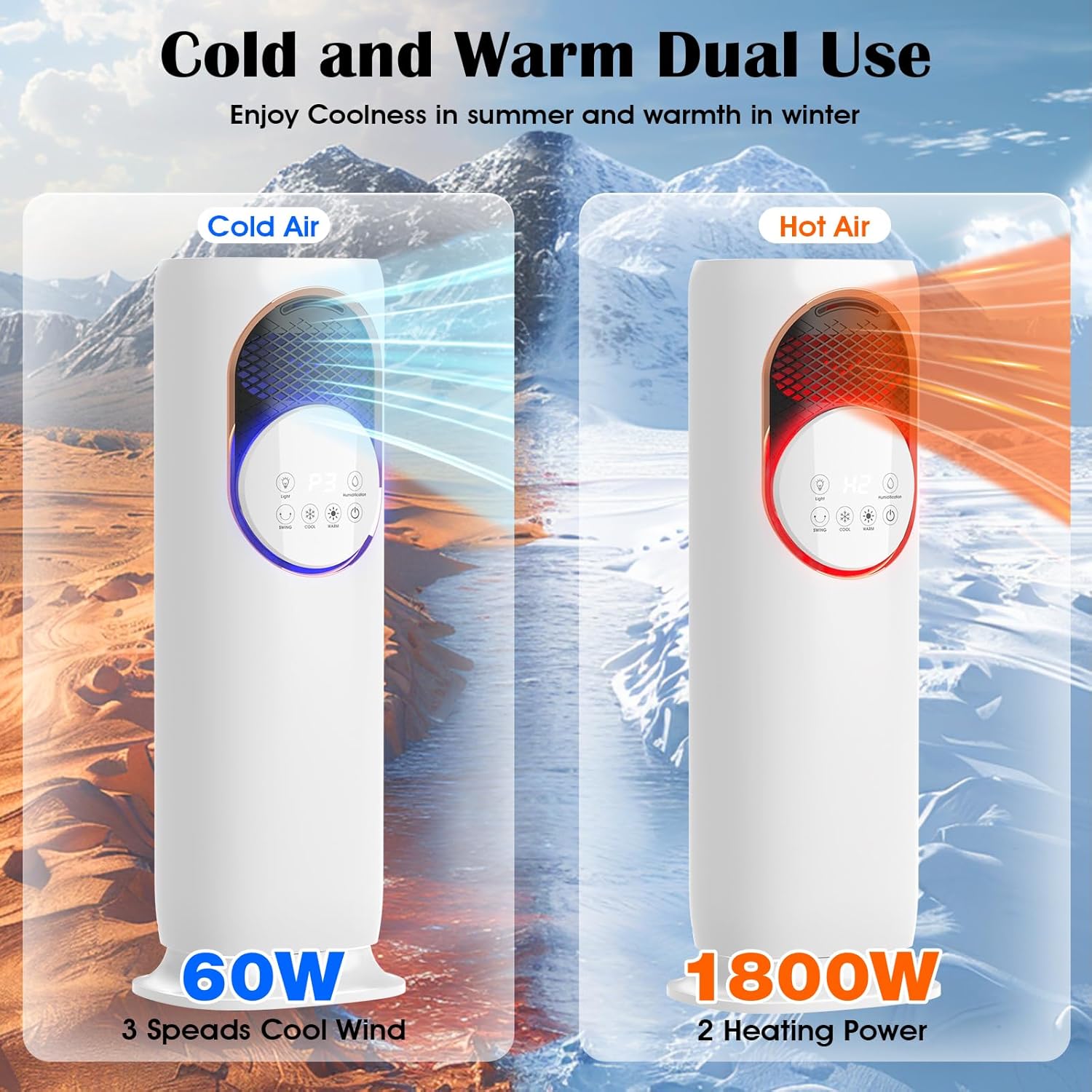
Image: The appliance illustrating its cold air output (60W, 3 speeds) for summer use.
- With the unit on, press the Cool Button.
- Each press will cycle through 3 fan speeds (Low, Medium, High). The current speed will be indicated on the display.
- For enhanced cooling, ensure the water tank is filled and humidification is active, especially with ice packs.
4.3 Heating Mode

Image: The appliance demonstrating its hot air output (1800W) and highlighting its overheating protection feature, which activates at 113°F.
- With the unit on, press the Warm Button.
- Each press will cycle through 2 heating levels (Low Heat, High Heat - 1800W). The current level will be indicated on the display.
- The PTC ceramic heating element provides rapid warmth.
4.4 Humidification Function
- Ensure the water tank is filled.
- Press the Humidification Button to turn the mist function On/Off.
- The unit can provide up to 12 hours of continuous mist. An auto-refill alert will notify you when the water level is low.
4.5 Oscillation

Image: The appliance illustrating its 120-degree wide oscillating airflow for broad coverage.
- Press the Swing Button to activate the 120° oscillation feature, distributing air across a wider area.
- Press the Swing Button again to stop oscillation at the desired position.
4.6 Timer Function
- The timer function is available via the remote control.
- Press the Timer Button on the remote to set the desired operating time (up to 12 hours). The unit will automatically turn off after the set time.
4.7 Sleep Mode
- Activate Sleep Mode for quiet operation (below 25dB) during nighttime. Refer to the remote control for the specific Sleep Mode button.
4.8 LED Light
- Press the Light Button to turn the integrated LED light On/Off.
5. Maintenance
Regular cleaning ensures optimal performance and extends the lifespan of your appliance. Always unplug the unit before cleaning.
5.1 Cleaning the Exterior
- Wipe the exterior surfaces with a soft, damp cloth.
- Do not use abrasive cleaners, solvents, or harsh chemicals.
- Ensure no water enters the internal components.
5.2 Cleaning the Water Tank
- Remove the water tank from the unit.
- Empty any remaining water.
- Rinse the tank with clean water. For thorough cleaning, use a soft brush and mild detergent, then rinse thoroughly.
- Allow the tank to air dry completely before reassembling or storing.
5.3 Storage
- If storing the unit for an extended period, ensure it is clean and dry.
- Empty and clean the water tank.
- Store the unit in its original packaging in a cool, dry place.
6. Troubleshooting
If you encounter issues, please refer to the following common problems and solutions:
| Problem | Possible Cause | Solution |
|---|---|---|
| Unit does not turn on | No power supply Unit tipped over Overheated | Check if plugged in correctly and outlet is functional. Place unit upright on a stable surface. Unplug, wait 30 minutes for cooling, then plug in again. |
| No heat/cool air | Incorrect mode selected Air inlets/outlets blocked | Ensure 'Warm' or 'Cool' mode is selected. Check for obstructions and clear them. |
| No mist/humidification | Water tank empty Humidification not activated | Refill water tank. Press the 'Humidification' button. |
| Remote control not working | Batteries dead/incorrectly inserted Obstruction between remote and unit | Replace batteries, check polarity. Ensure clear line of sight to the unit's receiver. |
| Unusual odor | New unit odor Dust accumulation | Initial use may produce a slight odor, which should dissipate. Clean the unit as per maintenance instructions. |
If the problem persists after trying these solutions, please contact Cobuy customer support.
7. Specifications
| Feature | Specification |
|---|---|
| Model Number | FAHC-01 |
| Voltage | 110 Volts |
| Heating Power | 1800W |
| Cooling Power | 60W (Fan Mode) |
| Heating Speeds | 2 Levels |
| Cooling Speeds | 3 Levels |
| Water Tank Capacity | 4 Liters |
| Oscillation Angle | 120° |
| Timer | Up to 12 Hours |
| Noise Level (Sleep Mode) | Below 25dB |
| Product Dimensions | 11.4"D x 9.39"W x 33.2"H |
| Safety Features | UL-certified, Tip-Over Protection, Overheating Prevention |
| Control Method | Touch Panel, Remote Control |
8. Warranty and Support
This Cobuy product is covered by a manufacturer's warranty. For specific warranty details, please refer to the warranty card included with your purchase or visit the official Cobuy website.
For technical support, troubleshooting assistance, or to inquire about replacement parts, please contact Cobuy customer service:
- Website: Visit the Cobuy Store on Amazon
- Email: Refer to your product packaging or warranty card.
- Phone: Refer to your product packaging or warranty card.
Please have your model number (FAHC-01) and purchase date ready when contacting support.