
TESHITVLOG 5304518467
Dishwasher User Interface Control Button Assembly Instruction Manual
Model: 5304518467 | Brand: TESHITVLOG
1. Introduction
This manual provides detailed instructions for the installation, operation, and maintenance of the TESHITVLOG Dishwasher User Interface Control Button Assembly, part number 5304518467. This component is designed as a direct replacement for original parts in compatible Electrolux and Frigidaire dishwasher models, restoring proper functionality to the appliance's control panel.

Image 1.1: The TESHITVLOG Dishwasher User Interface Control Button Assembly (Part 5304518467).
2. Safety Information
Always prioritize safety when working with electrical appliances. Before beginning any installation or repair, ensure the dishwasher is completely disconnected from its power source. Failure to do so may result in electric shock, injury, or damage to the appliance.
- Disconnect power to the dishwasher at the circuit breaker or by unplugging the appliance.
- Wear appropriate personal protective equipment, such as gloves, if necessary.
- If you are unsure about any step, consult a qualified appliance technician.
- Keep small parts away from children.
3. Compatibility
This control button assembly (Part Number 5304518467) is compatible with various Electrolux and Frigidaire dishwasher models. Please verify your dishwasher's model number to ensure compatibility before installation. The part replaces original equipment manufacturer (OEM) part number 5304518467.
Compatible Models Include:

Image 3.1: Visual representation of compatible Electrolux and Frigidaire dishwasher models.
- FFID2426TS5A
- FFID2426TS4A
- FFID2426TS3A
- FFID2426TS2A
- FFID2426TS6A
- LFID2426TF2A
- FFID2426TB0A
- FFID2426TD2A
- LFID2426TF4A
- LFID2426TF3A
- LFID2426TF6A
- LFID2426TF5A
- FFID2426TD6A
- FFID2426TB3A
- FFID2426TD5A
- FFID2426TB2A
- FFID2426TD4A
- FFID2426TB1A
- FFID2426TW1A
- FFID2426TW0A
- FFID2426TW3A
- FFID2426TW2A
4. Product Specifications
The TESHITVLOG Dishwasher User Interface Control Button Assembly is engineered for durability and precise fit. It is crafted from high-impact polymers with waterproof sealing to withstand the dishwasher's environment.
- Part Number: 5304518467
- Item Weight: Approximately 2.57 ounces
- Product Dimensions: Approximately 9.8 x 2.3 x 1.5 inches
- Included Components: 1 x Dishwasher Switch Assembly
- Material: Quality materials, high-impact polymers with waterproof sealing.

Image 4.1: Detailed product dimensions for the control button assembly.

Image 4.2: Key features including premium material, sturdy and durable construction, perfect fit, and plug & play design.
5. Installation and Setup
This section outlines the general steps for replacing the dishwasher user interface control button assembly. Specific disassembly and reassembly procedures may vary slightly depending on your dishwasher model. Always refer to your appliance's service manual for precise instructions.
Required Tools (Typical):
- Screwdriver set (Phillips and Flathead)
- Pliers (optional, for stubborn connectors)
- Work gloves (optional)
Installation Steps:
- Disconnect Power: Locate your dishwasher's circuit breaker and turn off the power, or unplug the dishwasher from the wall outlet. Verify power is off before proceeding.
- Access the Control Panel: Depending on your model, you may need to remove screws securing the inner door panel to access the control board and button assembly. Carefully separate the inner and outer door panels.
- Disconnect Old Assembly: Gently disconnect any wiring harnesses or ribbon cables connected to the old control button assembly. Note their orientation for reinstallation.
- Remove Old Assembly: Unclip or unscrew the old control button assembly from its mounting points.
- Install New Assembly: Position the new TESHITVLOG control button assembly in place, ensuring it aligns correctly with the mounting points. Secure it with screws or clips.
- Connect Wiring: Reconnect all wiring harnesses and ribbon cables to the new assembly. Ensure connections are secure and properly seated. The design is "plug and play" for ease of installation.
- Reassemble Dishwasher: Carefully reassemble the dishwasher door panels, ensuring no wires are pinched. Secure all screws.
- Restore Power: Turn the power back on at the circuit breaker or plug the dishwasher back into the outlet.
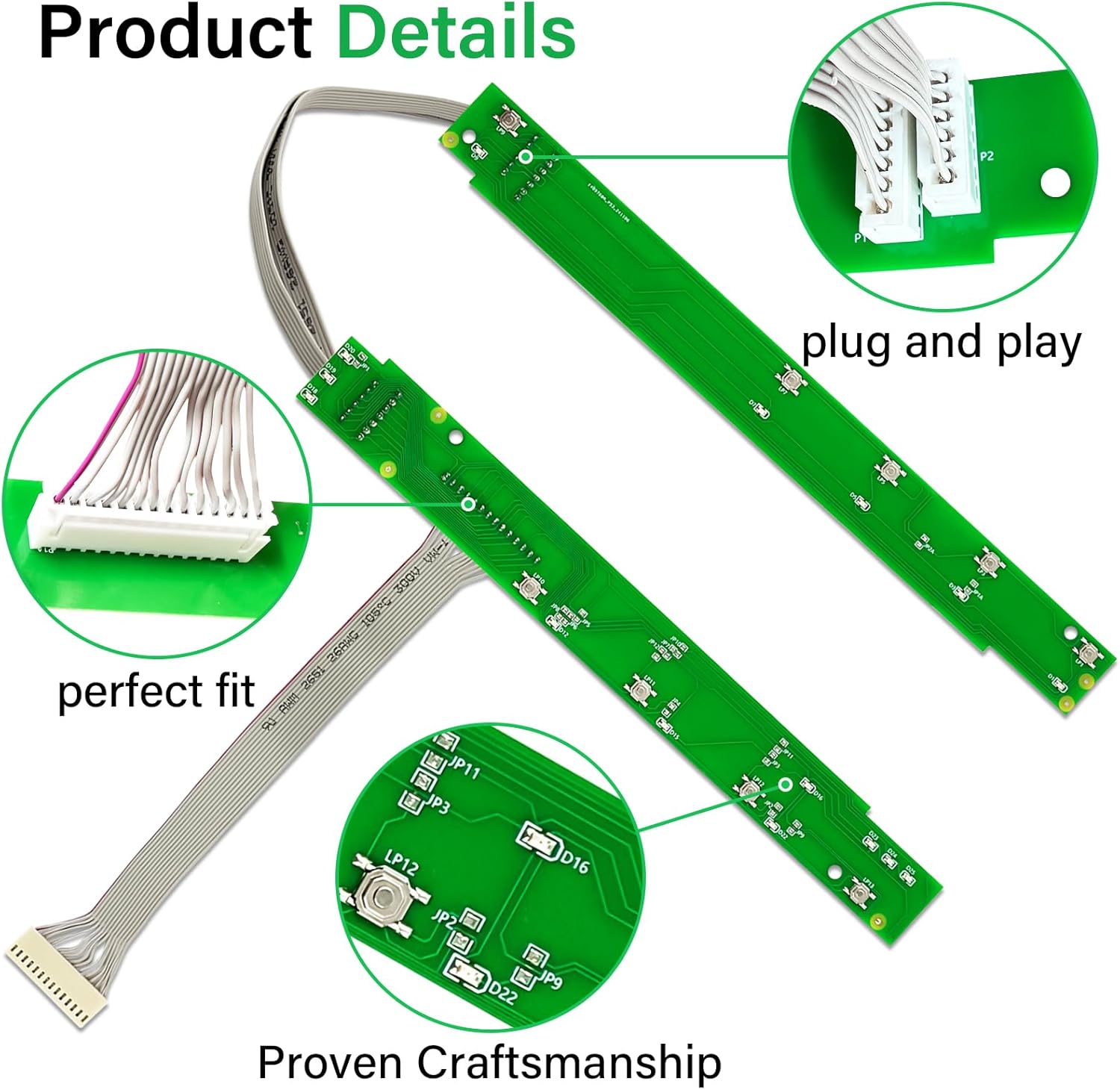
Image 5.1: The "plug and play" design ensures easy connection during installation.

Image 5.2: The 5304518467 Electrolux Dishwasher PC Board shown in its operational environment within a dishwasher.
6. Operating and Testing
After installation, it is important to test the new control button assembly to ensure proper functionality.
- Power On: Restore power to the dishwasher.
- Initial Check: Observe the control panel. Lights should illuminate as expected.
- Button Functionality: Press each button on the control panel to confirm responsiveness. Ensure that cycles can be selected and options can be changed.
- Run a Test Cycle: Initiate a short wash cycle to confirm the dishwasher starts, operates, and stops as intended.
7. Maintenance
The TESHITVLOG Dishwasher User Interface Control Button Assembly is designed for long-term reliability and typically requires no specific maintenance. However, general care for your dishwasher can help prolong the life of all its components, including the control panel.
- Keep the exterior of the control panel clean by wiping it with a soft, damp cloth. Avoid abrasive cleaners.
- Ensure the dishwasher door seal is in good condition to prevent excessive moisture exposure to the control panel area.
- Avoid pressing buttons with excessive force.
8. Troubleshooting
If you encounter issues after installing the new control button assembly, refer to the following common problems and solutions.
| Symptom | Possible Cause | Solution |
|---|---|---|
| Dishwasher didn't work, not starting or stopping unexpectedly. | Loose connection, power issue, or other appliance fault. |
|
| Buttons are unresponsive or not working. | Improper connection of the ribbon cable or control board issue. |
|
| Unable to select or change wash cycles. | Similar to unresponsive buttons, often a connection issue. |
|
| Three lights flashing when the dishwasher cannot be turned on. | Indicates a control panel or communication error. |
|

Image 8.1: Symptoms addressed by replacing the control button assembly.

Image 8.2: Common symptoms that indicate a need for this replacement part.

Image 8.3: Important troubleshooting step: verify harness connections and reboot the dishwasher.

Image 8.4: The assembly provides a quick fix for restoring touch sensor functionality and resolving error lights.
9. Warranty and Support
This TESHITVLOG product comes with a 60-day warranty. For warranty claims or technical support, please contact the seller or manufacturer directly through the platform where the purchase was made. Provide your order details and a description of the issue for prompt assistance.
For additional support or general inquiries, you may refer to the manufacturer's official website or contact their customer service department.
Ask a question about this manual
Ask about setup, troubleshooting, compatibility, parts, safety, or missing instructions. Manuals+ will review the question and use this page’s manual context to help answer it.