
1. Introduction
This user manual provides essential information for the safe and effective use of your Orestree 130W Charger. This power supply adapter is specifically designed for compatibility with the Dell OptiPlex 5090 Micro D14U005 Desktop. Please read this manual thoroughly before using the product to ensure proper operation and to prevent damage.
2. Product Overview
The Orestree 130W Charger consists of a power adapter unit, an AC power cord, and a DC output cable with a specific connector. Familiarize yourself with these components before setup.
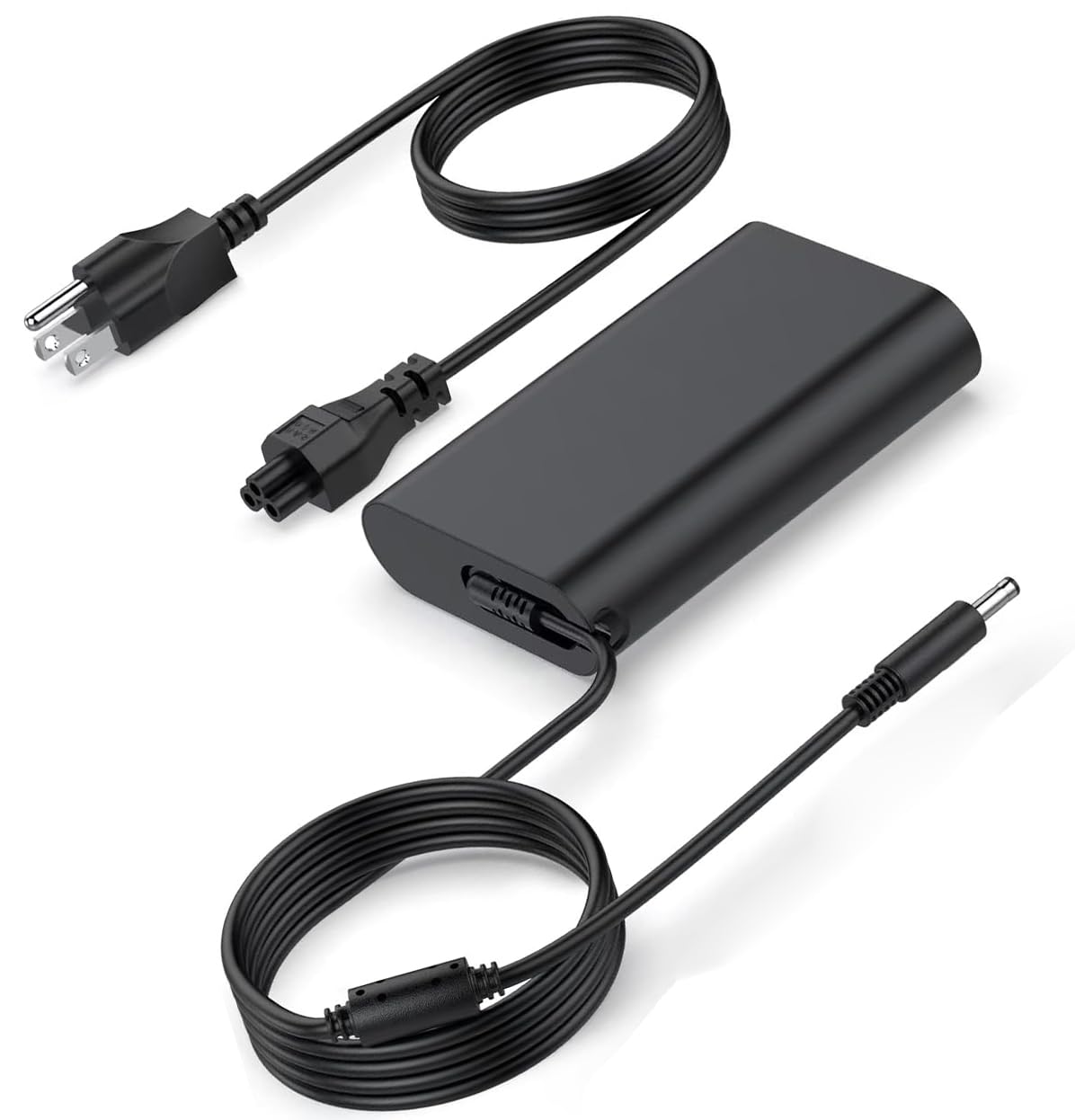
Image: The Orestree 130W power adapter, including the main adapter block, the detachable AC power cord with a standard US plug, and the integrated DC output cable terminating in a 4.5mm x 3.0mm barrel connector with a central pin.
- Power Adapter Unit: The main component that converts AC power to DC power.
- AC Power Cord: Connects the power adapter unit to a wall outlet.
- DC Output Cable: Permanently attached to the adapter unit, it connects to your Dell OptiPlex 5090 Micro D14U005 Desktop.
3. Setup Instructions
- Connect the AC Power Cord: Insert the three-prong connector of the AC power cord firmly into the corresponding port on the power adapter unit. Ensure it clicks securely into place.
- Connect to Power Outlet: Plug the other end of the AC power cord (the standard wall plug) into a functional electrical wall outlet. It is recommended to use a surge protector for added safety.
- Connect to Device: Carefully insert the DC output connector (the small barrel plug with a central pin) into the power input port of your Dell OptiPlex 5090 Micro D14U005 Desktop. Ensure the connection is snug and secure.
Once connected, your Dell OptiPlex should begin to receive power or charge its battery, indicated by the device's charging status light or on-screen display.
4. Operating Guidelines
- Power On: After connecting the charger, your Dell OptiPlex 5090 Micro D14U005 Desktop should power on or begin charging automatically.
- Compatibility: This charger is specifically designed for the Dell OptiPlex 5090 Micro D14U005 Desktop. Using it with incompatible devices may cause damage.
- Voltage Range: The charger supports an input voltage range of 100-240V, 50-60Hz, making it suitable for international use with appropriate plug adapters (not included).
- Disconnecting: Always disconnect the charger from the wall outlet first, then from your device, by pulling the plug directly, not by pulling the cable.
5. Maintenance and Care
- Storage: Store the charger in a cool, dry place when not in use. Avoid extreme temperatures and humidity.
- Cleaning: Disconnect the charger from all power sources before cleaning. Use a soft, dry cloth to wipe the surface. Do not use liquid cleaners or solvents.
- Cable Care: Avoid bending, twisting, or crimping the cables excessively, especially near the connectors, as this can damage the internal wires.
- Ventilation: Ensure the power adapter unit has adequate ventilation during operation. Do not cover it or place it in enclosed spaces that could lead to overheating.
6. Troubleshooting
| Problem | Possible Cause | Solution |
|---|---|---|
| Device not powering on/charging. | Loose connection, faulty outlet, incompatible device. | Ensure all cables are securely connected. Test the wall outlet with another device. Verify the charger is compatible with your Dell OptiPlex 5090 Micro D14U005 Desktop. |
| Charger unit feels excessively hot. | Poor ventilation, prolonged heavy use. | Ensure the adapter is in a well-ventilated area. Do not cover it. If overheating persists, discontinue use and contact support. |
| Sparking when plugging into outlet. | Normal initial contact spark, or faulty outlet/charger. | A small spark is normal. If sparking is excessive or continuous, unplug immediately and check the outlet and charger for damage. Do not use if damaged. |
7. Specifications
- Input: 100-240V ~ 50-60Hz
- Output: 19.5V 6.67A
- Wattage: 130W (Compatible with Dell 90W, 65W, 45W Small Tip Chargers)
- Connector Size: 4.5mm x 3.0mm (with central pin)
- Compatibility: Dell OptiPlex 5090 Micro D14U005 Desktop
- Package Includes: 1 x 130 watt power adapter, 1 x AC Power Cord
- Color: Black
- Item Weight: Approximately 8 ounces
- Package Dimensions: Approximately 8 x 5 x 0.5 inches
8. Warranty and Support
This Orestree 130W Charger comes with a 12 Months Warranty from the date of purchase. This warranty covers manufacturing defects and malfunctions under normal use.
For warranty claims, technical support, or any inquiries regarding your product, please contact the seller or manufacturer through your purchase platform. Please have your order number and product model (DA130PM130) ready when contacting support.