
1. Product Overview
The LVYUAN 12V/24V Car Battery Charger (Model 40A-PRO black) is an intelligent automotive smart battery charger and maintainer designed for a wide range of battery types. It features multi-stage charging processes, including quick and trickle charging, to protect and optimize battery life. This charger is suitable for 12V/24V 4Ah-400Ah lead-acid batteries (AGM, GEL, SLA, VRLA, Calcium, Wet) and 12V LiFePO4 batteries.
Key features include:
- Versatile Charging: Supports 12V/40A and 24V/20A fast charging.
- Intelligent Digital LED Display: Provides real-time information on ambient temperature, voltage, current, and remaining battery capacity.
- Comprehensive Safety Protections: Includes short circuit, overcurrent, cooling system, reverse polarity, over-charge, low-voltage, and over-temperature protection.
- Battery Repair Function: Activates and repairs deeply discharged batteries (0V start) and those not used for extended periods.
- Temperature Compensation: Optimizes charging performance for various climates.

Figure 1: The LVYUAN 40A-PRO black Smart Battery Charger with its included battery clamps.
2. Safety Information
Read all instructions carefully before using the charger. Failure to follow these instructions may result in electric shock, fire, or serious injury.
- Ventilation: Ensure adequate ventilation when charging. Batteries can produce explosive gases.
- Eye and Skin Protection: Wear appropriate eye protection and gloves when working with batteries.
- Flammable Materials: Keep the charger and battery away from open flames, sparks, and flammable materials.
- Polarity: Always connect the positive (+) charger clamp to the positive (+) battery terminal and the negative (-) charger clamp to the negative (-) battery terminal. Reverse polarity can cause damage.
- Disconnecting: Disconnect the AC power from the charger before connecting or disconnecting the battery clamps.
- Children and Pets: Keep the charger and battery out of reach of children and pets.
- Damaged Equipment: Do not operate the charger if it has been dropped, damaged, or exposed to moisture.
- Indoor Use: This charger is designed for indoor use. Avoid exposure to rain or excessive moisture.

Figure 2: The charger incorporates multiple safety protections including short-circuit, reverse-polarity, over-voltage, over-charge, low-voltage, and over-temperature protection.
3. Package Contents
Verify that all items are present in the package:
- LVYUAN 12V/24V Car Battery Charger (Model 40A-PRO black)
- Battery Clamps (Red for Positive, Black for Negative)
- User Manual
4. Product Components and Display
Familiarize yourself with the charger's components and the information displayed on its LED screen.

Figure 3: Overview of the charger's components and display.
4.1. Control Panel and Display Elements
- LED Display: Shows real-time charging status, including:
- Current (A): Displays the charging amperage.
- Voltage (V): Shows the battery voltage.
- Battery Capacity (VOL%): Indicates the estimated charge level of the battery.
- Ambient Temperature: Displays the current operating temperature.
- Battery Type: Indicates the selected battery type (e.g., LiFePO4, GEL, AGM, STD).
- Repair Mode: Icon illuminates when repair function is active.
- START/STOP Button: Initiates or halts the charging process.
- AMPS Button: Selects the charging current (10A/20A/40A for 12V, 10A/20A for 24V).
- Battery Selection Button: Cycles through compatible battery types (LiFePO4, GEL, AGM, STD).
- Repair Mode Button (Long Press): Activates the battery repair function.
4.2. Physical Components
- Handle: For easy portability.
- Power Switch: Located on the side/rear to turn the unit on/off.
- Cooling Fan: Automatically activates to dissipate heat when internal temperature exceeds 114°F/45°C.
- Input Power Cord: Connects the charger to an AC power outlet. Length: 52 inches (132 cm).
- Output Clip Cord: Connects to the battery terminals via red (positive) and black (negative) clamps. Length: 33 inches (84 cm).

Figure 4: Charger dimensions and cable lengths.
5. Setup and Connection
Follow these steps to safely connect the charger to your battery:
- Prepare the Battery: Ensure the battery terminals are clean and free of corrosion.
- Connect Positive Clamp: Attach the RED (+) charger clamp to the POSITIVE (+) battery terminal.
- Connect Negative Clamp: Attach the BLACK (-) charger clamp to the NEGATIVE (-) battery terminal.
- Connect to Power: Plug the charger's input power cord into a standard AC power outlet.
- Power On: Turn on the charger using the power switch (if applicable). The LED display will illuminate.
Important: Always connect the battery clamps before plugging the charger into the AC outlet, and disconnect the AC outlet before removing the clamps.

Figure 5: Proper connection of the charger to a vehicle battery.
6. Operating Instructions
6.1. Selecting Battery Type and Charging Current
After connecting the charger and powering it on, the display will show the current battery status. You may need to select the appropriate battery type and charging current:
- Battery Type Selection: Press the "Battery Selection" button to cycle through the available battery types (LiFePO4, GEL, AGM, STD) until the correct type for your battery is displayed. Note: This charger is not compatible with 24V LiFePO4 batteries.
- Current Selection: Press the "AMPS" button to choose the desired charging current (10A, 20A, or 40A for 12V batteries; 10A or 20A for 24V batteries). The charger will automatically adjust the current based on the battery's state and selected voltage.

Figure 6: The charger supports various 12V/24V lead-acid batteries and 12V LiFePO4 batteries.
6.2. 6-Stage Smart Charging Process
The charger utilizes a fully automatic 6-stage charging process to ensure efficient and safe charging, and to prolong battery life:
- Soft Start: A gentle initial charge to prepare the battery.
- Bulk Charge: Charges the battery at the maximum selected current until it reaches approximately 80% capacity.
- Absorption: Charges at a decreasing current to bring the battery to 100% capacity.
- Battery Test: Monitors the battery to ensure it holds a charge.
- Recondition: A special mode to recover deeply discharged or sulfated batteries.
- Float: Maintains the battery at full charge with a low, constant voltage, preventing overcharging. The charger automatically turns off when fully charged and restarts if the voltage drops.
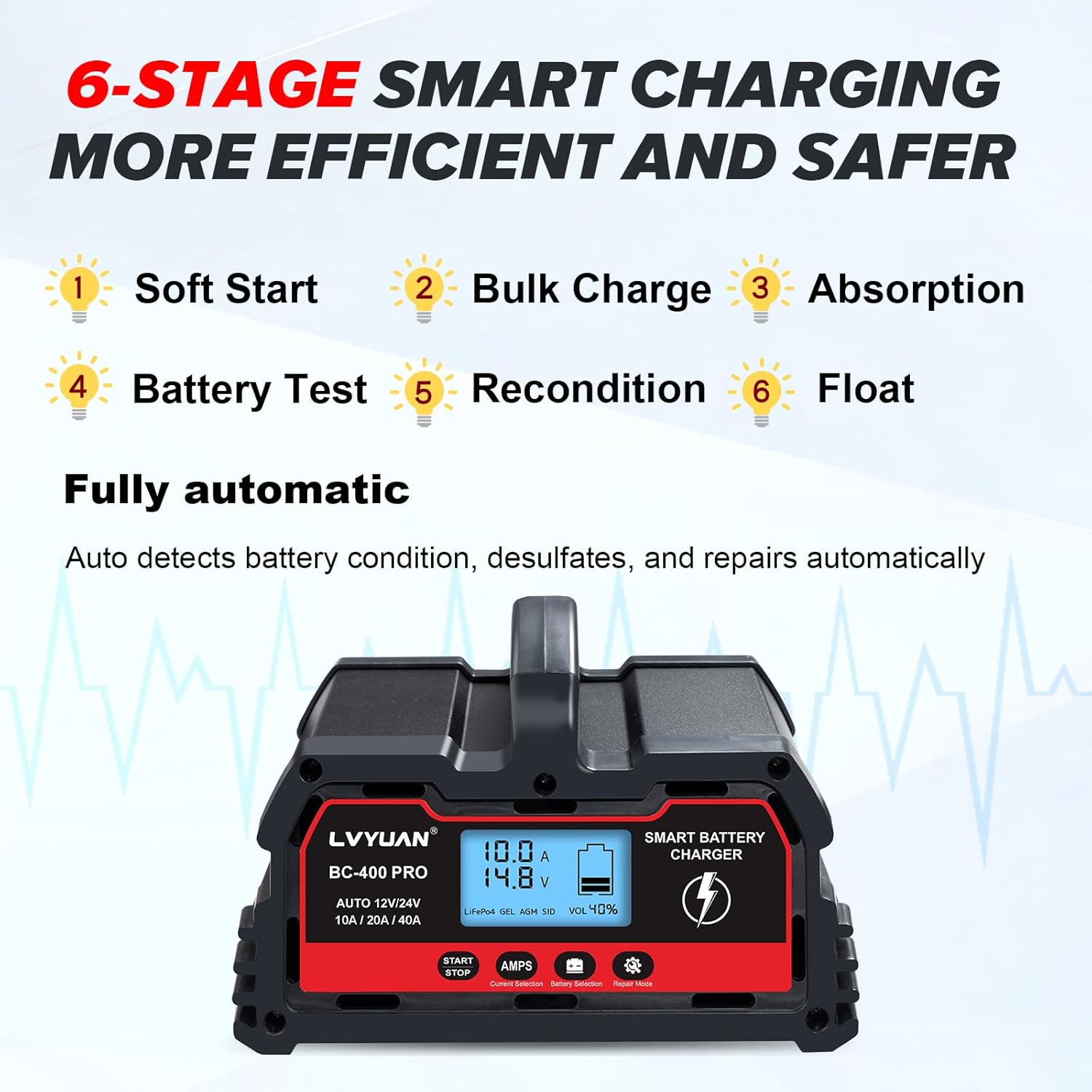
Figure 7: The 6-stage smart charging process for efficient and safe battery charging.
6.3. Repair Mode (0V Start)
If a battery is deeply discharged (down to 0V) or has not been used for a long time, the repair mode can be used to attempt to revitalize it. Long press the "Repair Mode" button to activate this function. The charger will attempt to desulfate and repair the battery, allowing it to accept a charge again.

Figure 8: The charger's display indicating active repair mode.
6.4. Temperature Compensation
The charger features intelligent temperature compensation, optimizing charging parameters based on the ambient temperature. This ensures safe and effective charging in both hot and cold climates, preventing overcharging in summer and undercharging in winter.

Figure 9: Temperature compensation ensures optimal charging performance in varying climates.
7. Maintenance
Proper maintenance ensures the longevity and optimal performance of your LVYUAN battery charger and the batteries it charges.
- Cleaning: Disconnect the charger from power and battery before cleaning. Wipe the exterior with a soft, dry cloth. Do not use solvents or abrasive cleaners.
- Cable Inspection: Regularly inspect the input power cord and output clip cords for any signs of damage, fraying, or exposed wires. Replace if damaged.
- Storage: Store the charger in a cool, dry place when not in use. Keep the cables neatly coiled.
- Battery Terminals: Ensure battery terminals are clean and free of corrosion before connecting the charger.
8. Troubleshooting
If you encounter issues with your charger, refer to the following common problems and solutions:
| Problem | Possible Cause | Solution |
|---|---|---|
| Charger does not power on. | No AC power, faulty outlet, or charger issue. | Check AC power connection. Test the outlet with another device. Ensure the charger's power switch is ON. |
| Charger not charging the battery. | Incorrect battery connection, wrong battery type selected, or deeply discharged battery. | Verify correct polarity of battery clamps. Ensure the correct battery type is selected on the charger. Try activating "Repair Mode" for deeply discharged batteries. |
| Display shows an error or warning. | Reverse polarity, over-temperature, short circuit, or other protection activated. | Check battery clamp connections for reverse polarity. Allow charger to cool down if it's hot. Disconnect and re-connect the battery. If the issue persists, contact support. |
| Charging current fluctuates significantly. | Normal operation for smart chargers, adjusting to battery state. | This is normal. The charger intelligently adjusts current based on the battery's charge stage and capacity to maintain battery health. |
If the problem persists after attempting these solutions, please contact LVYUAN customer support.
9. Specifications
| Feature | Detail |
|---|---|
| Model Number | 40A-PRO black |
| Input Voltage | 100-240V AC, 50/60Hz (Standard) |
| Output Voltage | 12V DC, 24V DC |
| Charging Current (12V) | 10A / 20A / 40A |
| Charging Current (24V) | 10A / 20A |
| Battery Capacity Range | 4Ah - 400Ah |
| Compatible Battery Types | Lead-Acid (AGM, GEL, SLA, VRLA, Calcium, Wet), 12V LiFePO4 |
| Protection Features | Short Circuit, Overcurrent, Reverse Polarity, Over-charge, Low-voltage, Over-temperature |
| Cooling System | Built-in fan, activates above 114°F/45°C |
| Product Dimensions | 6.88 x 7.87 x 4.5 inches (17.5 x 20 x 11.5 cm) |
| Item Weight | 3.7 pounds (1.68 kg) |
| Input Power Cord Length | 52 inches (132 cm) |
| Output Clip Cord Length | 33 inches (84 cm) |
10. Warranty and Support
LVYUAN products are manufactured to high-quality standards. For information regarding warranty coverage, please refer to the warranty card included with your product or visit the official LVYUAN website.
For technical support, troubleshooting assistance, or inquiries about your product, please contact LVYUAN customer service through the retailer where the product was purchased or via the contact information provided on the official LVYUAN website.