
1. Introduction
The Funio Mini Turbo Fan X6 is a compact, portable device designed for various air blowing and cooling applications. It features a high-speed brushless motor, stepless speed regulation, and a 4000mAh rechargeable battery, making it suitable for both personal cooling and light-duty air dusting tasks.

Figure 1: Funio Mini Turbo Fan X6 product overview.
2. Safety Instructions
- Read all instructions: Before using the device, thoroughly read and understand all operating and safety instructions.
- Keep away from water: Do not expose the device to water or moisture. Avoid using it in wet environments to prevent electric shock.
- Avoid direct contact with moving parts: Keep fingers, hair, and loose clothing away from the fan inlet and outlet during operation.
- Use appropriate power source: Only use the provided TYPE-C cable and a compatible power adapter (DC 5V-2A recommended) for charging.
- Battery safety: The device contains a 4000mAh lithium-ion battery. Do not disassemble, puncture, or expose the battery to extreme temperatures or fire.
- Overheat protection: The device is equipped with a 150°C overheat protection chip. If the device overheats, it may automatically shut down. Allow it to cool before resuming use.
- Children and pets: Keep the device out of reach of children and pets. This is not a toy.
- Proper storage: Store the device in a cool, dry place when not in use.
3. Package Contents
Verify that all items listed below are included in your package:
- Funio Mini Turbo Fan X6
- Charger (TYPE-C cable)
- Turbo Nozzle
- User Manual (this document)
Video 1: Unboxing and components of the Funio Mini Turbo Fan X6. This video demonstrates the contents of the package and how to attach the nozzle.
4. Product Features
- High-Speed Brushless Motor: Delivers powerful airflow with up to 130,000 RPM for efficient performance.
- Stepless Speed Regulation: Allows for precise adjustment of airflow from a gentle breeze to a strong blast.
- Portable and Lightweight Design: Compact, handheld form factor for easy transport and use.
- 4000mAh Rechargeable Battery: Provides extended operating time (up to 4 hours at low speed) and supports TYPE-C fast charging.
- Dual Outlet / Interchangeable Nozzles: Includes different nozzles for various applications, such as focused air streams or wider coverage.
- Strong Magnetic Adsorption: Features a magnetic base for stable placement on metallic surfaces.
- Safety Protections: Built-in 150°C overheat protection chip and spiral cooling vents to ensure safe operation.

Figure 2: The Funio Mini Turbo Fan X6 is designed to be small and light for easy portability.
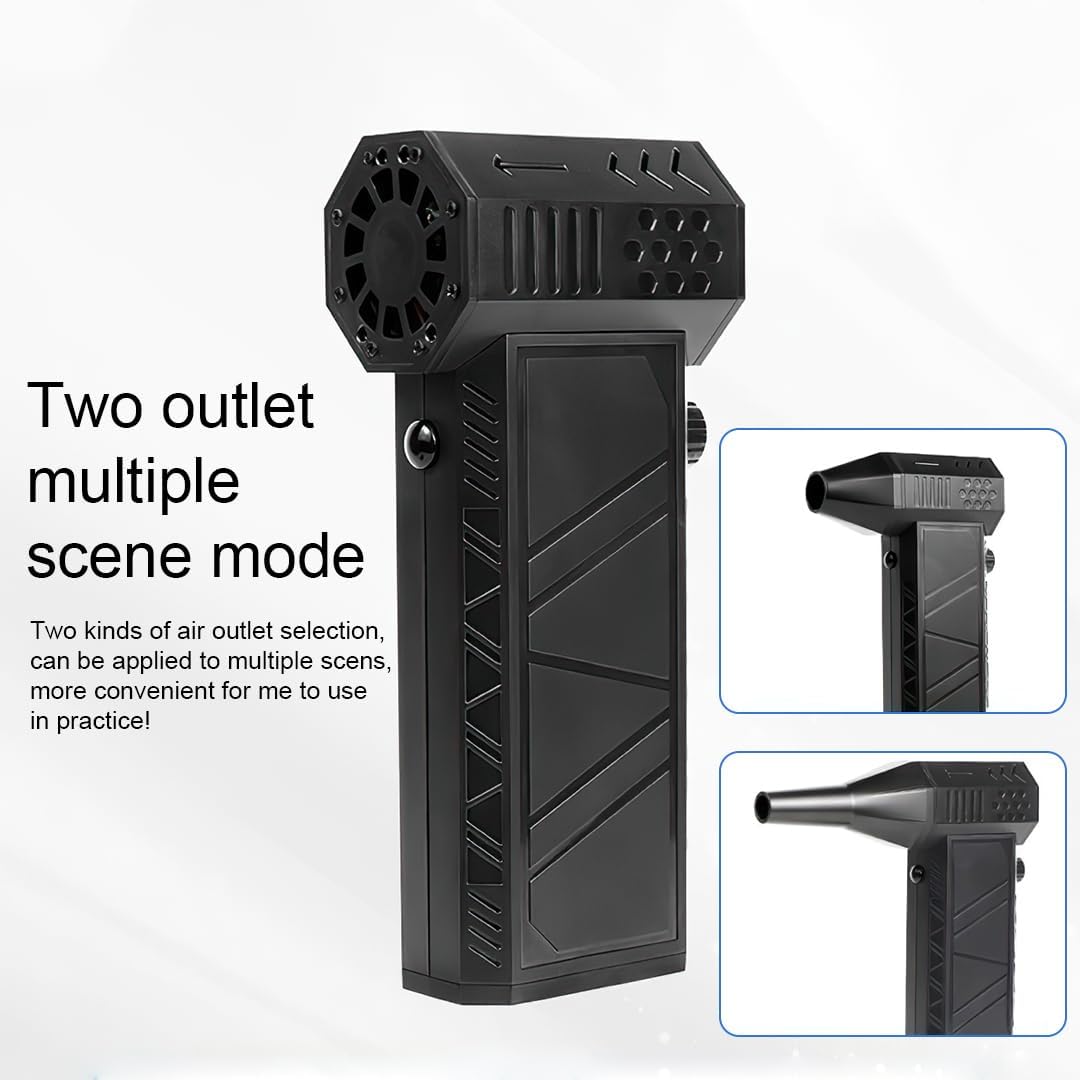
Figure 3: The stepless variable speed regulation knob allows for precise airflow adjustment.

Figure 4: The strong magnetic base ensures stable adsorption on metallic surfaces.
5. Setup
5.1 Charging the Device
- Locate the TYPE-C charging port on the device.
- Connect the provided TYPE-C charging cable to the device and a compatible USB power adapter (not included).
- The charging indicator light (if present) will illuminate to show charging status.
- A full charge typically takes approximately 3.5 hours. Disconnect the charger once fully charged.
5.2 Attaching/Changing Nozzles
- Ensure the device is turned off before attaching or removing nozzles.
- Align the desired nozzle with the air outlet of the fan.
- Gently push and twist the nozzle until it is securely in place.
- To remove, twist and pull the nozzle off.

Figure 5: The device supports two types of air outlets for different applications.
6. Operating Instructions
6.1 Power On/Off
- To turn on the device, press and hold the power button (trigger-style button).
- To turn off the device, release the power button.
6.2 Adjusting Airflow Speed
- While the device is powered on, rotate the knob located on the side of the device to adjust the airflow speed.
- Turn the knob clockwise for increased airflow and counter-clockwise for decreased airflow.
6.3 Usage Scenarios
The Funio Mini Turbo Fan X6 can be used for a variety of tasks:
- Personal Cooling: Provides a strong breeze for personal comfort.
- Air Dusting: Effectively removes dust from keyboards, electronics, car interiors, and other hard-to-reach areas.
- Drying: Can be used to quickly dry small wet surfaces or items.
- Inflation: Suitable for inflating small inflatables (ensure proper nozzle attachment).
- Combustion Support: Can assist in igniting and maintaining fires for outdoor activities.
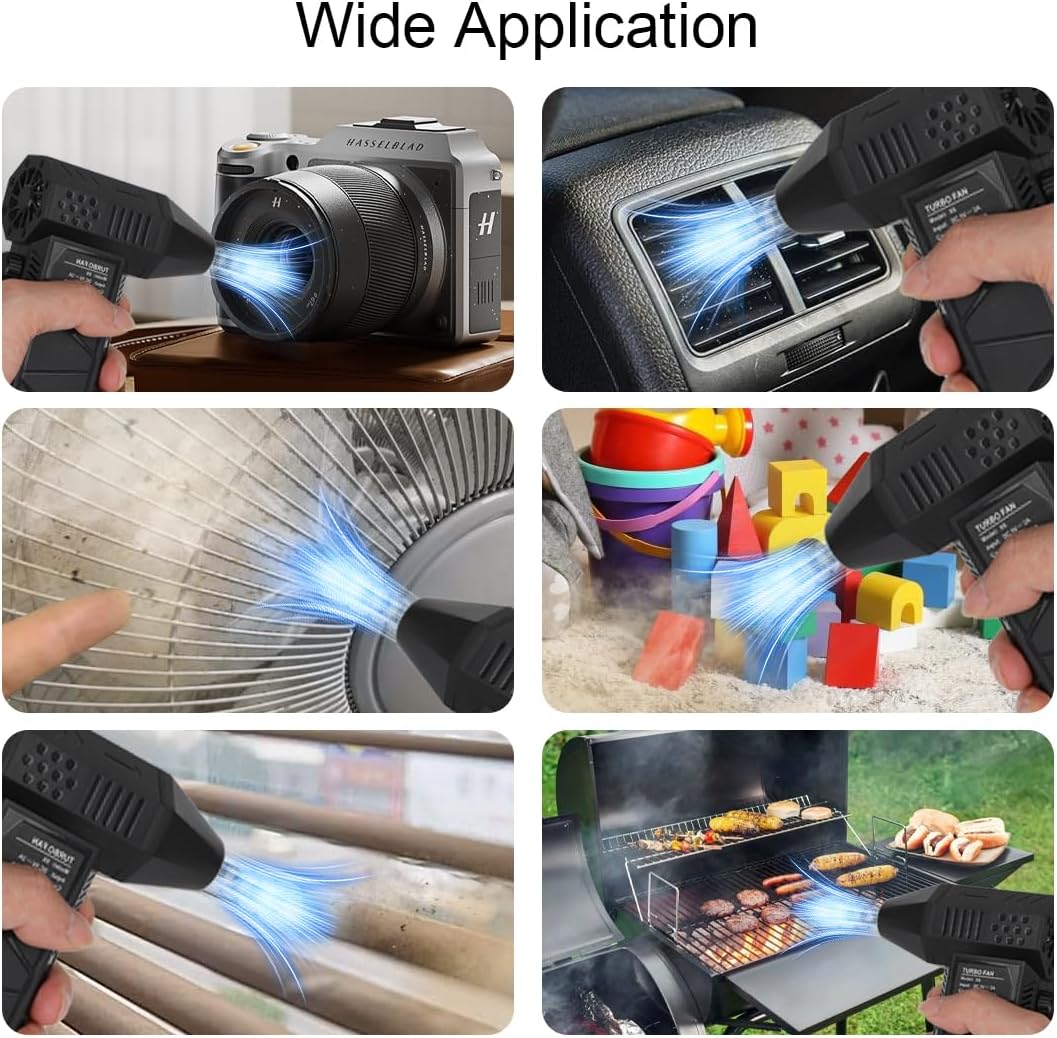
Figure 6: Examples of how the Funio Mini Turbo Fan X6 can be used in different environments.
Video 2: Demonstrating the powerful airflow and various applications of the Funio Mini Turbo Fan X6, including drying and leaf blowing.

Figure 7: Visual comparison of surfaces before and after cleaning with the Funio Mini Turbo Fan X6.
7. Maintenance
7.1 Cleaning
- Ensure the device is turned off and disconnected from any power source before cleaning.
- Use a soft, dry cloth to wipe the exterior of the device.
- For stubborn dirt, a slightly damp cloth can be used, but ensure no moisture enters the fan's internal components.
- Periodically check the air inlet and outlet for any obstructions and gently remove them if present.
7.2 Storage
- Store the device in a cool, dry place, away from direct sunlight and extreme temperatures.
- If storing for an extended period, ensure the battery is partially charged (around 50%) to prolong its lifespan.
8. Troubleshooting
| Problem | Possible Cause | Solution |
|---|---|---|
| Device does not turn on. | Battery is depleted. | Charge the device using the provided TYPE-C cable. |
| Weak airflow. | Low battery or obstructed air inlet/outlet. | Charge the device. Check and clear any obstructions from the air inlet/outlet. Adjust speed knob. |
| Device overheats and shuts down. | Extended heavy use or obstructed vents. | Allow the device to cool down. Ensure cooling vents are not blocked. Reduce usage time. |
| Nozzle does not stay attached. | Nozzle not properly aligned or secured. | Re-attach the nozzle, ensuring it is twisted securely into place. |
9. Specifications
| Feature | Detail |
|---|---|
| Model Name | Mini Tubo Fan X6 |
| Model Number | X6 |
| Brand | Funio |
| Color | Black |
| Material | Plastic |
| Product Dimensions (D x W x H) | 1.1" x 3.8" x 5.65" (143 x 93 x 39 mm) |
| Item Weight | 9.6 ounces (325g) |
| Power Source | Battery Powered |
| Battery Capacity | 4000mAh |
| Operating Voltage | 5.5-8.4 Volts |
| Charging Time | Approx. 3.5 hours (TYPE-C fast charging) |
| Duration (low speed) | Approx. 4 hours |
| Motor Speed | Up to 130,000 RPM |
| Control Method | Knob (Stepless Speed Regulation) |
| Special Features | Turbo, Lightweight, Portable, Dual Outlet, Magnetic Adsorption, Overheat Protection |
10. Warranty and Support
Funio products are manufactured to high-quality standards. This product is covered by a standard manufacturer's warranty against defects in materials and workmanship from the date of purchase. Please retain your proof of purchase for warranty claims.
For technical support, warranty inquiries, or replacement parts, please contact Funio customer service through the retailer where the product was purchased or visit the official Funio website for contact information.
Contact Information:
- Website: Funio Official Store on Amazon
- Email: Refer to your product packaging or the Funio website for the most current contact email.