Product Overview
The URAMAZ Food Scale with Detachable Display is a high-precision digital kitchen scale designed for accurate measurement of ingredients. Featuring a unique split-unit design, the display can be separated from the weighing platform, ensuring clear visibility even with large containers. It supports a wide range of measurements from 1 gram (0.1 ounce) up to 15 kilograms (33 pounds) and offers multiple unit options. Constructed with food-grade stainless steel, it is durable, easy to clean, and water-resistant, making it ideal for various culinary and household tasks.

Image: The URAMAZ Food Scale showing the main weighing platform, the detachable display unit, four AAA batteries, and two adhesive iron plates. A loaf of sourdough bread is placed on the scale, demonstrating its use for baking.
Setup Guide
1. Unpacking and Components
Carefully unpack all items from the box. The package should include:
- 1 x Kitchen Scale (weighing platform)
- 1 x Display Unit
- 4 x AAA Batteries
- 2 x 3M Adhesive Iron Plates
- 1 x Product Instructions Manual
2. Battery Installation
Locate the battery compartment on the back of both the weighing platform and the display unit. Insert the 4 AAA batteries, ensuring correct polarity (+/-) as indicated inside the compartment. Close the battery covers securely.
3. Remove Protective Film
Important:
Before first use, ensure to peel off the blue protective film from the stainless steel weighing surface of the scale. This film is applied to prevent scratches during shipping and must be removed for accurate measurements.

Image: A four-panel illustration demonstrating the initial setup and tare function. The first panel shows a hand peeling off the blue protective film from the scale's surface.
4. Display Unit Placement
The display unit features a built-in magnet, allowing it to be attached directly to metal surfaces such as refrigerators. For non-magnetic surfaces, use the provided 3M adhesive iron plates. Peel off the backing from an adhesive plate and stick it to a clean, dry wall or cabinet surface. The display unit can then be magnetically attached to this plate.

Image: An illustration showing the detachable display unit and its magnetic back, along with the two 3M adhesive iron sheets. It demonstrates how the display can be attached to a wall using these plates, providing flexible placement options.
Operating Instructions
1. Power On and Automatic Connection
First, turn on the weighing platform by pressing its power button. Then, turn on the display unit by pressing its "ON/OFF" button. The two components will automatically connect via Bluetooth. The connection distance can be up to 10-15 meters in an open area, or approximately 5 meters if connected through a wall.
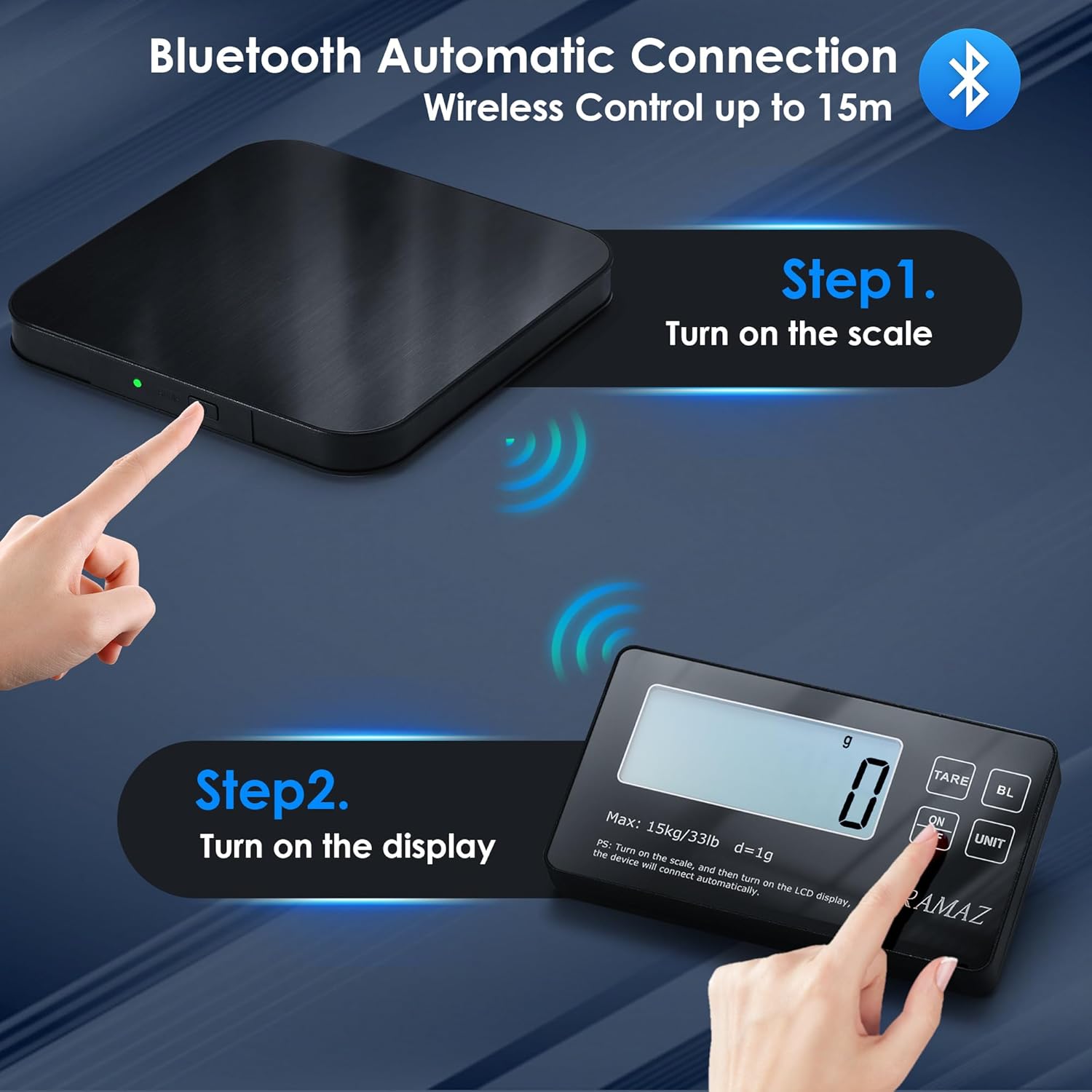
Image: A two-step diagram illustrating the Bluetooth automatic connection process. Step 1 shows a finger pressing the power button on the scale, and Step 2 shows a finger pressing the "ON/OFF" button on the display unit, indicating the wireless connection.
2. Selecting Weight Units
The scale supports 6 different weight units. Press the "UNIT" button on the display unit to cycle through the available units:
- grams (g)
- kilograms (kg)
- pounds and ounces (lb:oz)
- fluid ounces (fl.oz)
- milliliters (ml)
- milliliters (milk)
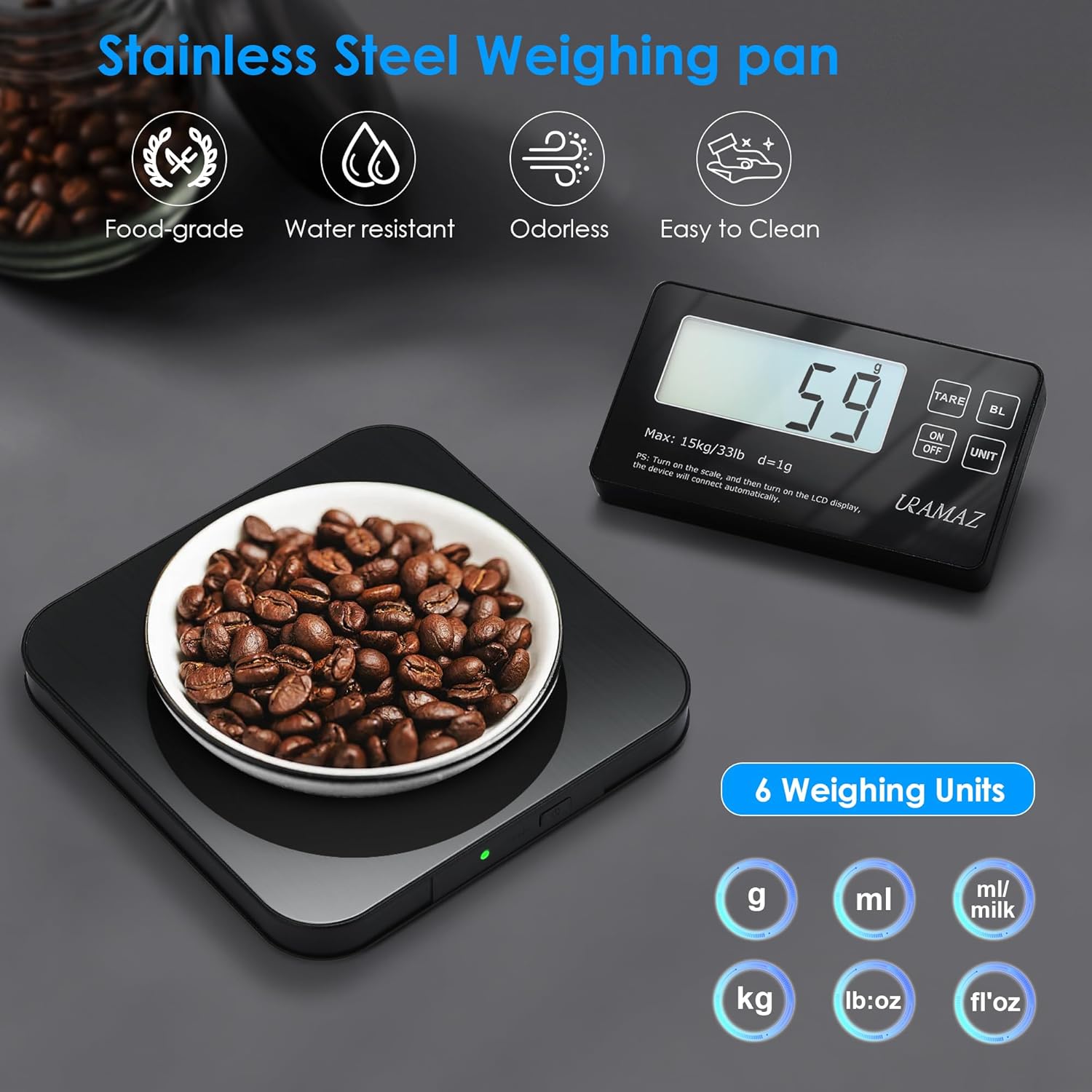
Image: The URAMAZ food scale with a bowl of coffee beans on its platform, and the detachable display showing a weight reading. Below the display, icons represent the six available weighing units: grams, milliliters, milliliters (milk), kilograms, pounds:ounces, and fluid ounces.
3. Tare Function (Zeroing the Scale)
The tare function allows you to reset the scale to zero after placing a container or an initial ingredient on it, so you can measure subsequent ingredients accurately without including the weight of the container or previous items.
- Place an empty container (e.g., bowl, plate) on the weighing platform.
- Press the "TARE" button on the display unit. The display will reset to "0.0".
- Add your ingredients to the container. The scale will now display only the weight of the added ingredients.
Image: A four-panel illustration demonstrating the tare function. Panel 2 shows placing a container on the scale, Panel 3 shows pressing the "TARE" button to zero the display, and Panel 4 shows adding ingredients and getting an accurate measurement.
4. Automatic Shut-off
To conserve battery life, the scale will automatically shut down after 5 minutes of inactivity. To resume use, simply press the "ON/OFF" button on the display unit.

Image: A kitchen scene with a parent and child baking, showing the URAMAZ food scale in use. Text highlights the "Upgrade 5 Minutes Auto-off" feature, indicating power saving when not in use.
Maintenance and Care
1. Cleaning
The weighing pan is made from 304 food-grade stainless steel, which is durable and easy to clean. Wipe the scale surface with a soft, damp cloth. For stubborn stains, a mild detergent can be used. Ensure the scale is dry before storage.
Caution:
While the scale is water-resistant, do not immerse the entire unit in water or place it under running water. The display unit is not designed to be fully waterproof.

Image: A multi-panel image showing the URAMAZ food scale. One panel depicts a hand wiping the scale surface with a cloth, labeled "Easy to Clean." Another panel shows water droplets on the scale surface, labeled "Water-Resistant," demonstrating its durability against spills.
2. Storage
Store the scale in a cool, dry place away from extreme temperatures and humidity. Avoid placing heavy objects on the scale when not in use, as this may affect its accuracy over time. The slim design allows for easy storage in drawers or cabinets.
Troubleshooting
| Problem | Possible Cause | Solution |
|---|
| Display shows "Lo" or "Low Battery" | Low battery power in either the scale or display unit. | Replace all 4 AAA batteries in both the scale and display unit. |
| Display shows "O-Ld" or "Overload" | The weight on the scale exceeds its maximum capacity (33 lbs / 15 kg). | Remove the item immediately to prevent damage. Ensure the weight is within the specified limit. |
| Inaccurate readings or inconsistent measurements | - Protective film not removed.
- Scale not on a flat, stable surface.
- External vibrations or air currents.
- Tare function not used correctly.
| - Ensure the blue protective film is completely removed.
- Place the scale on a hard, flat, and stable surface.
- Avoid using the scale near fans or in drafty areas.
- Always use the TARE function to zero the scale before adding new ingredients.
|
| Display unit not connecting to the scale | - Batteries are low or incorrectly installed.
- Units are too far apart or obstructions are present.
- Interference from other wireless devices.
| - Check and replace batteries in both units.
- Ensure the display unit is within 10-15 meters (open area) or 5 meters (through wall) of the scale. Reduce obstructions.
- Move the scale away from other electronic devices that might cause interference.
|
Specifications
| Feature | Detail |
|---|
| Brand | URAMAZ |
| Model Number | G07 |
| Maximum Capacity | 15 kg / 33 lbs |
| Minimum Weight | 1 g / 0.1 oz |
| Readout Accuracy | 2.86 g |
| Weighing Units | g, kg, lb:oz, fl.oz, ml, ml (milk) |
| Material | 304 Food-grade Stainless Steel (weighing pan), Plastic |
| Display Type | LCD with Backlight, Detachable |
| Power Source | 4 x AAA Batteries (included) |
| Auto Shut-off | 5 minutes of inactivity |
| Platform Dimensions | 5.2" x 5.2" |
| Item Weight | 260 Grams / 9.2 ounces |
| Special Features | Detachable Display, Magnetic Display, Tare Function, Overload Indication, Low Voltage Indication |

Image: An exploded view of the URAMAZ food scale's underside, highlighting its four accurate sensors and reinforced scale feet. The image also specifies the minimum weight of 1g/0.1oz and maximum capacity of 15kg/33lbs.
Warranty and Support
URAMAZ products are designed for quality and reliability. Specific warranty details are typically provided with your product packaging or can be found on the official URAMAZ website. Please refer to these resources for comprehensive warranty information, including coverage period and terms.
For technical support, troubleshooting assistance, or any inquiries regarding your URAMAZ Food Scale, please contact URAMAZ customer service. Contact information can usually be found in the product instructions included in the package or on the official URAMAZ brand website.
You can visit the official URAMAZ store for more information: URAMAZ Brand Store


