
Avantree HT5009 Plus
Avantree HT5009 Plus Wireless Headphones User Manual
Model: HT5009 Plus
Introduction
Thank you for choosing the Avantree HT5009 Plus Wireless Headphones. This system is designed to provide a superior audio experience for TV watching, featuring low latency, clear voice mode, and convenient wireless charging. This manual will guide you through the setup, operation, and maintenance of your new device.
Product Overview

The Avantree HT5009 Plus system includes wireless headphones, a Bluetooth transmitter, a charging dock, and a pair of extra ear pads.
Key Features
- No Lip-Sync Delays: Advanced Qualcomm chipsets in both headphones and transmitter minimize audio delay for perfectly synced visuals and audio.
- Louder, Clearer Audio (Clear Voice Mode): Enhances on-screen dialogue clarity and boosts overall volume, ideal for users with hearing difficulties.
- Easy Wireless Charging: Rechargeable headphones offer up to 40 hours of playtime and charge conveniently on the cordless charging base.
- Pass-Through Support: Listen simultaneously through the headphones and an external soundbar or speaker, allowing shared audio.
- Replacement, Durable, & Long Lasting Earpads: High-quality memory foam earpads are included for comfort and longevity.
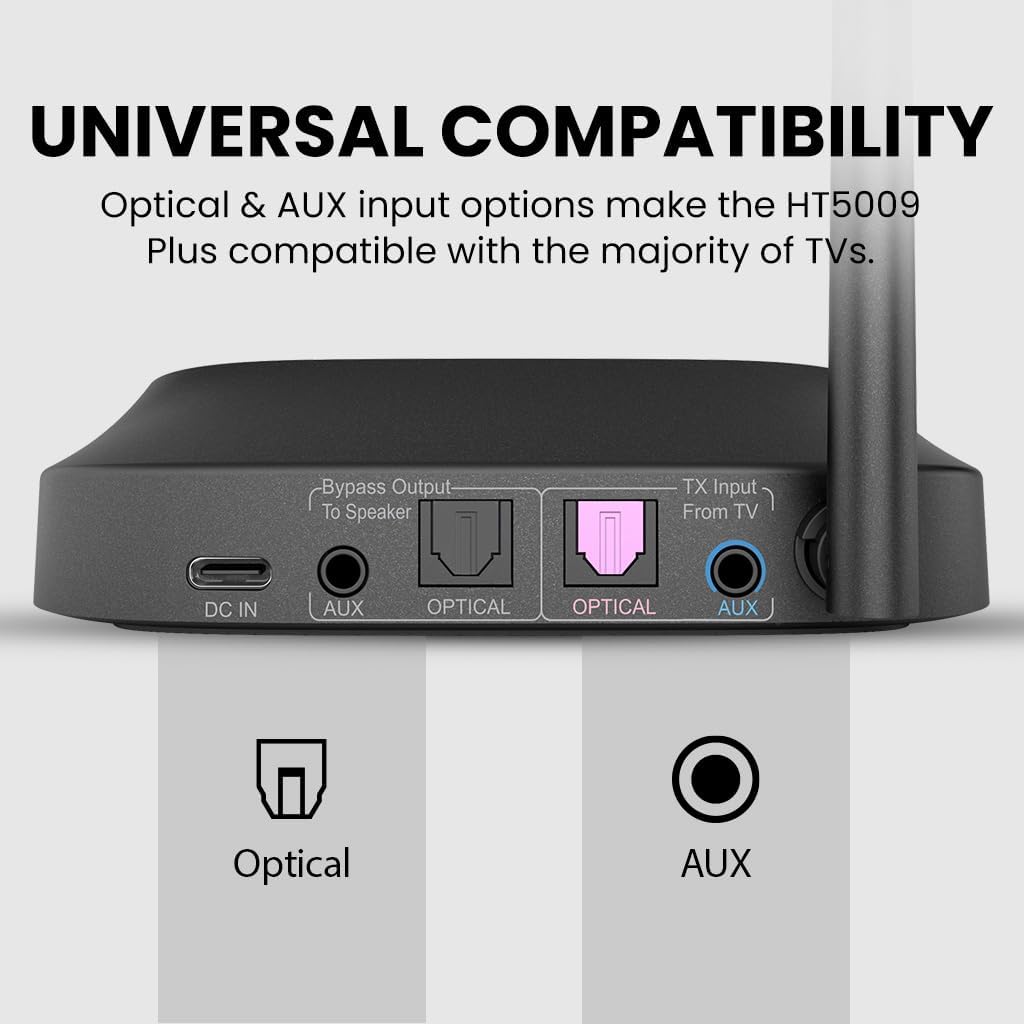
- Universal Compatibility: Optical and AUX input options ensure compatibility with most TVs.
- Lightweight Comfort: Designed for extended wearing without discomfort.

Experience perfectly synchronized audio and video with the HT5009 Plus's low latency technology.

The Clear Voice Mode ensures dialogue is crisp and easy to understand.

Simply place the headphones on the dock for effortless charging.

Share your TV's audio with others while still enjoying private listening.

The bundle includes extra earpads for extended comfort and product life.

Connect to your TV using either Optical or AUX cables for broad compatibility.

Enjoy long listening sessions comfortably with the lightweight design.
Setup Guide
1. Connecting the Transmitter to Your TV
The HT5009 Plus transmitter offers multiple connection options to ensure compatibility with various TV models.
- Optical (Recommended for Digital Audio):
- Connect one end of the optical cable to the 'OPTICAL OUT' port on your TV.
- Connect the other end to the 'OPTICAL' input port on the HT5009 Plus transmitter.
- Ensure your TV's audio output is set to 'PCM' or 'Stereo' (not Bitstream or Dolby Digital).
- AUX (3.5mm Audio Jack):
- Connect one end of the 3.5mm audio cable to the 'AUDIO OUT' or 'HEADPHONE OUT' port on your TV.
- Connect the other end to the 'AUX' input port on the HT5009 Plus transmitter.
The transmitter supports both Optical and AUX connections for versatile setup.
2. Charging the Headphones
Before first use, fully charge the headphones.
- Connect the charging dock to a power source using the provided USB cable and a compatible USB wall adapter (not included).
- Place the headphones onto the charging dock. The LED indicator on the headphones will show charging status (e.g., red for charging, off/blue for fully charged).
The charging dock provides a convenient way to store and recharge your headphones.
3. Powering On and Pairing
The headphones and transmitter are pre-paired from the factory. Simply power them on, and they should connect automatically.
- Power on the transmitter by connecting it to a power source.
- Power on the headphones by pressing and holding the power button until the LED indicator lights up.
- Once connected, the LED indicators on both devices will show a steady blue light.
Operating Instructions
Wearing the Headphones
Adjust the headband for a comfortable fit. Ensure the earcups fully cover your ears for optimal sound isolation and comfort.
Adjusting Volume
Use the volume control buttons located on the headphones to adjust the listening volume to your preference.
Using Clear Voice Mode
Activate the Clear Voice Mode button on the headphones to enhance dialogue clarity, especially useful for TV shows and movies with complex audio mixes.
Utilizing Pass-Through Support
If your TV is connected to the transmitter via Optical or AUX, and you have an external soundbar or speaker, the pass-through feature allows audio to be outputted to both the headphones and the external audio device simultaneously. Ensure the 'Bypass Output' on the transmitter is connected to your soundbar/speaker.
Maintenance
Cleaning
- Wipe the headphones and transmitter with a soft, dry cloth.
- Do not use abrasive cleaners or solvents.
Earpad Replacement
The HT5009 Plus comes with extra ear pads. To replace them:
- Gently peel off the old ear pads from the headphone earcups.
- Align the new ear pads with the earcup and carefully stretch them around the rim until securely fitted.
The included extra earpads ensure long-term comfort and hygiene.
Troubleshooting
No Sound from Headphones
- Ensure the transmitter is properly connected to the TV's audio output and powered on.
- Check if the headphones are powered on and paired with the transmitter (steady blue light).
- Verify the TV's audio output settings (e.g., set to PCM for Optical connection).
- Increase the volume on both the headphones and the TV.
Audio Delay / Lip-Sync Issues
- Ensure both the headphones and transmitter are using the low latency codec (indicated by specific LED on transmitter, refer to product manual for details).
- Check for any other Bluetooth devices nearby that might cause interference.
Headphones Not Charging
- Ensure the charging dock is properly connected to a power source.
- Verify the headphones are correctly seated on the charging pins of the dock.
- Check the charging indicator light on the headphones.
Specifications
| Feature | Detail |
|---|---|
| Model Name | HT5009 Plus |
| Connectivity Technology | Wireless |
| Wireless Communication Technology | Bluetooth |
| Bluetooth Version | 5.0 |
| Compatible Devices | TVs, Soundbars/Speakers, Smartphones, Tablets, Computers |
| Frequency Range | 20 Hz to 20,000 Hz |
| Earpiece Shape | Over-Ear |
| Form Factor | Over Ear |
| Control Method | Touch |
| Audio Driver Type | Dynamic Driver |
| Color | Black |
Warranty and Support
Avantree products come with a manufacturer's warranty. For detailed warranty information, product registration, or technical support, please visit the official Avantree website or contact their customer service directly. You can find contact information on the Avantree website or on the product packaging.
Online Support: www.avantree.com/support
Ask a question about this manual
Ask about setup, troubleshooting, compatibility, parts, safety, or missing instructions. Manuals+ will review the question and use this page’s manual context to help answer it.