1. Introduction
Thank you for choosing the KEEPEEZ 19-in-1 Stainless Steel Bread Maker. This appliance is designed to simplify your bread-making process with its versatile programs and user-friendly features. Please read this manual thoroughly before first use to ensure safe operation and optimal performance.
2. Important Safety Instructions
- Read all instructions before using the appliance.
- Do not touch hot surfaces. Use oven mitts or gloves when handling hot parts.
- To protect against electric shock, do not immerse cord, plugs, or the appliance in water or other liquid.
- Close supervision is necessary when any appliance is used by or near children.
- Unplug from outlet when not in use and before cleaning. Allow to cool before putting on or taking off parts.
- Do not operate any appliance with a damaged cord or plug, or after the appliance malfunctions or has been damaged in any manner.
- Do not use outdoors.
- Do not let cord hang over edge of table or counter, or touch hot surfaces.
- Do not place on or near a hot gas or electric burner, or in a heated oven.
- Extreme caution must be used when moving an appliance containing hot oil or other hot liquids.
- Do not use the appliance for other than intended use.
3. Product Overview
3.1 Components
The KEEPEEZ Bread Maker includes the main unit, a non-stick bread pan, a kneading paddle, a measuring cup, a measuring spoon, a hook, and a heat-resistant glove.

Image 3.1: The KEEPEEZ 19-in-1 Stainless Steel Bread Maker, shown with freshly baked bread slices and jam.

Image 3.2: Included accessories: non-stick pan, kneading paddle, measuring spoon, measuring cup, hook, and heat-resistant glove.
3.2 Control Panel
The control panel features an HD LCD display, buttons for menu selection, loaf size, crust color, and start/stop/pause/reset functions. It indicates the current program, remaining time, and selected options.
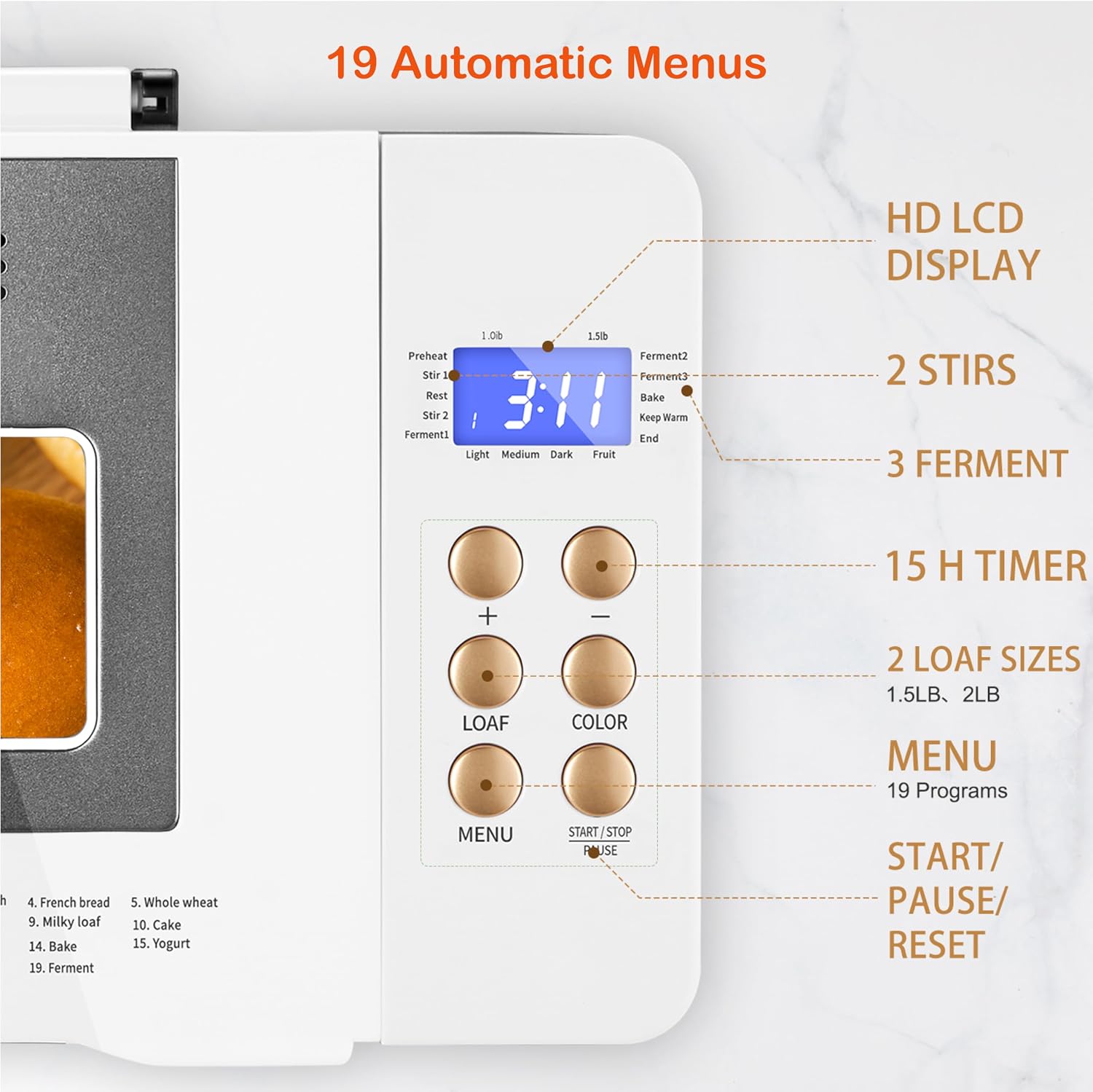
Image 3.3: Detailed view of the control panel, highlighting the HD LCD display, program options, loaf size, crust color, and operational buttons.
4. Setup
- Unpacking: Carefully remove the bread maker and all accessories from the packaging.
- Initial Cleaning: Before first use, wash the bread pan, kneading paddle, measuring cup, and measuring spoon with warm, soapy water. Rinse thoroughly and dry. Wipe the exterior of the appliance with a damp cloth.
- Placement: Place the bread maker on a stable, flat, heat-resistant surface, away from direct sunlight and heat sources. Ensure adequate ventilation around the appliance.
- Power Connection: Plug the power cord into a grounded electrical outlet.
5. Operating Instructions
5.1 Basic Operation
Operating the KEEPEEZ Bread Maker involves three main steps:
- Add Ingredients: Place all ingredients into the non-stick bread pan according to your chosen recipe. Ensure the kneading paddle is properly installed.
- Select Program: Use the MENU button to cycle through the 19 available programs (e.g., French, Gluten-Free, Sourdough, Jam, Cake, Yogurt, Dough). Select your desired loaf size (1.0 lb or 1.5 lb) and crust color (Light, Medium, Dark) using the respective buttons.
- Start Baking: Press the START/STOP button to begin the selected program. The machine will automatically mix, knead, rise, and bake.
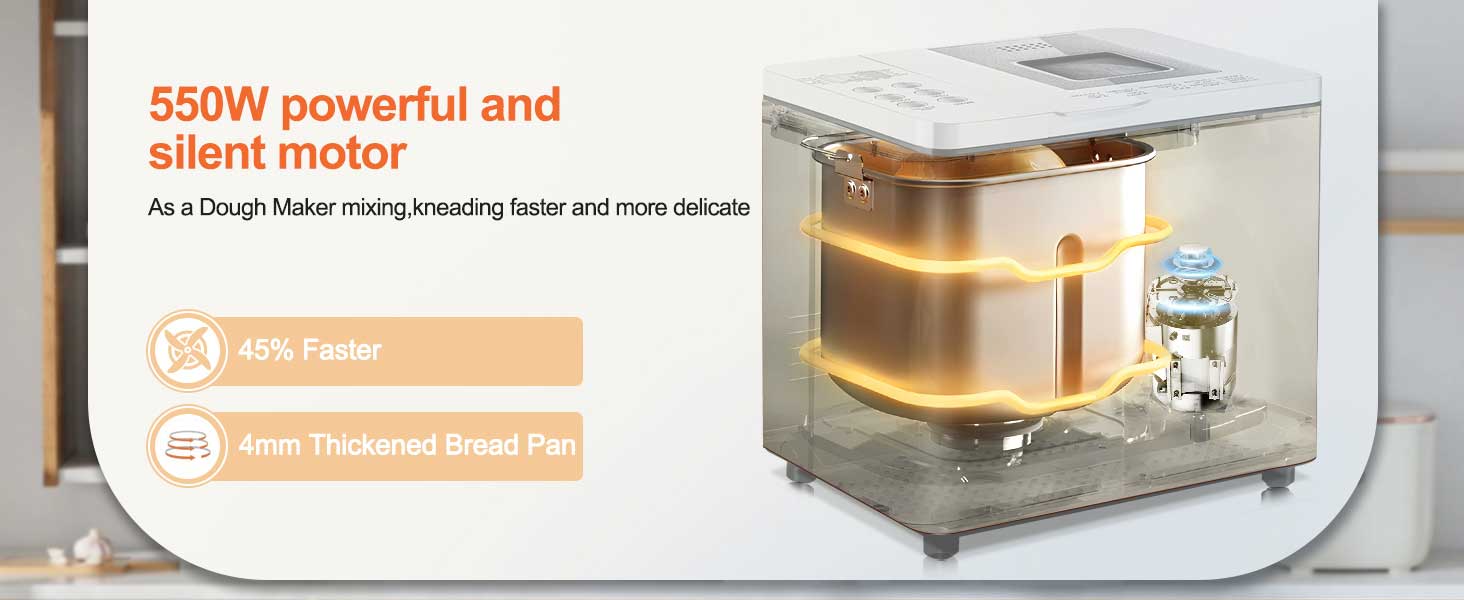
Image 5.1: Visual guide to the three-step bread making process: adding ingredients, selecting program, and enjoying the finished product.
5.2 Available Programs
The bread maker offers 19 programs for various bread types and other preparations, including:
- Basic Bread
- French Bread
- Whole Wheat
- Gluten-Free
- Sourdough
- Sweet Bread
- Milk Loaf
- Cake
- Jam
- Yogurt
- Dough (for pizza, pasta, etc.)
- Bake
- Ferment
- And more specialized options.
5.3 Timer and Keep Warm Function
The 15-hour delay timer allows you to add ingredients and set the machine to start baking at a later time, ensuring fresh bread when you need it. After baking, the 1-hour automatic keep warm function maintains the bread's temperature.

Image 5.2: Illustration of the 15-hour delay timer and 1-hour keep warm function, allowing for fresh bread at a desired time.
5.4 Dual Heating and Silent Operation
Equipped with 360° dual heaters on the bottom and lid, the bread maker ensures even toasting. The 550W motor is designed for quiet operation, producing less than 35dB of noise during use.

Image 5.3: Internal view highlighting the 360° double heating tubes for consistent baking and the 550W power.
6. Recipes
The KEEPEEZ Bread Maker comes with a recipe book to guide you through various preparations, including different types of bread, doughs, jams, and yogurts. These recipes are optimized for the machine's programs and settings.

Image 6.1: Examples of items that can be made with the bread maker, including bread, jam, yogurt, and dough, emphasizing the included master recipes.
7. Maintenance and Cleaning
Proper cleaning and maintenance ensure the longevity and performance of your bread maker.
- Before Cleaning: Always unplug the appliance and allow it to cool completely before cleaning.
- Bread Pan and Kneading Paddle: The non-stick pan and kneading paddle are dishwasher-safe. Alternatively, wash them with warm, soapy water, rinse, and dry thoroughly.
- Exterior: Wipe the exterior of the bread maker with a soft, damp cloth. Do not use abrasive cleaners or immerse the main unit in water.
- Interior: Use a soft, damp cloth to wipe the interior of the baking chamber.
- Storage: Store the bread maker in a dry, clean place when not in use.
8. Troubleshooting
If you encounter issues with your KEEPEEZ Bread Maker, please refer to the following common problems and solutions:
| Problem | Possible Cause | Solution |
|---|---|---|
| Bread does not rise | Yeast is old or inactive; incorrect water temperature; too much salt or sugar. | Check yeast expiration date; use lukewarm water (105-115°F); ensure correct ingredient measurements. |
| Bread is too dense | Too much flour; not enough liquid; yeast issue. | Measure ingredients precisely; ensure proper liquid-to-flour ratio. |
| Kneading paddle stuck in bread | Common occurrence. | Allow bread to cool, then carefully remove the paddle using the included hook. |
| Machine is noisy or vibrates excessively | Uneven surface; heavy dough. | Ensure the bread maker is on a stable, flat surface. This model features a silent motor, but some vibration during kneading is normal. |
| Display shows error code | Internal malfunction or sensor issue. | Unplug the machine, wait 10-15 minutes, then plug it back in. If the error persists, contact customer support. |
For further assistance, please contact KEEPEEZ customer support.
9. Specifications
- Model: MBF-041
- Brand: KEEPEEZ
- Color: Stainless Steel Body
- Product Dimensions: 9"D x 10.9"W x 10.1"H
- Wattage: 550 watts
- Number of Programs: 19
- Item Weight: 10 pounds

Image 9.1: Dimensions of the KEEPEEZ Bread Maker, illustrating its compact design.
10. Warranty and Support
The KEEPEEZ Bread Maker comes with a 2-year warranty. This warranty covers manufacturing defects and ensures accessory replacement if needed. For any questions, concerns, or warranty claims, please contact KEEPEEZ customer service. We aim to provide a response within 12 hours.
For support, please visit the official KEEPEEZ store or contact us through your purchase platform.