
1. Introduction
Thank you for choosing the NAVIFORCE NF1006-SGNB Solar Powered Chronograph Watch. This manual provides detailed instructions for the proper setup, operation, and maintenance of your watch. Please read this manual thoroughly to ensure optimal performance and longevity of your timepiece.
2. Product Overview
2.1 Watch Components
Familiarize yourself with the main components of your NAVIFORCE watch:
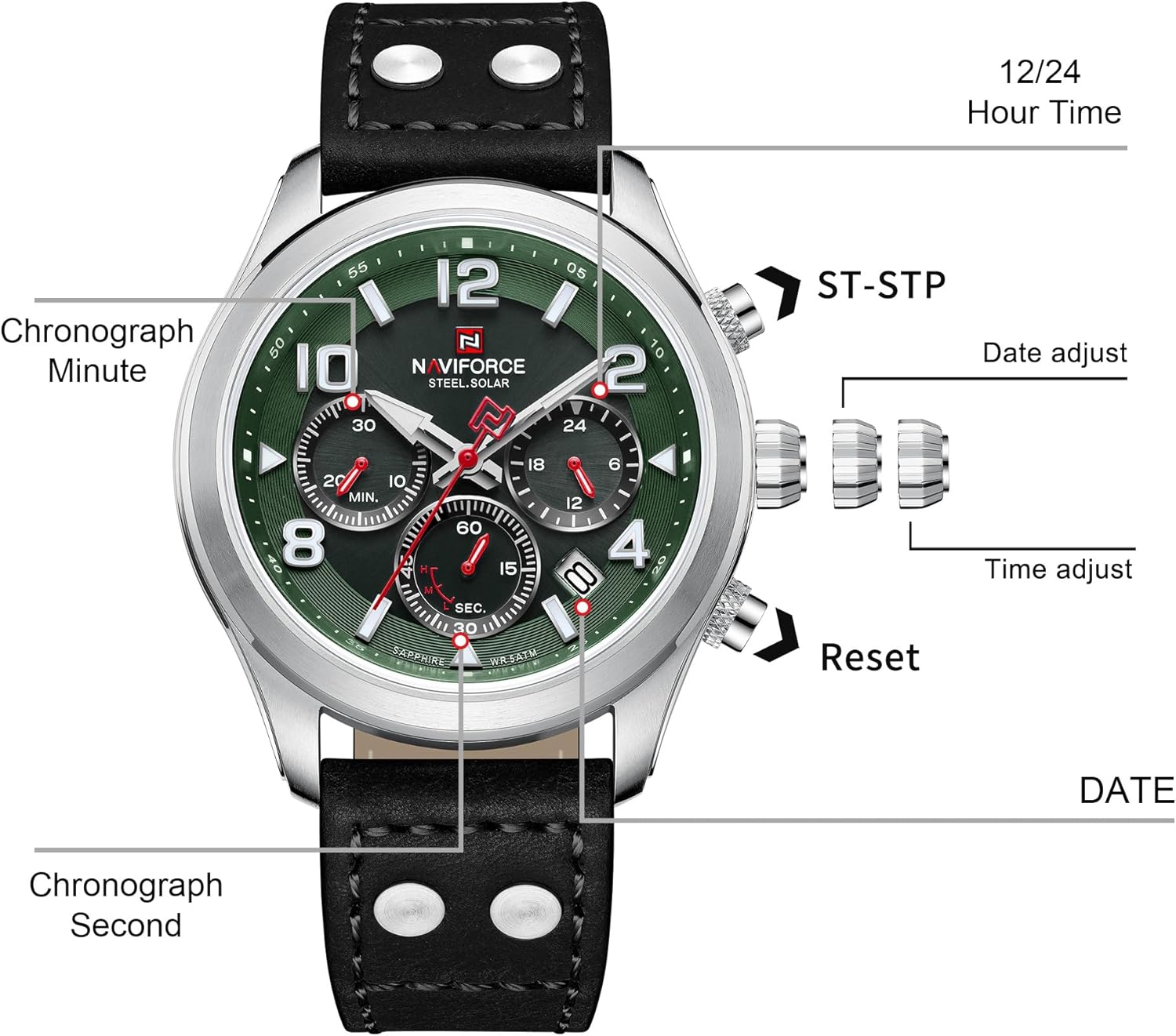
Image: Front view of the NAVIFORCE NF1006-SGNB watch with labels for Chronograph Minute, Chronograph Second, 12/24 Hour Time, Date, ST-STP button, Date adjust crown, Time adjust crown, and Reset button.
- Crown (Middle): Used for setting time and date.
- Buttons (Top and Bottom): Used for chronograph functions (Start/Stop, Reset).
- Main Dial: Displays current time.
- Sub-dials: Chronograph Minute, Chronograph Second, 12/24 Hour Time.
- Date Display: Window showing the current date.
- Luminous Hands and Markers: Provide visibility in low light conditions.
2.2 Key Features
- Solar Powered Movement: High-quality Japan Quartz movement with light energy charging, reducing the need for frequent battery replacement.
- Sapphire Crystal: Scratch-resistant crystal for enhanced durability.
- 5ATM Water Resistance: Suitable for daily use, such as hand washing and rain exposure. Not recommended for swimming or diving.
- Multi-function Chronograph: Features 3 sub-dials for minute, second, and 12/24 hour timekeeping.
- Genuine Leather Strap: Provides comfort and durability.
3. Setup
3.1 Initial Charging
Your watch is equipped with a solar-powered movement that converts light into electrical energy. For optimal performance, ensure the watch is exposed to light regularly. Upon first use or after prolonged storage in darkness, place the watch under direct sunlight or strong artificial light for several hours to fully charge the internal battery.

Image: Diagram illustrating the solar charging process, showing light source, glass, surface, energy conversion, and rechargeable battery.
3.2 Setting Time and Date
- Setting the Date: Gently pull the crown (middle button) out to the first click position. Rotate the crown clockwise or counter-clockwise to adjust the date. Push the crown back in to secure the date setting.
- Setting the Time: Pull the crown out to the second click position. Rotate the crown to move the hour and minute hands to the desired time. Ensure the 12/24 hour sub-dial is correctly aligned if applicable. Push the crown back in to secure the time setting.
4. Operating the Chronograph
The chronograph function allows for precise measurement of elapsed time.
- Starting the Chronograph: Press the top button (ST-STP) to start the chronograph. The chronograph second hand will begin to move.
- Pausing/Resuming: Press the top button (ST-STP) again to pause the chronograph. Press it once more to resume timing.
- Resetting the Chronograph: While the chronograph is stopped (paused or after stopping), press the bottom button (Reset) to return all chronograph hands to their zero positions.
5. Maintenance
5.1 Water Resistance
Your NAVIFORCE watch has a water resistance rating of 5ATM (50 meters). This means it is suitable for:
- Daily use
- Splashes
- Rain
- Washing hands
It is not recommended for swimming, diving, or hot water bathing, as steam and temperature changes can compromise the seals. Always ensure the crown is fully pushed in before any contact with water.
5.2 Cleaning
To maintain the appearance of your watch:
- Wipe the case and crystal with a soft, dry cloth.
- For the leather strap, avoid prolonged exposure to water, direct sunlight, and harsh chemicals. Clean with a damp cloth and allow to air dry.
5.3 Battery Life
The solar-powered battery is designed for long-term use, with an approximate life of 10-15 years, provided it receives adequate light exposure.
6. Troubleshooting
- Watch Not Running: Ensure the watch has been sufficiently charged by exposing it to light. If it still does not run, the battery may need professional inspection.
- Incorrect Time/Date: Refer to Section 3.2 for instructions on how to correctly set the time and date.
- Chronograph Hands Not Resetting to Zero: If the chronograph hands do not return to the 12 o'clock position after resetting, consult a professional watch repair service.
7. Specifications

Image: Diagram showing the dimensions of the NAVIFORCE NF1006-SGNB watch, including Lug Width (22mm), Weight (85g), Total length (260mm), Case Diameter (43mm), and Case Thickness (12mm). It also indicates wrist sizes from 6.1" (155mm) to 7.9" (200mm).
| Feature | Specification |
|---|---|
| Model Number | NF1006-SGNB |
| Movement | Japan Quartz, Solar Powered |
| Crystal | Sapphire |
| Water Resistance | 5ATM (50 meters) |
| Case Diameter | 43mm |
| Case Thickness | 12mm |
| Lug Width | 22mm |
| Strap Material | Genuine Leather |
| Strap Length | 260mm |
| Weight | 85g |
| Battery Type | 1 CR2 (included, solar-rechargeable) |
8. Warranty and Support
NAVIFORCE watches are manufactured to high standards. For warranty information or technical support, please refer to the warranty card included with your purchase or contact your retailer. Keep your proof of purchase for any warranty claims.