
1. Introduction
Thank you for choosing the CAMECHO Car Radio Bluetooth Single DIN Car Stereo Audio. This manual provides detailed instructions for the installation, operation, and maintenance of your new car stereo. Please read this manual thoroughly before using the product to ensure proper and safe operation.
This car audio system is designed to enhance your in-car entertainment experience with features such as Bluetooth connectivity for hands-free calls and music streaming, FM radio, USB and AUX input, and a convenient USB charging port.
Key Features:
- Bluetooth Connectivity: Hands-free calling and audio streaming for safe and enjoyable driving.
- FM Radio: High-quality digital stereo FM radio with automatic and manual channel search, and 18 preset stations.
- Versatile Media Playback: Supports large-capacity SD/USB storage devices, USB interfaces, and AUX input.
- USB Fast Charging: Equipped with a 2.1A USB charging port to power your mobile devices.
- Clock Setting: Easy adjustment of time display.
- LED Digital Display: Clear display for time and radio frequency.
2. Safety Information
Please observe the following safety precautions to prevent personal injury or damage to the unit.
- Voltage Compatibility: This car radio supports only 10.8-16V DC car voltage. It is not suitable for 24V vehicles. Connecting to an incompatible voltage may cause severe damage to the unit and vehicle electrical system.
- Professional Installation Recommended: Installation should ideally be performed by a qualified professional to ensure correct wiring and prevent damage.
- Wiring Diagram: Always refer to the detailed wiring diagram provided in this manual and on the product packaging before attempting any connections. Incorrect wiring can lead to malfunction or damage.
- Avoid Water and Moisture: Do not expose the unit to water or excessive moisture.
- Temperature: Do not operate the unit in extremely high or low temperatures.
- Ventilation: Ensure adequate ventilation around the unit to prevent overheating.
3. Product Overview and Components
Familiarize yourself with the main unit and its included accessories.
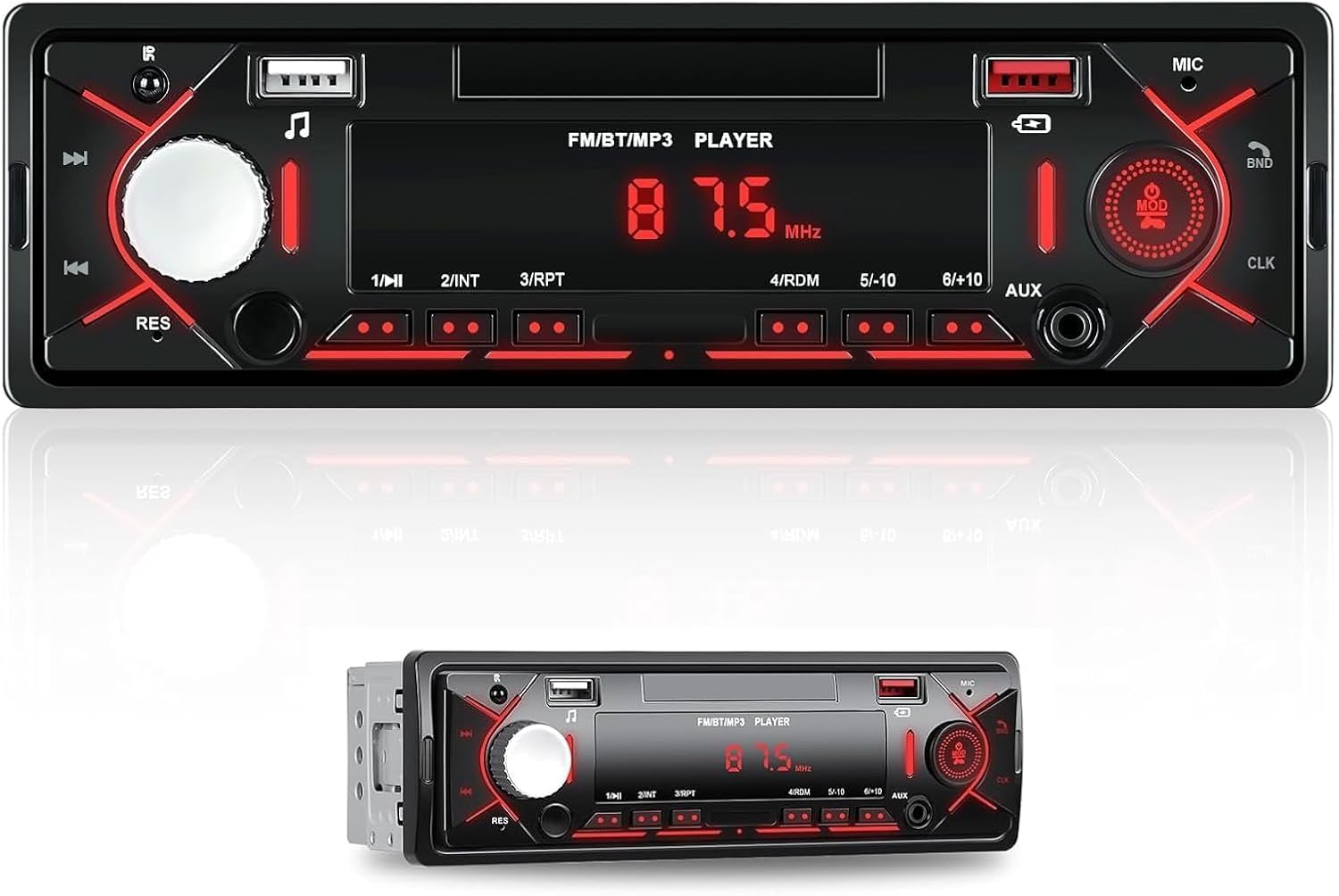
Figure 3.1: Front view of the CAMECHO Single DIN Car Stereo, showing the display, control knobs, buttons, USB port, and AUX input.
Packing List:
The following items are included in the product package:
- CAMECHO Car Radio Main Unit
- Power Cable
- Speaker Cable (Horn Cable)
- Installation Accessories (Mounting Brackets, Screws)
- User Manual
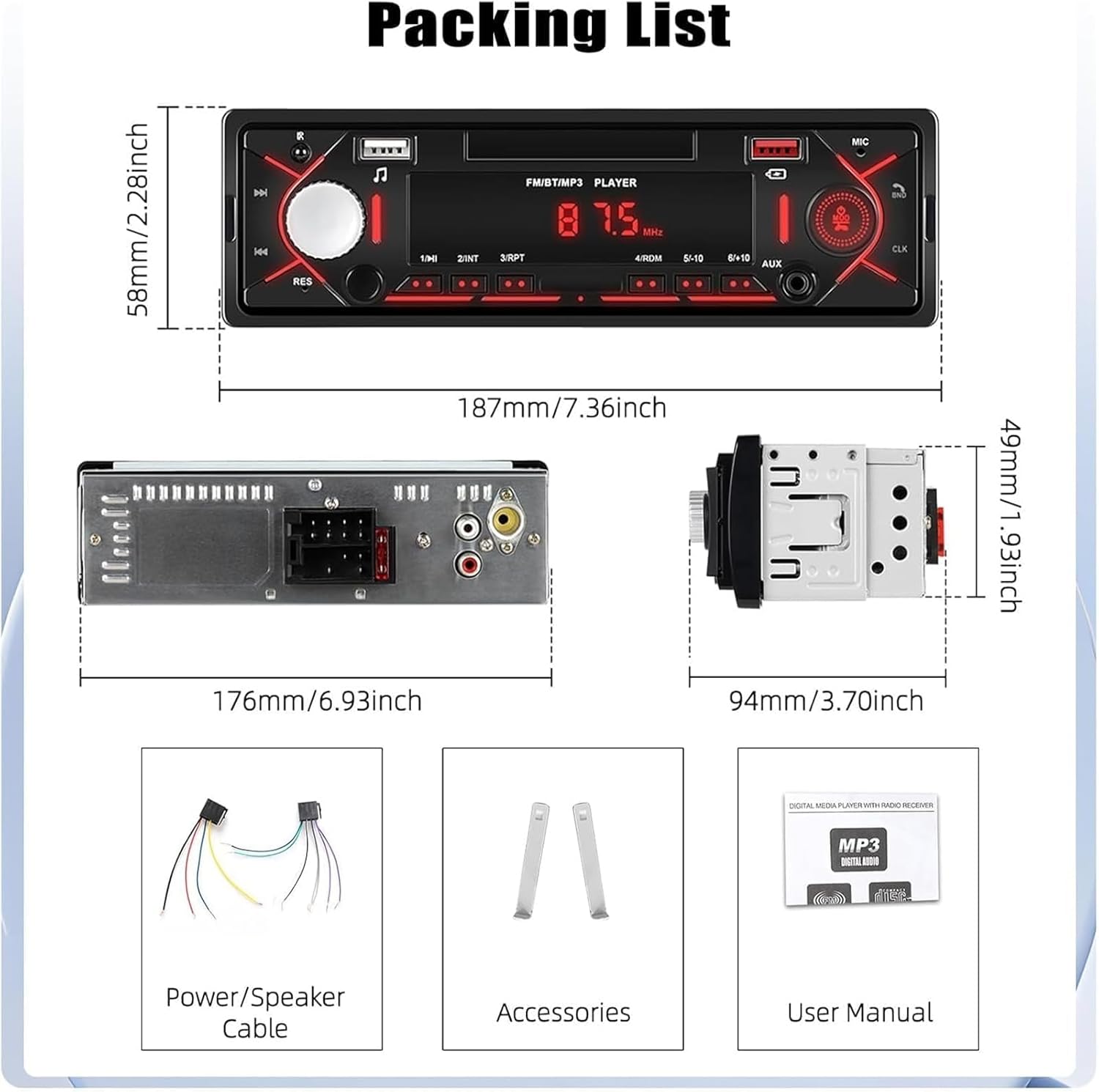
Figure 3.2: Image showing the contents of the packing list, including the main unit, power/speaker cables, accessories, and user manual, along with product dimensions.
4. Setup and Installation
Proper installation is crucial for the optimal performance of your car stereo. Please follow the wiring instructions carefully.
Wiring Diagram:
Refer to the diagram below for connecting the power and speaker cables. Ensure all connections are secure and correctly matched to your vehicle's wiring harness.

Figure 4.1: Detailed wiring diagram for the CAMECHO car stereo, showing connections for ACC, GND, ANT, B+, and speaker outputs (RL, FL, FR, RR).
- Power Cable: Connect ACC (Accessory), GND (Ground), ANT (Antenna), and B+ (Battery Positive) wires as per the diagram.
- Horn Cable (Speaker Cable): Connect the speaker output wires (RL OUT+, RL OUT-, FL OUT+, FL OUT-, FR OUT+, FR OUT-, RR OUT+, RR OUT-) to your vehicle's corresponding speaker wires.
- External Devices: The unit supports external subwoofer connection via RCA outputs (L-OUT, R-OUT) on the rear.
- Important Note: Before installation, please double-check the detailed wiring diagram in the picture to avoid incorrect connections.
5. Operating Instructions
5.1 Bluetooth Connection
The Bluetooth function allows for hands-free calling and wireless audio streaming from your mobile device.

Figure 5.1: Illustration of the Bluetooth function for hands-free calls and music, also showing the included remote control for added flexibility.
- Turn on the car stereo.
- Enable Bluetooth on your mobile phone.
- Search for available Bluetooth devices on your phone. The unit will typically appear as "CAMECHO" or a similar name.
- Select the unit from the list to pair. If prompted for a password, enter "0000" or "1234".
- Once paired, you can make/receive calls and play music wirelessly through the car stereo.
The remote control provides additional flexibility for answering calls, selecting songs, changing radio stations, and adjusting volume.
5.2 FM Radio Operation
Enjoy high-quality digital stereo FM radio with easy tuning and preset functions.

Figure 5.2: Depiction of the FM radio function, highlighting clear channel search and noise reduction capabilities, with example frequencies.
- Frequency Range: 87.5-108MHz.
- Automatic Search: Press the "BND" button (Band) or a dedicated search button to automatically scan and save available stations.
- Manual Search: Use the tuning knob or arrow buttons to manually adjust the frequency.
- Presets: The unit supports 18 radio presets. Long press a numbered button (1-6) to save the current station to that preset. Short press to recall a saved station.
- Note: This unit does not have RDS (Radio Data System) or CD function.
5.3 USB, AUX, and Charging Functions
Connect various external devices for media playback and charging.

Figure 5.3: Overview of the multi-functional ports on the car radio, including the USB port for media playback, USB charging port, and AUX input.
- USB Port (1): Insert a USB flash drive with MP3 files for playback. The unit will automatically detect and play the audio.
- USB Charging Port (2): Connect your mobile phone or other USB-powered devices to this 2.1A port for fast charging.
- AUX Input (3): Connect external audio devices (e.g., MP3 players, smartphones) using a 3.5mm audio cable. Select AUX mode on the stereo to play audio from the connected device.
5.4 Clock Setting
To set the clock on your car stereo:
- Long press the physical button on the device (often the CLK or DISP button, refer to your unit's specific button layout).
- The display will enter clock setting mode.
- Use the volume knob or arrow buttons to adjust the hours and minutes.
- Press the button again to confirm and exit clock setting mode.
The clear LED digital display ensures you can easily obtain accurate time information, even at night.
6. Maintenance
To ensure the longevity and optimal performance of your CAMECHO car stereo, follow these maintenance guidelines:
- Cleaning: Use a soft, dry cloth to wipe the unit's surface. For stubborn dirt, dampen the cloth slightly with water or a mild, non-abrasive cleaner. Do not use harsh chemicals, solvents, or abrasive cleaners.
- Avoid Liquids: Prevent liquids from entering the unit, as this can cause damage to internal components.
- Temperature: Avoid exposing the unit to extreme temperatures, direct sunlight for prolonged periods, or high humidity.
- Connections: Periodically check all wiring connections to ensure they are secure and free from corrosion.
7. Troubleshooting
If you encounter issues with your car stereo, refer to the following common problems and solutions. If the problem persists, please contact customer support.
| Problem | Possible Cause | Solution |
|---|---|---|
| No Power | Incorrect wiring; Blown fuse; Vehicle voltage issue. | Check power cable connections (ACC, B+, GND). Verify fuse. Ensure vehicle voltage is 10.8-16V DC. |
| No Sound | Incorrect speaker wiring; Volume too low; Mute function active. | Check speaker cable connections. Increase volume. Deactivate mute. |
| Bluetooth Not Connecting | Bluetooth not enabled on phone; Unit not in pairing mode; Interference. | Ensure phone's Bluetooth is on. Restart both devices. Move closer to the unit. Forget and re-pair the device. |
| Poor FM Reception | Antenna not connected; Weak signal area; Interference. | Check antenna connection. Try tuning to a stronger station. Avoid areas with high electrical interference. |
| USB/AUX Not Working | Incorrect mode selected; Damaged cable/USB drive; Incompatible file format. | Ensure correct input mode (USB/AUX) is selected. Try a different cable/USB drive. Ensure audio files are in a supported format (e.g., MP3). |
8. Specifications
Detailed technical specifications for the CAMECHO Car Radio:
- Model Number: 9b5681eb-5e67-4d48-916f-dfe0ee5ec033
- Brand: CAMECHO
- Connectivity Technology: Bluetooth
- Controller Type: Android (refers to compatibility, not OS of unit)
- Special Feature: Volume Control
- Compatible Devices: Smartphone
- Connector Type: RCA (for external audio output)
- Audio Output Mode: Stereo
- Surround Sound Channel Configuration: 2.1 (implies subwoofer output capability)
- Number of Channels: 2 (stereo output)
- FM Radio Frequency: 87.5-108MHz
- USB Charging Port: 2.1A
- Operating Voltage: 10.8-16V DC
- Item Weight: 10.6 ounces
- Package Dimensions: 7.87 x 4.33 x 0.39 inches
9. Warranty and Support
CAMECHO is committed to providing high-quality products and customer satisfaction. For warranty information, please refer to the terms and conditions provided at the time of purchase or visit the official CAMECHO website.
Customer Support:
If you have any questions, require technical assistance, or need further support, please do not hesitate to contact us:
- Email Support: camechovip@126.com
- Online Help: For additional resources and FAQs, please visit the CAMECHO Store on Amazon.

Figure 9.1: Image indicating online help and user manual support via email: camechovip@126.com.