1. Introduction
This manual provides detailed instructions for the safe and effective use of your Alonefire SV118 80W 365nm UV LED Flashlight. Please read this manual thoroughly before operation and retain it for future reference.

Image: The Alonefire SV118 UV LED Flashlight, showcasing its design and accompanying accessories like the USB-C cable and UV protection glasses.
2. Package Contents
Upon opening the package, please verify that all the following items are included:
- Alonefire SV118 UV LED Flashlight
- 4 x BRC18650 2000mAh 3.7V Rechargeable Lithium-ion Batteries
- 1 x USB-C Charging Cable
- 1 x Pair of UV Protection Glasses (Class 400)
- 1 x Lanyard

Image: All components included in the Alonefire SV118 package: the flashlight, USB-C cable, and UV protection glasses.
3. Safety Information
To ensure safe operation and prevent injury or damage, please observe the following precautions:
- UV Radiation Hazard: Direct exposure to UV light can be harmful to eyes and skin. Always wear the provided UV protection glasses when operating the flashlight. Avoid pointing the light directly at people or animals.
- Battery Safety: Use only the specified rechargeable batteries. Do not mix old and new batteries, or different types of batteries. Do not expose batteries to fire or extreme temperatures.
- Heat Warning: The flashlight may become warm during prolonged use, especially at maximum power. Avoid touching the head of the flashlight when hot.
- Water Resistance: This device is not waterproof. Avoid exposure to water or high humidity.
- Children: Keep out of reach of children.
4. Setup
4.1 Battery Installation
- Unscrew the tail cap of the flashlight.
- Insert the four BRC18650 rechargeable batteries according to the polarity markings (+/-) inside the battery compartment. Ensure correct orientation.
- Screw the tail cap back on securely.
4.2 Initial Charge
It is recommended to fully charge the batteries before first use. Refer to the "Charging" section for instructions.
5. Operating Instructions
The Alonefire SV118 features multiple brightness modes and a strobe function.
- Power On/Off and Brightness Adjustment:
- Press the "ON/OFF" button once to turn on the flashlight at maximum power.
- Press the button again to cycle through brightness modes: Medium, Low.
- Press the button a final time to turn off the flashlight.
- Strobe Function:
- From any mode (on or off), press and hold the "ON/OFF" button for 3 seconds to activate the slow strobe mode.
- Press and hold the button again for 3 seconds to activate the fast strobe mode.
- A short press will return to the previous mode or turn off the flashlight.
- Digital Power Display: The integrated LCD screen displays the current power level, allowing you to monitor battery status accurately.

Image: A hand holding the Alonefire SV118 UV LED Flashlight, demonstrating its ergonomic design and size.
6. Charging
The Alonefire SV118 features a convenient USB-C charging port.
- Locate the USB-C charging port on the flashlight handle.
- Connect the provided USB-C cable to the flashlight and plug the other end into a compatible USB power source (e.g., wall adapter, computer, power bank).
- The digital display will indicate the charging status. A red indicator light signifies charging, and the light turns off when fully charged.
- Charging typically takes 5-6 hours for a full charge.
- It is not necessary to remove the batteries for charging.

Image: The Alonefire SV118 flashlight connected via its USB-C port for charging, with indicators showing charging status and estimated charging time.
7. Applications
The 365nm UV LED flashlight is suitable for a wide range of professional and domestic applications due to its pure UV output and filtering capabilities.
- Resin Curing: Accelerates the curing process of UV-sensitive resins.
- Pet Stain Detection: Reveals hidden pet urine and other organic stains on carpets, furniture, and other surfaces.
- Mineral and Gemstone Identification: Helps identify fluorescent minerals, amber, and other gemstones.
- Authenticity Verification: Useful for checking currency, passports, and other documents with UV security features.
- Scorpion Detection: Scorpions fluoresce under 365nm UV light, making them easier to spot.
- Leak Detection: Can be used with UV dyes to detect leaks in HVAC, automotive, and plumbing systems.
- Fluorescent Agent Test: Detects fluorescent agents in cosmetics, textiles, and other products.
- Pet Fungal Inspection: Aids in identifying certain fungal infections on pets.
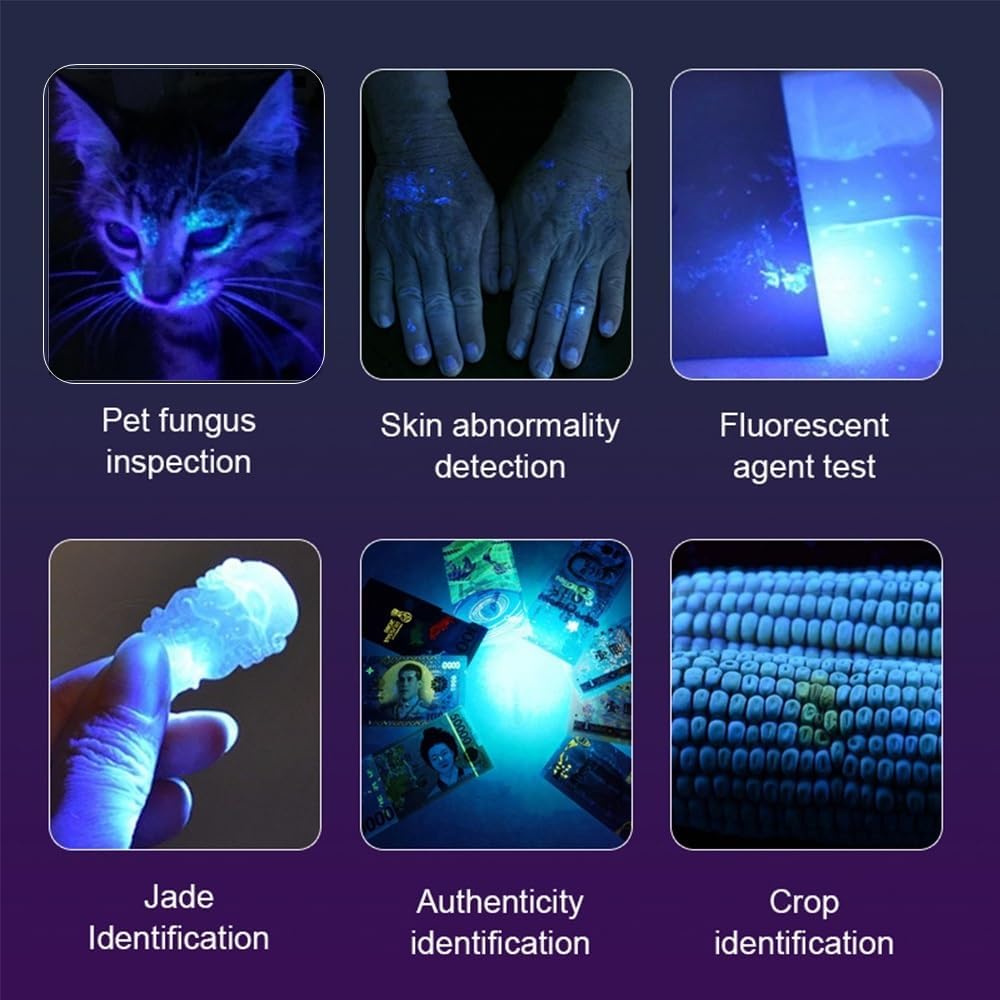
Image: A collage illustrating various applications of the UV flashlight, including pet fungus inspection, skin abnormality detection, fluorescent agent testing, jade identification, authenticity verification, and crop identification.

Image: A comparison showing a carpet before and after being illuminated by the UV flashlight, highlighting hidden pet stains.
8. Maintenance
- Cleaning: Wipe the flashlight body with a soft, damp cloth. Do not use abrasive cleaners or solvents.
- Lens Care: Gently clean the UV filter lens with a lens cleaning cloth to maintain optimal light output.
- Battery Storage: If storing the flashlight for an extended period, remove the batteries to prevent leakage. Store batteries in a cool, dry place.
- Lubrication: Periodically apply silicone grease to the O-rings and threads to maintain water resistance and smooth operation.
9. Troubleshooting
| Problem | Possible Cause | Solution |
|---|---|---|
| Flashlight does not turn on. |
|
|
| Light output is weak. |
|
|
| Flashlight gets excessively hot. |
|
|
10. Specifications
| Feature | Detail |
|---|---|
| Brand | ALONEFIRE |
| Model Number | SV118 |
| Light Source Type | UV LED (8pcs 4-core 365nm LEDs) |
| Power Consumption | Up to 80W |
| Luminous Flux | 9500 milliwatt |
| Battery Type | 4 x BRC18650 Lithium-ion (included) |
| Charging Port | USB-C |
| Charging Time | Approx. 5-6 hours |
| Battery Life (Max Power) | Approx. 20 minutes (as per user review, actual may vary) |
| Casing Material | High-quality Aluminum Alloy |
| Special Features | UV Filter Black Lens, Digital LCD Power Display |
| Item Weight | 630 grams |
| Water Resistance Level | Not waterproof |
| Country of Origin | China |

Image: A visual comparison demonstrating the difference between 365nm and 395nm UV light, highlighting the superior clarity and penetration of 365nm for fluorescence detection.
11. Warranty and Support
For warranty information or technical support, please contact Alonefire customer service through the retailer where the product was purchased. Please have your model number (SV118) and purchase date available when contacting support.
Note: Information regarding spare parts availability and software updates is not provided by the manufacturer.

