
XO Simple is Beauty GS01
User Manual: Smart Bluetooth Glasses
Model: GS01 | Brand: XO Simple is Beauty
Introduction
Thank you for choosing the XO Simple is Beauty Smart Bluetooth Glasses. These innovative glasses combine stylish design with advanced audio technology, allowing you to enjoy music, make calls, and access voice assistants while protecting your eyes. This manual provides detailed instructions for setup, operation, maintenance, and troubleshooting to ensure you get the most out of your new smart glasses.
Safety Information
- Do not expose the glasses to extreme temperatures or humidity.
- Avoid dropping or subjecting the glasses to strong impacts.
- Keep away from water and liquids to prevent damage to electronic components.
- Use only the provided magnetic charging cable.
- Do not attempt to disassemble or repair the glasses yourself. Contact customer support for assistance.
- Ensure lenses are clean for optimal vision and UV protection.
What's in the Box
- Smart Music Sunglasses x 1
- Magnetic Charging Cable x 1
- Glasses Case x 1
- User Manual x 1
- Glasses Cloth x 1
Product Overview
The Smart Bluetooth Glasses feature an open-ear audio design, allowing you to stay aware of your surroundings while enjoying audio. They are equipped with UV400 protected lenses for eye safety.

Figure 1: Overview of Smart Bluetooth Glasses components, including UV400 lens, microphone, touch control area, magnetic charging port, and dual directional speakers.
- UV400 Lenses: Provide full protection against harmful UV rays.
- Dual Directional Speakers: Deliver open-ear sound for audio playback and calls.
- Built-in Microphone: For clear hands-free communication.
- Touch Control Area: Located on the temples for easy operation.
- Magnetic Charging Port: For convenient and secure charging.
Setup
1. Charging the Glasses
Before first use, fully charge your smart glasses. The magnetic charging design ensures easy connection.
- Connect the magnetic charging cable to the charging port on the glasses.
- Connect the other end of the cable to a USB power adapter (not included) or a computer's USB port.
- A full charge takes approximately 2 hours. The glasses offer up to 100 hours of standby time.
2. Bluetooth Pairing
Pair your smart glasses with your smartphone or other Bluetooth-enabled device.

Figure 2: Bluetooth pairing process shown with smart glasses and a smartphone displaying Bluetooth settings.
- Ensure the glasses are powered off.
- On your device, enable Bluetooth.
- Press and hold both touch areas on the temples of the glasses simultaneously for 2 seconds to power them on and enter pairing mode. You will hear a voice prompt.
- On your device's Bluetooth settings, search for "GS01" or "Smart Glasses" and select it to connect.
- Once connected, you will hear a confirmation sound.
Operating Instructions
The smart glasses feature intuitive touch controls on the temples.
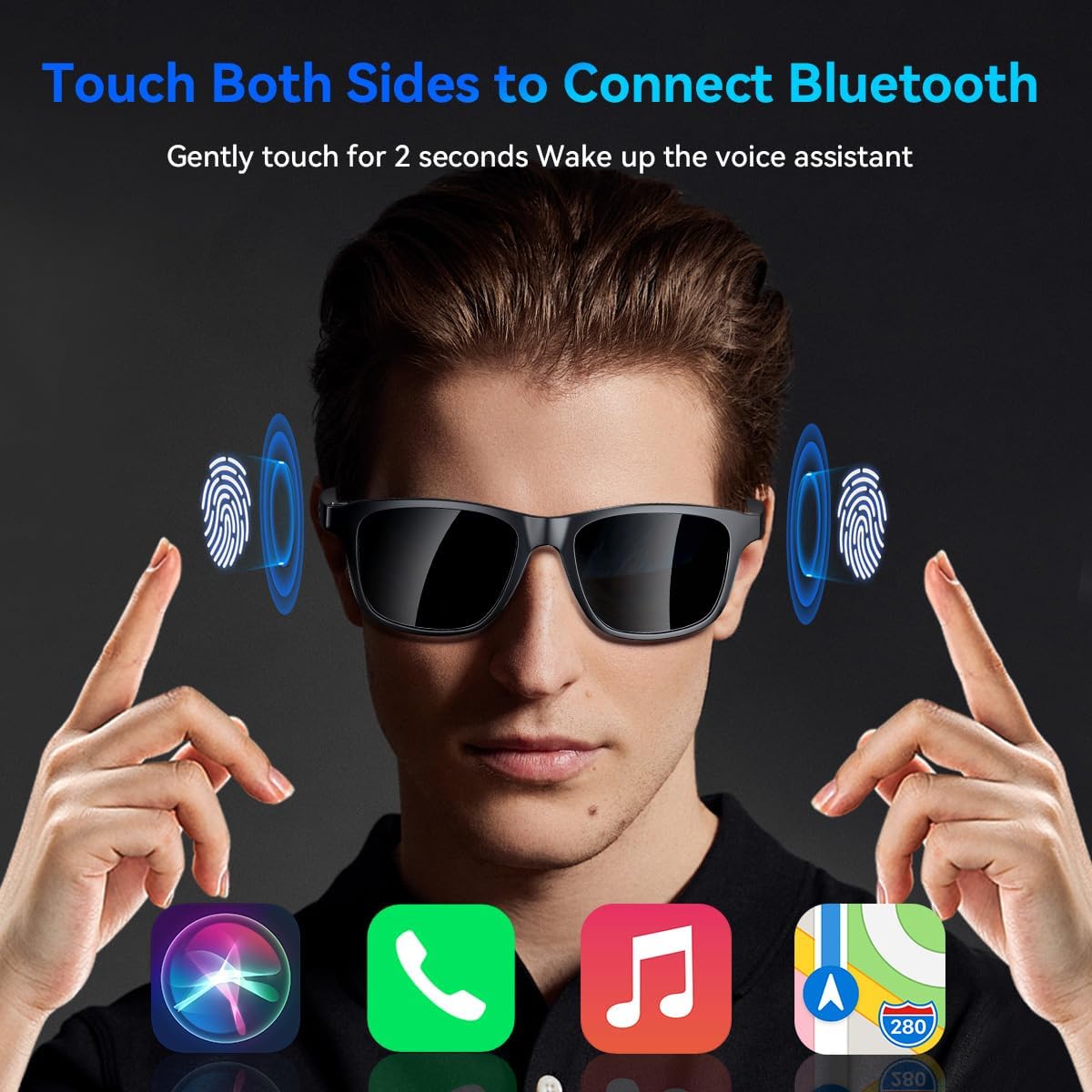
Figure 3: Detailed illustration of touch control functions for power, voice assistant, music playback, and call management.
- Power On/Off:
- To Power On: Press and hold any touch area for 2 seconds.
- To Power Off: Press and hold any touch area for 5 seconds.
- Music Playback:
- Play/Pause: Click on any touch area.
- Call Management:
- Answer Call: Click on the right touch area.
- Hang Up: Click on any touch area during a call.
- Reject Phone: Click on any touch area during an incoming call.
- Voice Assistant:
- Activate: Long press any touch area for 2 seconds.
Video 1: Official product video demonstrating the features and usage of the Smart Bluetooth Glasses.
Maintenance
Proper care will extend the lifespan of your smart glasses.

Figure 4: The smart glasses are designed for comfortable wear and eye protection during outdoor activities.
- Cleaning Lenses: Use the provided glasses cloth to gently wipe the lenses. For stubborn smudges, use a lens cleaning spray designed for eyewear. Avoid abrasive materials or harsh chemicals.
- Cleaning Frame: Wipe the frame with a soft, damp cloth. Do not submerge the glasses in water.
- Storage: When not in use, store the glasses in the provided glasses case to protect them from scratches and dust.
- Battery Care: To maintain battery health, avoid fully discharging the battery frequently. Charge regularly, even if not in constant use.
Troubleshooting
| Problem | Possible Cause | Solution |
|---|---|---|
| Glasses won't power on. | Low battery or incorrect power-on method. | Charge the glasses fully. Ensure you press and hold both touch areas simultaneously for 2 seconds. |
| Cannot pair with device. | Bluetooth is off, glasses not in pairing mode, or too far from device. | Ensure Bluetooth is enabled on your device. Put glasses in pairing mode. Keep devices within 10 meters. |
| No sound or low volume. | Volume too low on glasses or device, or not properly connected. | Increase volume on both glasses and connected device. Re-pair if necessary. |
| Call quality is poor. | Weak Bluetooth connection or environmental noise. | Move closer to your device. Avoid excessively noisy environments. |
Specifications
- Model Number: GS01
- Connectivity: Bluetooth
- Lenses: Photochromic, Anti-Blue Light, UV400 Protection
- Audio: Open-Ear Speakers, Built-in Mic
- Battery Capacity: 99.98 Milliamp Hours (included)
- Charging Time: Approximately 2 hours
- Standby Time: Up to 100 hours
- Item Weight: 4.6 ounces
- Operating System: Bluetooth
- Special Feature: Music Player
- Manufacturer: Shenzhen Gonbes Technology Co.,Ltd
- Country of Origin: China
Warranty & Support
XO Simple is Beauty stands behind the quality of its products.

Figure 5: XO Simple is Beauty customer support details.
- Warranty: Your Smart Bluetooth Glasses come with an 18-month support period from the date of purchase.
- Customer Service: We offer 24-hour friendly customer service to assist you with any issues or questions. Please refer to the contact information provided with your purchase or visit the official XO Simple is Beauty store on Amazon for support.
- 30-Day Trial: Enjoy a 30-day trial period to ensure complete satisfaction with your product.
Ask a question about this manual
Ask about setup, troubleshooting, compatibility, parts, safety, or missing instructions. Manuals+ will review the question and use this page’s manual context to help answer it.