
WOLTU GS16hbl
WOLTU Gaming Chair GS16hbl User Manual
Model: GS16hbl
Introduction
Thank you for choosing the WOLTU Gaming Chair GS16hbl. This ergonomic gaming chair is designed to provide maximum comfort and support during long hours of work or gaming. Featuring breathable mesh fabric, pocket spring cushioning, adjustable headrest and lumbar support, and a retractable footrest, this chair adapts to your needs for an optimal seating experience. Please read this manual carefully before assembly and use to ensure proper setup and operation.
Safety Instructions
- Ensure all components are present and undamaged before assembly. Do not use if any parts are missing or broken.
- Follow the assembly instructions precisely. Incorrect assembly can lead to instability and injury.
- Do not stand on the chair. Use it only for sitting.
- Do not exceed the maximum weight capacity of 150 kg (330 lbs).
- Keep children and pets away during assembly. Small parts can be a choking hazard.
- Avoid exposing the chair to direct sunlight or extreme temperatures to prevent material degradation.
- Regularly check all screws and connections to ensure they are tight. Retighten if necessary.
Package Contents
Before beginning assembly, please verify that all items listed below are included in your package:
- Gaming Chair (main components)
- Lumbar Pillow
- Headrest Pillow
- Footrest
- Accessory Set (screws, tools, etc.)
- Instruction Manual
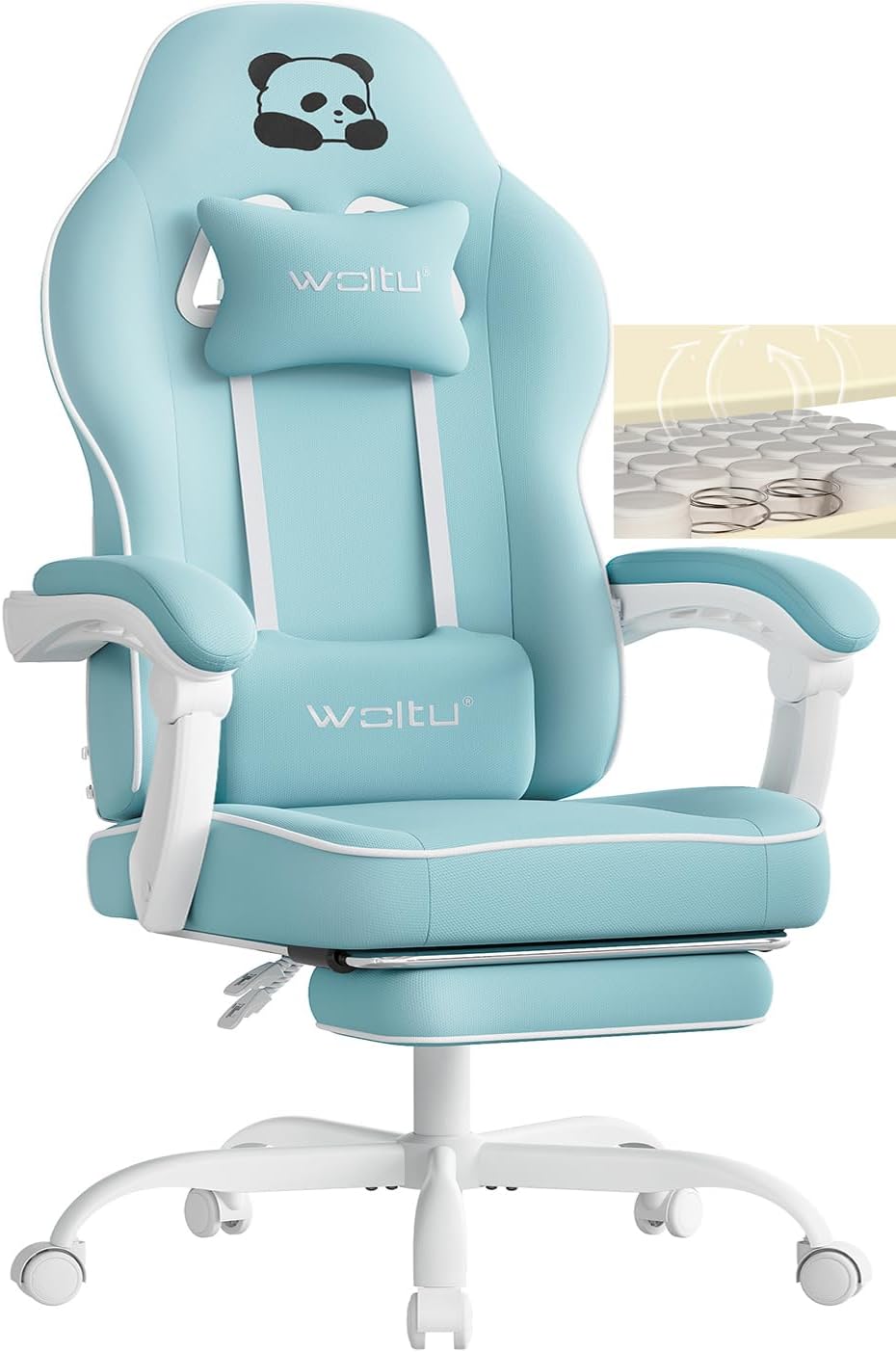
Figure 1: Complete WOLTU Gaming Chair GS16hbl and its components.
Setup and Assembly
Assembly of the WOLTU Gaming Chair is designed to be straightforward. Please follow the numbered steps provided in the included instruction manual. A typical assembly process involves:
- Unpacking: Carefully remove all components from the packaging. Lay them out on a clean, soft surface to prevent scratches.
- Base Assembly: Attach the casters to the five-star metal base. Insert the gas lift cylinder into the center hole of the base. Important: Ensure to remove the protective cap from the gas lift cylinder before installation.
- Seat Assembly: Attach the mechanism to the underside of the seat cushion.
- Backrest Attachment: Secure the backrest to the seat cushion using the provided screws.
- Armrest Installation: Attach the armrests to the seat and backrest. Note that the armrests are linked and will adjust with the recline.
- Footrest Installation: Install the retractable footrest mechanism to the underside of the seat.
- Pillow Attachment: Attach the headrest and lumbar support pillows using their straps.
- Final Check: Once assembled, ensure all screws are tightened and the chair is stable before use.

Figure 2: The WOLTU Gaming Chair integrated into a typical gaming environment.
Operating Instructions
The WOLTU Gaming Chair offers several adjustable features for personalized comfort:
- Seat Height Adjustment: Locate the lever under the right side of the seat. Pull the lever up to raise the seat, or pull it up while seated to lower the seat. Release the lever at the desired height.
- Backrest Recline (90° to 145°): Use the recline lever, typically on the right side of the chair, to adjust the backrest angle. Lean back to the desired position and release the lever to lock it. The armrests are connected and will adjust with the backrest.
- Retractable Footrest: Pull the footrest out from under the seat when desired. It can be extended for leg support and pushed back in when not needed.
- Adjustable Headrest and Lumbar Pillows: The headrest and lumbar pillows can be moved up or down along the backrest straps to provide optimal support for your neck and lower back.
- 360° Swivel: The chair can freely rotate 360 degrees on its base, allowing for easy movement and access to your surroundings.

Figure 3: Multifunctional adjustments of the WOLTU Gaming Chair.

Figure 4: Wingless seat design for enhanced comfort.
Maintenance
Proper maintenance will extend the life of your WOLTU Gaming Chair:
- Cleaning: For the mesh fabric, use a soft cloth dampened with mild soap and water. Avoid harsh chemicals or abrasive cleaners. For the metal parts, wipe with a dry cloth.
- Regular Checks: Periodically inspect all screws and bolts to ensure they are securely fastened. Tighten any loose connections.
- Caster Care: Keep the casters clean from dust and hair to ensure smooth movement.
- Avoid Overloading: Do not place excessive weight on the chair or its components, especially the footrest, to prevent damage.

Figure 5: Breathable mesh fabric and high-density foam construction.
Troubleshooting
| Problem | Possible Cause | Solution |
|---|---|---|
| Chair is wobbly or unstable. | Loose screws or incorrect assembly. | Check all connections and tighten any loose screws. Ensure all parts are assembled according to the manual. |
| Gas lift not adjusting height. | Protective cap still on gas lift; lever mechanism issue. | Ensure the protective cap has been removed from the gas lift cylinder. Check if the lever is properly connected and functioning. |
| Footrest feels unstable or bends. | Improper installation; excessive weight applied. | Verify the footrest is correctly installed and secured. Avoid putting excessive or sudden weight on the footrest; it is designed for leg support, not standing. |
| Casters not rolling smoothly. | Debris (hair, dust) caught in casters. | Turn the chair over and remove any debris from the caster wheels. |
Specifications
| Feature | Detail |
|---|---|
| Brand | WOLTU |
| Model Number | GS16hbl |
| Color | Light Blue |
| Product Dimensions (D x W x H) | 70 x 70 x 125.5 cm (approx. 27.6 x 27.6 x 49.4 inches) |
| Item Weight | 16.4 Kilograms (approx. 36.2 lbs) |
| Maximum Weight Capacity | 150 kg (approx. 330 lbs) |
| Backrest Recline Angle | 90° to 145° |
| Material | Breathable Mesh Fabric, Pocket Springs, High-Density Foam, Metal Frame |

Figure 6: WOLTU Gaming Chair dimensions.
Warranty and Support
WOLTU stands behind the quality of its products. While specific warranty details are not provided in this manual, standard return policies typically allow for returns or replacements within 30 days of purchase. For any questions, concerns, or assistance with your WOLTU Gaming Chair, please contact WOLTU GmbH customer support directly. You can often find contact information on the seller's page on the platform where you purchased the product or on the official WOLTU website.
For more information, visit the official WOLTU Store on Amazon.
Ask a question about this manual
Ask about setup, troubleshooting, compatibility, parts, safety, or missing instructions. Manuals+ will review the question and use this page’s manual context to help answer it.