
Introduction
The Arendsace 4-in-1 Digital Water Tester is a versatile and accurate device designed to measure Total Dissolved Solids (TDS), Electrical Conductivity (EC), and temperature (in Celsius and Fahrenheit) of various water sources. This manual provides detailed instructions for the proper setup, operation, and maintenance of your TDS meter to ensure reliable and consistent performance.

Image: The Arendsace 4-in-1 TDS Meter shown with its retail packaging.
What's in the Box
Upon opening the package, please verify that all the following items are included:
- 1 x Arendsace 4-in-1 TDS Meter (white)
- 1 x Instruction Manual
- 1 x Color Box
- 2 x LR44 Batteries (pre-installed or included separately)
Product Features
- Accurate and Reliable Readings: Equipped with smart high-precision intelligent chips and high-quality titanium alloy probes for stable and accurate detection.
- 4-in-1 Multi-functionality: Measures Total Dissolved Solids (TDS), Electrical Conductivity (EC), and temperature in both Celsius (℃) and Fahrenheit (℉).
- Intelligent Backlit Display: Features a large, easy-to-read backlit screen, ideal for low-light or dark environments. The screen changes color based on TDS levels: green for values below 40ppm and red for values exceeding 40ppm.
- Automatic Lock Function: Automatically locks detected values, eliminating the need for manual button presses to hold readings.
- Power Saving: Automatically shuts down within 2 minutes of inactivity to conserve battery life.
- Wide Range of Applications: Suitable for testing drinking water purity, checking the efficiency of reverse osmosis (RO)/DI systems, hydroponic nutrient solutions, swimming pools, spas, and general daily water testing.
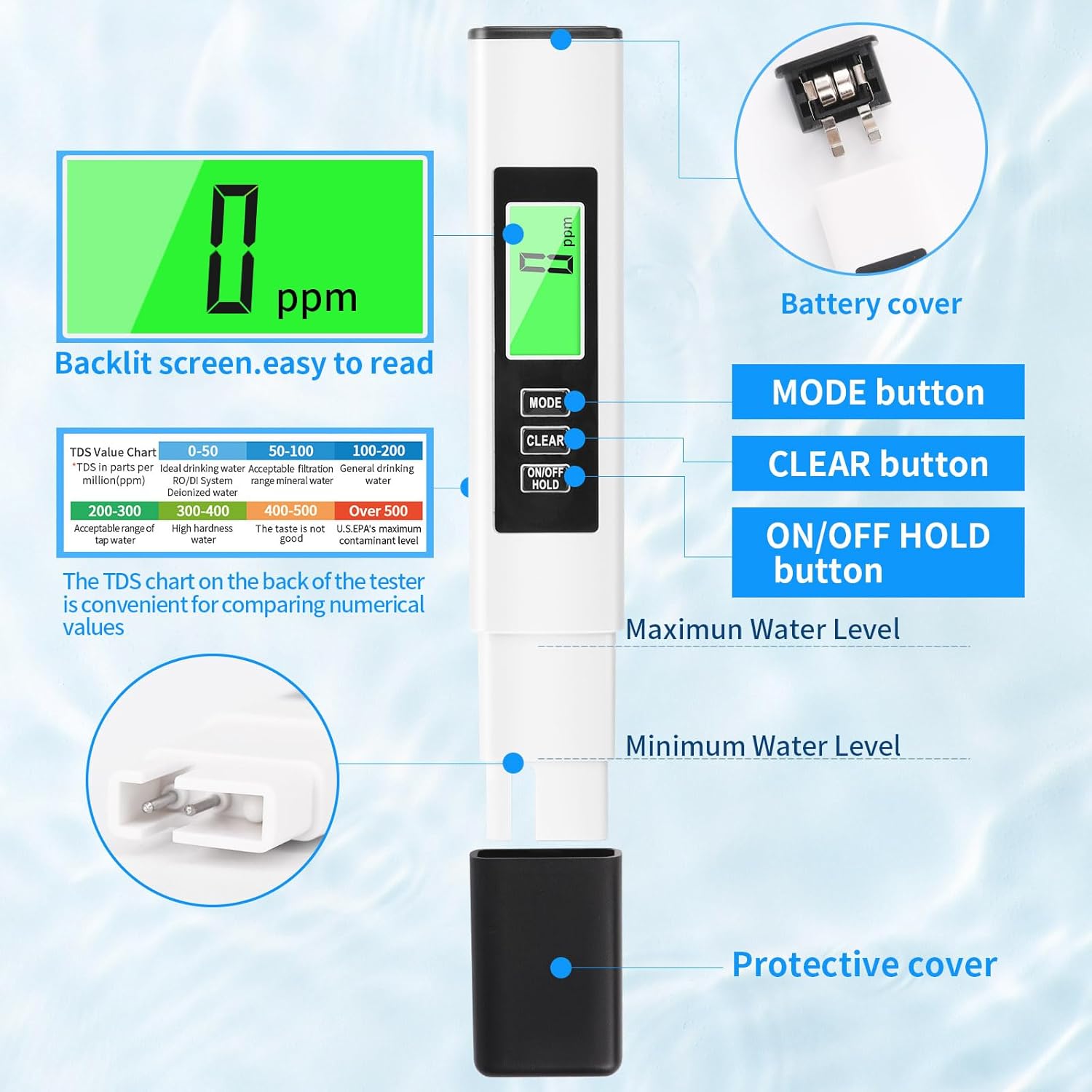
Image: Detailed diagram illustrating the components and buttons of the TDS meter, including battery cover, mode button, clear button, ON/OFF HOLD button, and water level indicators.
Setup
- Battery Installation: The device comes with 2 LR44 batteries included, which may be pre-installed. If not, locate the battery compartment cover at the top of the meter (as shown in the diagram). Carefully remove the cover and insert the batteries, ensuring correct polarity. Replace the cover securely. Note: Some users have reported the battery compartment cover can be tight; gentle prying with a flat, non-abrasive tool may be necessary if it's difficult to open.
- Protective Cover Removal: Before use, gently pull off the black protective cover from the bottom of the meter to expose the electrodes.
- Initial Cleaning: It is recommended to rinse the electrode probe with distilled water before the first use to remove any manufacturing residues.
Operating Instructions
- Prepare Sample: Pour the water sample you wish to test into a clean container.
- Power On: Press the ON/OFF HOLD button to turn on the meter. The display will illuminate.
- Immerse Probe: Dip the electrode probe into the water sample, ensuring the water level is between the minimum and maximum water level marks indicated on the meter. Do not immerse the entire meter.
- Read Measurement: Wait for the reading to stabilize (typically a few seconds). The meter will automatically lock the reading.
- Switch Modes: Press the MODE button to cycle through the four detection modes:
- Mode 1: TDS (Total Dissolved Solids) in ppm (parts per million)
- Mode 2: EC (Electrical Conductivity) in µS/cm (microsiemens per centimeter)
- Mode 3: Temperature in ℃ (Celsius)
- Mode 4: Temperature in ℉ (Fahrenheit)

Image: The meter's display cycling through TDS, EC, Celsius, and Fahrenheit modes.
- Clear Reading: Press the CLEAR button to reset the current reading before taking a new measurement.
- Backlight Indicator:
- If the TDS value is below 40ppm, the screen backlight will remain green, indicating ideal drinking water quality (e.g., RO/DI system water).
- If the TDS value exceeds 40ppm, the screen backlight will turn red, prompting attention to higher dissolved solids.
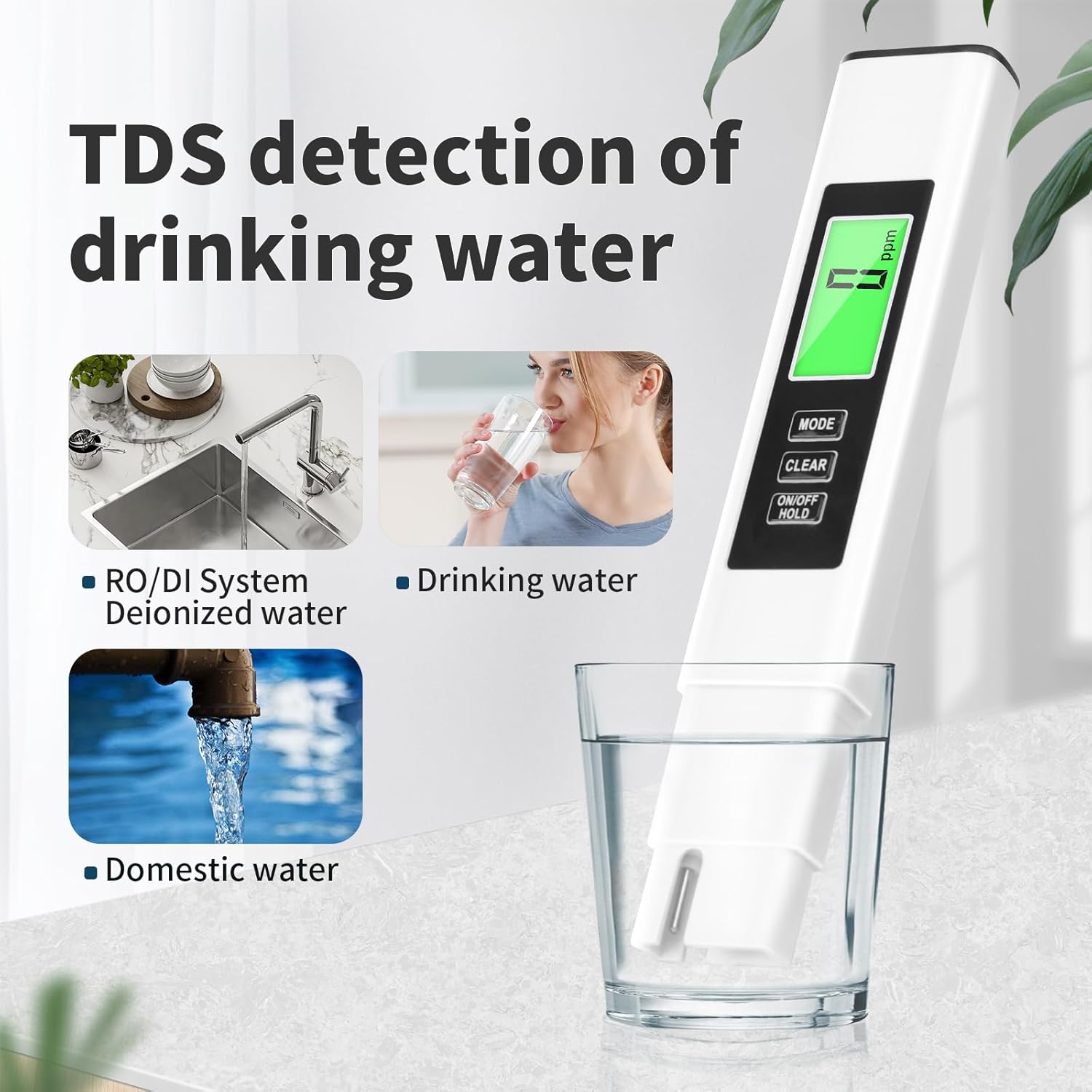

Image: Examples of the green backlight (left) for low TDS and red backlight (right) for high TDS readings.

Image: Visual comparison of TDS values for purified, tap, and well water, illustrating typical readings and their implications.
- Power Off: The meter will automatically shut off after 2 minutes of inactivity. You can also manually turn it off by pressing and holding the ON/OFF HOLD button.
Maintenance
- Clean Probe: After each use, rinse the electrode probe thoroughly with distilled or purified water to prevent residue buildup.
- Dry Probe: Always dry the probe completely with a soft, clean cloth or tissue after rinsing to ensure accurate readings for future tests.
- Storage: Replace the protective cap over the electrode probe when not in use. Store the meter in a cool, dry place, away from direct sunlight and extreme temperatures.
- Battery Replacement: If the display becomes dim or the meter does not power on, replace the LR44 batteries.
Troubleshooting
| Problem | Possible Cause | Solution |
|---|---|---|
| Inaccurate Readings | Dirty or damaged probe; low battery; improper calibration (though this model is factory calibrated and doesn't mention user calibration); air bubbles on probe. | Clean and dry the probe. Replace batteries. Gently tap the meter to dislodge air bubbles. |
| Meter does not turn on | Dead or incorrectly installed batteries. | Check battery polarity. Replace with new LR44 batteries. |
| Display is dim or flickering | Low battery power. | Replace batteries. |
| Reading fluctuates excessively | Unstable sample; air bubbles; electrical interference. | Ensure sample is still. Gently tap meter. Move away from strong electrical fields. |
Specifications
- Product Dimensions: 6.3 x 1.26 x 0.67 inches
- Item Weight: 1.45 ounces
- Model Number: A2S
- Batteries: 2 x LR44 batteries (included)
- Manufacturer: ARENDSACE
- Measurement Range: 0-990ppm (TDS)
- Temperature Range: (Not explicitly stated in specs, but implied by feature bullets)
Warranty and Support
Arendsace is committed to providing valuable products and excellent customer service. For any questions, concerns, or technical support regarding your 4-in-1 TDS Meter, please contact our professional response team. We offer real-time chat and email support to ensure fast and efficient assistance.
Please refer to the contact information provided on the product packaging or the official Arendsace website for the most up-to-date support channels.