
1. Introduction
This manual provides detailed instructions for the setup, operation, and maintenance of your vamout S54 Smart Watch. Please read this manual thoroughly before using the device to ensure proper function and to maximize your user experience. Keep this manual for future reference.

Image 1.1: The vamout S54 Smart Watch, showcasing its round display and rose gold finish.
2. Package Contents
Verify that all items are present in the package:
- 1 x vamout S54 Smart Watch
- 1 x USB Magnetic Charging Cable
- 1 x User Manual
- 1 x Retail Box

Image 2.1: Visual representation of the vamout S54 Smart Watch package contents, including the watch, charging cable, and manual, along with watch dimensions.
3. Setup
3.1 App Installation
To utilize all features of your vamout S54 Smart Watch, you must install the companion application on your smartphone.
- Ensure your smartphone's Bluetooth is enabled.
- Open the Google Play Store (for Android) or the Apple App Store (for iOS).
- Search for the application named "GloryFit".
- Download and install the "GloryFit" app.
3.2 Device Pairing
After installing the app, follow these steps to pair your smart watch with your phone:
- Open the "GloryFit" app on your smartphone.
- Navigate to the "Device" section within the app.
- Select "Add device" or a similar option.
- Scan the QR code displayed on your vamout S54 Smart Watch screen using the app's camera function. Alternatively, you may manually select your device from a list of nearby Bluetooth devices.
- Confirm the pairing request on both your watch and your phone.

Image 3.1: Visual guide for connecting the smartwatch to a smartphone, showing Bluetooth activation, app store search for "GloryFit", and QR code scanning for pairing. For direct app download, visit http://qr20.cn/AOTitN.
4. Operating Instructions
4.1 Bluetooth Calls and Smart Notifications
The vamout S54 Smart Watch supports Bluetooth calling and smart notifications, allowing you to stay connected directly from your wrist.
- Making/Receiving Calls: Once paired, use the built-in HD microphone and speaker to answer or make calls directly from the watch. The app allows storing frequent contacts.
- Notifications: Receive SMS and social media app notifications (e.g., WeChat, QQ, Facebook, Twitter, Line, WhatsApp, Instagram) directly on your watch.

Image 4.1: The smartwatch interface demonstrating Bluetooth call functions, including frequent contacts, dial pad, incoming call screen, and call history. It also highlights message reminder icons and voice assistant capability.

Image 4.2: A visual showing the smartwatch handling an incoming call and activating the voice assistant feature.

Image 4.3: The smartwatch screen showing notifications from different social media and messaging applications.
4.2 Display and Dials
The watch features a 1.39-inch TFT-LCD touch screen with a 360*360 resolution, offering clear visuals and responsive touch interaction.
- Customizable Dials: Choose from over 200 personalized dial wallpapers available in the companion app. You can also upload your own photos to create custom watch faces.

Image 4.4: The 1.39-inch HD touch screen of the smartwatch, highlighting its broad color range, wide vision (WIPS), and color accuracy. It also shows the 95% screen ratio and 360*360 pixel resolution.

Image 4.5: A selection of over 200 cloud watch faces and options for customized photo faces, demonstrating the personalization capabilities of the smartwatch.
4.3 Sports Modes and Activity Tracking
The vamout S54 Smart Watch offers extensive fitness tracking capabilities with over 100 sports modes.
- 100+ Sports Modes: Includes activities such as running, tennis, cycling, jumping rope, soccer, and general fitness.
- All-Day Activity Tracking: Records steps, distance, and calories burned. Weekly and monthly data can be viewed in the app to monitor progress.

Image 4.6: The smartwatch interface showing a selection of 100+ built-in sports modes and intelligent exercise recognition. It also displays activity data like steps, distance, and calories, along with images of users engaging in various sports.

Image 4.7: The smartwatch displaying all-day activity recording, including steps, heart rate, calories, and distance, with a map showing a tracked route.

Image 4.8: Individuals participating in various sports, illustrating the smartwatch's utility as a fitness tracker with over 100 sport modes.
4.4 Health Tracking
The watch is equipped with advanced sensors for continuous health monitoring.
- Heart Rate Monitoring: Provides 24-hour continuous real-time heart rate tracking.
- Blood Oxygen (SpO2) Monitoring: High-precision PPG optical sensing for blood oxygen levels.
- Sleep Tracking: Automatically monitors sleep status (deep/light sleep) and provides comprehensive sleep quality analysis.
- Women's Health Management: Tracks menstrual cycles and predicts fertile periods.
Note: Health data is for reference only and should not be used for medical diagnosis or treatment.

Image 4.9: The smartwatch and companion app screens showing 24-hour health tracking data for heart rate, blood oxygen (SpO2), and sleep patterns (awake, light sleep, deep sleep).

Image 4.10: Detailed views of the Blood Oxygen Monitor, Heart Rate Monitor, and Sleep Monitor interfaces on both the smartwatch and the connected app.

Image 4.11: The smartwatch interface dedicated to Women's Health Management, showing menstrual cycle tracking and fertile period prediction.
4.5 Voice Assistant and Other Features
The vamout S54 Smart Watch includes a voice assistant and several other practical functions:
- Voice Assistant: Operate the smartwatch hands-free using voice commands.
- Alarm Clock: Set alarms for reminders.
- Stopwatch & Timer: For timing activities.
- Camera Control: Remotely control your phone's camera.
- Find Cell Phone: Locate your paired smartphone.
- Calculator: Basic arithmetic functions.
- Music Control: Manage music playback on your phone.
- Weather Forecast: Get current weather information.
- Sedentary Reminder: Prompts you to move after periods of inactivity.
- Calendar: View dates and schedule.
- Brightness Adjustments: Customize screen brightness.
- Respiratory Training: Guided breathing exercises.
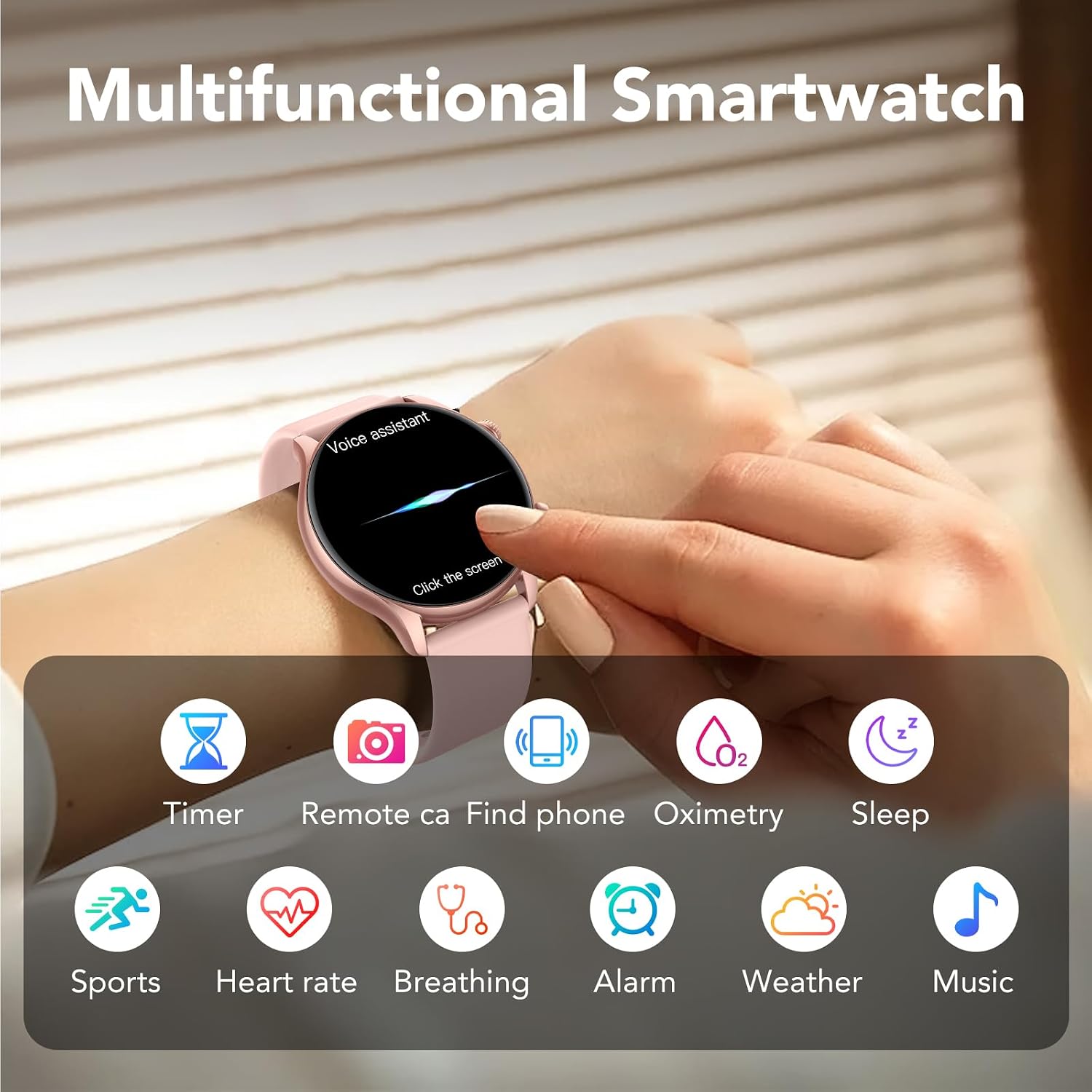
Image 4.12: The smartwatch screen showing the voice assistant activation and icons representing various functions such as timer, remote camera, find phone, oximetry, sleep, sports, heart rate, breathing, alarm, weather, and music.

Image 4.13: Individual smartwatch screens demonstrating the weather forecast, calculator, music control, and camera remote features.
5. Battery Information
The vamout S54 Smart Watch is equipped with a 300 mAh Lithium Ion battery. Charging is performed via the included USB magnetic suction charging cable.
- Charging Time: Approximately 2 hours for a full charge.
- Battery Life:
- Heavy Usage: Up to 7 days
- Daily Use: Up to 10 days
- Standby Time: Up to 30 days

Image 5.1: A graphic illustrating the battery life under different usage scenarios (heavy, daily, standby), charging time, and the USB magnetic suction charging method.
6. Specifications
| Feature | Detail |
|---|---|
| Model Number | S54 |
| Screen Size | 1.39 Inches |
| Screen Resolution | 360*360 Pixels |
| Operating System | Wear OS 1.0 |
| Connectivity Technology | Bluetooth 5.3 |
| Battery Capacity | 300 Milliamp Hours (Lithium Ion) |
| Water Resistance | IP68 Waterproof |
| Memory Storage Capacity | 1 GB |
| Item Weight | 3.2 ounces |
| Package Dimensions | 6.02 x 3.39 x 0.87 inches |
| Special Features | Alarm Clock, Heart Rate Monitor, SpO2 Monitor, Sleep Tracker, 100+ Sport Modes, Bluetooth Call, Voice Assistant |
7. Troubleshooting
If you encounter issues with your vamout S54 Smart Watch, please refer to the following common troubleshooting steps:
- Device Not Turning On: Ensure the watch is fully charged. Connect it to the charging cable and a power source for at least 30 minutes.
- Unable to Pair with Phone:
- Confirm Bluetooth is enabled on your phone.
- Ensure the "GloryFit" app is installed and running.
- Restart both your phone and the smartwatch.
- Make sure the watch is within Bluetooth range of your phone.
- If previously paired, try unpairing and re-pairing the device through the app.
- Notifications Not Appearing:
- Check app notification permissions on your phone for the "GloryFit" app.
- Ensure notification settings are enabled within the "GloryFit" app for the desired applications.
- Verify the watch is connected via Bluetooth.
- Inaccurate Health Data:
- Ensure the watch is worn snugly on your wrist, but not too tight.
- Clean the sensor on the back of the watch.
- Note that environmental factors and individual physiology can affect readings. Data is for reference only.
- Touch Screen Unresponsive: Restart the smartwatch. If the issue persists, ensure the screen is clean and dry.
8. Maintenance
To ensure the longevity and optimal performance of your vamout S54 Smart Watch, follow these maintenance guidelines:
- Cleaning: Regularly clean the watch screen and strap with a soft, dry, lint-free cloth. For stubborn dirt, a slightly damp cloth can be used, followed by immediate drying.
- Water Exposure: While the watch is IP68 waterproof, avoid prolonged submersion in water, hot water, or exposure to high-pressure water jets. Dry the watch thoroughly after exposure to water.
- Charging: Use only the provided magnetic charging cable. Avoid using damaged cables or chargers.
- Storage: Store the watch in a cool, dry place away from direct sunlight and extreme temperatures.
- Avoid Chemicals: Do not expose the watch to strong chemicals, detergents, or solvents, as these can damage the materials.
9. Warranty and Support
For warranty information and customer support, please refer to the documentation included with your purchase or contact the retailer. Keep your proof of purchase for warranty claims.