
A30C
Generic A30C Mini Portable LED Projector User Manual
Model: A30C | Brand: Generic
Introduction
This manual provides essential information for the safe and effective operation of your Generic A30C Mini Portable LED Projector. Please read this manual thoroughly before using the product and retain it for future reference. This compact, high-definition LED projector is designed to transform any space into a vibrant viewing experience, perfect for movies, gaming, and family entertainment.

Image: The Generic A30C Mini Portable LED Projector, a compact black device with a lens and control buttons on top.
Setup Guide
1. Unpacking
Carefully remove all components from the packaging. Ensure the following items are present:
- Generic A30C Mini Portable LED Projector
- Power Adapter
- Remote Control (if included)
- User Manual (this document)
2. Placement
Place the projector on a stable, flat surface. For optimal viewing, position the projector perpendicular to the projection surface (wall or screen). The projection distance directly affects the screen size. Refer to the diagram below for recommended distances and corresponding screen sizes.

Image: A diagram illustrating recommended projection distances and corresponding screen sizes, ranging from 33 inches at 3.28 feet (1m) to 300 inches at 29.52 feet (9m). A recommended range of 1.5m-3m is highlighted.
Ensure adequate ventilation around the projector to prevent overheating. Do not block the ventilation openings.
3. Power Connection
Connect the power adapter to the DC input port on the projector. Plug the other end of the power adapter into a suitable electrical outlet. The power indicator light will illuminate.
Operating Instructions
1. Power On/Off
Press the power button on the projector or the remote control to turn the device on. Press it again to turn off the projector.
2. Input Source Selection
The projector supports multiple input sources including HDMI, USB, SD card, and audio jack. Use the "Source" button on the projector or remote control to cycle through available input options and select your desired source.

Image: An illustration showing the projector connecting wirelessly via WiFi to Android and iOS devices, and wired via USB cable to other devices, highlighting its versatile connectivity.
- HDMI: Connect to laptops, gaming consoles, Blu-ray players, etc.
- USB: Play media files directly from a USB flash drive.
- SD Card: Play media files directly from an SD memory card.
- Audio Out: Connect external speakers or headphones.
- Bluetooth Connectivity: Connect to Bluetooth-enabled audio devices.
3. Focusing and Keystone Correction
Adjust the focus ring near the lens until the projected image is clear and sharp. If the image appears trapezoidal, use the keystone correction feature (if available on your model, typically a manual dial or digital setting) to adjust the image to a rectangular shape.
4. Display Quality
The A30C projector features an LCD imaging system and LED light source, supporting up to 1920 x 1080 pixels for crisp and clear images. Its advanced display technology provides enhanced brightness and contrast compared to standard projectors.
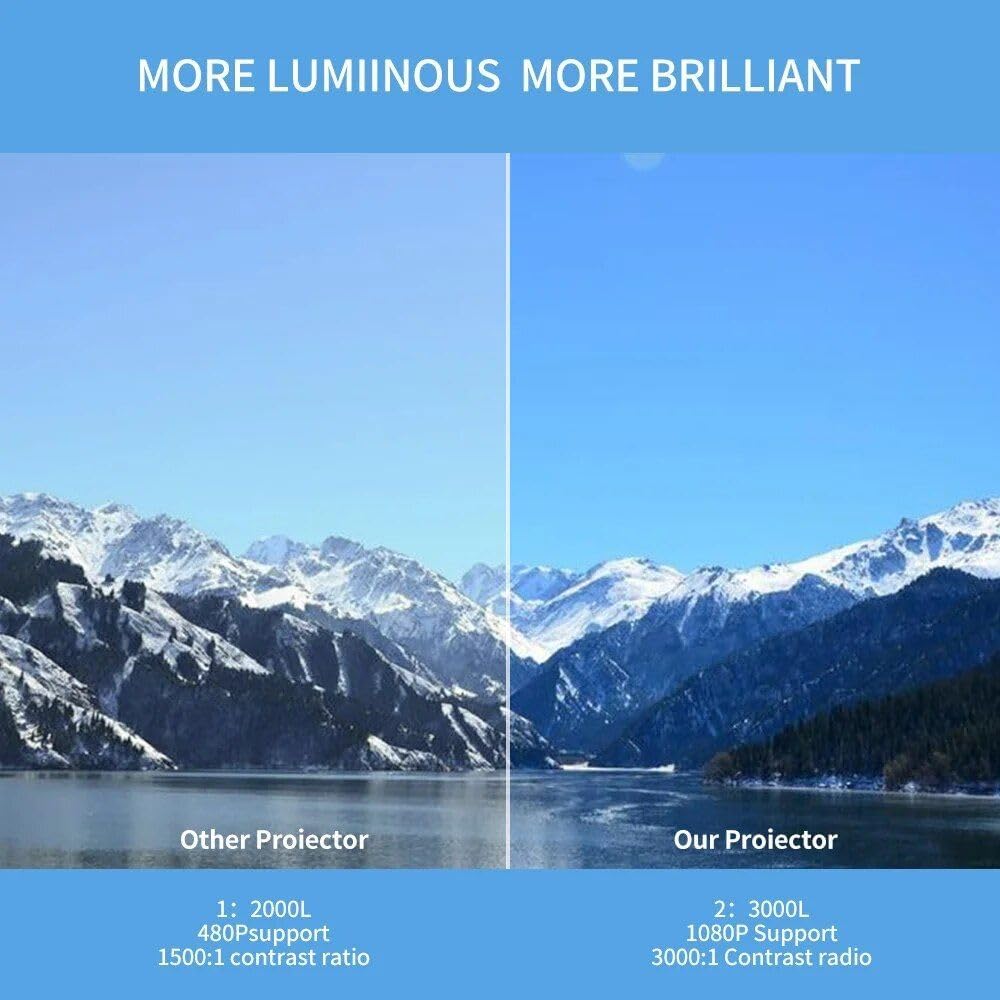
Image: A side-by-side comparison showing the superior brightness and clarity of "Our Projector" (3000L, 1080P Support, 3000:1 Contrast Ratio) versus "Other Projector" (2000L, 480P Support, 1500:1 Contrast Ratio), demonstrating the enhanced visual experience.
Maintenance
1. Cleaning
- Lens: Use a soft, lint-free cloth specifically designed for optical lenses. Do not use abrasive cleaners or solvents.
- Exterior: Wipe the projector's exterior with a soft, dry cloth. For stubborn dirt, slightly dampen the cloth with water.
- Ventilation Ports: Periodically check and gently clean the ventilation ports to ensure proper airflow and prevent dust buildup. Use a soft brush or compressed air.
2. Storage
When not in use for extended periods, store the projector in a cool, dry place, away from direct sunlight and extreme temperatures. It is recommended to use the original packaging or a protective case to prevent dust accumulation and physical damage.

Image: A hand placing the compact projector into a pant pocket, illustrating its small size and portability for easy storage and transport.
Troubleshooting
| Problem | Possible Cause | Solution |
|---|---|---|
| No image projected | Power not connected; Incorrect input source; Lens cap on. | Check power connection; Select correct input source; Remove lens cap. |
| Image is blurry | Out of focus; Incorrect projection distance. | Adjust focus ring; Adjust projector distance. |
| Image is trapezoidal | Projector not perpendicular to screen. | Adjust keystone correction; Reposition projector. |
| No sound | Volume too low; Muted; External audio device not connected properly. | Increase volume; Unmute; Check audio cable connections or Bluetooth pairing. |
| Overheating | Blocked ventilation; Prolonged use. | Ensure ventilation ports are clear; Allow projector to cool down. |
Specifications
| Feature | Detail |
|---|---|
| Brand | Generic |
| Model | A30C |
| Display Technology | LCD Imaging System, LED Light Source |
| Native Resolution | 1280 x 720 pixels |
| Supported Resolution | Up to 1920 x 1080 pixels (1080P) |
| Connectivity | HDMI, USB, SD Card Slot, Audio Jack, DC Power Input, Bluetooth |
| Color | Black |
| Item Weight | 14.1 ounces (approx. 400g) |
| Product Dimensions | 6.3 x 4.72 x 2.16 inches (approx. 16 x 12 x 5.5 cm) |
| Recommended Use | Indoor |
| Country of Origin | China |
Warranty and Support
This product is covered by a standard manufacturer's warranty. For specific warranty terms and conditions, please refer to the documentation provided at the time of purchase or contact your retailer. For technical support, troubleshooting assistance, or service inquiries, please contact the Generic customer support team through the contact information provided with your purchase or on the official Generic website.
Please have your product model (A30C) and ASIN (B0DM84NGD2) ready when contacting support.
Related Documents - A30C
 |
blurams Smart Pan-Tilt Camera A30/A30C User Manual Comprehensive user manual for the blurams Smart Pan-Tilt Camera models A30 and A30C. Includes setup instructions, package contents, component details, quick configuration guide, live view features, parameter settings, frequently asked questions (FAQs), and FCC compliance information. |
 |
Blurams A30/A30C Smart Pan-Tilt Camera User Manual and Setup Guide Comprehensive user manual and setup guide for the blurams A30/A30C Smart Pan-Tilt Camera, detailing packing list, appearance, installation, quick setup, features, troubleshooting, and FCC compliance. |
 |
Catalogue Produits 2026 : Calendriers, Agendas et Livres de Notes Découvrez la gamme complète de calendriers, agendas et livres de notes 2026 de PCA, Division de Blueline. Trouvez des produits promotionnels personnalisables de haute qualité, y compris des articles certifiés FSC®. |
 |
PCA 2026 Product Catalog: Calendars, Planners & Notebooks Explore the PCA 2026 Product Catalog from Blueline, featuring a wide range of customizable calendars, planners, notebooks, and promotional products. Enhance your brand visibility with quality items. |
 |
PCA 2027 Product Catalog: Calendars, Planners, Notebooks Explore the comprehensive 2027 product catalog from PCA (Blueline), featuring a wide range of customizable calendars, planners, and notebooks designed for businesses and promotional needs. Discover options for every requirement, from wall calendars and desk pads to pocket planners and executive notebooks. |
 |
Hangzhou Vision Insight Technology Co., Ltd. Smart Pan-Tilt Camera Model Differences Details on model differences for Hangzhou Vision Insight Technology Co., Ltd.'s Smart Pan-Tilt Camera series, including model names, trade names, and FCC ID. All models share the same core circuit and RF module. |
Ask a question about this manual
Ask about setup, troubleshooting, compatibility, parts, safety, or missing instructions. Manuals+ will review the question and use this page’s manual context to help answer it.