
1. Introduction
This manual provides detailed instructions for the setup, operation, and maintenance of your new XHGTJK replacement remote control for Daikin Room Air Conditioners. This remote is designed to provide essential control over your air conditioning unit, offering a convenient alternative to your original remote.
Please read this manual carefully before using the remote control to ensure proper functionality and to maximize its lifespan.
2. Product Overview
The XHGTJK replacement remote control is a compact and user-friendly device. It features a clear LCD display and intuitively placed buttons for easy operation of your Daikin air conditioner.

Figure 2.1: Front and back view of the XHGTJK replacement remote control. The front shows the LCD screen and control buttons, while the back displays battery compartment information.
3. Key Features
- Direct Replacement: Functions as a direct replacement for specified Daikin air conditioner remote controls.
- No Programming Required: Ready to use immediately after battery installation.
- Infrared (IR) Technology: Operates via infrared signals.
- Temperature Display: Capable of switching between Celsius and Fahrenheit temperature displays.
- Essential Controls: Provides main functions such as power on/off, temperature adjustment, and fan speed control.
4. Setup
4.1 Battery Installation
The remote control requires two (2) AAA batteries (not included) for operation. Ensure correct polarity when inserting batteries.
- Locate the battery compartment on the back of the remote control.
- Slide the battery compartment cover downwards to open it.
- Insert two new AAA batteries, matching the (+) and (-) terminals as indicated inside the compartment.
- Slide the battery compartment cover back into place until it clicks securely.
Note: Always replace both batteries at the same time. If the air conditioner is not used for an extended period, remove the batteries to prevent damage from leakage.
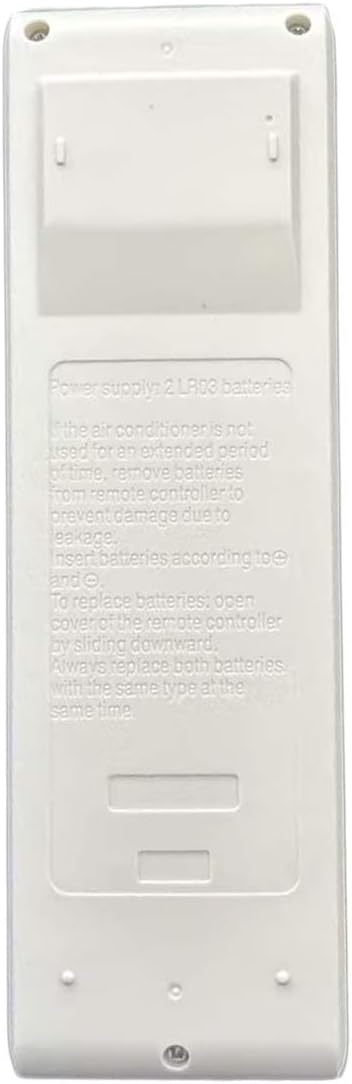
Figure 4.1: Back view of the remote control, illustrating the battery compartment and instructions for battery insertion.
5. Operating Instructions
Point the remote control directly at the indoor unit of your air conditioner. Ensure there are no obstructions between the remote and the unit.

Figure 5.1: Front view of the remote control, highlighting the LCD display and various control buttons.
5.1 Power On/Off
- Press the ON/OFF button (typically orange) to turn the air conditioner on or off.
5.2 Temperature Adjustment
- Use the Temperature Up (▲) and Temperature Down (▼) buttons to adjust the desired room temperature.
5.3 Fan Speed Control
- Press the FAN button to cycle through available fan speeds (e.g., Auto, Low, Medium, High).
5.4 Special Functions
- POWERFUL: Press this button for rapid cooling or heating.
- TEMP F/C: Press this button to switch the temperature display between Fahrenheit (°F) and Celsius (°C).
6. Maintenance
6.1 Battery Replacement
Replace batteries when the remote control's display becomes dim or if the remote becomes unresponsive. Refer to Section 4.1 for battery installation instructions.
6.2 Cleaning
To clean the remote control, wipe it gently with a soft, dry cloth. Do not use liquid cleaners, abrasive materials, or chemical solvents, as these may damage the remote's surface or internal components.
7. Troubleshooting
If your remote control is not functioning as expected, please refer to the following common issues and solutions:
- Remote not responding:
- Check if the batteries are inserted correctly with the correct polarity.
- Replace old batteries with new AAA batteries.
- Ensure there are no obstructions between the remote control and the air conditioner's indoor unit.
- Verify that you are within the effective operating range of the air conditioner.
- Some functions not working:
- This is a replacement remote control; while main functions are supported, some advanced or specific features of your original remote may not be fully replicated.
- Ensure the remote control model is compatible with your specific Daikin air conditioner model.
8. Specifications
| Feature | Detail |
|---|---|
| Product Dimensions | 5.15 x 1.06 x 11.32 inches |
| Item Weight | 3.59 ounces |
| Batteries Required | 2 AAA batteries |
| Color | Black |
| Compatible Devices | Daikin Room Air Conditioners (Specific models listed in header) |
9. Warranty and Support
9.1 Quality Warranty and Returns
This product comes with a 30-day quality warranty and a money-back guarantee. If you experience any issues or are not satisfied with your purchase, you may be eligible for a hassle-free return within 30 days of receipt.
9.2 Customer Support
For any questions, concerns, or assistance regarding your remote control, please contact the seller directly through the platform where the purchase was made. They will provide you with a satisfactory solution.