1. Introduction
Thank you for choosing the Billboard Cooper OWS Wireless Open Audio Headphones. These headphones are engineered to provide a comfortable, high-quality audio experience with the freedom of wireless connectivity. Featuring Open Wireless Stereo technology, IPX5 water resistance, and extended battery life, they are designed to seamlessly integrate into your active lifestyle.
Please read this manual carefully before using your headphones to ensure proper operation and to maximize their lifespan.
2. What's in the Box
- Billboard Cooper OWS Wireless Headphones (Left and Right)
- Charging Case
- USB Charging Cable (Type-C, assumed)
- User Manual (this document)

Image: The Billboard Cooper OWS wireless headphones (left and right earbuds) shown above their compact charging case.
3. Product Overview
Familiarize yourself with the components of your Billboard Cooper OWS headphones.

Image: A close-up view of the Billboard Cooper OWS headphones, highlighting their design and ear hooks.
Headphone Components:
- Ear Hook: Provides a secure and comfortable fit over the ear.
- Speaker Unit: Delivers open audio sound.
- Control Button/Touch Area: For playback, call management, and voice assistant (specific functions may vary).
- LED Indicator: Shows power, pairing, and charging status.
- Microphone: For hands-free calls.
Charging Case Components:
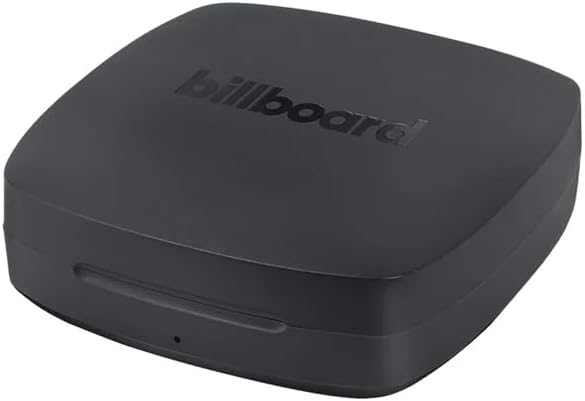
Image: The compact, black charging case for the Billboard Cooper OWS headphones.
- Charging Ports: Internal contacts for charging headphones.
- USB-C Charging Port: For charging the case itself (located on the back/side, assumed).
- Case LED Indicator: Shows case battery level and charging status.
4. Setup and First Use
4.1 Charging the Headphones and Case
Before first use, fully charge both the headphones and the charging case.
- Place the headphones into their respective slots in the charging case. Ensure the charging contacts align.
- Close the charging case. The headphone LED indicators will show charging status (e.g., solid red, then off when fully charged).
- Connect the USB charging cable to the charging case's USB-C port and the other end to a USB power adapter (not included) or a computer's USB port.
- The case's LED indicator will show charging status. A full charge for the case and headphones can take approximately 1-2 hours.
The headphones provide up to 8 hours of continuous playback on a single charge, and the charging case provides an additional 4 full charges, totaling up to 40 hours of battery life.
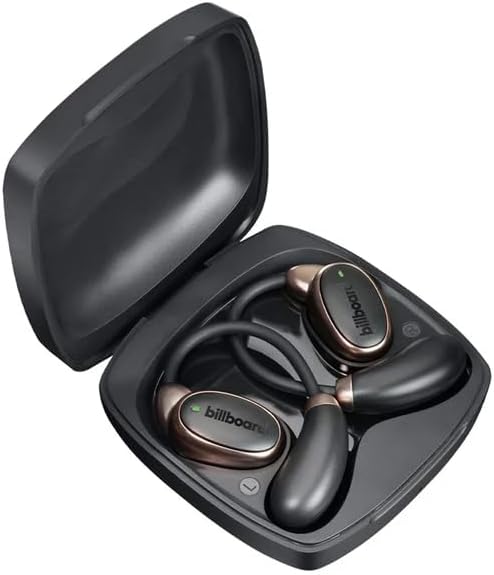
Image: The Billboard Cooper OWS headphones placed inside their open charging case, ready for charging.
4.2 Bluetooth Pairing
- Open the charging case. The headphones will automatically power on and enter pairing mode (LED indicators will flash, typically blue and red).
- On your device (smartphone, tablet, computer), enable Bluetooth.
- Search for new Bluetooth devices. Select "Billboard Cooper OWS" from the list of available devices.
- Once connected, the headphone LED indicators will stop flashing and may turn solid blue or off, and you will hear an audible confirmation.
- The headphones will automatically reconnect to the last paired device when taken out of the case, if Bluetooth is enabled on the device.
If pairing fails, turn off Bluetooth on your device, place the headphones back in the case, close it, then reopen and try again. You may also need to "forget" the device from your Bluetooth list and re-pair.
5. Operating Instructions
5.1 Power On/Off
- Power On: Open the charging case, or press and hold the control button on each earbud for approximately 3 seconds.
- Power Off: Place the headphones back into the charging case and close the lid, or press and hold the control button on each earbud for approximately 5 seconds.
5.2 Music Playback
| Function | Action |
|---|---|
| Play/Pause | Single tap on either earbud. |
| Next Track | Double tap on the Right earbud. |
| Previous Track | Double tap on the Left earbud. |
| Volume Up | Triple tap on the Right earbud. |
| Volume Down | Triple tap on the Left earbud. |
5.3 Call Management
| Function | Action |
|---|---|
| Answer/End Call | Single tap on either earbud. |
| Reject Call | Press and hold on either earbud for 2 seconds. |
5.4 Voice Assistant
Activate your device's voice assistant (Siri, Google Assistant, etc.) by pressing and holding the control button on either earbud for 2 seconds (after rejecting a call, if applicable).
5.5 Water Resistance (IPX5)
The Billboard Cooper OWS headphones are rated IPX5 water resistant, meaning they can withstand low-pressure water jets from any direction. This makes them suitable for workouts and light rain. They are not designed for submersion in water or for use during swimming.
Ensure the charging contacts are dry before placing them back in the charging case to prevent damage.
6. Maintenance and Care
- Cleaning: Use a soft, dry, lint-free cloth to clean the headphones and charging case. Do not use abrasive cleaners, alcohol, or chemical solvents.
- Storage: When not in use, store the headphones in their charging case to protect them and keep them charged. Store in a cool, dry place away from extreme temperatures.
- Battery Care: To preserve battery life, charge the headphones and case regularly, even if not used for extended periods. Avoid fully discharging the battery frequently.
- Water Exposure: While water resistant, avoid unnecessary exposure to water. If they get wet, wipe them dry thoroughly before placing them back in the charging case.
7. Troubleshooting
| Problem | Possible Solution |
|---|---|
| Headphones not pairing. |
|
| No sound from one or both earbuds. |
|
| Charging case not charging. |
|
| Short battery life. |
|
8. Specifications
| Feature | Detail |
|---|---|
| Model Name | Cooper |
| Model Number | BB-E75961 |
| Connectivity Technology | Wireless (Bluetooth) |
| Wireless Communication Technology | Bluetooth |
| Water Resistance Level | IPX5 (Water Resistant) |
| Battery Life (Headphones) | Up to 8 hours (continuous use) |
| Total Battery Life (with Case) | Up to 40 hours |
| Charging Time | Approx. 1-2 hours (for headphones and case) |
| Included Components | Charging station (case) |
| Color | Black |
| Ear Placement | Ear Canal (Open Wireless Stereo design) |
| Form Factor | Supra-aural (Over-ear hook) |
| Dimensions (Package) | 18.6 x 12.2 x 4.7 cm; 170 g |
9. Warranty and Support
Your Billboard Cooper OWS headphones come with a standard return policy. Please refer to your point of purchase for specific warranty details and return periods. For this product, a 30-day return period without cost is typically offered.
For technical support, troubleshooting assistance, or warranty claims, please contact Billboard customer service or the retailer from whom you purchased the product. Contact information can usually be found on the product packaging or the official Billboard website.
Please retain your proof of purchase for any warranty-related inquiries.


