
Introduction
This manual provides detailed instructions for the assembly, operation, maintenance, and troubleshooting of your Yoobure L-Shaped Desk. Please read this manual thoroughly before assembly and use to ensure proper function and longevity of your product. Keep this manual for future reference.

Image: Yoobure L-Shaped Desk in a home office environment, showcasing its features including the pegboard, monitor stand, and LED lighting.
Important Safety Information
Please observe the following safety guidelines to prevent injury or damage to the product:
- Always assemble the desk according to the provided instructions.
- Ensure the desk is stable and secure before use.
- Do not place heavy objects on the desk that could cause it to tip over.
- Keep the desk away from heat sources and excessive moisture to prevent damage to materials and electrical components.
- Do not overload the power outlets. Refer to the electrical specifications for maximum load.
Setup and Assembly
The Yoobure L-Shaped Desk is designed for straightforward assembly. All necessary parts, labeled components, and assembly tools are included. It is recommended that two people assemble this desk for ease and safety.
Assembly Steps:
- Unpack all components and verify against the parts list in the included manual.
- Follow the step-by-step instructions provided in the detailed manual.
- Utilize the included assembly tools for all connections.
- For visual guidance, an assembly video can be accessed via the QR code in the manual or on the product page.
- Ensure all screws and fasteners are tightened securely before placing items on the desk.
Reversible Design:
This desk features a reversible design, allowing you to configure the L-shape to either the left or right side to best suit your space. Plan your desired orientation before beginning assembly.

Image: Technical diagram illustrating the overall dimensions and the reversible nature of the L-shaped desk, showing both left and right configurations.
Operating Instructions
LED Lighting System:
The integrated LED strip offers customizable lighting for your workspace. It can be controlled via a dedicated mobile application or the included remote control.
- Control Options: Use the mobile APP or remote to adjust settings.
- Dynamic Modes: Choose from 22 dynamic modes to create various lighting effects.
- Color Adjustment: Select from a wide range of colors to match your preference.
- Music Sync: The lights can synchronize with music for an interactive experience.
- Timer Function: Set a timer for automatic light control.
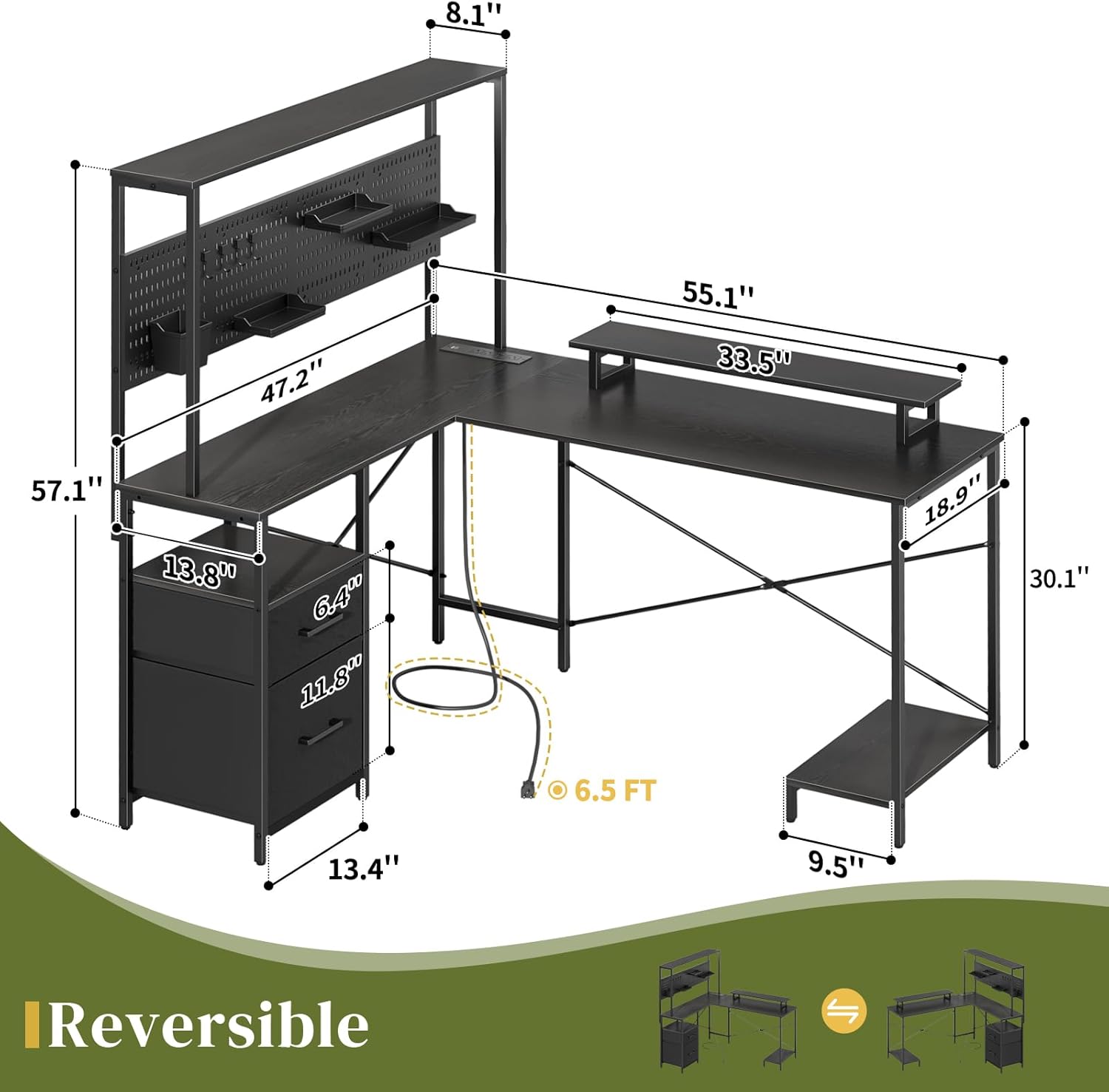
Image: The L-shaped desk illuminated by its integrated LED lights, showcasing various color options and how they enhance the workspace ambiance.
Integrated Power Outlets:
The desk includes a recessed power strip to conveniently power your electronic devices.
- AC Outlets: 4 standard AC outlets (120V/12A) are provided.
- USB Ports: 2 USB ports (5V/2A) are available for charging smaller devices.
- Power Cord: The power strip is equipped with a 6.56ft (6.5-foot) cord.
- Ensure devices are compatible with the provided power specifications.

Image: A close-up view of the desk's recessed power strip, showing four AC outlets and two USB ports, with devices connected for charging.
Storage and Organization:
The desk is designed with multiple storage solutions to maintain an organized workspace.
- Pegboard: A 47.2-inch pegboard with 3 bins and 5 hooks allows for customizable storage and display of small items.
- Monitor Stand: A removable monitor stand helps maximize desktop space and promotes ergonomic posture.
- Hutch: A raised hutch provides additional shelving for books or decor.
- Drawers: Two fabric drawers of varied sizes offer enclosed storage for office supplies.
- CPU Stand: A dedicated computer tower shelf saves desk or floor space.

Image: A composite image highlighting the desk's storage components: the pegboard with accessories, fabric drawers with a printer on top, a CPU stand, and a removable monitor stand.
Care and Maintenance
Proper care will ensure the longevity and appearance of your Yoobure L-Shaped Desk.
- Cleaning: Wipe surfaces with a soft, damp cloth. Avoid harsh chemicals or abrasive cleaners that may damage the engineered wood finish.
- Spills: Immediately wipe up any spills to prevent water damage to the water-repelling coat.
- Stability: Periodically check all fasteners and tighten if necessary to maintain desk stability.
- Environment: Keep the desk in a dry environment and away from direct sunlight or extreme temperature changes to prevent warping or fading.
- Adjustable Foot Pads: Utilize the adjustable foot pads to ensure the desk remains level and stable on uneven floors.
Troubleshooting
If you encounter any issues with your Yoobure L-Shaped Desk, please refer to the following common solutions:
| Problem | Possible Cause | Solution |
|---|---|---|
| Desk is wobbly | Loose fasteners; uneven floor | Tighten all assembly screws. Adjust the foot pads to level the desk. |
| LED lights not working | Power connection issue; remote battery low; APP not connected | Ensure the LED strip is properly connected to power. Check remote control battery. Re-pair the APP if necessary. |
| Power outlets not functioning | Desk not plugged in; circuit breaker tripped; overloaded | Verify the desk's main power cord is securely plugged into a working wall outlet. Check your home's circuit breaker. Reduce the number of devices plugged into the power strip. |
| Drawers do not slide smoothly | Improper assembly; obstruction | Review assembly steps for drawer installation. Check for any items obstructing the drawer's path. |
Product Specifications
| Feature | Detail |
|---|---|
| Brand | Yoobure |
| Model Number | 03989b78-afa5-4cd8-80c0-8598ce3f9dec |
| Overall Dimensions (L x W x H) | 55.1" x 47.2" x 57.1" |
| Color | Black |
| Material | Engineered Wood, Steel Frame |
| Special Features | Pegboard, Reversible Design, LED Lights, Power Outlets, Monitor Stand, Storage Shelves, Drawers, CPU Stand |
| Power Outlets | 4 AC (120V/12A), 2 USB (5V/2A) |
| Power Cord Length | 6.56 ft |
| Number of Drawers | 2 (fabric) |
| Number of Shelves | 3 (including hutch) |
| Assembly Required | Yes |
| Recommended Assembly Persons | 2 |
| Assembly Tools Included | Yes |
Warranty Information
The Yoobure L-Shaped Desk comes with a 1-Year Limited Warranty. This warranty covers manufacturing defects and issues arising from normal use within the specified period. Please retain your proof of purchase for warranty claims.
Customer Support
For any questions, assistance with assembly, or troubleshooting not covered in this manual, please contact Yoobure customer service. We aim to provide a quick 12-hour customer response service.
You can find more information and contact details by visiting the official Yoobure store: