Introduction
Welcome to the user manual for your RCA Wave-66 True Wireless Earbuds. This guide provides detailed instructions to help you set up, operate, maintain, and troubleshoot your earbuds, ensuring an optimal audio experience. Please read this manual thoroughly before using your device.
Product Overview
Key Features
- Long-Lasting Battery Life: Up to 20 hours of playtime.
- Hi-Res Audio: Exceptional clarity and detail for superior sound quality.
- Powerful Bass: Rich, resonant bass for immersive listening.
- Transparency Mode: Blends ambient sounds with music for situational awareness.
- Comfortable Fit: Lightweight build and ergonomic design for secure wear.
- Bluetooth 5.3: Advanced wireless connectivity.
- Built-in Mics: For hands-free calling.
- Touch Control: Intuitive control over audio and calls.
Components
The RCA Wave-66 package includes:
- RCA Wave-66 True Wireless Earbuds (Left and Right)
- Charging Case
- USB Charging Cable
- User Manual (this document)

Image: RCA Wave-66 True Wireless Earbuds resting in their open charging case, displaying the earbuds and the case's charging indicators. This image shows the overall design and how the earbuds are stored.

Image: RCA Wave-66 True Wireless Earbuds in their charging case, with a visual representation of sound waves emanating from the earbuds, highlighting their audio capabilities. This illustrates the active state or sound output.

Image: A close-up view of two individual RCA Wave-66 earbuds, detached from the case, with sound waves visually represented around them. This emphasizes the earbuds' design and their function as audio output devices.
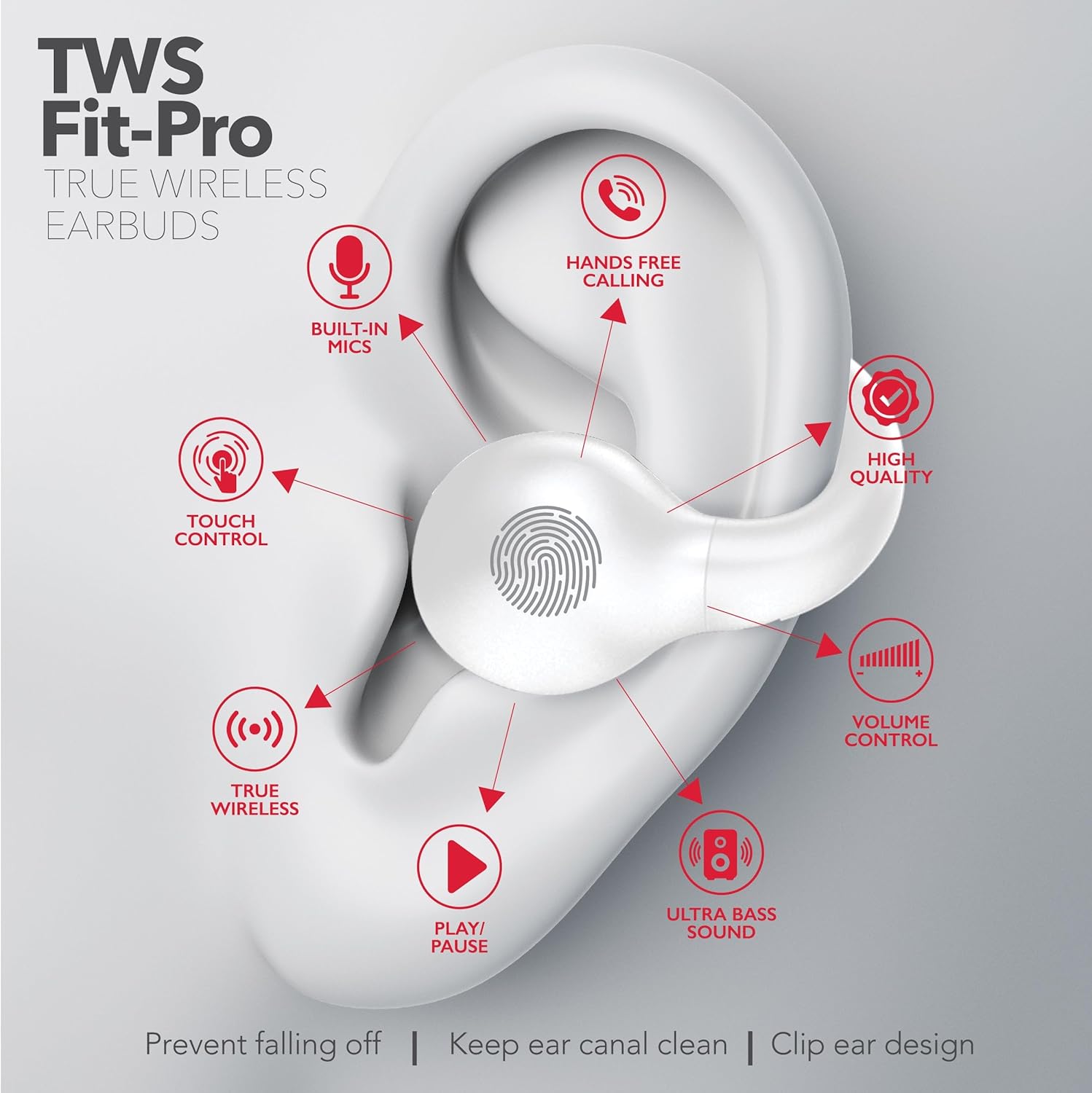
Image: An RCA Wave-66 earbud shown in a human ear, with arrows pointing to various features such as built-in mics, touch control, hands-free calling, high quality audio, volume control, ultra bass sound, and play/pause functionality. This visual aids in understanding the earbud's controls and benefits.

Image: An RCA Wave-66 earbud in a human ear, highlighting technical features like Active Noise Cancellation (ANC), comfortable clip design, one-step pairing, extended battery life, Bluetooth 5.4 technology, 20 hours playtime, faster charge, immersive open ear design, and on-ear controls. This provides a comprehensive overview of the earbud's advanced capabilities.
Setup
1. Initial Charging
- Place both earbuds into the charging case.
- Connect the charging case to a power source using the provided USB charging cable.
- Allow the earbuds and case to fully charge before first use. The charging indicators on the case will show charging status.
2. Pairing with a Device
- Ensure the earbuds are charged and placed in the charging case.
- Open the charging case. The earbuds will automatically enter pairing mode.
- On your device (smartphone, tablet, laptop), enable Bluetooth.
- Search for available Bluetooth devices and select "RCA Wave-66" from the list.
- Once connected, a confirmation sound or indicator will signify successful pairing.
- For subsequent use, the earbuds will automatically connect to the last paired device when removed from the case.
3. Wearing the Earbuds
- Identify the Left (L) and Right (R) earbuds.
- Gently insert each earbud into the corresponding ear, adjusting for a comfortable and secure fit. The ergonomic clip design helps ensure stability.
Operating Instructions
Power On/Off
- Power On: Open the charging case, or remove the earbuds from the case. They will power on automatically.
- Power Off: Place the earbuds back into the charging case and close the lid. They will power off automatically.
Music Playback
- Play/Pause: Tap the touch control area on either earbud once.
- Next Track: Double-tap the touch control area on the right earbud.
- Previous Track: Double-tap the touch control area on the left earbud.
Call Management
- Answer/End Call: Tap the touch control area on either earbud once.
- Reject Call: Press and hold the touch control area on either earbud for 2 seconds.
Transparency Mode
- Activate/Deactivate: Triple-tap the touch control area on either earbud to cycle between normal mode, Transparency Mode, and Active Noise Cancellation (ANC).
Volume Control
- Volume Up: Press and hold the touch control area on the right earbud.
- Volume Down: Press and hold the touch control area on the left earbud.
Maintenance
- Cleaning: Regularly clean the earbuds and charging case with a soft, dry, lint-free cloth. Do not use harsh chemicals or abrasive materials.
- Storage: When not in use, store the earbuds in their charging case to protect them and ensure they remain charged.
- Battery Care: To prolong battery life, avoid fully discharging the earbuds and charging case frequently. Charge them regularly, even if not in constant use.
- Water Resistance: The RCA Wave-66 earbuds are Not Water Resistant. Avoid exposure to water, sweat, or moisture to prevent damage.
Troubleshooting
| Problem | Solution |
|---|---|
| Earbuds not pairing. |
|
| No sound from one or both earbuds. |
|
| Charging case not charging. |
|
| Touch controls not responding. |
|
Specifications
| Feature | Detail |
|---|---|
| Model Name | Wave |
| Connectivity Technology | Wireless |
| Wireless Communication Technology | Bluetooth |
| Bluetooth Version | 5.3 |
| Battery Life | Up to 20 Hours (Earbuds) |
| Frequency Range | 20 Hz to 40 kHz |
| Audio Driver Type | Dynamic Driver |
| Control Method | Remote (Touch Control) |
| Ear Placement | In Ear |
| Form Factor | In Ear |
| Noise Control | Active Noise Cancellation (and Transparency Mode) |
| Water Resistance Level | Not Water Resistant |
| Compatible Devices | Smartphones, Laptops, Tablets, Desktops |
| Product Dimensions | 2.68 x 1.18 x 1.77 inches |
| Manufacturer | RCA |
Warranty and Support
For warranty information and customer support, please refer to the documentation included with your purchase or visit the official RCA website.
RCA Official Website: Visit the RCA Store on Amazon


