Introduction
Thank you for choosing the RCA Wave-78 True Wireless Earbuds. This manual provides essential information for setting up, operating, and maintaining your earbuds to ensure optimal performance and longevity. Please read this manual thoroughly before using the product.
Package Contents
- RCA Wave-78 True Wireless Earbuds (Left and Right)
- Charging Case
- USB Charging Cable
- Multiple Sizes of Ear Tips
- User Manual
Setup Guide
1. Charging the Earbuds and Case
Before first use, fully charge the earbuds and the charging case. Connect the provided USB charging cable to the charging case and a power source. The digital display on the case will indicate the charging status.
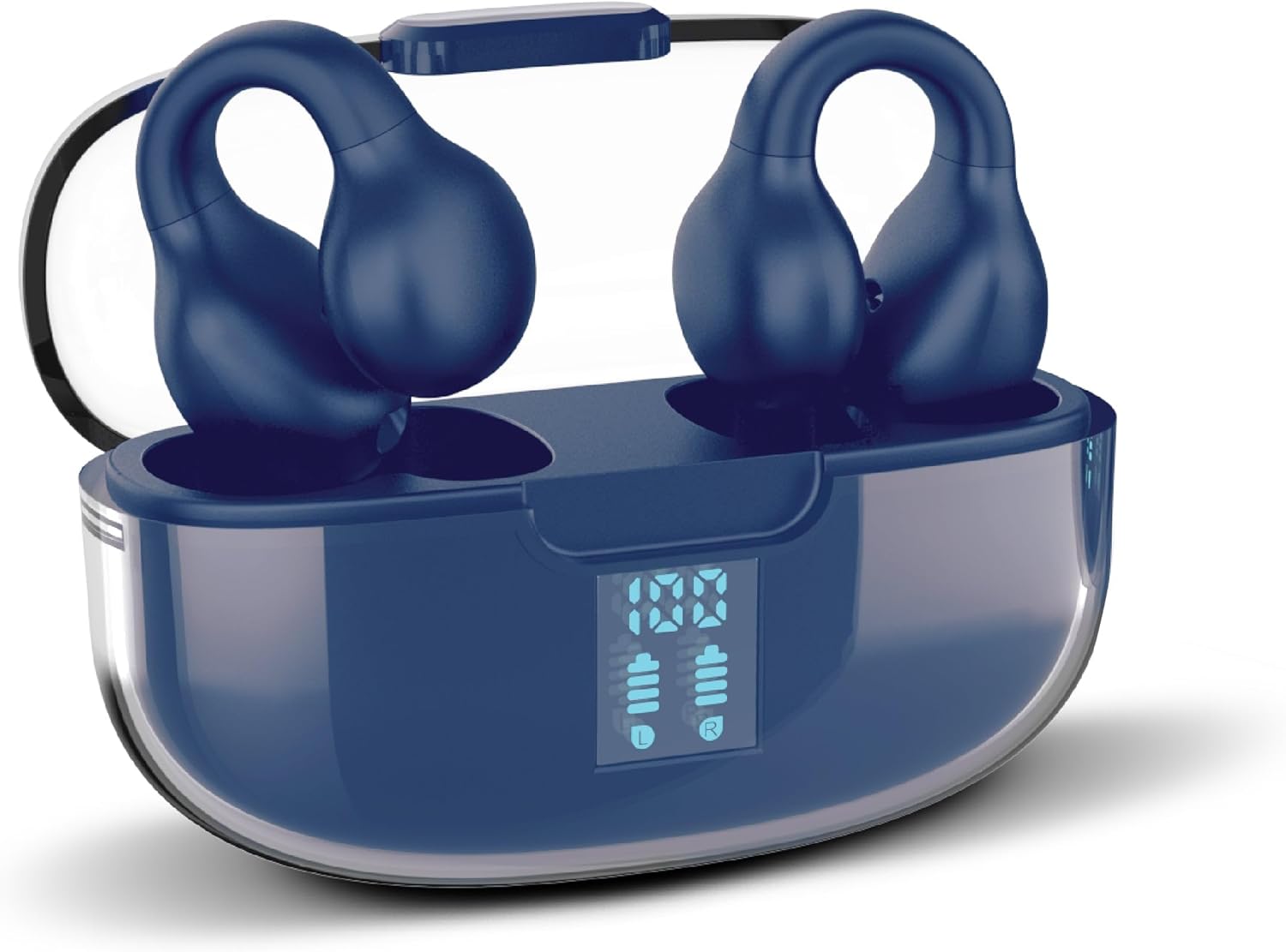
Image: RCA Wave-78 True Wireless Earbuds resting in their navy charging case, which features a clear lid and a digital display showing battery levels for both the case and individual earbuds (L and R).
The earbuds provide up to 5 hours of playback on a single charge, with the charging case offering an additional 15 hours, totaling up to 20 hours of listening time.
2. Pairing with Your Device
- Ensure the earbuds are charged and placed inside the charging case.
- Open the charging case. The earbuds will automatically enter pairing mode.
- On your device (smartphone, tablet, laptop), enable Bluetooth and search for available devices.
- Select "RCA Wave-78" from the list of found devices to connect.
- Once paired, the earbuds will automatically connect to your device when the case is opened for subsequent uses.

Image: A graphic illustrating the "One Step Pairing" feature, showing earbuds in an open charging case with a phone icon, indicating automatic connection after initial setup.
Operating Instructions
Wearing the Earbuds
The RCA Wave-78 earbuds feature an ergonomic clip-ear design for a secure and comfortable fit. Gently place the earbud over your ear, ensuring the speaker portion is aligned with your ear canal and the clip rests comfortably on your outer ear.

Image: A diagram comparing the secure clip design of the RCA Wave-78 earbuds to traditional in-ear earbuds, highlighting how the clip design contours to the ear for comfort and stability.
Touch Controls
The earbuds are equipped with intuitive touch controls for managing audio playback and calls.

Image: A detailed diagram showing an ear with the RCA Wave-78 earbud in place, highlighting various features such as built-in mics, hands-free calling, touch control, true wireless functionality, play/pause, ultra bass sound, volume control, and high-quality audio.
- Play/Pause: Single tap on either earbud.
- Next Track: Double tap on the right earbud.
- Previous Track: Double tap on the left earbud.
- Volume Up: Triple tap on the right earbud.
- Volume Down: Triple tap on the left earbud.
- Answer/End Call: Single tap on either earbud during an incoming call.
- Reject Call: Press and hold either earbud for 2 seconds during an incoming call.
- Activate Voice Assistant: Press and hold either earbud for 3 seconds.

Image: A graphic demonstrating the "On-Ear Touch Control" feature, showing a finger interacting with the earbud for seamless function management.
Transparency Mode and Active Noise Cancellation (ANC)
The RCA Wave-78 earbuds offer both Transparency Mode and Active Noise Cancellation to adapt to your listening environment.
- Transparency Mode: Allows ambient sounds to blend with your audio, keeping you aware of your surroundings. This is ideal for urban environments or when interacting with others.
- Active Noise Cancellation (ANC): Reduces external noise, providing a more immersive listening experience. Smart ANC senses ambient sound levels and fine-tunes cancellation in real time.
To switch between modes, press and hold the touch control area on the left earbud for 2 seconds (specific gesture might vary, refer to quick start guide if provided).

Image: A man wearing the RCA Wave-78 earbuds in an outdoor setting, illustrating the Active Noise Cancellation feature which senses ambient sound and fine-tunes cancellation.

Image: A woman wearing the RCA Wave-78 earbuds during an outdoor activity, demonstrating the "Immersive Open Ear Design" which allows for environmental awareness while enjoying audio.
Maintenance
Proper maintenance ensures the longevity and optimal performance of your RCA Wave-78 earbuds.
- Cleaning: Regularly clean the earbuds, especially the ear tips and speaker grilles, with a soft, dry, lint-free cloth. Avoid using abrasive materials or harsh chemicals. Ensure the ear canal remains clean for hygiene and sound quality.
- Storage: When not in use, store the earbuds in their charging case to protect them from dust, damage, and to keep them charged.
- Avoid Moisture: The earbuds are not water resistant. Avoid exposure to water, rain, or excessive moisture.
- Temperature: Do not expose the earbuds or charging case to extreme temperatures (hot or cold).
Troubleshooting
If you encounter issues with your RCA Wave-78 earbuds, refer to the following common solutions:
| Problem | Solution |
|---|---|
| Earbuds not pairing/connecting |
|
| No sound from one earbud |
|
| Charging case not charging |
|
| Poor sound quality |
|
Specifications
| Feature | Detail |
|---|---|
| Model Name | Wave-78 |
| Item Model Number | Wave-66 Navy |
| Brand | RCA |
| Color | Navy |
| Connectivity Technology | Wireless (Bluetooth 5.0) |
| Wireless Communication Technology | Bluetooth |
| Ear Placement | In Ear (Clip Ear Design) |
| Audio Driver Type | Dynamic Driver |
| Frequency Range | 20 Hz - 20,000 Hz |
| Battery Life (Earbuds) | Up to 5 Hours |
| Total Battery Life (with Charging Case) | Up to 20 Hours |
| Control Method | Touch, Voice |
| Noise Control | Active Noise Cancellation, Transparency Mode |
| Special Features | Built-in Microphones, Clip Ear Design, Touch Control, Hi-Res Audio, Deep Bass |
| Water Resistance Level | Not Water Resistant |
| Compatible Devices | Smartphones, Tablets, Laptops, Bluetooth-enabled Devices |
| Product Dimensions | 2.68 x 1.18 x 1.77 inches |
| UPC | 850068964406 |
Warranty and Support
For warranty information and customer support, please refer to the documentation included with your purchase or visit the official RCA website. You can also visit the RCA Store on Amazon for more product details and support resources.
Manufacturer: RCA


