
1. Introduction
This manual provides essential information for the proper setup, operation, and maintenance of your new replacement remote control. This remote is designed to be compatible with various car stereo receiver models, including Roadstar RS-2751BR, RS-2750BR, RS-2714BR, RS-2605BR, and Reakosound 820S.
Please ensure your original remote control is identical to the one shown in this manual for full compatibility. While this is a direct replacement, some minor function variations may exist compared to your original unit.

Figure 1: Front view of the remote control, showing all buttons and their labels. The remote is white with a black frame and features blue, red, and green accents on its buttons.
2. Setup
2.1 Battery Installation
The remote control requires one CR2025 coin cell battery for operation. Follow these steps to install or replace the battery:
- Locate the battery compartment on the back of the remote control.
- Use a small coin or a flat tool to gently twist the battery cover counter-clockwise to the 'OPEN' position, as indicated by the arrow.
- Insert the CR2025 battery with the positive (+) side facing upwards.
- Align the battery cover and twist it clockwise to the 'CLOSE' position until it clicks securely into place.

Figure 2: Back view of the remote control, illustrating the battery compartment and the instructions for opening and closing it for CR2025 battery installation. A small clip accessory is also visible.
3. Operating Instructions
Point the remote control directly at the infrared (IR) receiver on your car stereo. Ensure there are no obstructions between the remote and the receiver.
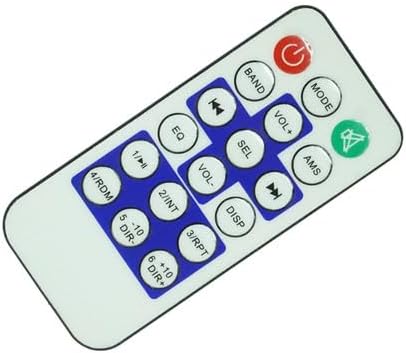
Figure 3: An angled perspective of the remote control, providing a clearer view of the button arrangement and their functions.
3.1 Button Functions
| Button | Function |
|---|---|
| Power | Turns the car stereo receiver On/Off. |
| MODE | Switches between different audio sources (e.g., Radio, USB, AUX). |
| Mute | Mutes or unmutes the audio output. |
| BAND | Selects radio bands (e.g., FM1, FM2, AM). |
| VOL+ / VOL- | Increases / Decreases the volume level. |
| AMS | Automatic Memory Store / Scan. |
| ◀◀ / ▶▶ | Previous / Next track or station. |
| SEL | Selects menu options or enters settings. |
| EQ | Cycles through equalizer presets. |
| DISP | Changes display information. |
| 1/▶‖ | Play/Pause (for media playback). |
| 2/INT | Intro scan (plays first few seconds of each track). |
| 3/RPT | Repeat playback mode. |
| 4/RDM | Random/Shuffle playback mode. |
| 5/-10 DIR- | Skips back 10 tracks/files or navigates folders. |
| 6/+10 DIR+ | Skips forward 10 tracks/files or navigates folders. |
4. Maintenance
4.1 Cleaning
To clean the remote control, use a soft, dry cloth. For stubborn dirt, slightly dampen the cloth with water or a mild, non-abrasive cleaner. Do not use harsh chemicals, solvents, or abrasive cleaning pads, as these can damage the remote's surface or internal components.
4.2 Storage
When not in use for extended periods, store the remote control in a cool, dry place away from direct sunlight and extreme temperatures. If the remote will not be used for several months, it is advisable to remove the battery to prevent leakage and potential damage.
5. Troubleshooting
5.1 Common Issues and Solutions
- Remote not responding:
- Check if the battery is installed correctly with the correct polarity (+/-).
- Replace the CR2025 battery with a new one.
- Ensure there are no obstructions between the remote and the car stereo's IR receiver.
- Verify that the remote is pointed directly at the receiver.
- Limited range or intermittent response:
- Replace the battery. A weak battery can reduce the remote's effective range.
- Ensure the IR receiver on the car stereo is clean and free from dust or debris.
- Some functions not working:
- While this remote is a replacement, not all functions may be identical to your original remote. Refer to your car stereo's original manual for specific function details.
- Ensure your car stereo model is listed as compatible in the product title. If your model is not listed, full compatibility cannot be guaranteed.
6. Specifications
- Product Type: IR Replacement Remote Control
- Color: Black
- Battery Type: 1 x CR2025 Coin Cell Battery (included)
- Max Number of Supported Devices: 1
- Compatible Devices: Roadstar RS-2751BR, RS-2750BR, RS-2714BR, RS-2605BR, Reakosound 820S Car Stereo Receivers
- Special Features: Ergonomic design, direct IR replacement
7. Warranty and Support
This product is an aftermarket replacement remote control. For any doubts or issues not covered in this manual, please contact the seller directly for assistance. It is recommended to check your car stereo's original manual for correct remote control compatibility and functions before purchase.