
1. Product Overview
The Clouree B69W-1 Door Alarm Window Sensor is a wireless contact sensor designed to enhance home security by providing real-time notifications when a door or window is opened or closed. It connects directly to your WiFi network, eliminating the need for a separate hub, and is controlled via the Tuya or Smart Life mobile applications.

Image 1.1: Clouree B69W-1 Door Alarm Window Sensor, showing the main sensor unit and the smaller magnetic strip.
Key Features:
- Real-time Notifications: Receive instant alerts on your phone when a door or window is opened or closed.
- WiFi Connectivity: Connects directly to your 2.4GHz WiFi network; no hub required.
- Silent Alarm Design: Alerts are sent to your phone without a local audible alarm from the device itself.
- Long Battery Life: Operates on 2 AAA batteries (included) with over a year of standby time. Low battery alerts are sent to your phone.
- App Control: Compatible with "Tuya" and "Smart Life" Apps for monitoring and control without monthly fees.
- Multi-location Installation: Suitable for doors, windows, cabinets, refrigerators, mailboxes, and other open/close items.
- Easy Installation: Tool-free installation using included 3M adhesive tape.
2. Package Contents
Verify that all items are present in the package:
- Clouree B69W-1 Door Alarm Window Sensor (Main Unit)
- Magnetic Strip
- 2 x AAA Batteries
- 3M Adhesive Tape
- User Manual (this document)
Component Identification:
The main sensor unit features an LED indicator light on the front. On the back, you will find the 'Set' button and the 'Power On/Off' switch. The battery compartment is also located on the back, designed to hold two AAA batteries. The smaller magnetic strip works in conjunction with the main sensor to detect open/close states.
3. Setup and Installation
Follow these steps to set up and install your Clouree B69W-1 sensor.
3.1. Initial Setup and App Pairing
- Insert Batteries: Open the battery compartment on the main sensor unit and insert the two AAA batteries, ensuring correct polarity.
- Power On: Locate the 'Power On/Off' switch on the back of the main sensor unit and slide it to the 'On' position.
- Download App: Download and install the "Tuya" or "Smart Life" app from your mobile device's app store.
- Register/Login: Open the app and register a new account or log in to an existing one.
- Add Device:
- In the app, tap the '+' icon (usually in the top right corner) to add a device.
- Select "Add Device".
- Scroll down and select "Sensors", then choose "Contact Sensor (Wi-Fi)".
- Ensure your phone is connected to a 2.4GHz Wi-Fi network. Enter your Wi-Fi password.
- Reset Device for Pairing: Long press the 'Set' button on the back of the main sensor unit for approximately 5 seconds until the LED indicator light on the front blinks rapidly.
- In the app, confirm that the indicator is blinking quickly and proceed with the pairing process.
- The app will search for and add the device. Once added successfully, tap "Done".
Video 3.1: A tutorial demonstrating the Wi-Fi connection process for the Clouree B69W-1 Door Sensor using the mobile application.
3.2. Physical Installation
The sensor consists of two parts: the main sensor unit and a smaller magnetic strip. These two parts must be installed close to each other on a door or window frame.
- Clean Surface: Ensure the installation surface on your door/window frame is clean and dry.
- Attach Adhesive: Peel the backing from the 3M adhesive tape and attach it to the back of both the main sensor unit and the magnetic strip.
- Position Sensor: Attach the main sensor unit to the fixed part of the door or window frame.
- Position Magnetic Strip: Attach the magnetic strip to the moving part of the door or window, aligning it with the main sensor unit. The gap between the two parts should be less than 2 cm (0.79 inches) when the door/window is closed. Alerts are triggered for gaps over 2 cm.
- Test Installation: Open and close the door/window to verify that the sensor detects the change and sends a notification to your app.
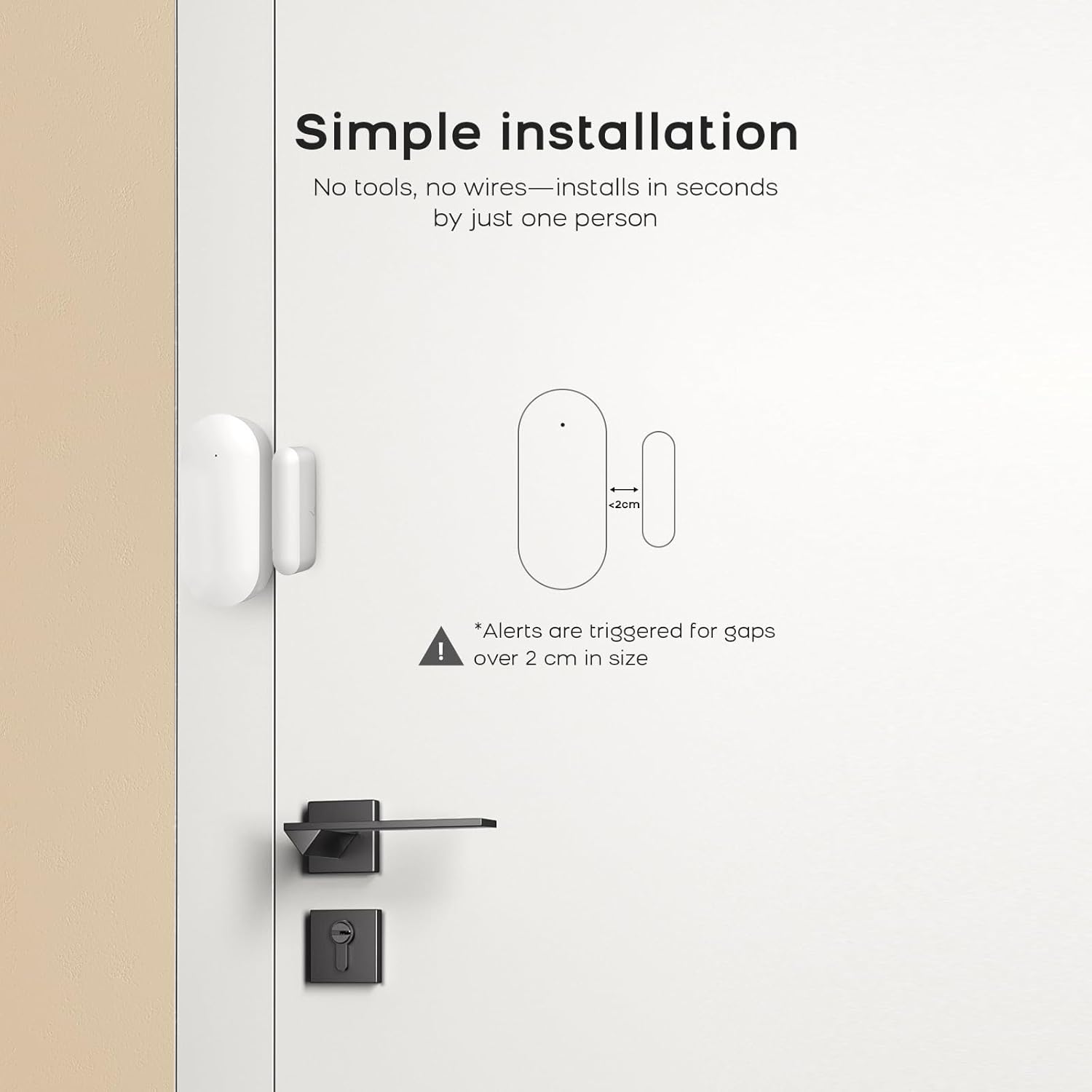
Image 3.2: A diagram illustrating the simple, tool-free installation of the sensor and magnetic strip, highlighting the maximum 2 cm gap for detection.
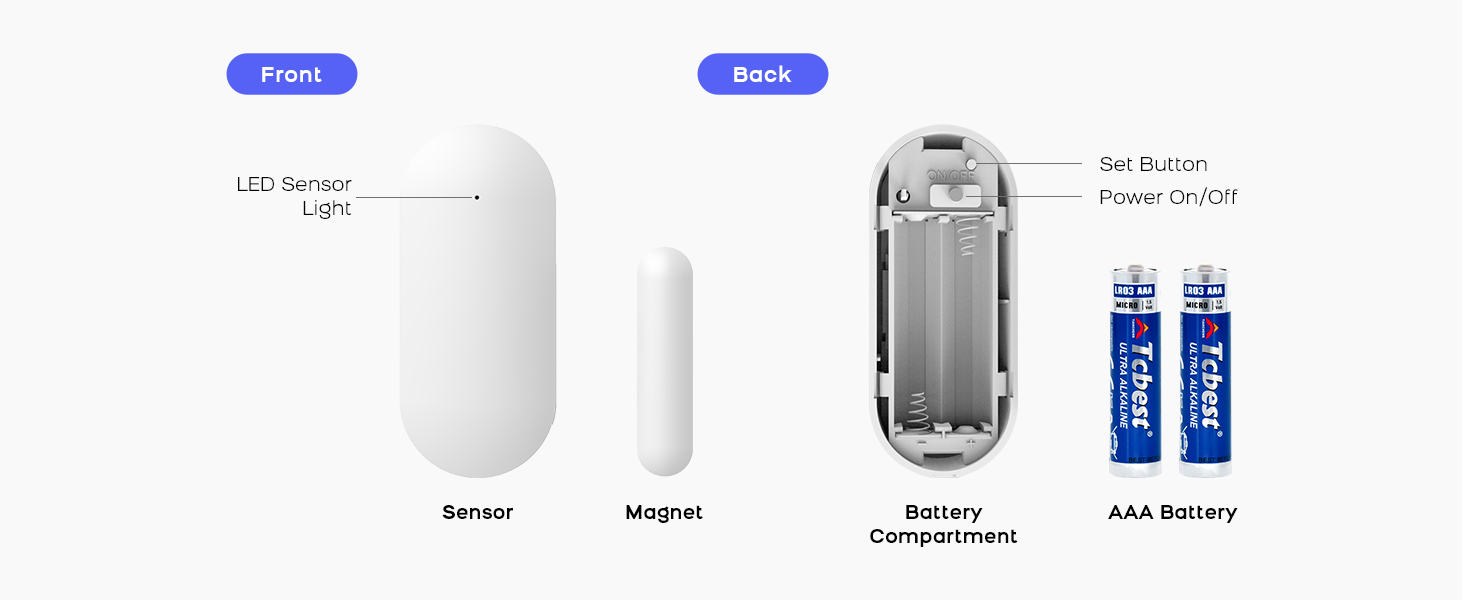
Image 3.3: A visual guide showing four steps for easy installation: cleaning the surface, inserting batteries, applying adhesive, and attaching the sensor to a door/window.
4. Operating Instructions
Once installed and paired, the Clouree B69W-1 sensor operates automatically.
- Monitoring: The sensor continuously monitors the open/close status of the door or window it is attached to.
- Real-time Alerts: When the status changes (e.g., door opens), a notification is immediately sent to your linked mobile application.
- App Interface: Open the "Tuya" or "Smart Life" app to view the current status of your sensor, review event history, and manage settings.
- Silent Operation: The sensor itself does not emit an audible alarm. All alerts are delivered silently to your mobile device. To hear alerts, ensure your phone's volume and notification settings are configured appropriately.

Image 4.1: A smartphone screen showing a real-time "Open door alarm" notification received from the Clouree sensor.

Image 4.2: The compact design of the sensor, shown installed on a window frame, emphasizing its discreet presence.
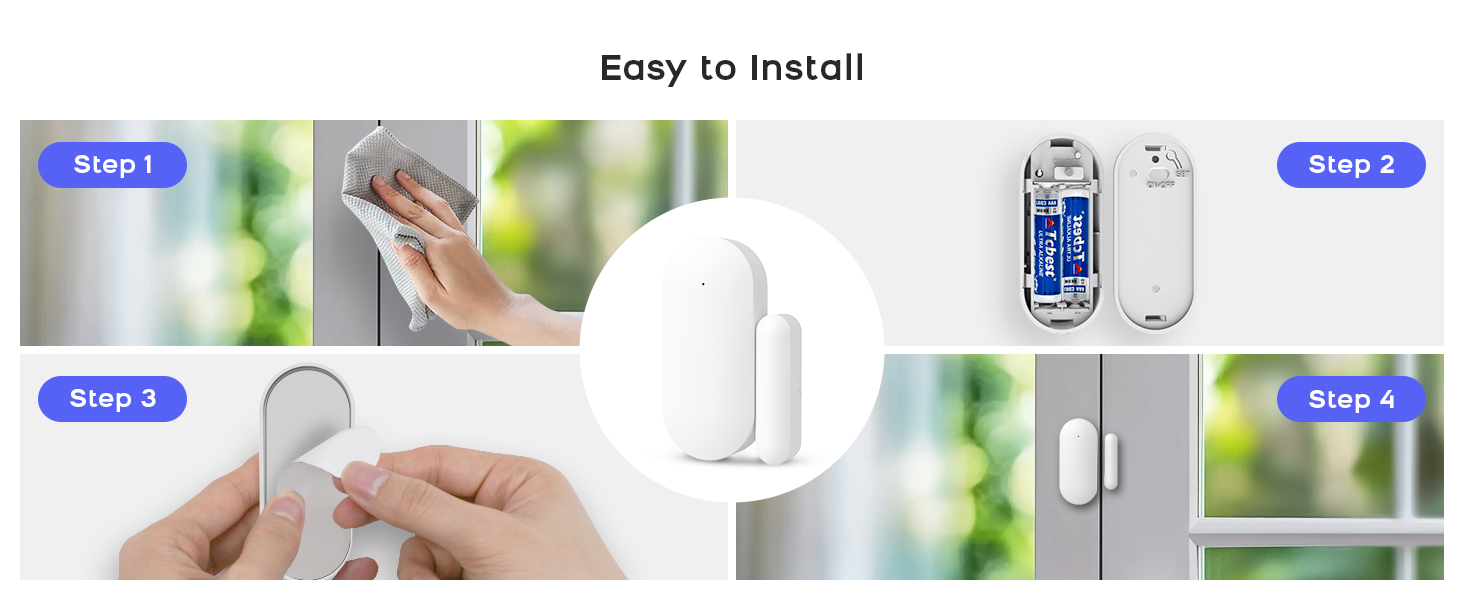
Image 4.3: Examples of multi-scenario installation, demonstrating the sensor's versatility for different household entry points.
5. Maintenance
Proper maintenance ensures the longevity and optimal performance of your sensor.
- Battery Replacement: The sensor uses 2 AAA batteries. When the battery level is low, you will receive a notification on your mobile app. Replace both batteries promptly to ensure continuous operation.
- Cleaning: Wipe the sensor and magnetic strip with a dry, soft cloth. Do not use liquid cleaners or abrasive materials.
- Adhesive Check: Periodically check the adhesive tape to ensure the sensor and magnetic strip remain securely attached to their surfaces. Reapply new 3M tape if necessary.
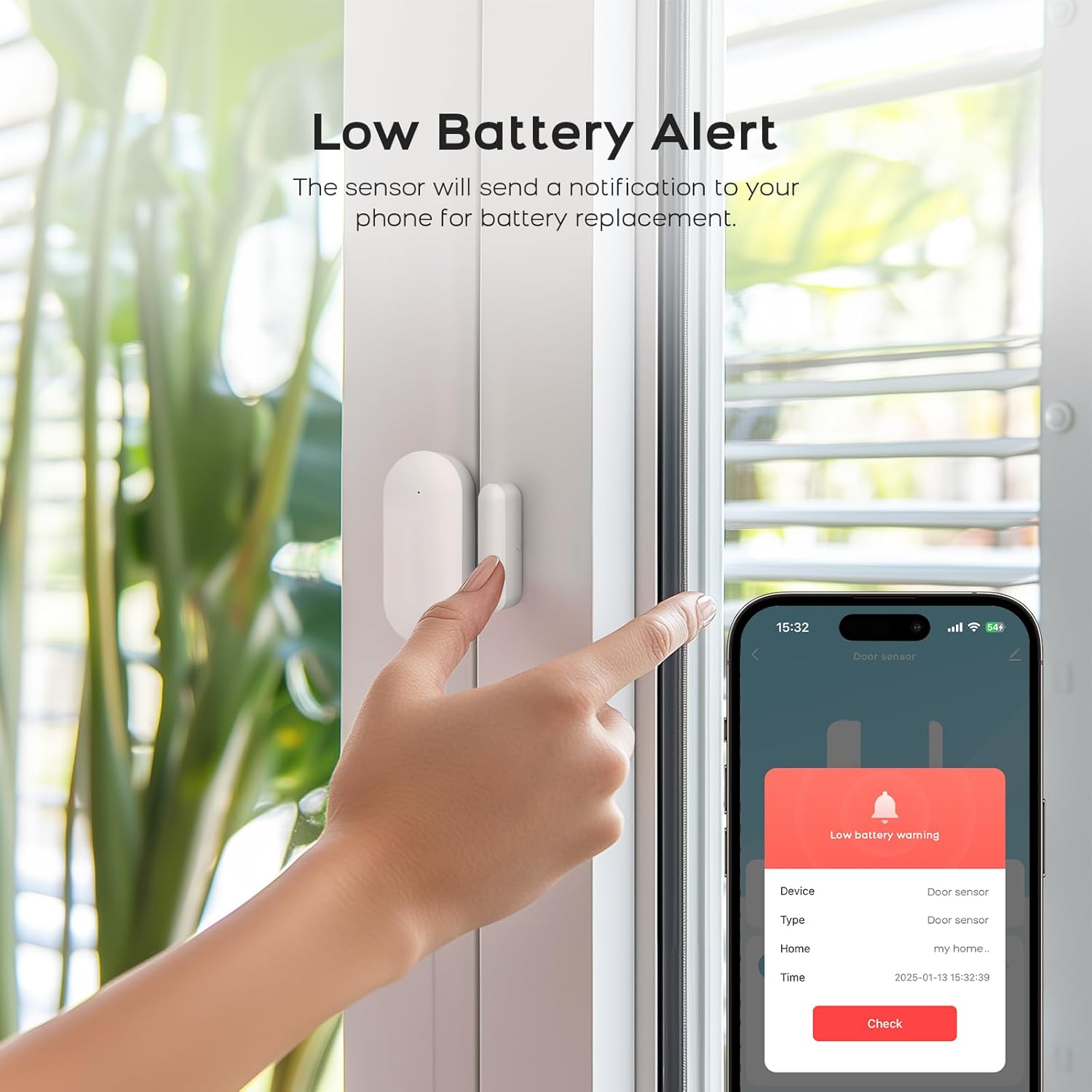
Image 5.1: A smartphone screen showing a "Low battery warning" notification, prompting the user to replace the sensor's batteries.
6. Troubleshooting
If you encounter issues with your Clouree B69W-1 sensor, refer to the following common solutions:
- Sensor Not Connecting to Wi-Fi:
- Ensure your Wi-Fi network is 2.4GHz. The sensor does not support 5GHz Wi-Fi.
- Verify that your Wi-Fi password is entered correctly in the app.
- Make sure the sensor is in pairing mode (LED blinking rapidly) when attempting to add it in the app.
- Move the sensor closer to your Wi-Fi router during the initial pairing process.
- Restart your Wi-Fi router and try pairing again.
- No Notifications Received:
- Check your phone's notification settings for the "Tuya" or "Smart Life" app to ensure notifications are enabled.
- Verify that the sensor is online and connected in the app.
- Ensure the gap between the main sensor unit and the magnetic strip is less than 2 cm when closed.
- Check the battery level of the sensor in the app. Replace batteries if low.
- Sensor Offline in App:
- Check the sensor's batteries.
- Ensure your Wi-Fi network is operational.
- If the sensor is far from the router, consider repositioning it or using a Wi-Fi extender.
- Try restarting the sensor by turning it off and on again.
7. Specifications
| Feature | Specification |
|---|---|
| Model Number | B69W-1 |
| Brand | Clouree |
| Control Method | App (Tuya / Smart Life) |
| Sensor Technology | Contact Sensor |
| Connectivity | 2.4GHz Wi-Fi |
| Power Source | 2 x AAA Batteries (included) |
| Battery Life | Over 1 year (standby) |
| Item Weight | 0.06 Kilograms (approx. 2.08 ounces) |
| Product Dimensions | 0.1 x 0.1 x 0.1 inches (Note: These dimensions seem generic, actual size may vary slightly) |
| Mounting Type | Adhesive (3M tape included) |
| Compatible Devices | iPhone (and Android via Tuya/Smart Life app) |
8. Warranty and Support
For warranty information and technical support, please refer to the official Clouree website or contact their customer service directly. Details are typically provided on the product packaging or through the mobile application's help section.
The product is designed for ease of use and reliability. Should you encounter any issues not covered in the troubleshooting section, please reach out to the manufacturer's support channels for assistance.