
Introduction
This manual provides detailed instructions for the setup, operation, maintenance, and troubleshooting of your VONZONE Electronic Dart Board, Model UHZ02. This dart board offers 34 games with 355 variations, automatic scoring, and supports up to 8 players. Please read this manual thoroughly before use to ensure proper function and longevity of your product.
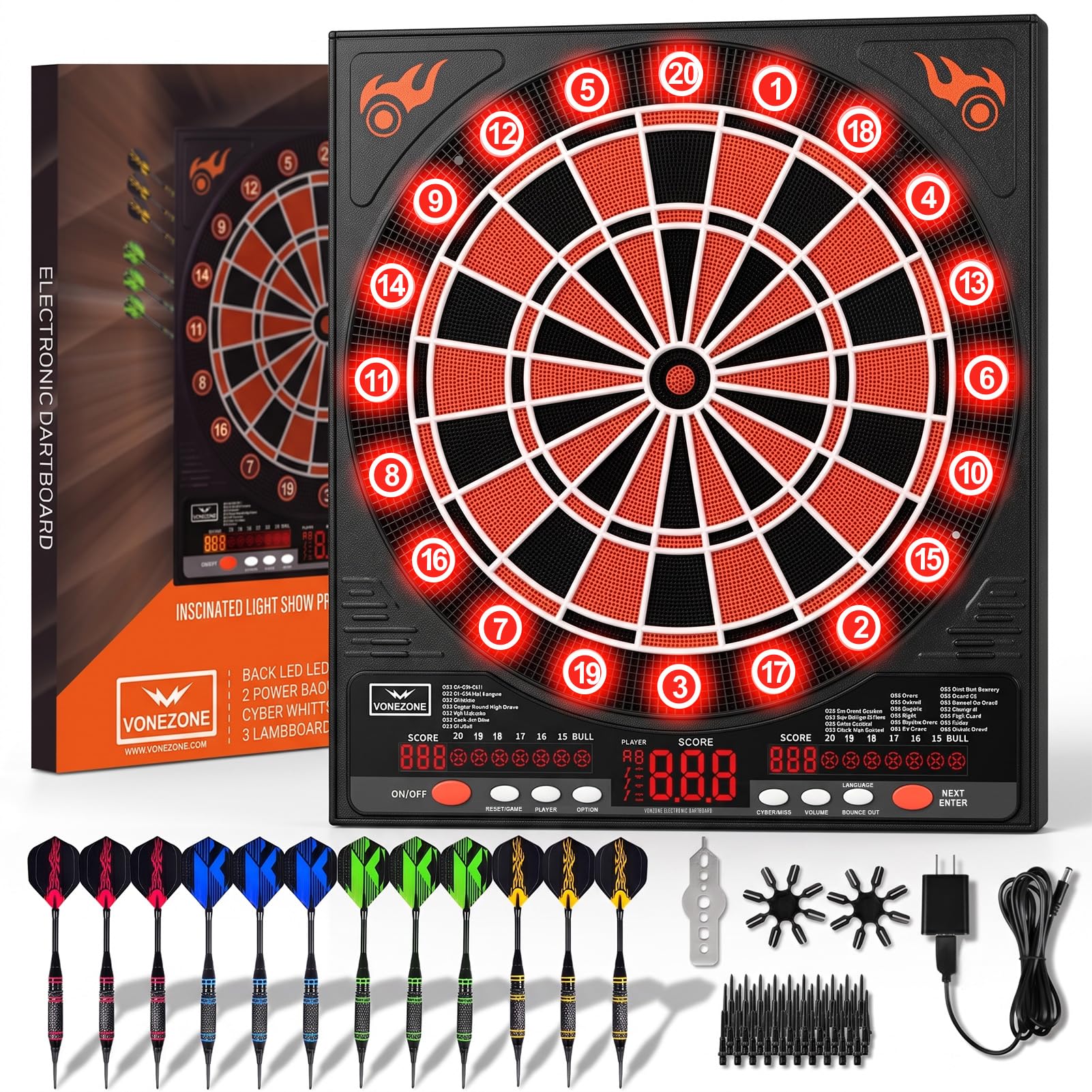
Image: The VONZONE Electronic Dart Board, showcasing its design, LED display, and included darts.
Setup Instructions
1. Unpacking and Component Check
Carefully remove all components from the packaging. Verify that all items listed below are present:
- Electronic Dart Board (1)
- Soft Tip Darts (12)
- Dart Feathers (Fligths)
- Replacement Soft Tips (50)
- Feather Protectors (2)
- Dart Wrench (1)
- Power Adapter (1)
Video: An overview of the VONEZONE Electronic Dartboard, including unboxing and initial components. This video demonstrates the contents of the package and the product's appearance.
2. Dart Assembly
Attach the dart flights to the dart barrels. Use the included dart wrench to tighten any loose components if necessary. Ensure all darts are properly assembled before use.

Image: A set of soft tip darts with replacement tips, illustrating the components for dart assembly.
3. Mounting the Dart Board
The dart board is designed for wall mounting. Select a suitable location, ensuring sufficient space for throwing and player safety. Use appropriate hardware (not included) for secure installation. The recommended throwing distance is 7 feet 9.25 inches (2.37 meters) from the face of the board to the throwing line, and the center of the bullseye should be 5 feet 8 inches (1.73 meters) from the floor.
4. Powering the Device
The dart board can be powered by either the included AC adapter or 3x AA batteries (not included).
- AC Adapter: Connect the AC adapter to the power input port on the dart board and plug it into a standard electrical outlet.
- Batteries: Open the battery compartment on the back of the dart board and insert 3x AA batteries, ensuring correct polarity. Close the compartment securely. If using battery power, replace batteries regularly to avoid unclear digital display.

Image: Illustration of the VONEZONE Electronic Dartboard showing both AC adapter and battery power options.
Operating Instructions
1. Power On/Off
Press the ON/OFF button located on the control panel to turn the dart board on or off. The LED display will illuminate upon power-on.
Video: A demonstration of the VONEZONE Colonel Electronic Dartboard's control panel, including the ON/OFF button and game selection. This video helps users understand how to navigate the dartboard's functions.
2. Game Selection
The dart board features 34 games and 355 variations. Use the GAME button to cycle through the available games. Press NEXT/ENTER to confirm your selection.

Image: A visual representation of the 34 games and 355 variations available on the VONEZONE Electronic Dart Set, providing a comprehensive list for users.
3. Player Selection
The dart board supports up to 8 players. Use the PLAYER button to select the number of players for your game. Each player will have a dedicated color LED digital circle for score tracking.

Image: A detailed view of the dartboard's scoring sections, ultra-thin spider web design, and the distinct colored lights that indicate each player's turn and score.
Video: A demonstration of the Electronic Dartboard's eight different light colors for player indication. This video highlights the visual feedback for each player during gameplay.
4. Automatic Scoring and LED Display
The dart board features an automatic scoring system. Scores are displayed on the large, clear LED screen. An automatic voice announcer will call out scores, and the display is easily readable from up to 2 meters away.

Image: A close-up view of the dartboard's LED display, illustrating how current scores and settings are presented for easy visibility.
5. Language and Volume Control
The system supports English, German, and French voice/text prompts. Use the LANGUAGE button to switch between languages. Adjust the volume using the VOLUME button, which offers 8 levels of adjustment.
Video: A demonstration of the VONEZONE Colonel Electronic Dartboard's control panel, including language and volume settings. This video helps users understand how to adjust these features.
6. Memory Function
The dart board is equipped with a memory function. When powered off and then on again, it will automatically recall the settings from your last game, allowing for quick resumption of play.
7. Dart Removal
When removing darts from the board, twist the dart to the right (clockwise) while pulling. This technique makes dart removal easier and helps prolong the life of your dart tips.
Maintenance
1. Cleaning
Wipe the dart board surface with a soft, dry cloth. Avoid using abrasive cleaners or solvents, as these can damage the display and finish. Ensure no liquids enter the electronic components.
2. Dart Tip Replacement
If dart tips become worn or broken, replace them with the provided extra tips. Use the dart wrench to carefully remove old tips and secure new ones.
3. Storage
When not in use, store the dart board in a dry place away from direct sunlight and extreme temperatures. The board features side storage holes that can hold up to 12 darts, keeping them organized and preventing loss.

Image: A close-up view of the dartboard's side storage holes, designed to securely hold up to 12 darts.
Troubleshooting
| Problem | Possible Cause | Solution |
|---|---|---|
| Dart board does not power on. | No power, loose connection, or dead batteries. | Check AC adapter connection and power outlet. If using batteries, ensure they are correctly inserted and replace if necessary. |
| Darts do not register score. | Dart tip not fully inserted into segment, or segment is stuck. | Ensure darts are thrown with sufficient force for tips to fully enter segments. Gently wiggle or press the segment to release if stuck. |
| LED display is dim or unclear. | Low battery power. | Replace batteries or use the AC adapter for consistent power. |
| Buttons are unresponsive. | Temporary electronic glitch or button malfunction. | Turn the dart board off and then on again to reset. If the issue persists, contact customer support. |
| Darts bounce out frequently. | Worn dart tips or improper throwing technique. | Replace worn dart tips. Ensure darts are thrown straight and with adequate force. The ultra-thin spider web design is intended to minimize bounce-outs. |
Specifications
- Brand: VONZONE
- Model Number: UHZ02
- Material: Acrylonitrile Butadiene Styrene (ABS)
- Color: Orange
- Product Dimensions (W x H): 3.54" x 22.44"
- Item Weight: 3 pounds
- Number of Games: 34
- Number of Game Variations: 355
- Max Players: 8
- Power Source: AC Adapter (included) or 3x AA Batteries (not included)
- Included Components: Electronic Dart Disk, Soft Head Darts (12), Dart Feathers, Replacement Soft Heads (50), Feather Protectors (2), Dart Wrench, Power Adapter
- UPC: 706531742661

Image: A diagram illustrating the product dimensions of the VONZONE Electronic Dart Board and a single dart for scale.
Warranty and Support
Warranty Information
For quality issues not caused by human damage, VONZONE offers free returns and exchanges within 180 days of the date of purchase. Please retain your proof of purchase for warranty claims.
Customer Support
If you encounter any problems or have questions regarding your VONZONE Electronic Dart Board, please contact our customer support team. Refer to the contact information provided with your product packaging or visit the official VONZONE website for assistance.