
Introduction
The ZENBON Carbon Fiber Rollator Walker is designed to provide mobility support and convenience for seniors and adults. This lightweight, foldable rolling walker features a comfortable seat, adjustable hand grips, and durable wheels suitable for various terrains. Its robust carbon fiber construction ensures a high weight capacity and long-lasting performance.
Key Features:
- Ergonomic Design: Features ergonomic handles adjustable from 30.7 to 38.6 inches to promote proper posture and a secure grip.
- High Weight Capacity: Constructed from durable carbon fiber, supporting users up to 440 pounds.
- Advanced Wheel System: Equipped with four large 7.9-inch puncture-proof PA+15%GF+TPR soft-surface tires for superior traction, maneuverability, and shock absorption on diverse surfaces.
- User-Friendly Brakes: Handbrake system allows for easy activation (pull up to brake, push down to lock) for enhanced safety.
- Foldable & Portable: Lightweight at 12 lbs (without bag) and folds compactly with one hand for effortless storage and transportation.
- Integrated Storage: Includes a spacious 22.7L capacity storage bag, supporting up to 13 lbs (6.8 kg), for carrying personal items.
Important Safety Information
Please read and understand all safety instructions before using the rollator walker. Failure to do so may result in injury.
- Consult a doctor or physiotherapist to assess the need for a rollator, especially if balance or muscle strength is compromised.
- Before each use, ensure the seat support, handle tubes, and all accessories are securely locked.
- Adjust handles to the user’s hip height for optimal posture and control.
- Always engage the brakes when stationary, on slopes, or when seated.
- When sitting, maintain an upright posture with hands on the handles and avoid leaning backward.
- Never leave the rollator unattended without engaging the brakes to prevent accidental rolling.
- When assembling or folding, be careful not to pinch your hands in the folding mechanism.
Setup
Unfolding the Rollator
Carefully remove the rollator from its packaging. To unfold, gently pull the sides apart until the frame locks into place. Ensure all locking mechanisms are engaged before use. Note: Be careful not to pinch your hands during the unfolding process.
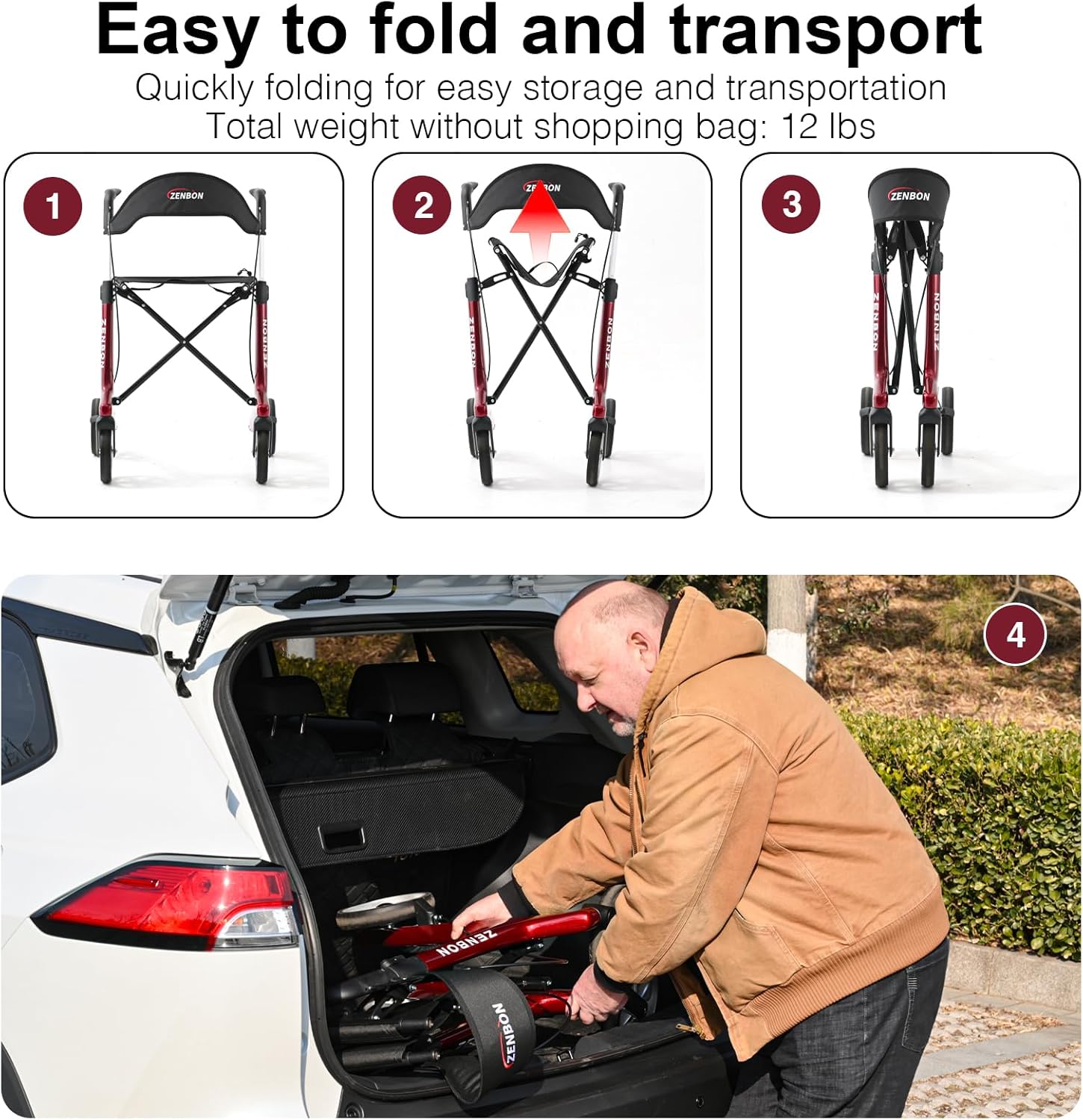
Figure 1: Steps for folding and transporting the rollator walker. The walker folds compactly for easy storage in a vehicle.
Adjusting Handle Height
The hand grips are adjustable to ensure proper posture and comfort. Locate the adjustment pins or levers on the side of the handle tubes. Press the pin or open the lever, then slide the handle up or down to the desired height. Ensure the handle is level with your wrist when your arms are relaxed at your sides. Release the pin/lever to lock the handle in place. Verify that both handles are at the same height and securely locked before use.

Figure 2: Illustration of adjustable hand grip height and recommended wrist-level positioning for optimal user comfort and safety.
Attaching the Storage Bag
The rollator comes with a removable storage bag. Attach the bag securely to the designated hooks or straps on the rollator frame, typically located under the seat. Ensure it is firmly attached to prevent it from falling during use.

Figure 3: The spacious 22.7L storage bag, capable of holding up to 13 lbs, for convenient transport of personal items.
Setup and Usage Video
Video 1: Demonstrates the unfolding, adjustment, braking, and folding of the ZENBON Rollator Walker, including its use on various terrains and as a temporary seat.
Operating Instructions
Walking with the Rollator
Stand upright behind the rollator with your hands on the grips. Push the rollator forward a short distance, then step forward with one foot, followed by the other. Maintain a steady pace and keep your body close to the rollator for stability. The 360° rotating front wheels provide excellent maneuverability for navigating various indoor and outdoor environments.
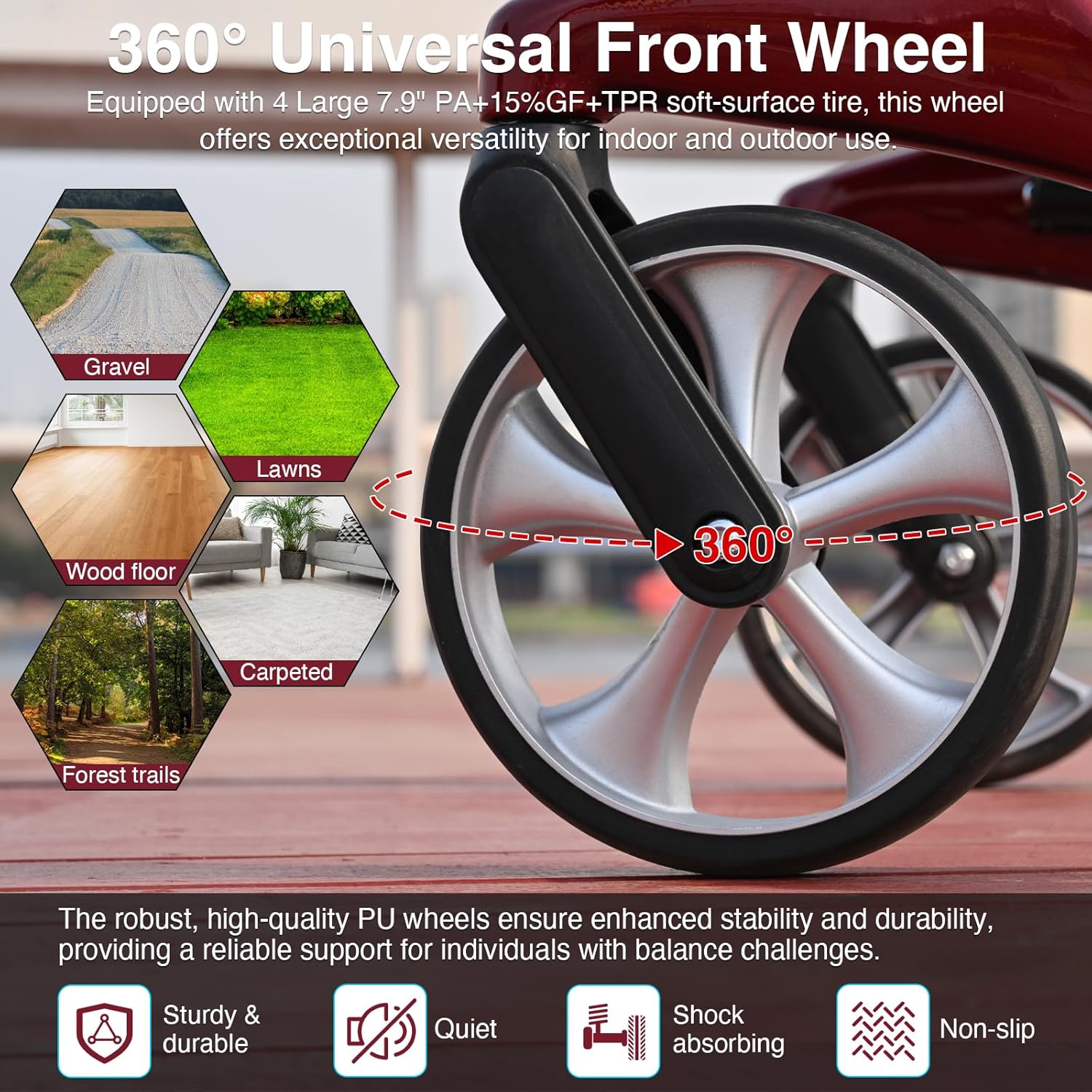
Figure 4: The rollator's universal front wheels are designed for smooth movement across various surfaces, including gravel, grass, wood, carpet, and forest trails.
Using the Brake System
The rollator is equipped with a dual-function handbrake system:
- To Brake (Slow/Resistance): Pull the brake levers upwards towards the hand grips. This applies resistance to the wheels, allowing for controlled slowing, especially when going downhill.
- To Park (Lock Wheels): Push the brake levers downwards until they click into the locked position. This engages the parking brake, preventing the rollator from moving. Always engage the parking brake before sitting on the seat or when leaving the rollator stationary.
- To Release Brakes: Pull the brake levers upwards to disengage the parking brake and allow the wheels to roll freely.
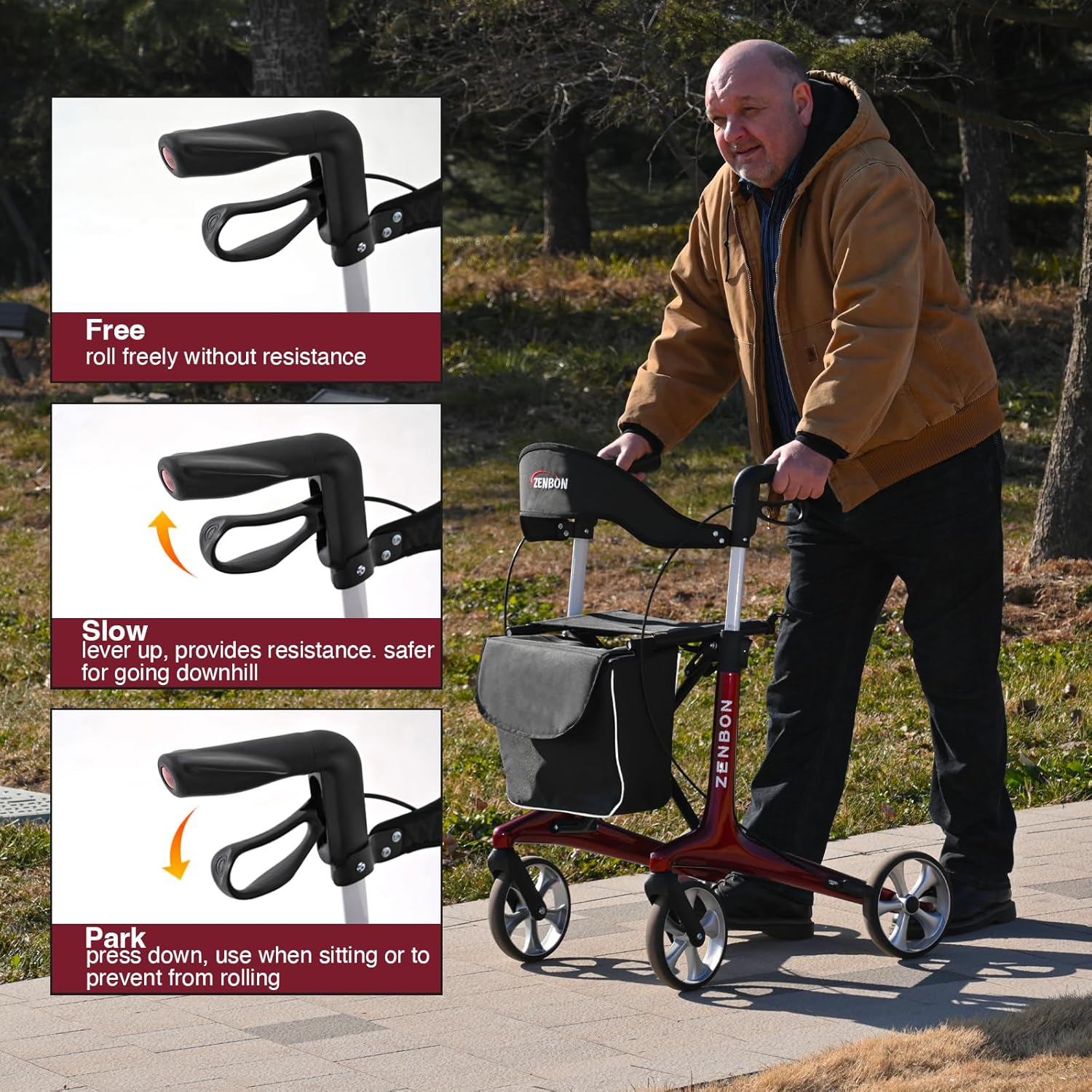
Figure 5: Detailed view of the handbrake functions: Free, Slow (resistance), and Park (locked).
Using the Seat
When you need to rest, ensure the rollator is on a flat, stable surface. Engage both parking brakes by pushing the levers down until they lock. Turn around and carefully sit on the seat, facing the front of the rollator. Use the backrest for support. Always ensure the brakes are locked before and while sitting.

Figure 6: A user seated on the rollator, highlighting the seat's capacity and dimensions for comfortable resting.
Folding for Storage and Transport
To fold the rollator, first remove any items from the storage bag. Lift the seat or pull the designated strap (if applicable) to initiate the folding mechanism. Gently push the sides of the frame together until it collapses into a compact form. The lightweight design (12 lbs without the bag) makes it easy to lift and store in a car trunk or closet. Note: Exercise caution to avoid pinching hands during folding.

Figure 7: Visual guide to quickly folding the rollator for convenient storage and transport in a vehicle.
Maintenance
Regular maintenance ensures the longevity and safe operation of your ZENBON Rollator Walker.
- Cleaning: Wipe down the frame and seat with a damp cloth and mild soap. Avoid abrasive cleaners. Ensure all parts are dry before storage.
- Wheel Inspection: Periodically check the wheels for wear and tear. The puncture-proof tires are designed for durability, but inspect for any damage or debris that might affect smooth rolling.
- Brake Check: Regularly test the brake system to ensure it engages and disengages properly. If brakes feel loose or ineffective, contact customer support for assistance.
- Fastener Check: Ensure all screws, bolts, and locking mechanisms are tight and secure. Do not overtighten.
- Storage: Store the rollator in a dry, clean place away from extreme temperatures.
Troubleshooting
If you encounter any issues with your rollator walker, please refer to the following common solutions:
- Rollator does not roll smoothly: Check for debris in the wheels. Ensure the parking brakes are fully disengaged.
- Brakes are not engaging/disengaging properly: Inspect the brake cables for any kinks or damage. Ensure the brake levers are not obstructed. If the issue persists, contact customer support.
- Rollator feels unstable: Verify that all folding mechanisms are fully locked and the handle height adjustment pins are securely engaged. Ensure the rollator is used on a flat surface.
For issues not listed here or if troubleshooting steps do not resolve the problem, please contact ZENBON customer support.
Specifications

Figure 8: Technical data and dimensions of the ZENBON Rollator Walker.
| Feature | Detail |
|---|---|
| Material Type | Carbon Fiber |
| Walker Type | Rollator Walker |
| Foldable | Yes |
| Maximum Weight Capacity | 440 lbs (200 kg) |
| Maximum Seat Load | 440 lbs (200 kg) |
| Maximum Armrest Load | 330 lbs (150 kg) |
| Shopping Bag Load Capacity | 13 lbs (6.8 kg) |
| Item Weight (without bag) | 12 lbs (5.44 kg) |
| Product Dimensions (Unfolded) | 25.6 x 24.4 x 30.7 inches (65 x 62 x 78 cm) |
| Folded Dimensions | 25.6 x 8.7 x 32.5 inches (65 x 22.1 x 82.5 cm) |
| Adjustable Handle Height Range | 30.7 - 38.6 inches (78 - 98 cm) |
| Wheel Size | 4 Large 7.9 inch (20 cm) |
| Wheel Material | Black PA+15%GF+TPR soft-surface tire |
| Seat Dimensions | 16.14 x 8.27 inches (41 x 21 cm) |
| Distance from Seat to Ground | 22.83 inches (58 cm) |
| Backrest Height | 5.31 inches (13.5 cm) |
Warranty and Support
ZENBON is committed to providing quality products and excellent customer service. While specific warranty details are not provided in this manual, we encourage you to retain your proof of purchase for any warranty claims.
If you have any questions regarding the assembly, operation, maintenance, or any other aspect of your ZENBON Rollator Walker, please do not hesitate to contact our customer support team. We are dedicated to assisting you and ensuring a satisfactory experience with our products.
Contact Information: Please refer to the contact details provided with your purchase or visit the official ZENBON website for support.