1. Introduction
Thank you for choosing the Stealth Cam 40MP Deceptor Max Cellular Trail Camera. This advanced cellular trail camera is designed to capture high-quality photos and videos of wildlife with exceptional clarity and speed. Featuring 40-megapixel image resolution, a rapid 0.4-second trigger speed, and reliable cellular connectivity, the Deceptor Max ensures you stay connected to your scouting efforts. This manual provides detailed instructions for setting up, operating, and maintaining your camera to ensure optimal performance.
2. Package Contents
Please verify that all items listed below are included in your package:
- 2 x Stealth Cam 40MP Deceptor Max Cellular Trail Camera
- 4 x SanDisk 32GB Ultra SDHC UHS-I Memory Card (100MB/s)
- 1 x Vidpro 4-in-1 USB 2.0 Card Reader

Figure 2.1: Included items in the Stealth Cam Deceptor Max bundle.
3. Product Overview
The Deceptor Max camera is equipped with advanced features for reliable outdoor surveillance:
- 40 Megapixel Resolution: Captures highly detailed images.
- 0.4-Second Trigger Speed: Ensures quick capture of moving subjects.
- Cellular Connectivity: Dual pre-installed SIM cards for automatic connection to the strongest AT&T or Verizon network.
- 940nm No-Glo LED Array: Provides invisible detection and flash up to 80 feet for discreet operation.
- Expanded Battery Capacity: Designed to hold 16 AA batteries for extended field use.
- Weatherproof Housing: Durable construction with an integrated lock latch.
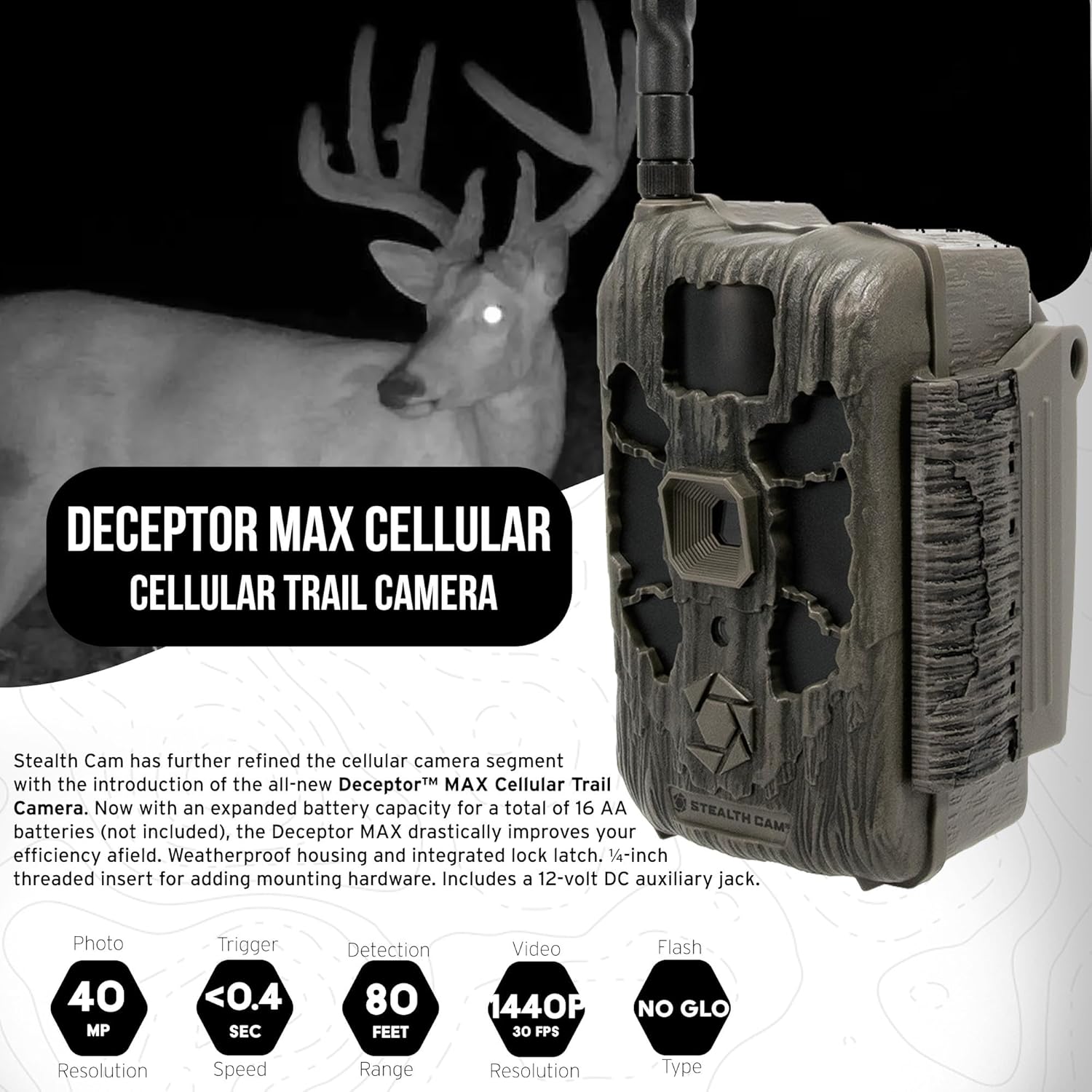
Figure 3.1: Front view of the Deceptor Max camera, showing key components.

Figure 3.2: Example image captured by the Deceptor Max, showcasing image clarity.
4. Setup
4.1. Battery Installation
The Deceptor Max requires 16 AA batteries (not included) for operation. For best performance and extended battery life, use high-quality alkaline or lithium batteries. Ensure correct polarity when inserting batteries.
- Open the camera's battery compartment latch.
- Insert 16 AA batteries, matching the positive (+) and negative (-) indicators inside the compartment.
- Securely close the battery compartment latch.

Figure 4.1: Proper battery installation in the Deceptor Max camera.
4.2. Memory Card Installation
The camera supports SDHC memory cards. A 32GB SDHC card is included in your bundle.
- Locate the SD card slot, typically near the battery compartment.
- Insert the 32GB SDHC memory card with the label facing up until it clicks into place.
- To remove, gently push the card in until it springs out.
4.3. Mounting the Camera
The Deceptor Max features a weatherproof housing and a 1/4-inch threaded insert for various mounting options.
- Choose a suitable location, such as a tree or post, that provides a clear view of the desired area.
- Use the included mounting strap to secure the camera firmly. Thread the strap through the slots on the back of the camera and around the mounting surface.
- Alternatively, utilize the 1/4-inch threaded insert at the bottom of the camera to attach it to compatible mounting hardware (sold separately).
- Adjust the camera's angle to cover the target area effectively.
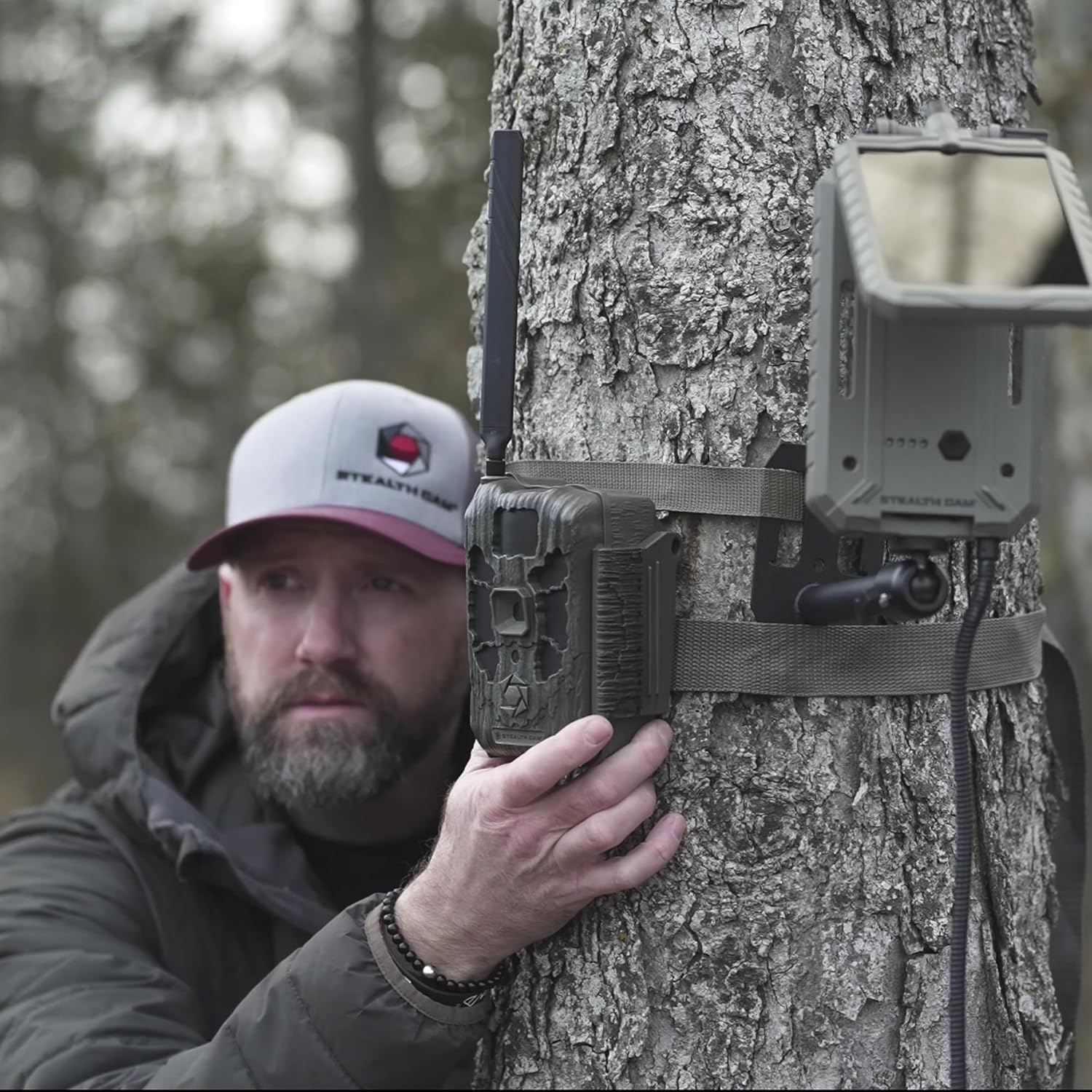
Figure 4.2: Example of mounting the Deceptor Max camera to a tree.
5. Operating the Camera
5.1. Powering On/Off
Locate the power switch inside the camera's housing. Toggle it to the 'ON' position to power up the camera. To power off, toggle the switch to 'OFF'.
5.2. Cellular Connectivity and Command Pro App
The Deceptor Max utilizes two pre-installed SIM cards and an Automatic Network Coverage feature to connect to the strongest available AT&T or Verizon network. Manage your camera remotely using the Command Pro app.
- Download the Command Pro app from your smartphone's app store.
- Create an account and register your Deceptor Max camera following the in-app instructions.
- Through the app, you can remotely control camera settings, request on-demand photos and videos, and view captured media in real-time.
- The app also allows for sharing images and integrating with HuntStand for enhanced scouting.

Figure 5.1: Command Pro app interface for remote camera management.
5.3. Photo and Video Capture
The camera is designed for high-performance image and video capture:
- Image Resolution: Up to 40 Megapixels.
- Trigger Speed: Ultra-fast 0.4 seconds.
- Burst Mode: Captures up to nine photos per burst.
- Flash Range: 80 feet with 940nm No-Glo LED array.
- Video: Records videos with audio.
6. Maintenance
Proper maintenance ensures the longevity and optimal performance of your trail camera:
- Cleaning: Gently wipe the camera lens and housing with a soft, damp cloth. Avoid abrasive cleaners.
- Battery Replacement: Replace all 16 AA batteries when the low battery indicator appears or when performance degrades.
- Memory Card Management: Regularly format your SD card using the camera's menu (if available) or a computer to prevent data corruption and ensure maximum storage.
- Firmware Updates: Check the Stealth Cam website periodically for firmware updates to ensure your camera has the latest features and bug fixes.
- Storage: When not in use for extended periods, remove batteries and store the camera in a cool, dry place.
7. Troubleshooting
If you encounter issues with your Deceptor Max camera, refer to the following common solutions:
- Camera Not Powering On: Ensure batteries are inserted correctly with proper polarity and are fully charged. Check that the power switch is in the 'ON' position.
- No Images/Videos Captured: Verify the SD card is properly inserted and has sufficient free space. Check camera settings for trigger delay and detection sensitivity. Ensure the camera is armed.
- Poor Image/Video Quality: Clean the camera lens. Ensure the camera is mounted securely to prevent movement. Check for obstructions in front of the lens or flash.
- No Cellular Connection: Confirm you have an active data plan for your camera. Check the signal strength indicator in the Command Pro app. Relocate the camera to an area with better cellular coverage.
- App Connectivity Issues: Ensure your smartphone has a stable internet connection. Update the Command Pro app to the latest version. Restart both your phone and the camera.
- Short Battery Life: Use high-quality alkaline or lithium batteries. Reduce the frequency of image/video capture or cellular transmissions if possible.
8. Specifications
| Feature | Detail |
|---|---|
| Image Resolution | 40 Megapixels |
| Trigger Speed | 0.4 seconds |
| Flash Type | 940nm No-Glo LED |
| Flash Range | Up to 80 feet |
| Burst Mode | Up to 9 photos per burst |
| Cellular Network | Automatic connection to AT&T or Verizon |
| Battery Type | 16 x AA (not included) |
| Memory Card Support | SDHC (up to 32GB included) |
| Product Dimensions (L x W x H) | 9.1 x 9.1 x 9.1 inches |
| Item Weight | 7.39 pounds |
| Weather Resistance | Weatherproof housing |
| UPC | 196271787891 |
9. Warranty Information
For detailed warranty information regarding your Stealth Cam Deceptor Max Cellular Trail Camera, please refer to the official Stealth Cam website or the warranty card included with your product packaging. Warranty terms and conditions may vary.
10. Customer Support
If you require further assistance or have questions not covered in this manual, please contact Stealth Cam customer support. You can find contact information and additional resources on the official Stealth Cam website:


