
Introduction
Welcome to the user manual for your new Generic M59 Pro Max Smartwatch. This guide provides essential information on setting up, operating, maintaining, and troubleshooting your device. The M59 Pro Max Smartwatch is designed to enhance your daily life with features like advanced activity tracking, call support, smart notifications, and various sport modes.
Package Contents
Please verify that all the following items are included in your package:
- M59 Pro Max Smartwatch
- 7 Random Straps (Silicone, Rubber, Nylon)
- Wireless Charging Cable
- User Manual

Image: The M59 Pro Max Smartwatch and its accessories, including a variety of interchangeable straps, neatly arranged in its packaging.
Setup
1. Charging the Smartwatch
Before first use, fully charge your smartwatch. Place the smartwatch on the wireless charging cable. The screen will indicate charging status. A full charge typically takes 2-3 hours.
2. Power On/Off
- To Power On: Press and hold the side button until the screen lights up.
- To Power Off: Press and hold the side button, then select 'Power Off' on the screen.
3. App Installation and Pairing
To unlock the full potential of your smartwatch, download the companion fitness tracker application on your smartphone or tablet. Refer to the Quick Start Guide for the specific app name or QR code.
- Download and install the app from your device's app store.
- Enable Bluetooth on your smartphone.
- Open the app and follow the on-screen instructions to pair your M59 Pro Max Smartwatch. Ensure the smartwatch is powered on and near your phone during pairing.
Operating Instructions
Basic Navigation
The M59 Pro Max features a 2-inch HD touchscreen display for intuitive interaction. Swipe left, right, up, or down to navigate through menus and access different functions. Tap to select items.
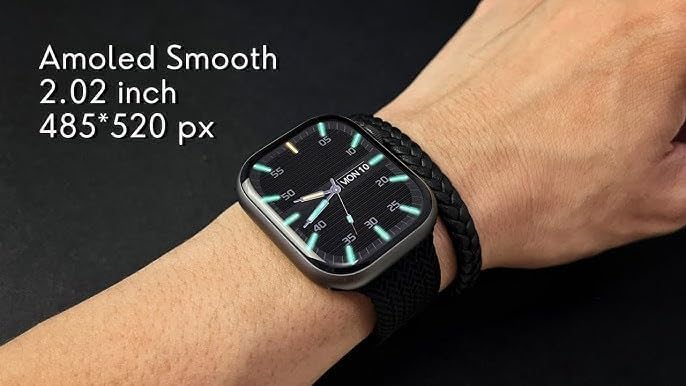
Image: The M59 Pro Max Smartwatch worn on a wrist, showcasing its vibrant 2.02-inch AMOLED display with a resolution of 485x520 pixels.
Calls and Notifications
Once paired via Bluetooth, you can manage calls and receive notifications directly on your smartwatch.
- Making Calls: Use the dialer on the watch or access your phone's contacts through the watch interface.
- Receiving Calls: Answer or reject incoming calls directly from your wrist.
- Notifications: View messages, app alerts, and other notifications.
Fitness Tracking and Sport Modes
The smartwatch offers comprehensive fitness tracking and multiple sport modes.
- Activity Tracking: Monitors steps, distance, and calories burned.
- Heart Rate Monitor: Provides real-time heart rate data.
- Sleep Tracking: Analyzes sleep patterns and duration.
- Sport Modes: Select from various activities like running, cycling, and more to track specific workout data.
NFC and GPT Features
The M59 Pro Max supports NFC for convenient transactions and GPT for enhanced interaction. Refer to the companion app for specific setup and usage instructions for these advanced features.
Maintenance
Cleaning
Wipe the smartwatch and straps regularly with a soft, dry cloth. For stubborn dirt, a slightly damp cloth can be used. Avoid harsh chemicals or abrasive materials.
Water Resistance
The M59 Pro Max is water repellent. This means it can withstand splashes, sweat, and light rain. It is not suitable for swimming, showering, or diving. Avoid prolonged exposure to water.
Strap Care
The included straps are made of silicone, rubber, and nylon. Clean them according to their material type. Ensure straps are dry before reattaching to the watch.
Troubleshooting
If you encounter issues with your smartwatch, try the following solutions:
- Smartwatch not powering on: Ensure the device is fully charged.
- Cannot pair with smartphone: Make sure Bluetooth is enabled on your phone and the smartwatch is within range. Try restarting both devices.
- Inaccurate fitness data: Ensure the watch is worn snugly on your wrist. Calibrate the app if available.
- Notifications not appearing: Check app permissions on your smartphone and ensure notifications are enabled for the companion app.
- Screen unresponsive: Try restarting the smartwatch.
For further assistance, please refer to the support section of the companion application or contact your retailer.
Specifications
| Model Name | M59 Pro Max |
| Brand Name | Generic |
| Operating System | Proprietary OS |
| Screen Size | 2 inches |
| Display Type | OLED |
| Resolution | 240 x 280 |
| Connectivity Technology | Bluetooth, Cellular (LTE) |
| Wireless Communication Standard | Bluetooth |
| Connectivity Features | NFC, Bluetooth, Cellular |
| Special Features | Advanced Activity Tracking, Call and Chat Support |
| Battery Cell Composition | Lithium Ion |
| GPS | No GPS |
| Item Shape | Round |
| Band Material Type | Silicone, Rubber, Nylon |
| Water Resistance Level | Water Repellent |
| Sport Type | Multiple Sports |
| Human Interface Input | Touchscreen |
| Supported Application | Fitness Tracker |
| Controller Type | Voice Control |
| Meter Type | Heart Rate Monitor, Sleep Duration, Step Count |
| Closure Type | Buckle |
| Color | Black |
| Band Color | Black |
| Compatible Devices | Smartphone, Tablet |
| Compatible Phone Models | All current smartphone models |
Warranty and Support
Warranty Information
This product is provided without an explicit warranty. Please check with your retailer regarding their return and exchange policies.
Customer Support
For any questions or issues not covered in this manual, please contact the retailer where you purchased the product or refer to the support section within the companion application.