1. Introduction
This manual provides detailed instructions for the safe and efficient use of your Generic XO-X26 Portable Wireless Earphones. Please read this manual thoroughly before using the product and retain it for future reference. The XO-X26 earphones are designed to provide a convenient and high-quality audio experience through Bluetooth connectivity.
2. Package Contents
Please check the package for the following items:
- XO-X26 Wireless Earbuds (Left and Right)
- Charging Case
- USB Charging Cable
- User Manual

Image: Retail packaging for the XO-X26 Wireless Earphones, showing the earbuds and charging case.
3. Product Overview
Familiarize yourself with the components of your XO-X26 earphones.
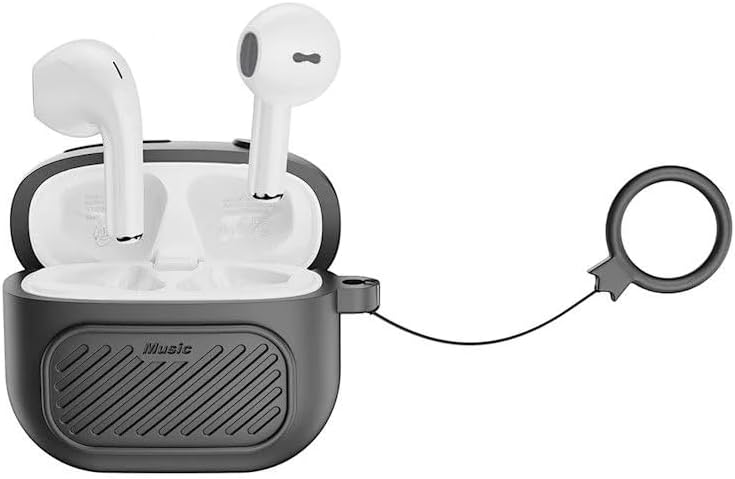
Image: The XO-X26 wireless earbuds placed inside their black charging case, which features a textured surface and an attached black lanyard.

Image: The XO-X26 wireless earbuds in their charging case, positioned on a reflective surface with a blue water background, illustrating their water resistance.

Image: The XO-X26 wireless earbuds in their charging case, resting on a clear glass desk in an indoor setting, highlighting their compact design.

Image: The XO-X26 wireless earbuds in a white charging case, with a green indicator light visible, showing the earbuds ready for use.
4. Setup
4.1 Charging the Earphones and Case
Before first use, fully charge the earphones and the charging case.
- Place the earbuds into the charging case. Ensure they are correctly seated.
- Connect the USB charging cable to the charging port on the case and to a USB power source (e.g., computer, wall adapter).
- The indicator light on the charging case will illuminate to show charging status.
- Once fully charged, disconnect the charging cable.
The charging case provides additional charges for the earbuds, extending their usage time.
4.2 Pairing with a Bluetooth Device
To connect your XO-X26 earphones to your smartphone or other Bluetooth-enabled device:
- Ensure the earbuds are charged.
- Open the charging case. The earbuds will automatically enter pairing mode, and an indicator light on the earbuds or case will flash.
- On your device, go to Bluetooth settings and turn Bluetooth on.
- Search for available devices. Select "XO-X26" from the list.
- Once connected, a confirmation sound or indicator light change will occur.
- The earphones will automatically reconnect to the last paired device when taken out of the case, if Bluetooth is enabled on the device.
5. Operating the Earphones
The XO-X26 earphones feature intuitive touch controls.
5.1 Basic Controls
- Play/Pause: Single tap on either earbud.
- Next Track: Double tap on the right earbud.
- Previous Track: Double tap on the left earbud.
- Volume Up: Triple tap on the right earbud.
- Volume Down: Triple tap on the left earbud.
5.2 Call Management
- Answer/End Call: Single tap on either earbud.
- Reject Call: Press and hold either earbud for 2 seconds.
5.3 Voice Assistant
- Activate Voice Assistant (Siri/Google Assistant): Press and hold either earbud for 3 seconds.
6. Maintenance
Proper maintenance ensures the longevity and optimal performance of your XO-X26 earphones.
- Cleaning: Use a soft, dry, lint-free cloth to clean the earbuds and charging case. Do not use abrasive cleaners or solvents.
- Water Resistance: The earphones are IPX4 water-resistant, meaning they are protected against splashing water from any direction. They are not designed for submersion in water. Do not expose them to heavy rain or immerse them.
- Storage: When not in use, store the earphones in their charging case to protect them from dust and damage. Store in a cool, dry place.
- Battery Care: To preserve battery life, charge the earphones regularly, even if not used frequently. Avoid fully discharging the battery for extended periods.
7. Troubleshooting
If you encounter issues with your XO-X26 earphones, refer to the following common solutions:
| Problem | Solution |
|---|---|
| Earbuds not pairing |
|
| No sound from one earbud |
|
| Charging case not charging |
|
| Poor audio quality |
|
8. Specifications
| Model Name: | XO-X26 |
| Brand: | Generic |
| Connectivity: | Wireless (Bluetooth) |
| Form Factor: | In Ear |
| Color: | Black |
| Water Resistance: | IPX4 |
| Included Components: | Charging Cable, Charging Case, Earbuds, User Manual |
9. Warranty and Support
The Generic XO-X26 Portable Wireless Earphones come with a manufacturer's warranty of 6 months from the date of purchase.
This warranty covers defects in materials and workmanship under normal use. It does not cover damage caused by misuse, accidents, unauthorized modifications, or normal wear and tear.
For warranty claims or technical support, please contact your retailer or the point of purchase. Please retain your proof of purchase for warranty validation.


