
OYDL 2609Y14U4C
OYDL YU Xiang F07 Bell UH-1 Huey RC Helicopter User Manual
Model: 2609Y14U4C
Introduction
This user manual provides essential information for the safe and effective operation of your OYDL YU Xiang F07 Bell UH-1 Huey RC Helicopter. Please read this manual thoroughly before operating the helicopter to ensure proper setup, flight, and maintenance. This 1:34 scale model is designed for advanced users, featuring a brushless direct-drive motor, 3D/6G flybarless system, and optical flow positioning for precise control.
Package Contents
Verify that all items listed below are included in your package:
- Aircraft (YU Xiang F07 Bell UH-1 Huey RC Helicopter) x 1
- User Manual x 1
- Specialized USB Charging Cable x 1
- Main Propeller Blades x 4
- Tail Propeller Blades x 1
- Smart Battery (7.4V 1200mAh 25C Li-Po) x 3 (for 3 Battery variant)
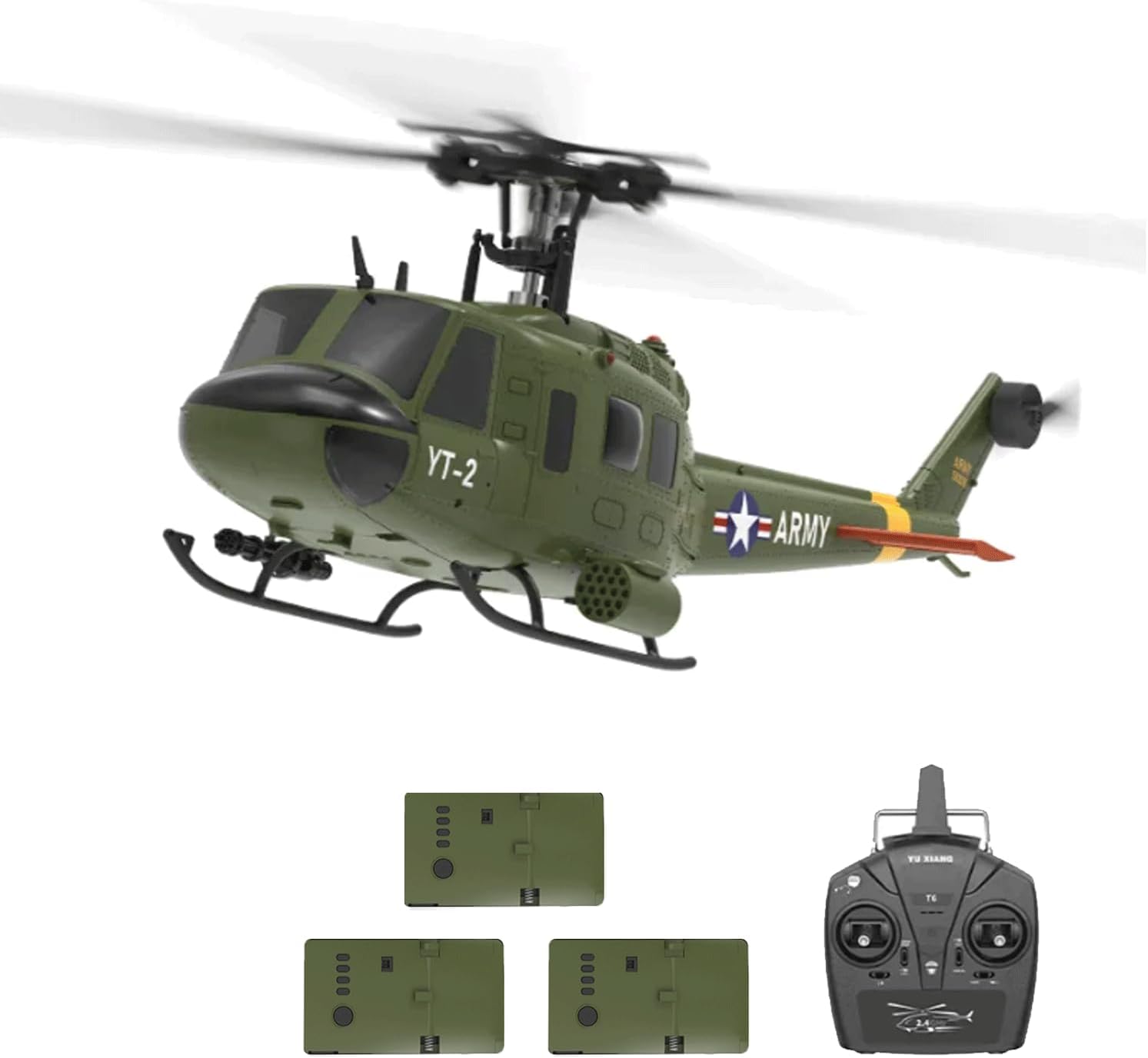
Image: The YU Xiang F07 Bell UH-1 Huey RC Helicopter, its remote control, and three included batteries.
Features
- Scale Model Design: Based on the iconic Bell UH-1 Huey helicopter, this 1:34 scale model features highly detailed, realistic aesthetics and cool lighting effects.
- Optical Flow Positioning & Barometer Altitude Hold: Enables high-precision indoor and outdoor flight with pinpoint accuracy and stable hovering.
- One-key Inverted Flight: Simplifies mastering inverted flight, making it as accessible as normal flight.
- 6-axis Gyro & Electronic Stabilization: Provides stable, quick, and precise flight posture, ideal for beginners. Features a flybarless design with a dual-axis driven motor system.
- Durable Construction: Made from a robust nylon + carbon fiber composite for high strength, impact resistance, and longevity.
- 2511 1200KV Brushless Motor: Offers low noise, high torque, and exceptional efficiency. High-temperature-resistant magnetic steel ensures durability up to 150°C.
- Professional Li-Po Battery: 7.4V 1200mAh 25C Li-Po battery provides high discharge rates, 10-12 minutes of flight time, and over 500 charge cycles. Includes low battery indication and over-discharge protection.
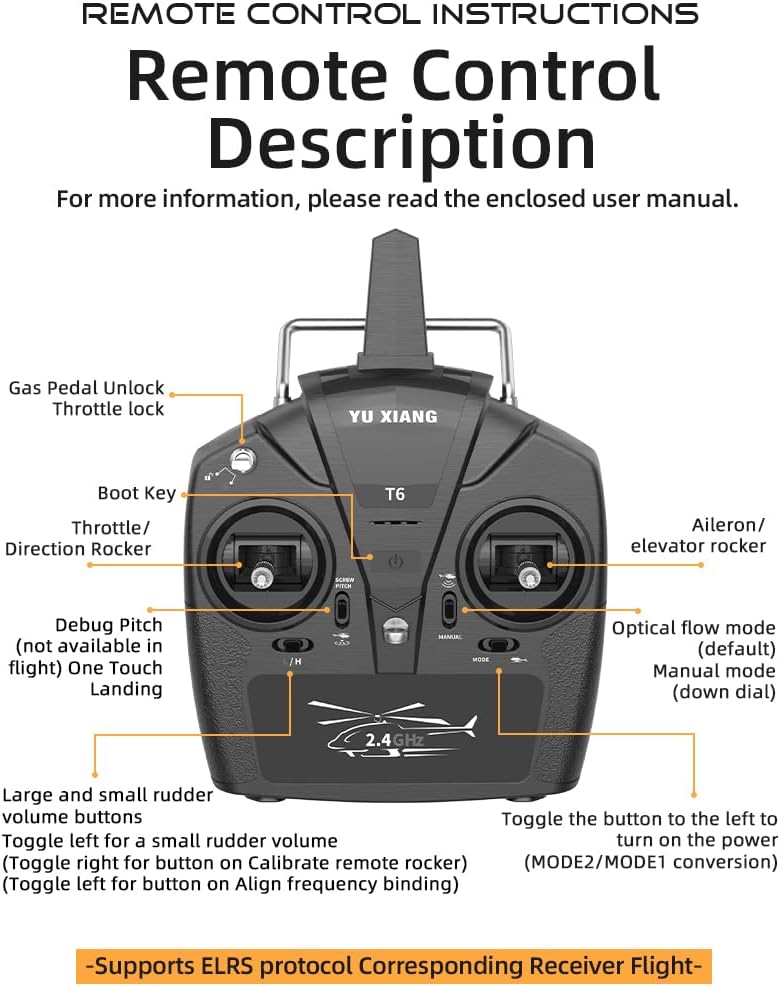
Image: Visual representation of the helicopter's core features, such as the 6-axis gyroscope and brushless motor.

Image: Detailed view of the 2511 1200KV brushless motor, emphasizing its robust design and heat resistance.
Setup
Battery Charging
Before first use, fully charge the helicopter's Li-Po battery. The charging time is approximately 60-70 minutes.
- Connect the specialized USB charging cable to a USB power source (e.g., computer USB port, USB wall adapter).
- Connect the battery to the charging cable.
- The indicator light on the USB charger will show the charging status (refer to charger's specific light indications).
- Once charging is complete, disconnect the battery from the charger.
Battery Installation
Carefully insert the charged battery into the helicopter's battery compartment, ensuring correct polarity and a secure fit.
Remote Control Setup
Install batteries into the remote control (not specified in JSON, assume standard AA/AAA). The remote control supports ELRS protocol for corresponding receiver flight.

Image: Detailed layout of the remote control, indicating the function of each button and stick.
Operating Instructions
Pre-Flight Check
- Ensure the helicopter battery is fully charged and securely installed.
- Verify the remote control batteries are sufficient.
- Check that all propeller blades are securely attached and undamaged.
- Perform flight in an open area, free from obstacles, people, or animals.
Pairing the Helicopter and Remote
Follow the specific pairing instructions in the enclosed user manual for your model. Generally, this involves powering on the helicopter first, then the remote, and performing a throttle stick calibration.
Basic Flight Controls
Familiarize yourself with the remote control functions:
- Throttle/Direction Rocker (Left Stick): Controls altitude (up/down) and yaw (left/right rotation).
- Aileron/Elevator Rocker (Right Stick): Controls forward/backward movement (pitch) and left/right sideways movement (roll).
- Optical Flow Mode (Default): Provides stable flight with precise positioning.
- Manual Mode: Offers more direct control for experienced pilots.
- One-Touch Landing: Initiates an automatic landing sequence.
- One-Touch Inverted Flight: Allows for easy transition to inverted flight. Practice this outdoors in an open field with no wind or light wind. Note: The vehicle only performs left and right rolls in inverted mode, not forward and backward.

Image: Depiction of the helicopter's one-touch inverted flight capability.
Flight Environment
The helicopter is suitable for both indoor and outdoor use due to its optical flow positioning and barometer altitude hold function. For optimal performance and safety, especially when learning or performing advanced maneuvers like inverted flight, choose an open area with minimal wind.
Video: An official product video demonstrating the YU Xiang F07 Bell UH-1 Huey RC Helicopter in flight, showcasing its stability and maneuverability in various environments.
Maintenance
- Cleaning: Use a soft, dry cloth to clean the helicopter after each use. Avoid water or harsh chemicals.
- Blade Inspection: Regularly check main and tail propeller blades for any cracks, bends, or damage. Replace damaged blades immediately to ensure safe flight.
- Battery Care: Store batteries in a cool, dry place. Do not overcharge or over-discharge. If storing for extended periods, charge to approximately 50% capacity.
- Motor Inspection: Periodically check the brushless motor for any debris or signs of wear.
- General Inspection: Before each flight, inspect the helicopter for any loose parts, damaged wiring, or structural integrity issues.
Troubleshooting
| Problem | Possible Cause | Solution |
|---|---|---|
| Helicopter does not respond to remote. | Low battery in helicopter or remote; not paired correctly. | Charge helicopter battery; replace remote batteries; re-pair helicopter and remote. |
| Helicopter flies erratically or is unstable. | Damaged propellers; uncalibrated gyroscope; strong wind. | Inspect and replace damaged blades; recalibrate gyroscope (refer to full manual); fly in calmer conditions. |
| Short flight time. | Battery not fully charged; aging battery. | Ensure battery is fully charged; consider replacing battery if performance degrades significantly. |
| Helicopter does not lift off. | Insufficient throttle; motor issue; battery too low. | Increase throttle gradually; check for motor obstruction; ensure battery is charged. |
Specifications
| Feature | Detail |
|---|---|
| Model Name | F07 (UH-1 six-channel intelligent 6G aileronless simulation Huey) helicopter |
| Product Dimensions | 15 x 14.7 x 4.7 inches (approx. 385mm length) |
| Item Weight | 8 ounces (approx. 228g) |
| Remote Control Mode | 2.4G Remote Control |
| Remote Control Distance | Greater than 120 meters |
| Product Material | High-strength composite materials (Nylon + Carbon Fiber) |
| Recommended Age | 14+ years |
| Body Battery | LI-POLY Smart Battery 7.4V (1200MAH) 25C |
| Charging Time | About 60-70 Minutes |
| Usage Time | 10-12 Minutes |
| Motor Type | 2511 1200KV Brushless Motor |
| Gyroscope | 6-axis Gyro |
| Positioning | Optical Flow Positioning, Barometer Altitude Hold |

Image: A comprehensive product information sheet detailing the helicopter's specifications.
Warranty and Support
For warranty information, technical support, or replacement parts, please refer to the contact information provided on the product packaging or visit the official OYDL website. Keep your purchase receipt as proof of purchase for any warranty claims.
Manufacturer: OYDL