
1. Introduction
The LIBODD ET12S is a versatile 2-in-1 device that integrates a digital multimeter with a thermal imager. This instrument is designed for various applications, including electrical troubleshooting, HVAC inspections, and general maintenance, providing both precise electrical measurements and visual temperature distribution. This manual provides essential information for the safe and effective operation of your ET12S device.
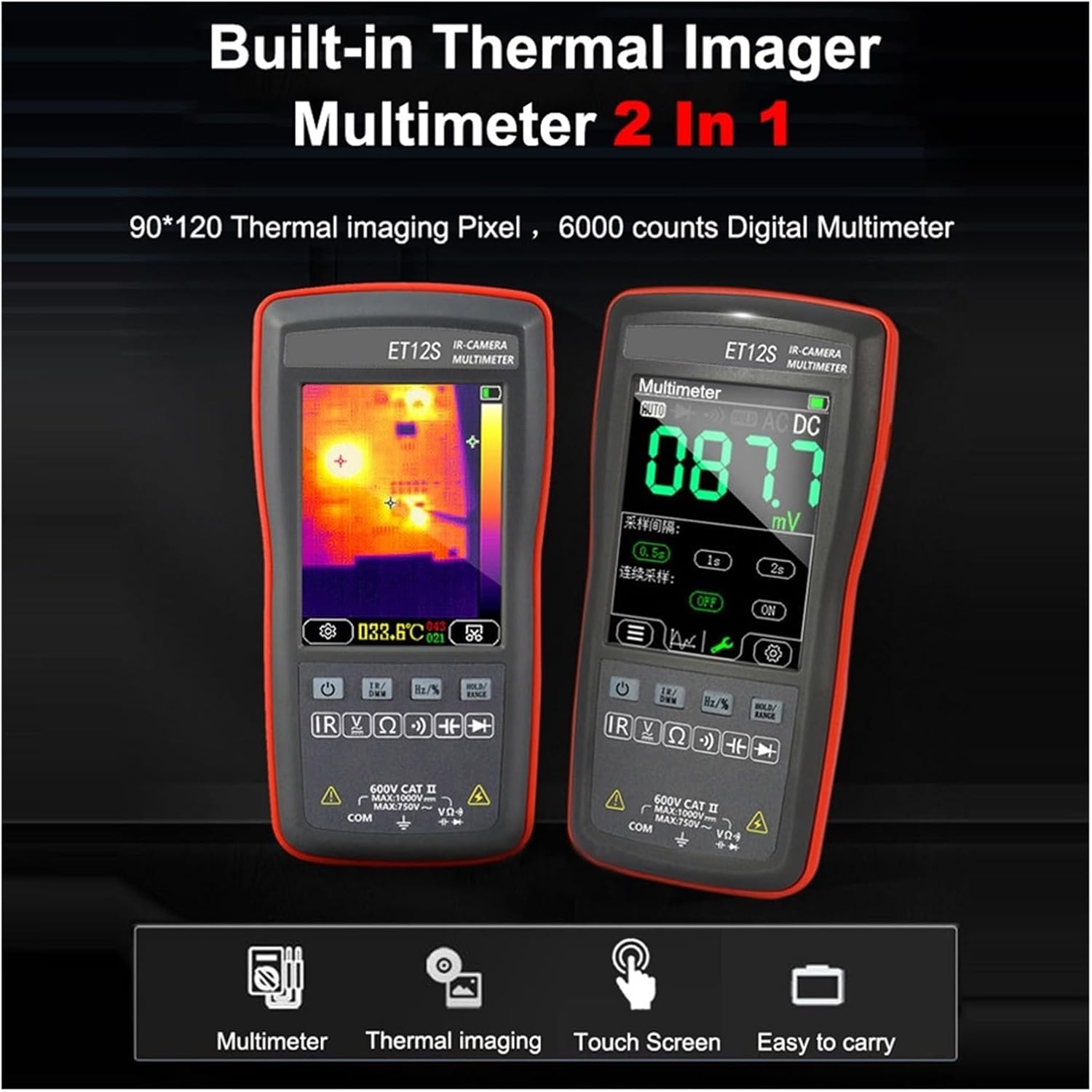
Image 1.1: The ET12S device displaying both thermal imaging and multimeter modes. The left screen shows a thermal image with temperature readings, while the right screen displays electrical measurement values.
2. Safety Information
To ensure safe operation and avoid damage to the device, please read and adhere to the following safety precautions:
- Do not exceed the maximum input voltage ratings for any measurement function (1000V DC, 750V AC).
- Always inspect the test leads for damage before use. Do not use if insulation is compromised.
- Ensure the correct function is selected before connecting the test leads to the circuit under test.
- Avoid touching the thermal imaging camera lens with sharp objects to prevent damage.
- Do not operate the device in wet environments or if the device itself is wet.
- Refer to local electrical safety standards and regulations when performing measurements.
- The device contains a built-in lithium battery. Do not attempt to replace it yourself.
- Charge the device using the provided Type-C USB cable and a compatible power source.
3. Package Contents
Verify that all items are present in the package:
- 1 x LIBODD ET12S Thermal Imager Multimeter
- 1 x Pair of Test Leads
- 1 x User Manual (this document)
- 1 x Type-C USB Cable (for charging and data transfer)
4. Product Overview
Familiarize yourself with the components and controls of your ET12S device.

Image 4.1: Front view of the ET12S, illustrating the display, touch screen areas, and physical buttons. Key functions include Power, IR Camera/Multimeter Switch, Hold/Range, and Frequency/Duty Cycle.

Image 4.2: Rear view of the ET12S, highlighting the thermal imaging camera lens and the latch for the battery back cover. The thermal camera should be protected from sharp objects.
4.1 Key Components:
- Display Screen: 2.8-inch 320x480 resistive touchscreen for viewing measurements and navigating menus.
- Thermal Imaging Camera: Located at the top rear of the device, used for capturing thermal images.
- Test Lead Input Jacks: Standard jacks for connecting test leads for electrical measurements.
- Power Button: To turn the device on or off.
- IR Camera / Multimeter Switch Button: Toggles between thermal imaging and multimeter modes.
- Hold / Range Button: Used to hold the current reading or manually select measurement ranges.
- Frequency / Duty Cycle Button: For measuring frequency and duty cycle.
- USB Type-C Port: For charging the internal battery and connecting to a PC for data transfer.
5. Setup
5.1 Initial Charging
The ET12S comes with a built-in 850mAh lithium battery. Before first use, it is recommended to fully charge the device.
- Connect the provided Type-C USB cable to the USB port on the side of the ET12S.
- Connect the other end of the USB cable to a standard USB power adapter (not included) or a computer's USB port.
- The charging indicator on the device will show the charging status. Allow the device to charge until the indicator shows a full charge.
5.2 Powering On/Off
- To Power On: Press and hold the Power Button until the screen illuminates.
- To Power Off: Press and hold the Power Button until the device shuts down. The device also features automatic power-off functionality, which can be configured in the system settings.
6. Operating Instructions
6.1 Touchscreen Navigation and Language Settings
The ET12S features a resistive touchscreen for intuitive operation. Functions can be accessed with a single touch.

Image 6.1: The ET12S touchscreen interface showing system settings, including options for 'PowerBoot' (Camera/Multimeter), auto-off timers, and language selection (Chinese/English).
- Tap on icons or menu options to select them.
- To change the language, navigate to the 'System settings' menu (as shown in Image 6.1) and select 'Language'. Choose between Chinese and English.
- The 'PowerBoot' setting allows you to choose whether the device starts in Camera (thermal imager) or Multimeter mode.
6.2 Switching Between Thermal Imager and Multimeter Modes
Press the IR Camera / Multimeter Switch Button (labeled 'IR' and 'DMM' or similar) to toggle between the thermal imaging display and the digital multimeter display. Alternatively, this can be done via the 'PowerBoot' setting on the touchscreen.
6.3 Multimeter Functions
The ET12S offers a range of electrical measurement capabilities:
- AC/DC Voltage Measurement: Connect test leads to the appropriate input jacks and the circuit. The device supports up to 1000V DC and 750V AC.
- Resistance Measurement: Measure resistance up to 40MΩ. Ensure the circuit is de-energized before measuring resistance.
- Capacitance Measurement: Measure capacitance up to 100uF. Discharge capacitors before testing.
- Diode Test: Test diodes within a range of 0V-1.5V.
- Continuity Test: Detect circuit continuity with a maximum resistance of 30Ω. An audible beep indicates continuity.
- Frequency / Duty Cycle: Measure frequency and duty cycle within 0.1%-99.9% range using the dedicated button.
6.4 Thermal Imager Functions
When in thermal imaging mode, the ET12S displays a thermal image with temperature readings.
- Temperature Measurement Range: -20°C to +400°C (-4°F to +752°F) for the ET12S model.
- Emissivity Adjustment: The emissivity can be adjusted from 0.1 to 0.99 to accurately measure temperatures of different materials. The default setting is 0.95.
- Automatic Gain Mode: The device automatically adjusts the thermal image for optimal clarity.
- Image Capture: The device supports capturing thermal images in BMP format.
6.5 PC Connection and Data Transfer
The ET12S can connect to a computer via its Type-C USB interface for data transfer.
- Connect the ET12S to your PC using the USB Type-C cable.
- The device will appear as a removable storage device.
- You can transfer saved thermal images (BMP format) and multimeter measurement data records to your computer.
- Specialized PC software (if provided by LIBODD) may offer advanced analysis and backup features for the data.
7. Maintenance
7.1 Cleaning
- Wipe the device casing with a soft, damp cloth. Do not use abrasive cleaners or solvents.
- For the thermal imaging lens and display screen, use a soft, lint-free cloth specifically designed for optics. Avoid scratching the surfaces.
- Ensure the device is powered off and disconnected from any power source before cleaning.
7.2 Battery Care and Storage
- Recharge the battery when the low battery indicator appears to prolong battery life.
- If storing the device for an extended period, charge the battery to approximately 50% every three months to prevent deep discharge.
- Store the device in a cool, dry place, away from direct sunlight and extreme temperatures. The recommended storage temperature is -20°C to 60°C (-4°F to 140°F).
- Avoid exposing the device to high humidity (working humidity <85% RH, non-condensing).
8. Troubleshooting
If you encounter issues with your ET12S, refer to the following common problems and solutions:
| Problem | Possible Cause | Solution |
|---|---|---|
| Device does not power on. | Low or depleted battery. | Charge the device using the Type-C USB cable. |
| Inaccurate multimeter readings. | Incorrect function selected; damaged test leads; poor contact. | Ensure correct function is selected. Check test leads for damage and proper connection. Ensure good contact with the circuit. |
| Thermal image appears blurry or incorrect. | Dirty thermal lens; incorrect emissivity setting. | Clean the thermal lens with a soft, lint-free cloth. Adjust the emissivity setting to match the material being measured. |
| Device freezes or is unresponsive. | Software glitch. | Perform a soft reset by holding the power button for an extended period (e.g., 10-15 seconds) until it restarts. If issue persists, contact support. |
| Cannot connect to PC. | Faulty USB cable; incorrect PC port; driver issue. | Try a different USB cable or PC USB port. Ensure the device is powered on. Check PC device manager for driver issues. |
9. Specifications
Technical specifications for the LIBODD ET12S Digital Thermal Imager Multimeter:

Image 9.1: Detailed comparison of specifications for the ET11S and ET12S models, covering thermal imaging and multimeter parameters, as well as general device features.
9.1 Thermal Imager Parameters (ET12S)
- Sensor: Uncooled focal plane
- Image Capture Frequency: 20Hz
- Thermal Imaging Pixel: 90*120
- Field of View (FOV): 55°(H) * 35°(V)
- Emissivity: 0.1-0.99 adjustable (default 0.95)
- Measuring Ranges: -20°C to +400°C (-4°F to +752°F)
- Mode: Automatic gain
- Temperature Measurement Error: >0°C: ±2°C / ±2%; ≤0°C: ±5°C / ±5%
- Display Temperature Accuracy: 0.1°C / 0.1°F
9.2 Multimeter Parameters (ET12S)
- Maximum DC Input Voltage: 1000V
- Maximum AC Input Voltage: 750V
- Maximum Measured Resistance: 40MΩ
- Maximum Measured Capacitance: 100uF
- Duty Cycle Measurement Ranges: 0.1% - 99.9%
- Diode Measuring Ranges: 0V - 1.5V
- Maximum Resistance of On-off Detection: 30Ω
- Counts: 4000 counts
- Refreshes: 6 times per second
9.3 Other Parameters
- Display Screen: 2.8 inches, 320*480 resolution
- Touchscreen: Resistive touchscreen
- USB Interface: Type-C
- Storage Capacity: 3.5MB
- Imaging Format: BMP
- Battery: 1 * built-in 850mAh lithium battery
- Storage Temperature: -20°C to 60°C (-4°F to 140°F)
- Working Temperature: 0°C to 50°C (32°F to 122°F)
- Working Humidity: <85% RH (non-condensing)
- Item Size: 134 * 69 * 25mm / 5.28 * 2.72 * 0.98in
- Item Weight: 125g / 4.41oz
10. Warranty Information
Please refer to the warranty card included with your product or contact the retailer/manufacturer for specific warranty terms and conditions. Typically, products are covered against defects in materials and workmanship for a defined period from the date of purchase. Keep your proof of purchase for warranty claims.
11. Support
For technical assistance, troubleshooting beyond this manual, or service inquiries, please contact LIBODD customer support. Refer to the contact information provided on the product packaging or the official LIBODD website.
When contacting support, please have your product model (ET12S) and purchase information ready.