
1. Introduction
This manual provides detailed instructions for the installation, operation, and maintenance of your Ailgely Motorcycle LED Display Gauge. This multi-functional instrument integrates a speedometer, odometer, tachometer, and fuel gauge, designed to provide essential riding information with enhanced visibility and customizable settings.
Key Features:
- Customizable Settings: Easily adjust speed, RPM, and fuel capacity with a button press for a personalized driving experience.
- Multi-functional Display: Integrates speedometer, odometer, tachometer, and fuel gauge for comprehensive monitoring.
- Easy Installation: Designed for quick and hassle-free setup, enhancing rider convenience.
- Enhanced Visibility: Features a white backlight and large LCD display for clear readability day and night, reducing eye strain.
- Accurate Fuel Gauge: Displays fuel level in 5 segments, providing precise and reliable information for efficient fuel management.
2. Safety Information
Please read all safety warnings and instructions carefully before installation and operation. Failure to follow these instructions may result in product damage, property damage, or personal injury.
- Ensure the motorcycle's power is off before beginning installation.
- Consult a qualified technician if you are unsure about any installation steps.
- Do not modify the product or its wiring in any way not described in this manual.
- Keep the product away from extreme temperatures and moisture.
3. Package Contents
Verify that all items are present in the package:
- Ailgely Motorcycle LED Display Gauge (Model Aiafz5gcgpun-2)
- Wiring Harness
- Speed Sensor (if included with your specific variant)
- Mounting Hardware (bolts, nuts, washers)
- User Manual (this document)

Image 1: Front view of the Ailgely Motorcycle LED Display Gauge with its wiring harness.

Image 2: Rear view of the gauge, highlighting the mounting bolts and electrical connectors.
4. Setup and Installation
This section details the steps for installing your new LED display gauge. Professional installation is recommended if you are unfamiliar with motorcycle electrical systems.
4.1 Wiring Diagram
Refer to the following general wiring guide. Specific wire colors may vary, but the functions are standard. Always cross-reference with your motorcycle's wiring diagram.
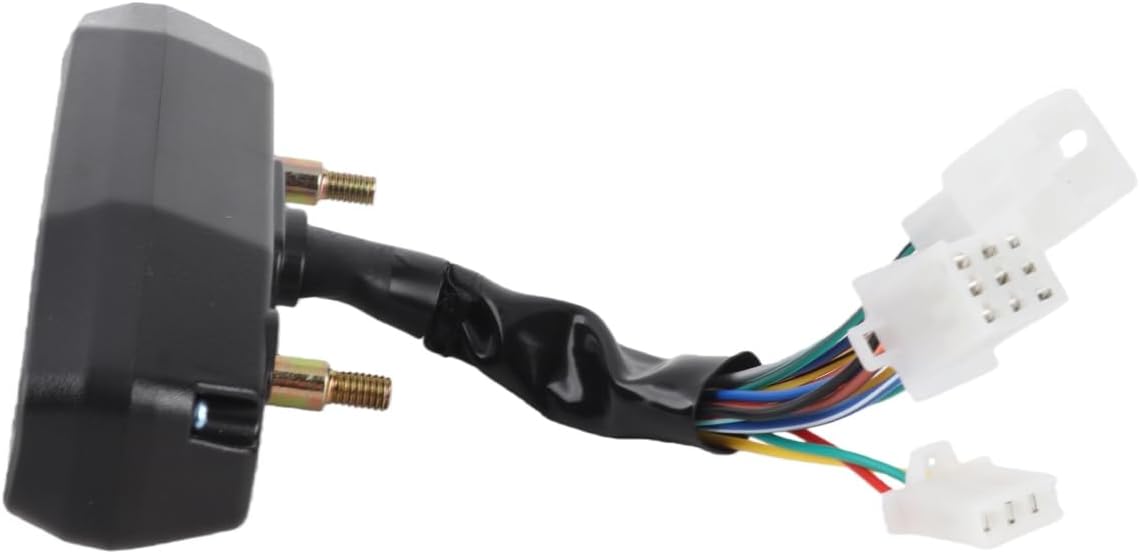
Image 3: Example wiring diagram showing connections for power, ground, speed sensor, tachometer, and indicator lights.
- Red Wire: +12V (Ignition Switched Power)
- Black Wire: Ground (-)
- Green Wire: Speed Sensor Signal
- Yellow/Black Wire: Tachometer Signal (Connect to ignition coil positive or ECU tach output)
- Blue Wire: High Beam Indicator (+)
- Orange Wire: Left Turn Signal Indicator (+)
- Light Blue Wire: Right Turn Signal Indicator (+)
- Brown Wire: Fuel Level Sensor Input
- White Wire: Neutral Gear Indicator (+)
- Other Wires (if present): Refer to specific product documentation or consult a professional.
Note: Some reviews indicate that the turn signal indicators might not be separated for left/right. If your motorcycle uses separate left/right signals and the gauge only has one input, you may need to use diodes to combine the signals before connecting to the gauge.
4.2 Mounting the Gauge
- Choose a suitable location on your motorcycle's dashboard or handlebars.
- Use the provided mounting hardware to securely attach the gauge. Ensure it is stable and visible to the rider.

Image 4: Side view showing the compact design and mounting points of the gauge.
4.3 Speed Sensor Installation
- Install the speed sensor near a rotating part of the wheel (e.g., brake rotor bolts).
- Attach the magnet(s) to the rotating part, ensuring they pass close to the sensor head with each rotation.
- Connect the speed sensor wire to the corresponding input on the gauge's wiring harness.
4.4 Initial Configuration (Speed and RPM)
To enter the setup mode for speed and RPM calibration:
- With the motorcycle's ignition OFF, press and hold the button on the gauge.
- While holding the button, turn the ignition ON.
- The display will enter configuration mode. Follow the on-screen prompts or refer to the specific instructions provided with your unit for detailed calibration steps.
- Speed Calibration: Set the tire circumference (diameter x π). This value is crucial for accurate speed and odometer readings.
- RPM Calibration: Adjust the RPM setting according to your engine's cylinder count and ignition type. This typically involves setting the pulse ratio.
5. Operating Instructions
Once installed and configured, the gauge will display various parameters:
- Speed: Current riding speed.
- RPM: Engine revolutions per minute.
- Odometer: Total distance traveled.
- Fuel Gauge: Displays current fuel level in 5 segments. If not connected, it may display battery voltage.
- Indicator Lights: High beam, turn signals (left/right), and neutral gear.
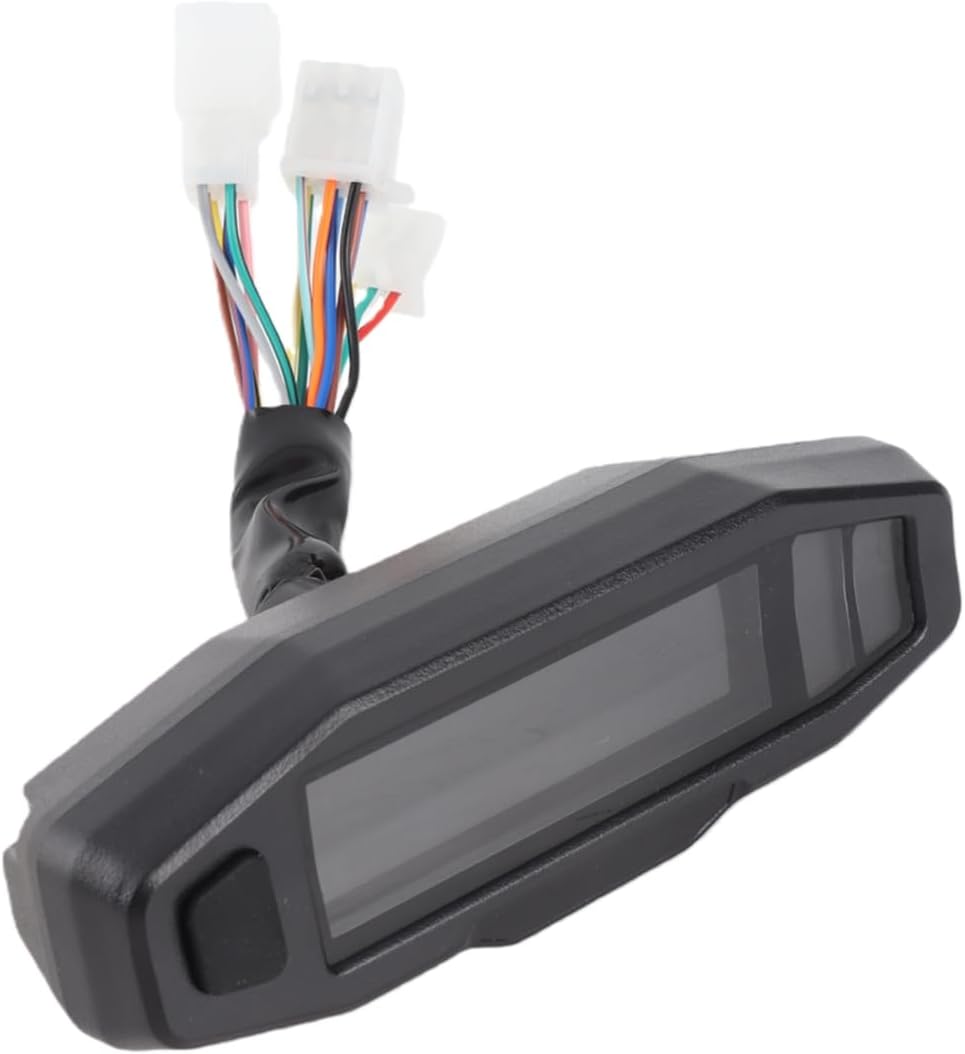
Image 5: Front view of the gauge, illustrating the display screen and control button.
5.1 Button Functions
The single button on the gauge typically serves multiple functions:
- Short Press: Cycle through display modes (e.g., Odometer, Trip A, Trip B).
- Long Press: Reset trip meters or enter/exit settings mode (as described in Section 4.4).
6. Maintenance
To ensure the longevity and optimal performance of your Ailgely LED Display Gauge, follow these maintenance guidelines:
- Cleaning: Wipe the display with a soft, damp cloth. Avoid abrasive cleaners or solvents that could damage the screen.
- Wiring Inspection: Periodically check all wiring connections for looseness or corrosion. Ensure wires are securely routed and protected from heat and moving parts.
- Sensor Check: Verify that the speed sensor and its magnet(s) are clean and properly aligned.
- Water Exposure: While designed to be water-resistant, avoid direct high-pressure water jets on the unit.
7. Troubleshooting
If you encounter issues with your gauge, refer to the following common problems and solutions:
| Problem | Possible Cause | Solution |
|---|---|---|
| No Power/Display Off | Loose wiring connection, blown fuse, faulty power supply. | Check all power and ground connections. Inspect motorcycle fuses. Ensure 12V power is reaching the red wire. |
| Speed/Odometer Inaccurate or Not Working | Incorrect speed calibration, faulty speed sensor, misaligned magnet. | Recalibrate speed setting (tire circumference). Check speed sensor wiring. Ensure magnet passes close to the sensor. |
| Tachometer Not Working | Incorrect RPM calibration, incorrect wiring to ignition coil/ECU, weak signal. | Recalibrate RPM setting. Verify tachometer signal wire connection. Try connecting to a different signal source if available (e.g., negative side of ignition coil if connected to positive). |
| Fuel Gauge Inaccurate or Not Working | Incorrect fuel sensor wiring, incompatible fuel sensor, faulty sensor. | Check fuel sensor wiring. Ensure the fuel sensor type is compatible with the gauge. If no fuel sensor is connected, the gauge may display battery voltage. |
| Indicator Lights Not Functioning | Incorrect wiring, faulty bulb/LED in motorcycle, diode required for combined signals. | Verify wiring for each indicator. If turn signals are combined, ensure diodes are used if necessary. |
If the problem persists after attempting these solutions, contact customer support or a qualified motorcycle technician.
8. Specifications
| Feature | Detail |
|---|---|
| Brand Name | Ailgely |
| Model Number | Aiafz5gcgpun-2 |
| Manufacturer Model Number | Aiafz5gcgpun-2 |
| Origin | China |
| Product Type | Car Monitor Accessory (Motorcycle Instrument Cluster) |
| Display Type | LED LCD with White Backlight |
| Functions | Speedometer, Odometer, Tachometer, Fuel Gauge, Indicator Lights |
| Material | Black Plastic + Metal |
9. Warranty and Support
Warranty: This product comes with a 1-year warranty from the date of purchase, covering manufacturing defects. Please retain your proof of purchase for warranty claims.
Exclusions: The warranty does not cover damage caused by improper installation, misuse, accidents, unauthorized modifications, or normal wear and tear.
Customer Support: For technical assistance, warranty claims, or any questions regarding your Ailgely Motorcycle LED Display Gauge, please contact your retailer or the manufacturer directly. Refer to your purchase documentation for contact details.