
Introduction
This manual provides detailed instructions for the installation, operation, and maintenance of your Irishom 1080P Wireless Video Doorbell System. This system features a 10-inch touchscreen monitor, 1080P video resolution, two-way audio communication, and WiFi connectivity for enhanced home security and convenience. Please read this manual thoroughly before using the product to ensure proper function and safety.

Image: The Irishom 1080P Wireless Video Doorbell System, showing the outdoor doorbell unit and the indoor 10-inch touchscreen monitor.
Setup
1. Package Contents
Before beginning installation, verify that all components are present:
- 1 x Outdoor Unit (Doorbell Camera)
- 1 x Indoor Unit (10-inch Touchscreen Monitor)
- 1 x Indoor Unit Hanging Board
- 1 x Power Supply (EU, US, UK, or AU plug, depending on region)
- 1 x Test Line
- 2 x Pairs of Camera Adapters
- 4 x 4P Wire Clamps
- 1 x 3P Cable Connector
- 1 x 2P Cable Connector
- 1 x Screw Pack for mounting
- 1 x User Manual (this document)
2. Installation
2.1 Outdoor Unit Installation
Mount the outdoor unit at a suitable height near your door, ensuring a clear view of visitors. Use the provided screw pack to secure it firmly. Ensure the unit is protected from direct heavy rain if possible.

Image: The outdoor doorbell unit installed on a wall next to a door, with the indoor monitor and mobile app interface shown for context.
2.2 Indoor Monitor Installation
Attach the hanging board to an indoor wall at a convenient viewing height. Connect the necessary wires to the indoor monitor as per the wiring diagram, then mount the monitor onto the hanging board.
3. Wiring Diagram
Follow the diagram below for correct wiring connections between the outdoor unit, indoor monitor, power supply, and any optional CCTV cameras. Incorrect wiring may damage the device.
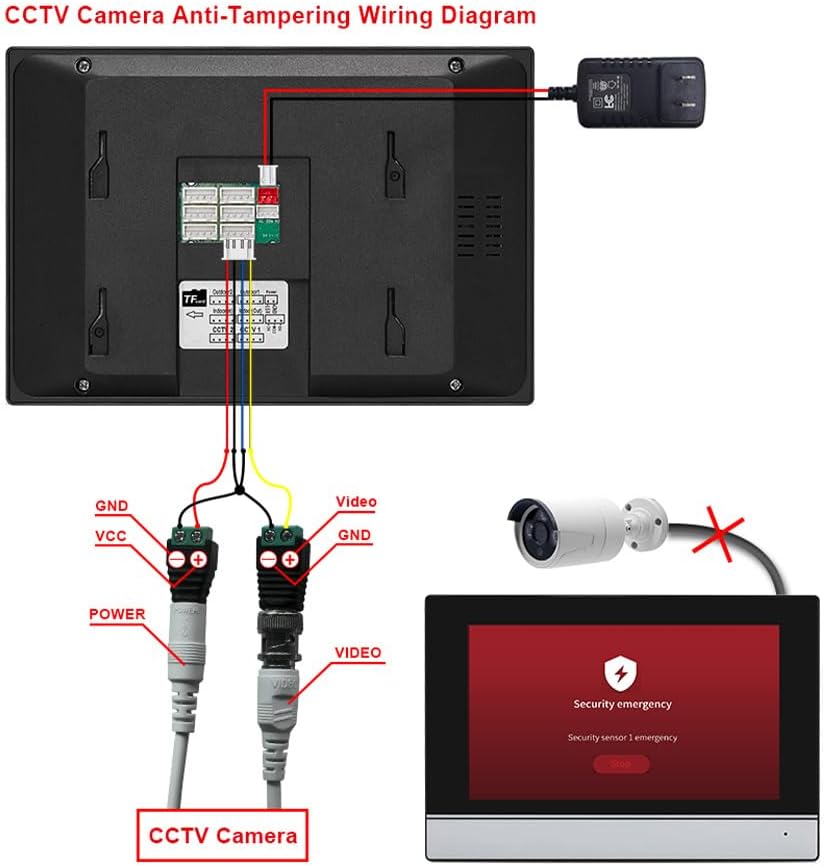
Image: A detailed wiring diagram showing connections for the indoor monitor, power adapter, and an optional CCTV camera. It illustrates connections for GND, VCC, POWER, and VIDEO lines.
- Power Connection: Connect the DC 15V 1.2A power supply to the indoor monitor.
- Outdoor Unit Connection: Use the provided 4P wire clamps and cable connectors to link the outdoor unit to the indoor monitor.
- Optional CCTV Camera: If integrating an external CCTV camera, connect its video and power lines to the designated ports on the indoor monitor as shown.
4. App Setup and Wi-Fi Connection
To enable remote access and advanced features, connect your indoor monitor to your home Wi-Fi network and pair it with the mobile application.
- Power on the indoor monitor.
- Navigate to the Wi-Fi settings on the monitor and connect to your home network.
- Download the "TY APP" (or similar specified app) from your mobile device's app store.
- Open the app and follow the on-screen instructions to add a new device. This typically involves scanning a QR code displayed on the indoor monitor.
- Ensure your mobile device is connected to the same Wi-Fi network during the initial pairing process.

Image: Illustration of the easy setup process, showing a smartphone scanning a QR code displayed on the indoor monitor for quick pairing with the mobile application.
For app download and further instructions, visit: https://m.smart321.com/AYfWAKgjsa
Operating Instructions
1. Basic Functions
1.1 Two-Way Intercom
- When a visitor presses the doorbell, the indoor monitor will ring and display the visitor's video feed.
- Tap the "Answer" icon on the monitor to initiate two-way audio communication with the visitor.
- To end the conversation, tap the "Hang Up" icon.
1.2 Live Monitoring
You can view the live feed from the outdoor unit at any time:
- On the indoor monitor, tap the "Monitor" icon to view the live video from the outdoor unit.
- If additional cameras are connected, you can switch between camera views.
- Through the mobile app, select the doorbell device to access its live feed remotely.
2. Advanced Features
2.1 Motion Detection and Recording
The system can detect motion near the outdoor unit and automatically record video.
- Activation: Access the settings menu on the indoor monitor or mobile app to enable motion detection.
- Sensitivity: Adjust motion detection sensitivity to minimize false alarms.
- Storage: Recordings are saved to a TF card (up to 128GB supported). Ensure a TF card is inserted for recording functionality.
- Playback: View recorded events directly from the indoor monitor or through the mobile app.

Image: The indoor monitor displaying a motion detection alert, with an overlay illustrating a person triggering the motion sensor near the outdoor unit. This highlights the recording and security features.
2.2 Night Vision
The outdoor unit is equipped with infrared night vision, providing clear video even in low-light conditions.
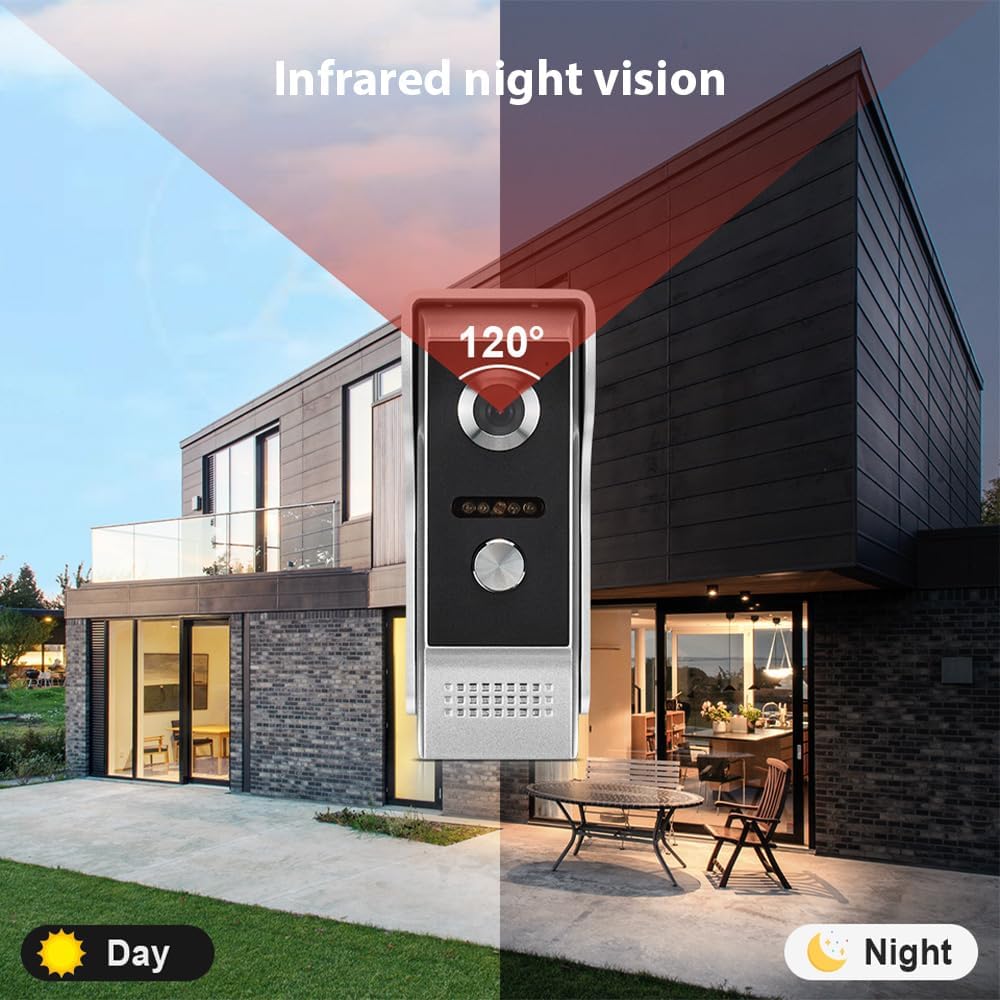
Image: A split image demonstrating the doorbell's 120-degree field of view during both day and night, highlighting the infrared night vision capability for clear visibility in darkness.
2.3 Customization Options
The indoor monitor offers various customization settings:
- Boot Logo: Customize the startup image or logo displayed on the monitor.
- Language Settings: Select your preferred language from the available options (supports 8 languages).
- Electronic Photo Frame: Utilize the monitor to display photos when idle.
- Weather Forecast & Calendar: Access current weather information and a calendar directly on the monitor.
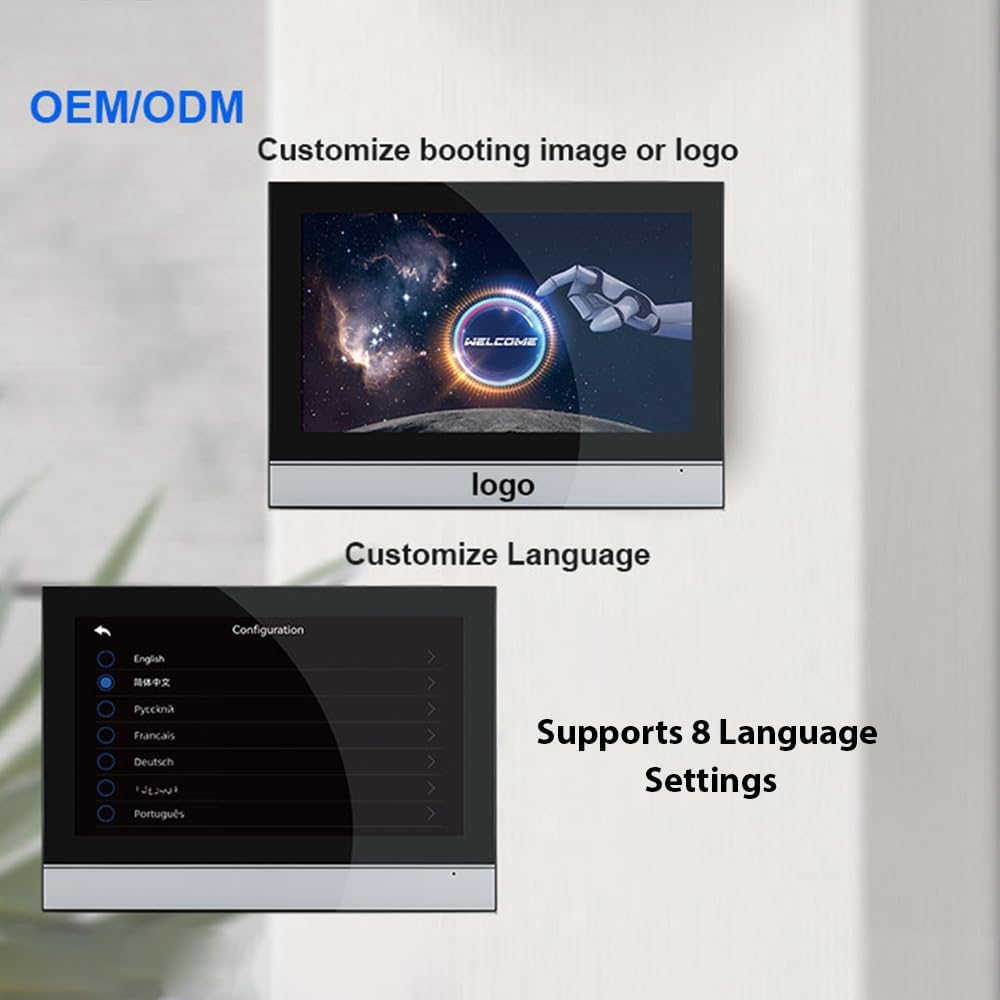
Image: Two screenshots from the indoor monitor, one showing a customizable boot logo with "WELCOME" text, and another showing the language selection menu with options like English, Russian, French, German, and Portuguese.
2.4 Home Modes
The system provides different modes to suit your daily routine:
- At Home Mode: Standard operation with doorbell ringtone available.
- Leave Home Mode: Allows visitors to record a message at the outdoor station.
- Sleep Home Mode: Disables the doorbell ringtone for undisturbed rest.

Image: The indoor monitor displaying various icons for different functions, including a clock, weather, and home modes. Below, three panels illustrate the "At Home," "Leave Home," and "Sleep Home" modes with corresponding actions and messages.
Maintenance
- Cleaning: Use a soft, dry cloth to clean the indoor monitor and outdoor unit. Avoid abrasive cleaners or solvents.
- Firmware Updates: Periodically check for firmware updates through the mobile app or monitor settings to ensure optimal performance and security.
- Cable Inspection: Regularly inspect all cables and connections for wear or damage.
- TF Card Management: If using a TF card for recording, periodically review and delete old footage to free up space, or ensure loop recording is enabled.
Troubleshooting
- No Power:
- Ensure the power adapter is securely connected to the indoor monitor and a working power outlet.
- Verify the power outlet is functional by plugging in another device.
- No Video/Poor Video Quality:
- Check all video cable connections between the outdoor unit and indoor monitor.
- Ensure the outdoor unit lens is clean and free from obstructions.
- If using Wi-Fi, check your network signal strength.
- No Audio/Poor Audio Quality:
- Check audio cable connections.
- Ensure the microphone and speaker on both units are not obstructed.
- Adjust volume settings on the indoor monitor.
- Wi-Fi Connection Issues:
- Ensure your Wi-Fi router is working and within range.
- Re-enter the Wi-Fi password on the indoor monitor.
- Restart both the indoor monitor and your Wi-Fi router.
- Confirm your mobile device is on the same Wi-Fi network during initial setup.
- Motion Detection Not Working:
- Ensure motion detection is enabled in the settings.
- Adjust sensitivity settings.
- Check if the TF card is properly inserted and has sufficient storage space.
Specifications
| Brand | Irishom |
| Model Number | DMU5971888364678JC |
| Indoor Unit Screen | 10-inch IPS Touchscreen |
| Resolution | 1080 x 600 |
| Power Supply | DC 15V 1.2A |
| Power Consumption (Standby) | ≤ 3W |
| Power Consumption (Operating) | ≤ 1W |
| Night Vision Distance | 20 - 300 cm |
| Operating Temperature | -30 °C to 60 °C |
| Outdoor Unit Dimensions | 12.7 x 5.4 x 4.5 cm |
| Outdoor Unit Weight | 248 g |
| Storage Support | Up to 128GB TF card |
| Connectivity | WiFi |
| Expandability | Supports up to 2 outdoor units, 2 cameras, 4 display screens |
Warranty Information
This product comes with a standard manufacturer's warranty. Please refer to the warranty card included in your package or contact your retailer for specific warranty terms and conditions. Keep your purchase receipt as proof of purchase.
Customer Support
If you encounter any issues or have questions regarding your Irishom Video Doorbell System that are not covered in this manual, please contact customer support through your retailer or the official Irishom website.
- For technical assistance, please have your model number (DMU5971888364678JC) and purchase date ready.
- Online resources and FAQs may also be available on the manufacturer's support page.