
haedspup 00
Belt Grinder 1x30" Instruction Manual
Model: 00 | Brand: haedspup
1. Introduction
This manual provides detailed instructions for the safe and efficient operation, maintenance, and troubleshooting of your haedspup 1x30" Belt Grinder. Please read this manual thoroughly before operating the machine to ensure proper usage and to prevent injury or damage.
The haedspup Electric Mini Belt-sander is designed to provide efficient polishing and sanding results, offering a compact and versatile solution for various applications. Its design allows for easy control in both home and workplace environments, adapting to different sanding needs through various methods.

Figure 1.1: Overview of the haedspup 1x30" Belt Grinder.
This belt grinder is suitable for a wide range of applications including metal processing, jewelry making, plastic resin art, acrylic polishing, and tool making. It is also widely used in parts factories and building materials factories, making it ideal for tool polishing.

Figure 1.2: Wide range of applications for the belt grinder.
2. Important Safety Instructions
WARNING: Read all safety warnings, instructions, illustrations, and specifications provided with this power tool. Failure to follow all instructions listed below may result in electric shock, fire, and/or serious injury.
- Always wear appropriate personal protective equipment (PPE), including safety glasses, hearing protection, and dust mask, when operating the belt grinder.
- Ensure the work area is clean, well-lit, and free from obstructions.
- Do not operate power tools in explosive atmospheres, such as in the presence of flammable liquids, gases, or dust.
- Keep children and bystanders away while operating a power tool. Distractions can cause you to lose control.
- Always disconnect the power plug from the outlet before making any adjustments, changing accessories, or storing the tool.
- Do not force the power tool. Use the correct power tool for your application.
- Maintain the power tool and accessories. Check for misalignment or binding of moving parts, breakage of parts, and any other condition that may affect the power tool’s operation.
- The belt grinder is designed with heat dissipation holes to protect the motor. Ensure these are not blocked during operation.
- The protective baffle is designed to prevent abrasive belt breakage and to block sparks. Always ensure it is properly installed and positioned.
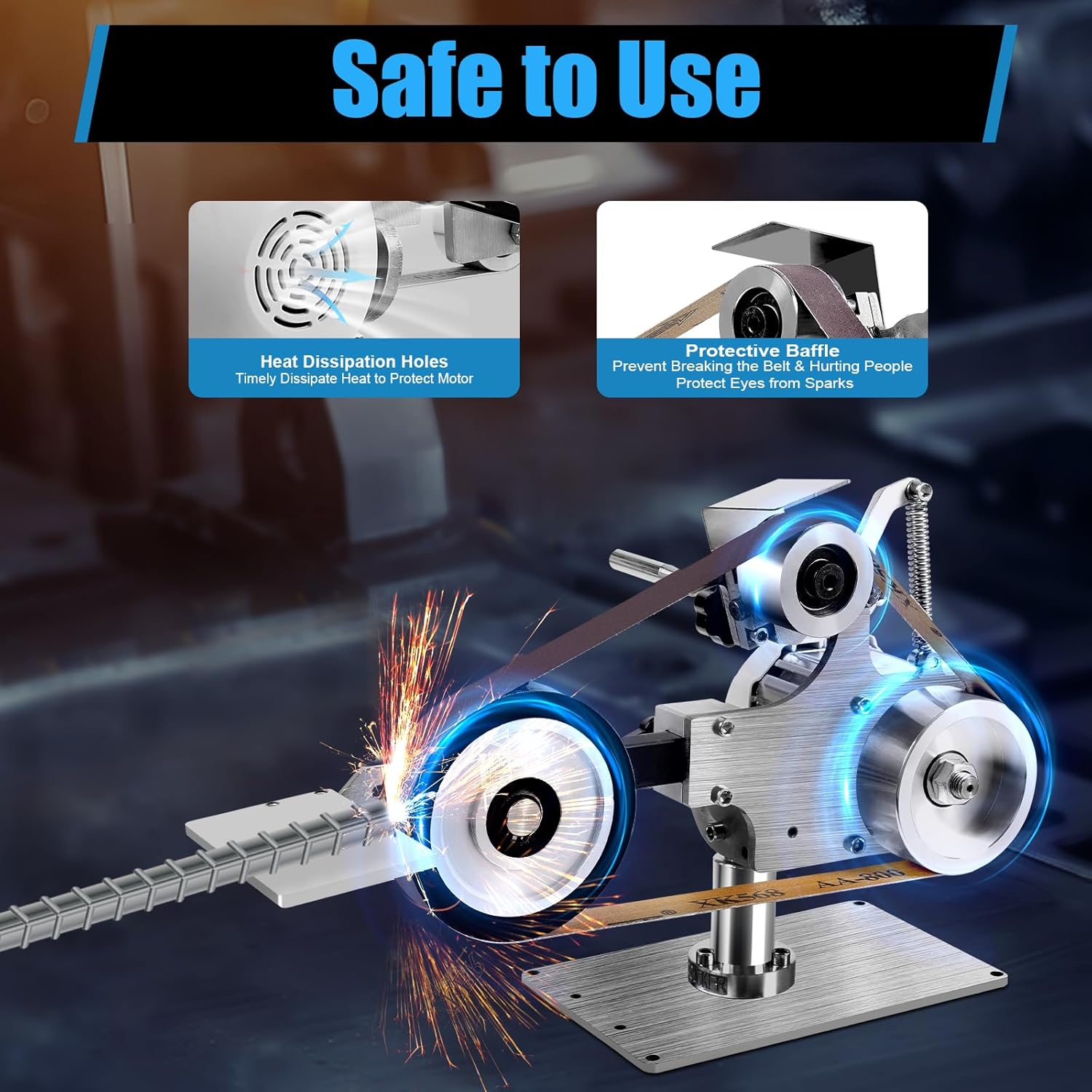
Figure 2.1: Safety features including heat dissipation and protective baffle.
3. Package Contents and Components
Carefully unpack all items and ensure all components listed below are present and undamaged. If any items are missing or damaged, please contact customer support.
3.1 Package Included:
- 1x Electric Mini Belt-sander Unit
- 1x Motor Driver
- 1x Flat Grinding Frame
- 1x Driving Wheel (Al-alloy)
- 1x Protective Baffle
- 2x Abrasive Belts (initial set)
- 2x Different Worktables
- 1x Chinese & English Instruction Manual (this document)
- Other Accessories for Installation
3.2 Key Components Overview:
- Driving Wheel: Made of Al-alloy for faster acceleration and deceleration, and corrosion resistance.
- Abrasive Belt: The standard size is 762*25mm (30*0.98in). Compatible with various grits (60#, 120#, 400#, 1200#, 5000#) to suit different sanding needs.
- Brushless Motor Driver: Features stepless speed regulation and a digital display for precise control of the machine.

Figure 3.1: Key product details and components.
4. Setup and Assembly
Follow these steps to assemble your belt grinder before first use.
4.1 Initial Assembly:
- Place the main belt-sander unit on a stable, level workbench.
- Attach the motor driver to the main unit, ensuring all connections are secure.
- Install the desired worktable (flat grinding frame or wheel) onto the unit. Ensure it is firmly secured.
- Mount the protective baffle in its designated position.
- Install an abrasive belt. Ensure the belt is correctly aligned and tensioned according to the instructions provided with the belt.
4.2 Adjusting the Worktable:
The worktable can be adjusted freely at multiple angles to accommodate various sanding tasks. Loosen the adjustment knob, position the worktable to the desired angle, and then tighten the knob securely.
4.3 Horizontal Sanding Configuration:
For wider sanding areas or specific applications, the machine body can be rotated 90° for horizontal sanding. This allows for more convenient operation and increased versatility. Refer to the diagram below for visual guidance.

Figure 4.1: Worktable adjustment and horizontal sanding configuration.
5. Operating Instructions
Once assembled, your haedspup Belt Grinder is ready for operation. Always ensure safety precautions are followed before starting.
5.1 Powering On and Speed Control:
- Connect the power cord to a suitable 110V power outlet.
- Turn on the motor driver. The digital display will show the current speed setting.
- Use the stepless speed regulation controls on the motor driver to adjust the belt speed. Start with a lower speed and gradually increase as needed for your application. The maximum speed is 5000rpm.
5.2 Sanding Methods:
The belt grinder offers two primary sanding methods:
- Using the Driving Wheel: The 3.9-inch diameter wheel is ideal for sanding concave surfaces and larger arcs. Position your workpiece against the rotating wheel with controlled pressure.
- Using the Flat Grinding Frame: This frame is designed for polishing large, flat areas or items with complex shapes. Apply even pressure across the surface of the abrasive belt.

Figure 5.1: Different sanding options available with the belt grinder.
Always ensure the workpiece is securely held and apply consistent, moderate pressure. Avoid excessive force, which can damage the workpiece or the machine.
6. Maintenance
Regular maintenance ensures the longevity and optimal performance of your belt grinder.
6.1 Cleaning:
- Before cleaning, always disconnect the power supply.
- Use a brush or compressed air to remove dust and debris from the machine, especially around the motor vents and belt path.
- Wipe down exterior surfaces with a clean, damp cloth. Do not use harsh chemicals or abrasive cleaners.
6.2 Abrasive Belt Replacement:
Abrasive belts wear out over time and need to be replaced. The package includes two abrasive belts, and various grits are available for purchase.
- Disconnect the power supply.
- Release the tension on the abrasive belt mechanism.
- Carefully remove the worn belt.
- Install the new abrasive belt, ensuring it is correctly oriented and centered on the wheels.
- Apply tension to the belt until it is firm but not overly tight.
- Before operating, manually rotate the belt a few times to ensure it tracks properly.
6.3 General Care:
- Store the belt grinder in a dry, clean environment when not in use.
- Regularly inspect the power cord for any signs of damage.
- Check all fasteners and ensure they are tight.
7. Troubleshooting
This section addresses common issues you might encounter with your belt grinder. If the problem persists, please contact customer support.
| Problem | Possible Cause | Solution |
|---|---|---|
| Machine does not start | No power supply; Loose connection; Motor driver issue | Check power outlet and cord; Ensure all connections are secure; Contact support if motor driver is faulty. |
| Belt not tracking correctly | Improper belt tension; Misaligned belt; Worn belt | Adjust belt tension; Realign the belt; Replace worn belt. |
| Excessive vibration or noise | Loose components; Worn belt or wheel; Unbalanced workpiece | Check and tighten all fasteners; Replace worn parts; Ensure workpiece is stable. |
| Poor sanding performance | Worn abrasive belt; Incorrect grit for material; Insufficient pressure | Replace abrasive belt; Use appropriate grit; Apply consistent pressure. |
| Motor overheating | Blocked ventilation holes; Continuous heavy load | Clear ventilation holes; Allow motor to cool down; Reduce load. |
8. Technical Specifications
Detailed specifications for the haedspup 1x30" Belt Grinder.
| Feature | Specification |
|---|---|
| Brand | haedspup |
| Model Number | 00 |
| Material | Stainless Steel, Al-alloy |
| Surface Treatment | Galvanizing Process |
| Motor Type | DC Brushless Motor |
| Adapter Plug | US Plug |
| Voltage | 110V |
| Power | 550W |
| Sound-pressure Level | ≤ 100dB |
| Speed | 5000rpm |
| Line Speed | 30m/s |
| Abrasive Belt Size | 762*25mm / 30*0.98in |
| Wheel Size (Diameter; Height) | 100mm / 3.9in (Diameter); 25mm / 0.98in (Height) |
| Base Size | 12*20*0.49cm / 4.7*7.9*0.2in |
| Motor Driver Size | 17.5*5.5*15.5cm / 6.9*2.2*6.1in |
| Product Size (Vertical) | 38*14*25cm / 15*5.5*9.8in |
| Product Size (Horizontal) | 38.5*21*17cm / 15.2*8.3*6.7in |
| Net Weight | 7.6kg / 16.8lbs |
| Gross Weight | 8.25kg / 18.2lbs |
| UPC | 769092613269 |

Figure 8.1: Product dimensions and weight for storage and setup planning.

Figure 8.2: Key performance metrics of the belt grinder.
9. Warranty Information
Specific warranty details for your haedspup Belt Grinder are typically provided with your purchase documentation. Please refer to the warranty card or contact the seller directly for information regarding warranty coverage, terms, and conditions.
10. Customer Support
For technical assistance, parts, or service, please contact haedspup customer support through the retailer where you purchased the product or visit the official haedspup brand store online.
Online Store: haedspup Official Store on Amazon
Please have your model number (00) and purchase date ready when contacting support.
Related Documents - 00
 |
Tormek KJ-45 & KJ-140 Centering Knife Jig Instruction Manual Comprehensive instruction manual for the Tormek KJ-45 and KJ-140 Centering Knife Jigs, designed for precise and controlled knife sharpening. Learn how to mount knives, set edge angles, sharpen, and hone various blade types for optimal sharpness and durability. Includes details on jig components, blade thickness and height requirements, and recommended sharpening techniques for different knives. |
 |
Tormek Sharpening Systems: Precision Tools for Woodworkers Explore the Tormek range of water-cooled sharpening systems, jigs, and accessories for professional and hobbyist woodworkers. Achieve razor-sharp edges with Tormek T-8 and T-4 models. |
 |
Tormek KS-123 Knife Angle Setter: User Guide for Precise Sharpening Comprehensive guide for the Tormek KS-123 Knife Angle Setter, detailing its compatibility, setup, and usage for achieving accurate sharpening angles on Tormek machines. Includes parts identification and step-by-step instructions. |
 |
SKIL BB9504-00 Belt Sander Parts List and Diagram Official parts list and exploded view diagram for the SKIL BB9504-00 Belt Sander, detailing all components with part numbers and descriptions for maintenance and identification. |
 |
US Army M6, M7, M9 Bayonet Systems Maintenance Manual Official US Army Organizational and Direct Support Maintenance Manual (TM 9-1005-237-23&P) detailing repair parts and special tools for the M6, M7 Bayonet-knives, M10 Scabbard, and M9 Multipurpose Bayonet System. |
 |
PowerBlock PowerBench 2.0 Assembly Instructions Comprehensive assembly guide for the PowerBlock PowerBench 2.0, detailing each step with parts lists, required tools, and essential safety precautions for proper setup and use. |
Ask a question about this manual
Ask about setup, troubleshooting, compatibility, parts, safety, or missing instructions. Manuals+ will review the question and use this page’s manual context to help answer it.