
OYDL YVDV09SF14SHIDP5261QI
YU Xiang F07 Bell UH-1 Huey RC Helicopter User Manual
Model: YVDV09SF14SHIDP5261QI | Brand: OYDL
1. Introduction
Thank you for choosing the YU Xiang F07 Bell UH-1 Huey RC Helicopter. This 1:34 scale model is designed to provide an engaging and stable flight experience, featuring advanced technologies such as optical flow positioning and a 6-axis gyro. This manual provides essential information for safe operation, setup, maintenance, and troubleshooting to ensure optimal performance and longevity of your helicopter.
Please read this manual thoroughly before operating the helicopter and retain it for future reference.
2. Safety Information
Operating an RC helicopter requires caution and responsibility. Failure to follow these safety guidelines may result in injury or damage to the product or property.
- Adult Supervision: This product is recommended for ages 14+. Adult supervision is highly recommended for younger users.
- Flight Environment: Fly in open, clear areas away from people, animals, buildings, and power lines. Avoid flying in strong winds or adverse weather conditions.
- Propeller Safety: Keep hands, face, and loose clothing away from rotating propellers. Do not attempt to catch the helicopter while it is flying.
- Battery Safety: Use only the specified battery and charging cable. Do not overcharge or short-circuit batteries. Store batteries in a cool, dry place away from flammable materials. Discontinue use if batteries show signs of swelling or damage.
- Water Contact: Avoid contact with water. While the helicopter is durable, prolonged exposure to moisture can damage electronic components.
- Pre-Flight Check: Always inspect the helicopter and remote control for any damage or loose parts before each flight.
3. Package Contents
Verify that all items are present in your package:
- Aircraft (YU Xiang F07 Bell UH-1 Huey RC Helicopter) x 1
- Remote Control x 1
- User Manual x 1
- Specialized USB Charging Cable x 1
- Main Propeller Blades x 4
- Tail Propeller Blades x 1
- Smart Battery (7.4V 1200mAh 25C Li-Po) x 2

Image: The YU Xiang F07 Bell UH-1 Huey RC Helicopter, accompanied by its remote control and two smart batteries, as included in the package.
4. Product Overview
The YU Xiang F07 is a highly detailed 1:34 scale model of the Bell UH-1 Huey helicopter, designed for advanced RC enthusiasts. It features a flybarless design, dual-axis driven motor system, and an electronic stabilization system for precise control.

Image: A detailed view of the YU Xiang F07 Bell UH-1 Huey RC Helicopter, showcasing its realistic design and main rotor.
4.1 Key Features
- Scale Model: 1:34 scale based on the Bell UH-1 Huey helicopter with realistic features and lighting effects.
- Optical Flow Positioning: High-precision optical flow positioning and barometer altitude hold for stable indoor and outdoor flight.
- 6-axis Gyro: Provides stable, quick, and precise flight posture, ideal for beginners.
- Brushless Motor: Powered by a 2511 1200KV brushless motor for low noise, high torque, and exceptional efficiency.
- Durable Construction: Made from durable nylon + carbon fiber composite blades, high-strength and impact-resistant.
- One-key Inverted Flight: Intuitive feature for mastering inverted flight.

Image: A visual representation of the helicopter's core technologies and design principles, including its 6-axis gyroscope and brushless motor.
4.2 Remote Control Description
Familiarize yourself with the remote control layout and functions:
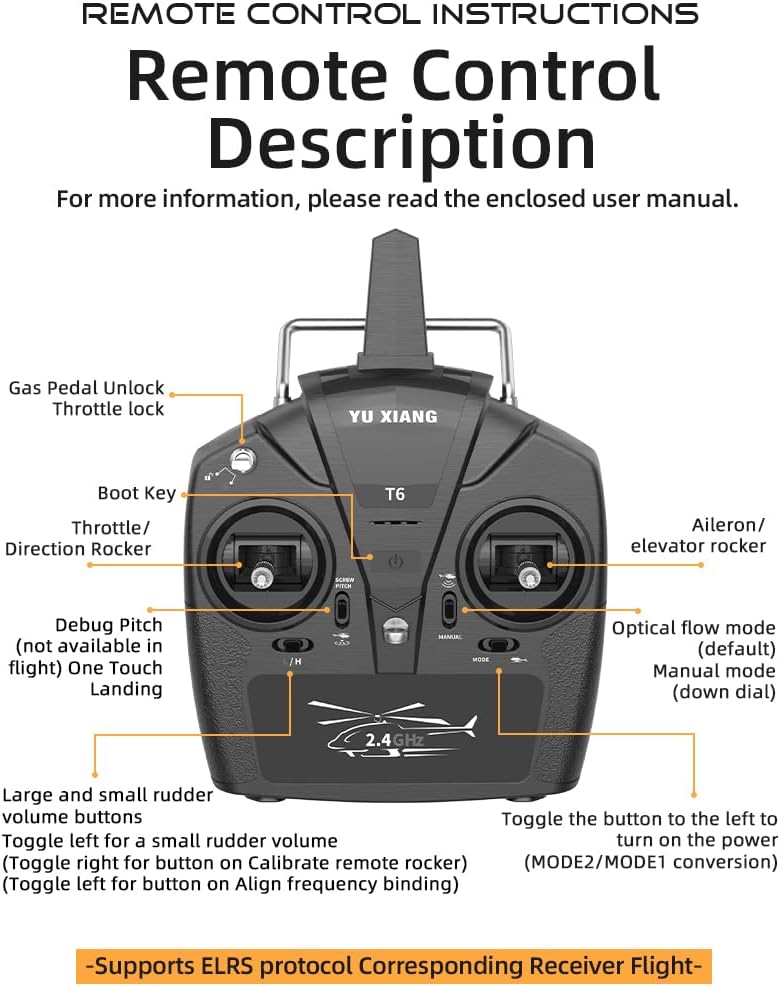
Image: A detailed diagram illustrating the various buttons and functions of the remote control for the YU Xiang F07 helicopter.
5. Setup
5.1 Battery Charging
- Connect the specialized USB charging cable to a USB power source (e.g., computer USB port, USB wall adapter).
- Connect the smart battery to the charging cable.
- The charging indicator light will show the charging status. Charging time is approximately 60-70 minutes per battery.
- Once fully charged, disconnect the battery from the charger.
Note: The professional 7.4V 1200mAh 25C Li-Po battery offers high discharge rates and up to 12 minutes of flight time with 500+ cycles of use. Avoid overcharging to prolong battery life.
5.2 Battery Installation
- Ensure the helicopter and remote control are powered off.
- Locate the battery compartment on the helicopter.
- Carefully insert the charged smart battery into the compartment, ensuring correct polarity.
- Secure the battery compartment cover.
5.3 Remote Control Pairing (Binding)
To establish a connection between the remote control and the helicopter:
- Turn on the remote control by toggling the power button to the left.
- Power on the helicopter.
- Place the helicopter on a flat, stable surface.
- The remote control and helicopter will automatically attempt to bind. Wait for the indicator lights to stabilize, indicating a successful connection.
- If binding fails, refer to the remote control diagram for the 'Align frequency binding' button (toggle left for button on Align frequency binding) and try again.
6. Operating Instructions
6.1 Basic Flight Controls
The remote control uses a standard Mode 2 configuration (left stick for throttle/rudder, right stick for aileron/elevator) by default. Refer to the remote control diagram for specific stick functions.
- Throttle (Left Stick Up/Down): Controls the helicopter's altitude (Upwards/Downwards).
- Rudder (Left Stick Left/Right): Controls the helicopter's yaw (Turn Left/Turn Right).
- Elevator (Right Stick Up/Down): Controls the helicopter's pitch (Onward/Backwards).
- Aileron (Right Stick Left/Right): Controls the helicopter's roll (Left Flight/Right Flight).

Image: A visual guide to the helicopter's movement capabilities, illustrating how stick inputs translate into flight directions.
6.2 Optical Flow Positioning & Altitude Hold
The helicopter is equipped with high-precision optical flow positioning and a barometer altitude hold function. This allows the helicopter to maintain a stable hover at a set altitude, making it easier to control, especially for beginners. This feature is active in the default 'Optical flow mode'.
6.3 One-key Inverted Flight
The intuitive one-key inverted flight feature simplifies mastering inverted flight. This function allows the helicopter to flip and fly upside down with a single command. It is recommended to practice this feature in an open field with no wind or light wind conditions.

Image: Demonstrates the optical flow positioning for stable flight and the sequence of movements for the one-touch inverted flight feature.
6.4 Flight Modes
The helicopter supports different flight modes:
- Optical Flow Mode (Default): Provides stable flight with altitude hold and visual positioning, suitable for beginners.
- Manual Mode: Can be activated by turning the 'down dial' on the remote control. This mode offers more direct control for experienced pilots.
6.5 Official Product Video
Watch the official product video for a demonstration of the YU Xiang F07 Bell UH-1 Huey RC Helicopter in action, showcasing its flight capabilities and features.
Video: An official demonstration of the YU Xiang F07 Bell UH-1 Huey RC Helicopter's flight performance, including take-off, hovering, and various maneuvers in different environments.
7. Maintenance
Regular maintenance ensures the longevity and optimal performance of your helicopter.
- Cleaning: Gently wipe the helicopter with a soft, dry cloth after each use to remove dust and debris. Do not use water or chemical cleaners.
- Propeller Inspection: Regularly check the main and tail propeller blades for any cracks, bends, or damage. Replace damaged blades immediately using the provided spares. The blades are made from durable nylon + carbon fiber composite for high strength and impact resistance.
- Motor Care: The 2511 1200KV brushless motor is designed for durability. Avoid prolonged operation in dusty or sandy environments to prevent debris from entering the motor.
- Battery Storage: When not in use for extended periods, store batteries at approximately 50% charge in a cool, dry place. Do not store fully charged or fully discharged batteries.
- General Inspection: Periodically check all screws and connections to ensure they are secure.

Image: Illustrates the robust construction of the helicopter's paddles, made from nylon and carbon fiber composite, emphasizing their durability and impact resistance.
8. Troubleshooting
If you encounter issues with your helicopter, refer to the following common problems and solutions:
| Problem | Possible Cause | Solution |
|---|---|---|
| Helicopter does not power on. | Battery not charged or incorrectly installed. | Ensure battery is fully charged and correctly inserted. Check power switch. |
| Helicopter does not respond to remote control. | Not paired correctly; remote control battery low. | Re-pair the remote control and helicopter. Replace remote control batteries. |
| Unstable flight or drifts. | Propellers damaged; calibration needed; strong wind. | Check and replace damaged propellers. Re-calibrate the helicopter on a flat surface. Fly in calm conditions. |
| Short flight time. | Battery not fully charged; aging battery. | Ensure battery is fully charged. Consider replacing the battery if it's old or degraded. |
9. Specifications
Detailed specifications for the YU Xiang F07 Bell UH-1 Huey RC Helicopter:
| Product Name | F07 (UH-1 six-channel intelligent 6G aileronless simulation Huey) helicopter |
| Model Number | YVDV09SF14SHIDP5261QI |
| Brand | OYDL |
| Product Dimensions | 15 x 14.7 x 4.7 inches (Aircraft) |
| Item Weight | 8 ounces (228g) |
| Product Material | High-strength composite materials (Nylon + Carbon Fiber) |
| Remote Control Mode | 2.4G Remote Control |
| Remote Control Distance | Greater than 120 meters |
| Body Battery | LI-POLY Smart Battery 7.4V (1200MAH) 25C |
| Charging Time | About 60-70 Minutes |
| Usage Time | 10-12 Minutes |
| Manufacturer Recommended Age | 14+ years |

Image: A summary table of the helicopter's key specifications, including dimensions, weight, battery type, and flight times.
10. Warranty and Support
For warranty information and customer support, please refer to the contact details provided by your retailer or visit the official OYDL website. Keep your purchase receipt as proof of purchase for any warranty claims.
For additional assistance or technical inquiries, please contact OYDL customer service.