
1. Introduction
Thank you for choosing the GarveeHome Power Lift Recliner Chair. This manual provides essential information for the safe and efficient use of your new recliner. Please read it thoroughly before assembly and operation, and retain it for future reference.
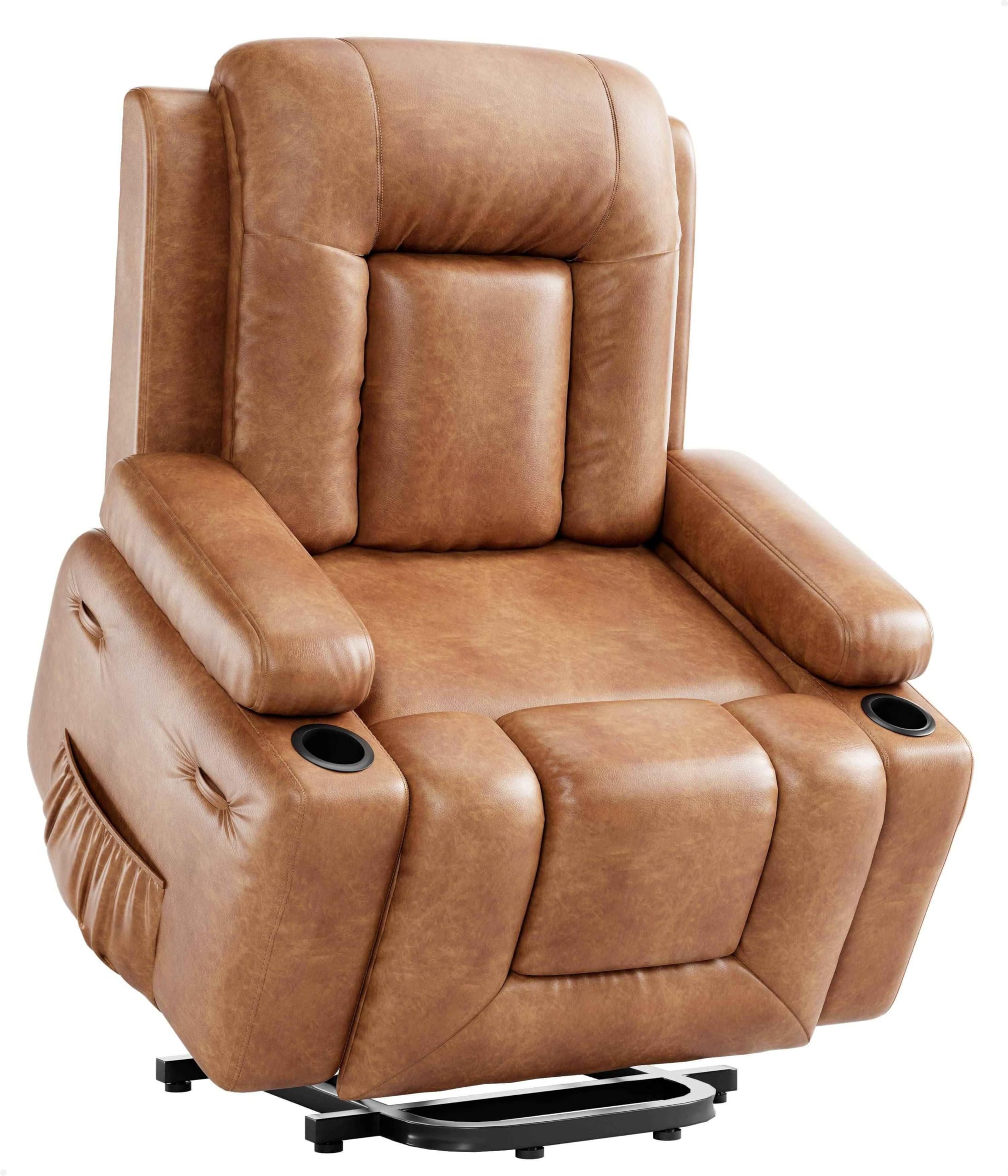
Image 1.1: The GarveeHome Power Lift Recliner Chair in Retro Brown, featuring a comfortable design with armrests and a plush backrest.
2. Safety Information
To ensure safe operation and prevent injury or damage, please adhere to the following safety guidelines:
- Weight Capacity: This product has a maximum weight capacity of 400 lbs (181 kg). Do not exceed this limit to prevent damage or injury.
- Lift Function: Always ensure the chair is unoccupied before using the power lift function to raise or lower the chair.
- Stability: Before using the chair, verify that it is stable and positioned on a flat, level surface to prevent tipping.
- Movement: Do not attempt to move or tilt the chair while it is occupied or while the lift mechanism is active.
- Children and Pets: Keep children and pets away from the chair's moving parts to avoid injury.
- Power Cord: Ensure the power cord is not pinched, tangled, or placed under the chair where it could be damaged.
- Liquid Spills: Avoid spilling liquids on the chair, especially near electrical components. In case of a spill, unplug the chair immediately and allow it to dry completely before use.
3. Product Overview
The GarveeHome Power Lift Recliner Chair is designed for comfort and ease of use, featuring electric lift, heat, and massage functions. It includes:
- Power Lift Function: Assists users in standing up or sitting down effortlessly.
- Recline Function: Allows for adjustable back and leg positions for personalized comfort.
- Heat and Massage: Integrated heating elements and vibration massage points for relaxation.
- Comfortable Design: High-density sponge cushions and durable faux PU leather upholstery.
- Convenience Features: Includes cup holders and side pockets.

Image 3.1: The recliner chair demonstrating its power lift function, assisting a user to stand.

Image 3.2: Illustration of the heat and massage zones within the recliner chair, highlighting two lumbar heat parts and multiple vibration points.
4. Assembly Instructions
Before beginning assembly, ensure all parts are present and undamaged. It is recommended to have two people for assembly.
4.1. Package Contents
- Backrest
- Seat Base
- Arm Pads (Left and Right)
- Remote Control
- Power Adapter
- User Manual (this document)
4.2. Assembly Steps
- Unpack Components: Carefully remove all components from the packaging. Place them on a soft, clean surface to prevent scratches.
- Attach Backrest: Align the metal brackets on the backrest with the corresponding slots on the seat base. Slide the backrest down firmly until it locks into place. You should hear a click.
- Install Arm Pads: Slide the left and right arm pads onto the side rails of the seat base. Ensure they are securely fastened. Some models may require a firm push to lock them.
- Connect Power: Locate the power cable extending from the chair base. Connect it to the power adapter, then plug the adapter into a standard electrical outlet.
- Remote Control: The remote control is pre-connected. Ensure its cable is securely plugged into the chair's connection port, usually located near the side pocket.
- Final Check: Before first use, gently rock the chair to ensure all connections are secure and the chair is stable.
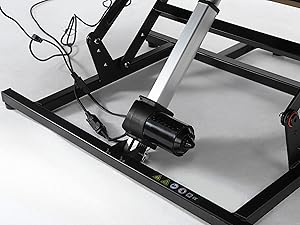
Image 4.1: View of the chair's robust metal frame and electric motor, illustrating the power mechanism.
5. Operating Instructions
Your GarveeHome Power Lift Recliner Chair is operated via a wired remote control. Familiarize yourself with the remote's buttons before use.

Image 5.1: The recliner chair in a slightly lifted position, with the remote control visible, indicating its electric operation.
5.1. Remote Control Functions
- Lift Button (Up Arrow): Press and hold to gently raise the chair to an assisting standing position.
- Recline Button (Down Arrow): Press and hold to recline the backrest and extend the footrest. Release when the desired position is reached.
- Heat Button: Activates or deactivates the lumbar heating function.
- Massage Button: Cycles through different massage modes and intensity levels. Press repeatedly to adjust.
- Timer Button (if available): Sets a timer for the heat and massage functions.
5.2. Using the Power Lift Function
- To stand up: While seated, press and hold the Lift Button. The chair will slowly tilt forward and rise, assisting you to a standing position. Release the button when you are able to stand comfortably.
- To sit down: Position yourself in front of the chair. Press and hold the Recline Button to lower the chair. Once the chair is in a comfortable sitting position, gently sit down. Continue holding the button until the chair is fully lowered or in your desired sitting position.
5.3. Using the Recline Function
- To recline: Press and hold the Recline Button. The backrest will lean back, and the footrest will extend. Release the button when you reach your desired recline angle.
- To return to upright: Press and hold the Lift Button. The footrest will retract, and the backrest will return to an upright position.
5.4. Using Heat and Massage Functions
- Heat: Press the Heat Button once to activate the lumbar heating. Press again to turn off.
- Massage: Press the Massage Button to start the massage function. Subsequent presses will cycle through different massage modes and intensities. Hold the button to turn off the massage.
6. Maintenance
Proper maintenance ensures the longevity and optimal performance of your recliner chair.
- Cleaning: Wipe clean with a damp cloth. For faux PU leather, use a mild soap solution if necessary, then wipe with a clean, dry cloth. Avoid harsh chemicals or abrasive cleaners.
- Inspection: Periodically check all connections and moving parts for wear or damage. Ensure all screws are tight.
- Power Cord: Regularly inspect the power cord for any cuts, fraying, or damage. If damaged, discontinue use and contact customer support.
- Storage: If storing the chair for an extended period, unplug it and store in a dry, cool place away from direct sunlight.

Image 6.1: Detail of the faux PU leather upholstery, highlighting its texture and durability for easy cleaning.
7. Troubleshooting
If you encounter any issues with your recliner, refer to the following troubleshooting guide:
| Problem | Possible Cause | Solution |
|---|---|---|
| Chair does not respond to remote. |
|
|
| Lift or recline function is slow or jerky. |
|
|
| Heat or massage not working. |
|
|
8. Specifications
| Feature | Detail |
|---|---|
| Model Name | PHO_334 |
| Brand | GarveeHome |
| Color | Retro Brown |
| Material | Faux Leather (PU Leather), Sponge Filling |
| Product Dimensions (D x W x H) | 21.26"D x 43.31"W x 37.4"H |
| Seat Width | 21.3 inches |
| Seat Depth | 21.65 inches |
| Seat Height | 19.69 inches |
| Item Weight | 111.8 pounds |
| Weight Capacity | 400 lbs (181 kg) |
| Special Features | Power Lift, Power Recline, Heat and Massage, Cup Holders, Side Pocket |
| Reclining Positions | 3 |
| UPC | 198723166087 |

Image 8.1: Detailed product dimension diagram, including height, width, depth, and recline measurements.
9. Warranty and Customer Support
GarveeHome is committed to customer satisfaction. While specific warranty details are not provided in this manual, we encourage you to contact our support team for any questions, concerns, or assistance you may need.
If you have any questions or require clarification about your Power Lift Recliner Chair, please contact GarveeHome customer support. Our team is available to assist you.
Please refer to your purchase documentation or the GarveeHome website for the most up-to-date warranty information and contact details.