1. Introduction
Thank you for choosing the RioBuds RS8 Window Cleaning Robot. This manual provides essential information for the safe and efficient operation, maintenance, and troubleshooting of your device. Please read this manual thoroughly before using the product and retain it for future reference.
Important Safety Information
- Always ensure the safety tether is securely attached before operation, capable of withstanding up to 220 lbs of impact force.
- Do not use the robot on cracked or damaged glass surfaces.
- Keep the robot away from children and pets during operation.
- Ensure the power adapter is correctly connected and the backup battery is charged.
- Operate the robot only in suitable weather conditions; avoid strong winds or heavy rain.
- The robot is designed for window cleaning; do not use it for other purposes.
2. Package Contents
Verify that all items are present in the package:
- RioBuds RS8 Window Cleaning Robot
- Cleaning Pads (multiple)
- Power Adapter
- Remote Control
- Safety Tether
- User Manual (this document)
3. Product Overview
Familiarize yourself with the components of your RioBuds RS8 Window Cleaning Robot.
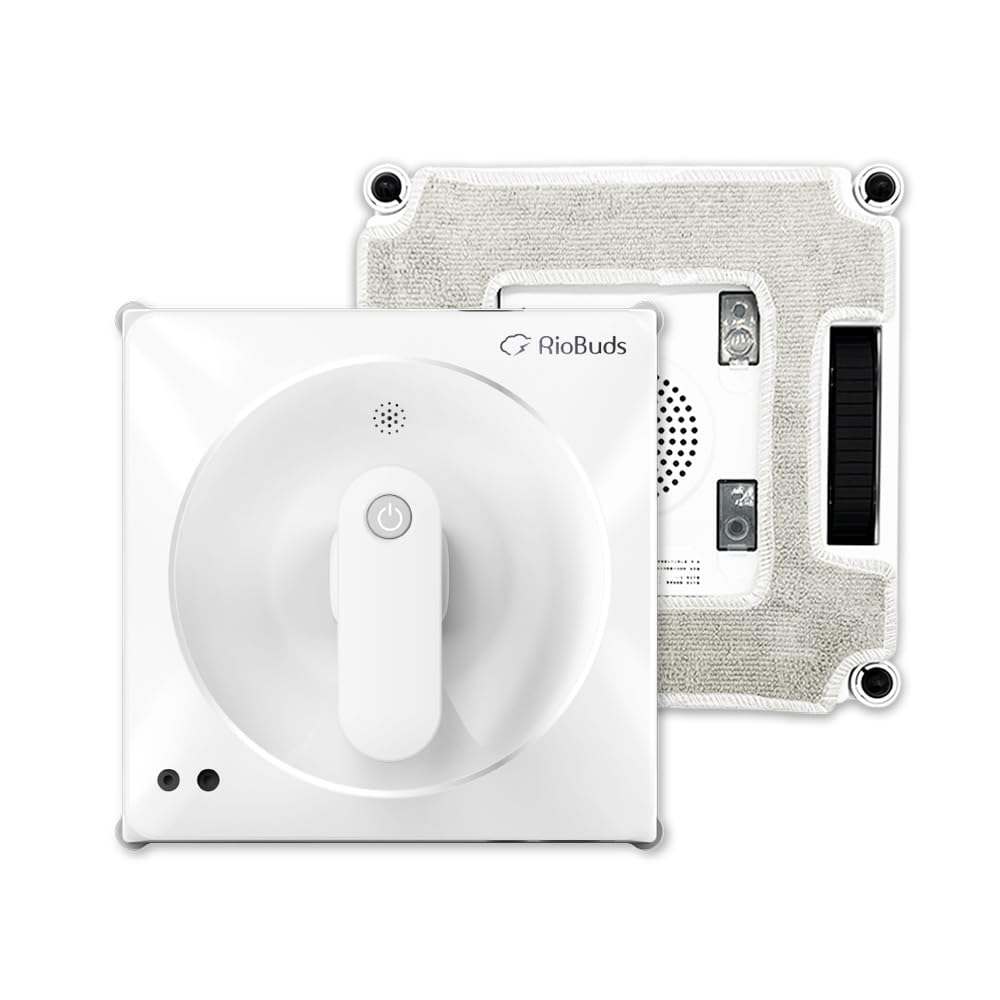
Figure 3.1: The RioBuds RS8 Window Cleaning Robot. This image displays the compact design of the robot, highlighting its main body and the attachment points for cleaning pads. The overall shape is square with rounded corners, indicating its ability to reach window edges effectively.
Key Features:
- Dual-Sided Spray Nozzles: For continuous water application and enhanced cleaning.
- Powerful 4300PA Suction: Ensures secure adherence to glass surfaces.
- Anti-Slip Technology: Maintains grip even on wet surfaces.
- Edge Detection Sensors: Prevents the robot from falling off edges.
- Backup Battery: Provides power in case of main power interruption.
- Safety Tether: Additional security measure.
4. Setup
- Charge the Backup Battery: Before first use, connect the robot to the power adapter and allow the internal backup battery to fully charge. This ensures the robot remains attached to the window in case of a power outage.
- Attach Cleaning Pads: Securely attach clean cleaning pads to the designated areas on the bottom of the robot. Ensure they are flat and cover the entire cleaning surface.
- Fill Water Tank (if applicable): If your model has a refillable water tank, fill it with distilled water or a recommended window cleaning solution. The RS8 features dual-sided spray, so ensure the nozzles are clear.
- Connect Power Adapter: Plug the power adapter into the robot and then into a power outlet.
- Attach Safety Tether: Securely attach the safety tether to the robot and then to a sturdy anchor point indoors, such as a heavy piece of furniture or a window frame. This is a critical safety step.
5. Operating Instructions
- Placement: Place the robot on the window surface, ensuring it is flat against the glass.
- Power On: Press the power button on the robot or the remote control. The robot will activate its suction to adhere to the window. Wait for the suction to fully engage before releasing the robot.
- Select Cleaning Mode: Use the remote control to select your desired cleaning mode (e.g., automatic, spot clean). The robot will begin its cleaning path.
- Monitor Operation: Observe the robot during its cleaning cycle. The dual-sided spray nozzles will automatically apply water or cleaning solution as it moves.
- Manual Control (Optional): If needed, use the directional buttons on the remote control to guide the robot to specific areas.
- Completion: Once the cleaning cycle is complete, the robot will return to its starting position or stop.
- Power Off and Remove: Press the power button to deactivate suction. Carefully remove the robot from the window.
Tips for Best Performance:
- For heavily soiled windows, perform a dry clean first to remove loose dirt, then a wet clean.
- Change cleaning pads regularly for optimal results.
- Ensure the window surface is free of large debris that could scratch the glass or damage the robot.
6. Maintenance
Regular maintenance ensures the longevity and optimal performance of your RioBuds RS8.
- Clean Cleaning Pads: After each use, remove and wash the cleaning pads. They can typically be hand-washed or machine-washed with mild detergent. Allow them to air dry completely before reuse.
- Clean Robot Body: Wipe the exterior of the robot with a soft, damp cloth. Do not use abrasive cleaners or immerse the robot in water.
- Check Suction Cups/Wheels: Inspect the suction mechanism and any moving parts for dirt or debris. Clean as necessary to maintain strong adhesion.
- Inspect Nozzles: Ensure the dual-sided spray nozzles are not clogged. Use a small brush or pin to clear any blockages if needed.
- Store Properly: When not in use, store the robot in a cool, dry place, away from direct sunlight and extreme temperatures.
7. Troubleshooting
Refer to this section for common issues and their solutions.
| Problem | Possible Cause | Solution |
|---|---|---|
| Robot does not adhere to window. | Insufficient suction; dirty cleaning pads; uneven surface. | Ensure power is connected and suction is activated. Clean or replace cleaning pads. Place robot on a flat section of glass. |
| Robot slips on wet surfaces. | Excessive water on surface; worn anti-slip components. | While the RS8 has anti-slip technology, ensure not to oversaturate the window. Check and clean anti-slip components. |
| Poor cleaning performance. | Dirty cleaning pads; clogged spray nozzles; insufficient cleaning solution. | Replace or wash cleaning pads. Clear spray nozzles. Ensure water tank is filled (if applicable). |
| Robot stops unexpectedly. | Power interruption; low backup battery; edge detection triggered. | Check power connection. Ensure backup battery is charged. Reposition robot if it's hitting an obstruction or edge. |
8. Specifications
| Feature | Detail |
|---|---|
| Brand | RioBuds |
| Model Name | RS8 |
| Special Feature | Dual-Sided Spray, Anti-Slip on Wet Surfaces |
| Color | White |
| Product Dimensions | 8.46"L x 8.46"W x 4"H |
| Included Components | Window Cleaning Robot, Cleaning Pad, Power Adapter, Remote Control |
| Battery Life | 30 minutes (internal backup battery) |
| Item Weight | 4.4 pounds |
| Suction Power | 4300PA |
| Surface Recommendation | Glass |
9. Customer Support
For further assistance, technical support, or warranty inquiries, please contact RioBuds customer service. Refer to the product packaging or the official RioBuds website for contact details.