
1. Introduction
This manual provides essential information for the proper use, setup, and maintenance of your Tulbeys G10-Z Smart Glasses. Please read this manual thoroughly before using the product to ensure optimal performance and longevity.

Image 1.1: The Tulbeys G10-Z Smart Glasses, featuring a sleek black frame and clear lenses.
2. Package Contents
Verify that all items are present in the package:
- Tulbeys G10-Z Smart Glasses
- Magnetic Charging Cable
- Instruction Manual (this document)
- Cleaning Cloth

Image 2.1: Illustration of the smart glasses packaging, including the glasses, charging cable, instruction manual, and cleaning cloth, alongside detailed dimensions.
3. Product Overview
Familiarize yourself with the components of your smart glasses:

Image 3.1: Diagram illustrating the key structural components of the smart glasses.
- A. ABS Frame: Durable and lightweight frame material.
- B. HD Blue Light Lens: Lenses designed to filter harmful blue light.
- C. Dual-Speakers: Integrated speakers for open-ear audio.
- D. Touch Area: Capacitive touch sensors for control.
- E. Magnetic Charging Ports: Connection points for the magnetic charging cable.
- F. Mic: Built-in microphone for calls and voice assistant.
4. Setup
4.1 Initial Charging
Before first use, fully charge your smart glasses. The glasses have independent power switches and charging modules on both sides. Ensure both sides are connected to the magnetic cable for proper charging.
- Connect the magnetic charging cable to the magnetic charging ports (E) on both temples of the glasses.
- Connect the USB end of the cable to a compatible USB power adapter (not included).
- A charging indicator light will illuminate.
- Charging typically takes 1.5-2 hours.

Image 4.1: Close-up of the magnetic charging ports and cable for the smart glasses.
4.2 Bluetooth Pairing
To connect your smart glasses to a device:
- Ensure the glasses are powered off.
- Simultaneously press and hold the touch area on both the left and right temples for 2 seconds to power on the glasses.
- The glasses will enter pairing mode, indicated by a flashing LED light (usually blue).
- On your smartphone or Bluetooth-enabled device, go to Bluetooth settings and search for available devices.
- Select "Tulbeys G10-Z" (or similar name) from the list.
- Once connected, the LED indicator will stop flashing and remain solid blue, or turn off.

Image 4.2: Depiction of the Bluetooth 5.3 chip, highlighting the advanced connectivity technology.
5. Operating Instructions
The smart glasses feature intuitive touch controls on the temples:

Image 5.1: Visual guide to the basic touch operations for the smart glasses.
- Power On: Simultaneously press and hold the left and right touch areas for 2 seconds.
- Power Off: Press and hold either touch area for 5 seconds.
- Audio Mode (Play/Pause): Click either side of the touch area.
- Answer Call: Click the touch area of the right temple.
- Reject Call: Click the touch area of the left temple.
- Hang Up Call: Click either touch area during a call.
- Voice Assistant: Press and hold either touch area for 2 seconds.
6. Features
- Open-Ear Audio Design: Allows you to listen to audio while remaining aware of your surroundings.
- Anti-Blue Light Lenses: Filters harmful blue light to reduce eye strain from electronic devices.
- Bluetooth 5.3 Technology: Provides stable connection, fast transmission, and broad compatibility.
- Integrated Microphone and Speakers: Enables hands-free calls and voice assistant interaction.
- Touch Controls: Intuitive touch interface for managing audio, calls, and voice assistant.
- Long Battery Life: Up to 4 hours playtime, 5 hours call time, and 100 hours standby time.

Image 6.1: Overview of key features including touch control, hands-free calling, music playback, open-ear design, voice assistant, Bluetooth 5.3, lightweight design, and suitability for outdoor sports.
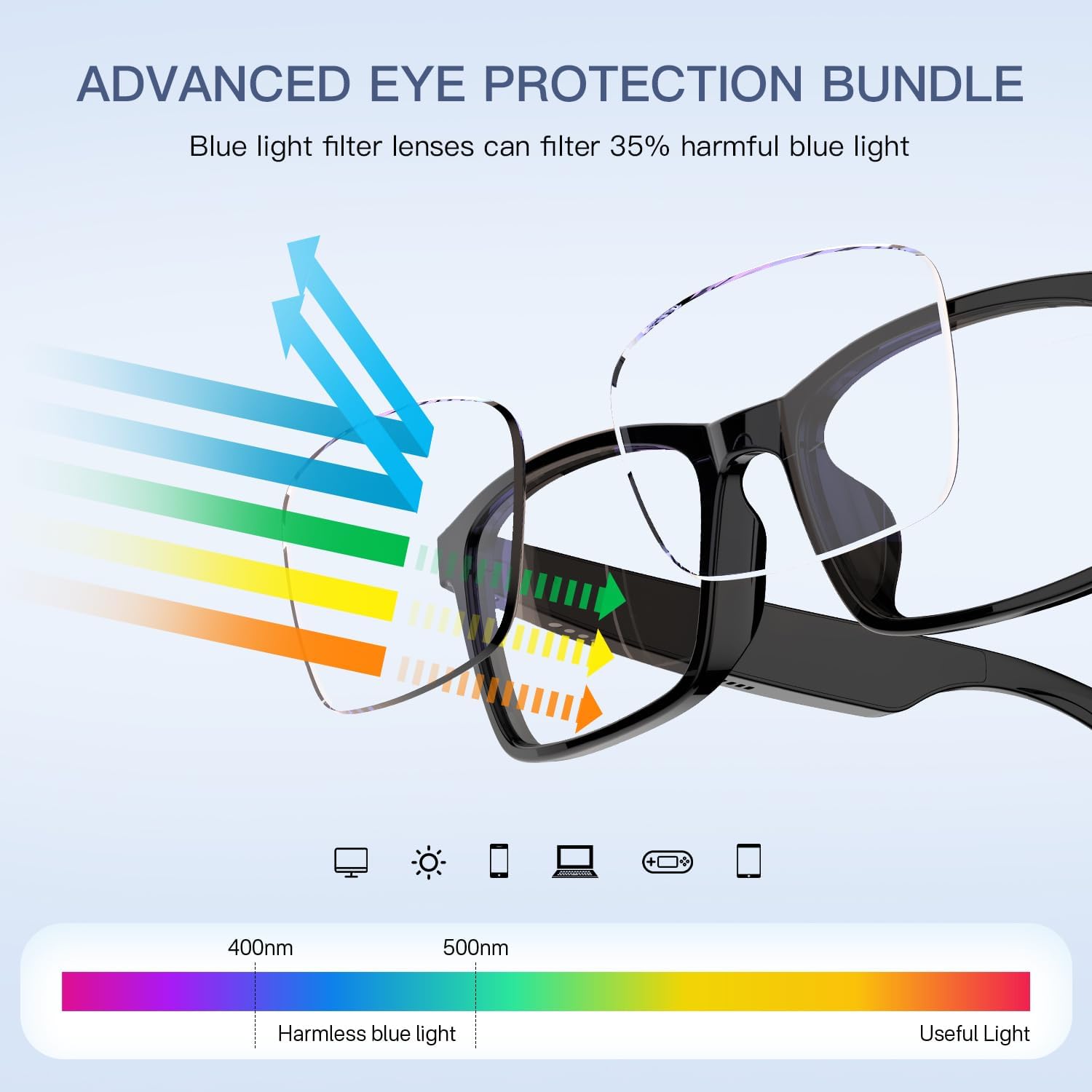
Image 6.2: Diagram illustrating how the anti-blue light lenses filter harmful blue light from electronic screens.
7. Maintenance
- Cleaning: Use the provided cleaning cloth to gently wipe the lenses and frame. Avoid harsh chemicals or abrasive materials.
- Storage: Store the glasses in their protective case when not in use to prevent scratches and damage.
- Water Exposure: The glasses are not waterproof. Avoid exposure to excessive moisture or submersion in water.
- Temperature: Do not expose the glasses to extreme temperatures (hot or cold) as this may affect battery life and electronic components.
8. Troubleshooting
| Problem | Possible Cause | Solution |
|---|---|---|
| Glasses do not power on. | Low battery; only one side powered on. | Charge both sides of the glasses. Ensure both touch areas are pressed simultaneously for power on. |
| Cannot connect via Bluetooth. | Glasses not in pairing mode; device Bluetooth off; interference. | Ensure glasses are in pairing mode. Turn Bluetooth off/on on your device. Move closer to the device. |
| No sound or low volume. | Volume too low on glasses or connected device; glasses not properly positioned. | Adjust volume on both glasses and connected device. Ensure speakers are aligned with your ears. |
| Charging issues. | Magnetic cable not properly connected; dirty charging ports; faulty cable. | Ensure magnetic cable is securely attached to both ports. Clean charging ports. Try a different USB power source. |
| Incessant low battery beeping. | Battery is critically low. | Charge the glasses immediately. |
9. Specifications
| Feature | Detail |
|---|---|
| Model Name | G10-Z |
| Brand | Tulbeys |
| Connectivity Technology | Bluetooth 5.3 (Wireless) |
| Battery Type | 2 Lithium Polymer batteries (included) |
| Battery Capacity | 160mAh (total) |
| Playtime | Up to 4 hours |
| Call Time | Up to 5 hours |
| Standby Time | Up to 100 hours |
| Charging Time | 1.5-2 hours |
| Item Weight | 30 Grams (1.06 ounces) |
| Product Dimensions | 61.42 x 61.81 x 15.75 inches (approximate) |
| Special Features | Anti-blue light lenses, Open-ear audio, Built-in mic and speakers, Touch control, Voice assistant compatibility. |

Image 9.1: Visual representation of the battery performance, showing 5 hours talk time and 100 hours standby time.
10. Warranty and Support
Tulbeys products are designed for reliability and performance. For warranty information, technical support, or customer service inquiries, please refer to the contact information provided on the product packaging or visit the official Tulbeys website.
Please retain your proof of purchase for warranty claims.