
1. Introduction
This instruction manual provides essential information for the safe and effective use of your HOYOA DCB104 4-Port Battery Charger. Please read and understand all instructions before operating the charger to ensure proper function and safety.

Figure 1: HOYOA DCB104 4-Port Battery Charger. This image displays the yellow and black charger with its four battery slots and a carrying handle.
2. Product Overview
The HOYOA DCB104 is a versatile 4-port rapid charger designed to efficiently charge multiple batteries simultaneously. It features additional USB-A and Type-C ports for charging mobile devices.
- 4-Port Rapid Charging: Charges up to four 12V MAX or 20V MAX batteries at 3A per port.
- USB-A & Type-C Ports: Integrated ports for charging phones, tablets, and other USB-powered devices.
- Wide Compatibility: Supports various Dewalt 12V MAX, 20V MAX, and FlexVolt batteries.
- Safety Features: Equipped with multiple protection mechanisms against electrical hazards.
- Portable & Wall-Mountable: Features a foldable handle for easy transport and pre-drilled holes for wall installation.
3. Setup
- Unpacking: Carefully remove the charger and all accessories from the packaging. Inspect for any damage.
- Power Connection: Connect the provided power cord to the charger's power input port and then plug it into a standard 100-120V~ 50/60Hz AC outlet. The green and yellow LED lights will flash once to indicate the charger is ready.
- Placement: Place the charger on a stable, flat surface or mount it to a wall using the pre-drilled holes. Ensure adequate ventilation around the charger.

Figure 2: The charger features a foldable handle for easy portability and storage.

Figure 3: Rear view of the charger showing wall mounting holes and cooling vents.
4. Operating Instructions
4.1 Battery Charging Procedure
- Ensure the charger is plugged into a live power outlet.
- Insert the battery pack firmly into one of the charging cavities. The charging process will begin automatically.
- Monitor the LED indicator for the battery's charging status.
- Once the battery is fully charged (indicated by a solid green light), remove it from the charger.
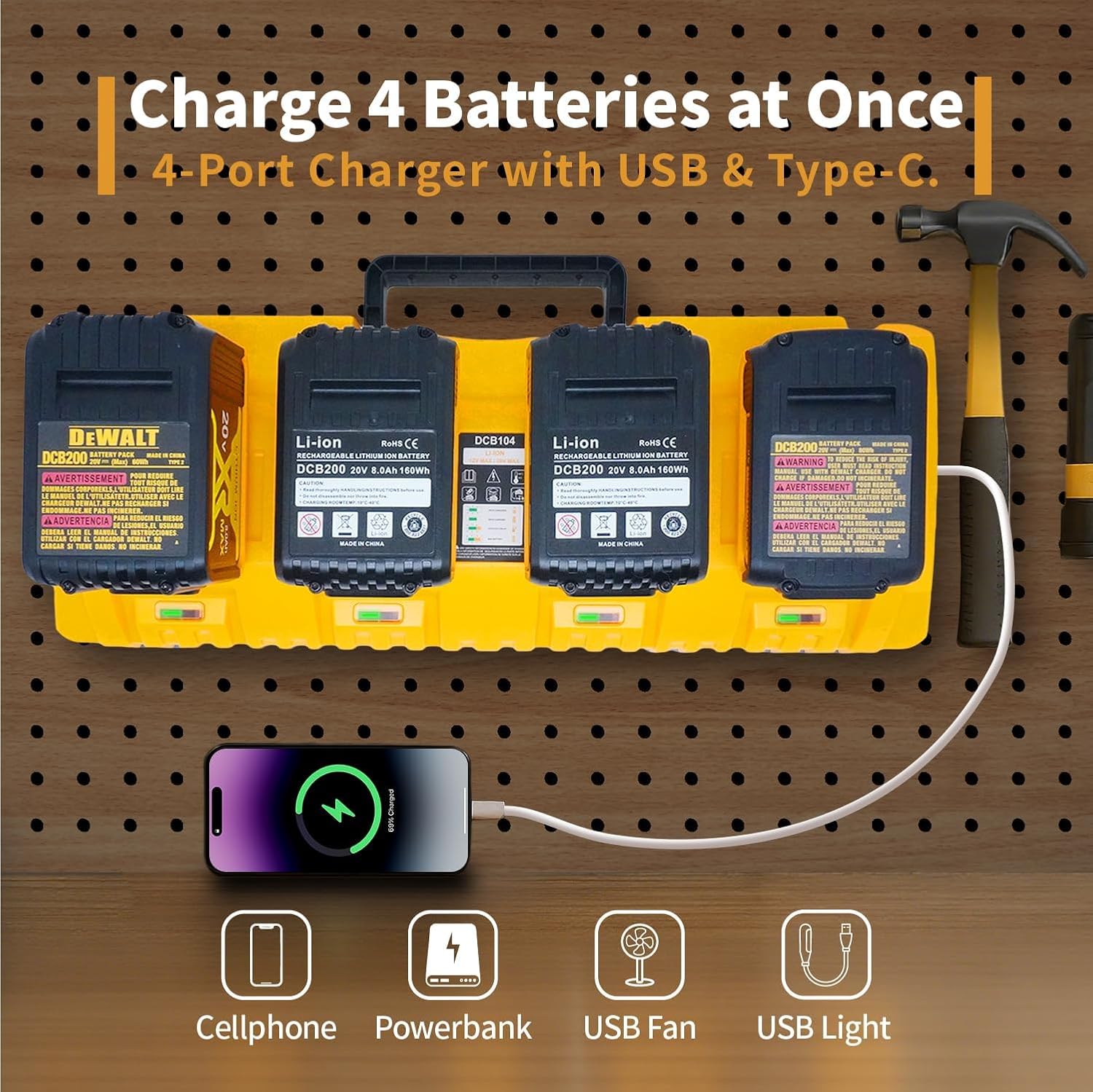
Figure 4: The charger can accommodate up to four batteries at once, along with USB-powered devices.
4.2 LED Indicator Status
The charger features LED indicators for each port to display the battery status:
- Green Flashing: Battery is charging.
- Green Solid: Battery is fully charged.
- Green Flashing & Yellow Solid: Over-temperature delay (battery is too hot or too cold). Charging will resume once the battery reaches an acceptable temperature.
- Green & Yellow Flashing: Indicates a battery issue or improper insertion. Re-insert the battery or replace if damaged.

Figure 5: Visual guide to the LED indicator lights for various charging states.
4.3 USB and Type-C Charging
The charger includes USB-A and Type-C ports on the side for charging external devices. Simply plug your device's USB cable into the appropriate port to begin charging.
5. Battery Compatibility
The HOYOA DCB104 charger is compatible with a wide range of Dewalt 12V MAX, 20V MAX, and FlexVolt batteries. Refer to the list below for specific compatible models:
- 12V MAX Batteries: DCB120, DCB121, DCB124, DCB126, DCB127.
- 20V MAX Batteries: DCB200, DCB201, DCB201-2, DCB203, DCB204, DCB205, DCB206, DCB208, DCB210, DCB230, DCB240, N123282, N123283.
- FlexVolt Batteries: DCB606, DCB609, DCB609G, DCB612 (Note: Operates at 20V by default, switches to 60V in compatible tools).

Figure 6: Visual representation of various compatible battery types.
6. Safety Information and Protection Features
The HOYOA DCB104 charger incorporates advanced safety features to protect both the batteries and the charger during operation:
- Overcharge Protection: Prevents batteries from being overcharged, extending their lifespan.
- Over-Voltage Protection: Safeguards against excessive voltage input.
- Overheat Protection: Monitors internal temperature and pauses charging if it exceeds safe limits.
- Overcurrent Protection: Protects against excessive current flow.
- Short-Circuit Protection: Automatically shuts off in case of a short circuit.
- Over-Discharge Protection: Prevents batteries from being discharged too deeply.
General Safety Advice:
- This charger is designed for indoor use only.
- Do not probe with conductive metal objects during charging.
- Do not insert a cracked or damaged battery into the charger.
- Keep away from water and moisture.
- To reduce the risk of injury, charge only batteries designed for this charger. Other types of batteries may burst, causing personal injury and damage.
- Ensure the power cable is at the correct place; do not be trampled or damaged.
- To reduce the risk of damage, always disconnect the charger from the wall socket if pulling the power cable from the wall socket is not good.

Figure 7: Icons illustrating the comprehensive safety protections of the charger.
7. Maintenance
- Cleaning: Disconnect the charger from the power source before cleaning. Use a dry, soft cloth to wipe the exterior. Do not use abrasive cleaners or solvents.
- Storage: Store the charger in a dry, cool place away from direct sunlight and moisture when not in use.
- Cable Care: Regularly inspect the power cord for any signs of damage. Replace immediately if damaged.
8. Troubleshooting
If you encounter issues with your charger, refer to the LED indicator status in Section 4.2. Common issues and their solutions include:
- Charger Not Powering On: Ensure the power cord is securely plugged into both the charger and a working electrical outlet.
- Battery Not Charging (Green & Yellow Flashing): The battery might be too hot or too cold. Allow it to reach room temperature before attempting to charge again. If the issue persists, the battery might be faulty.
- Battery Not Charging (Green & Yellow Flashing, no temperature issue): The battery might be improperly inserted or damaged. Re-insert the battery firmly. If the problem continues, the battery may be defective.
9. Specifications
| Model Number | DCB104 |
| Input Voltage | 100-120V~ 50/60Hz |
| Output Voltage | 20 Volts |
| Output Current (per port) | 3.0A |
| Number of Ports | 4 Battery Ports, 1 USB-A, 1 Type-C |
| Compatible Batteries | Dewalt 12V MAX, 20V MAX, and FlexVolt Li-ion Batteries |
| Item Weight | 3.88 pounds |
| Product Dimensions | 16.93 x 6.69 x 3.94 inches |
| Color | Yellow |
| Certifications | UL, CE, FCC, IEC |
Table 1: Technical Specifications of the HOYOA DCB104 Charger.
10. Warranty and Support
The HOYOA DCB104 charger comes with a Twelve Month Warranty from the date of purchase. For warranty claims or technical support, please contact HOYOA customer service.
HOYOA provides reliable power solutions and tool accessories. For further assistance, please refer to the contact information provided with your product or visit the official HOYOA store.
Contact Information:
- Amazon Message
- Email: hoyoa2020
- Social Media: @Hoyoa Power Tools, @hoyoa_official
11. Official Product Videos
Watch these official product videos for visual guidance and demonstrations:
HOYOA Replacement For Dewalt Battery Charger DCB104
Video 1: An overview of the HOYOA DCB104 charger, demonstrating its features and ease of use.
3X Faster Charge 4 DeWalt Batteries at Once
Video 2: A demonstration highlighting the rapid charging capability of the 4-port charger.