
1. Introduction
The ZK-SMC01 is a versatile stepper motor controller designed for precise control of 42 and 57 series stepper motors. It supports forward and reverse rotation, angle control, pulse generation, and speed regulation. This controller also features PLC serial communication capabilities, allowing for integration into automated systems. This manual provides detailed instructions for the proper setup, operation, and maintenance of the ZK-SMC01 controller.
2. Setup
2.1 Power Connection
The ZK-SMC01 controller operates on a DC voltage supply. Connect a 24 Volts DC power source to the designated power input terminals. Ensure correct polarity to prevent damage to the device.
2.2 Motor and Control Signal Wiring
Proper wiring of the stepper motor and control signals is crucial for correct operation. Refer to the image below for terminal identification and connect your stepper motor and external control signals accordingly.

Image: Rear view of the ZK-SMC01 controller showing the PCB and wiring terminals.
- DC-DC+ / GND: Power input terminals. Connect your 24V DC power supply here.
- PUL: Pulse output terminal. Connect to the pulse input of your stepper motor driver.
- DIR: Direction output terminal. Connect to the direction input of your stepper motor driver.
- EN: Enable output terminal. Connect to the enable input of your stepper motor driver.
- P1 / P2: External input terminals, typically used for limit switches or external trigger signals.
- COM: Common ground for external control signals.
- RX / TX / GND / 3.3V: Serial communication (UART) interface for PLC or other serial devices.
- FORWARD / REVERSE / STOP: Input terminals for external control buttons or signals to initiate specific motor actions.
2.3 Mounting
The controller features mounting tabs for secure installation. Ensure adequate ventilation around the unit to prevent overheating.

Image: Side view of the ZK-SMC01 controller, highlighting the mounting tabs for installation.
3. Operating Instructions
3.1 Front Panel Controls
The ZK-SMC01 features an intuitive front panel with a display, buttons, and a rotary encoder for easy operation.
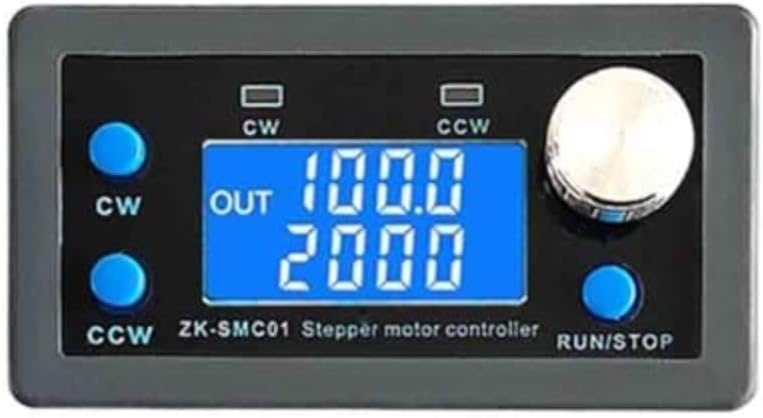
Image: Front view of the ZK-SMC01 controller, showing the LCD display, control buttons, and rotary encoder.
- CW Button: Initiates clockwise rotation or increases a parameter value.
- CCW Button: Initiates counter-clockwise rotation or decreases a parameter value.
- RUN/STOP Button: Starts or stops the motor operation. Also used to confirm settings.
- Rotary Encoder: Used for navigating menus and adjusting numerical values. Pressing the encoder typically confirms a selection or enters a setting mode.
3.2 Display Information
The LCD display provides real-time information about the controller's status and current settings.
- OUT: Indicates the output pulse count or current operating mode.
- Top Line (e.g., 100.0): Typically displays the current speed (frequency) or angle setting.
- Bottom Line (e.g., 2000): Often shows the total number of pulses to be output for a specific move, or a target position.
3.3 Operating Modes
The ZK-SMC01 supports various operating modes, configurable via the front panel or serial communication:
- Angle Control: Allows the motor to rotate a specific angular displacement.
- Pulse Control: Outputs a precise number of pulses to move the motor a set number of steps.
- Speed Control: Maintains a constant motor speed, adjustable in real-time.
- Forward/Reverse: Direct control over the motor's rotation direction.
3.4 Serial Communication (PLC)
The controller can be integrated into a larger automation system via its serial communication interface. This allows for remote control, parameter setting, and status monitoring by a PLC or other compatible device. Refer to the detailed communication protocol documentation (not included in this manual) for specific commands and data formats.
4. Maintenance
To ensure the longevity and reliable operation of your ZK-SMC01 controller, follow these maintenance guidelines:
- Cleaning: Keep the controller clean and free from dust and debris. Use a soft, dry cloth for cleaning. Avoid liquid cleaners.
- Environment: Operate the controller within its specified environmental conditions (temperature, humidity). Avoid exposure to moisture, corrosive gases, or excessive vibrations.
- Connection Checks: Periodically inspect all wiring connections to ensure they are secure and free from corrosion. Loose connections can lead to erratic behavior or damage.
- Ventilation: Ensure that the controller has adequate airflow, especially if it is enclosed, to prevent overheating.
5. Troubleshooting
This section provides solutions to common issues you might encounter with the ZK-SMC01 controller.
| Problem | Possible Cause | Solution |
|---|---|---|
| Motor does not move. | No power, incorrect wiring, motor driver issue, controller in STOP mode. | Check power supply, verify all wiring connections (power, PUL, DIR, EN), ensure motor driver is functional, press RUN/STOP button. |
| Motor moves erratically or vibrates. | Incorrect motor current setting on driver, loose wiring, motor not properly secured. | Adjust motor driver current, check all wiring for secure connections, ensure motor is firmly mounted. |
| Display is blank or unreadable. | No power, incorrect voltage, display damage. | Verify power supply (24V DC), check power connections, contact support if display is physically damaged. |
| Serial communication not working. | Incorrect wiring (RX/TX), wrong baud rate, protocol mismatch. | Check RX/TX wiring, ensure baud rate and communication parameters match between controller and PLC/device. Refer to communication protocol. |
6. Specifications
Key technical specifications for the ZK-SMC01 Stepper Motor Controller:
| Feature | Detail |
|---|---|
| Model | ZK-SMC01 |
| Compatible Motors | 42, 57 Stepper Motors |
| Input Voltage | 24 Volts (DC) |
| Control Modes | Forward/Reverse, Angle, Pulse, Speed Control |
| Communication | PLC Serial Communication (UART) |
| Display Type | LCD or LED |
| Item Weight | 1.06 ounces (approximately 30 grams) |
| Package Dimensions | 3.94 x 2.95 x 0.79 inches (10 x 7.5 x 2 cm) |
| Manufacturer | YOURRYONG US |
| UPC | 763312601173 |
7. Warranty and Support
For information regarding product warranty, please refer to the terms and conditions provided by the seller or manufacturer at the time of purchase. Warranty details may vary based on region and retailer.
If you encounter issues not covered in this manual or require further assistance, please contact the seller or YOURRYONG US customer support through their official channels. When contacting support, please provide your product model (ZK-SMC01) and a detailed description of the issue.