
Introduction
This manual provides detailed instructions for the assembly, operation, and maintenance of your XD Designs Multi-Functional Twin Size Daybed. This daybed features an upholstered headboard, integrated storage shelves, a study desk, and two under-bed drawers, designed to maximize space and functionality in various living environments.
Safety Information
- Read all instructions carefully before assembly and use.
- Keep all small parts and packaging materials away from children.
- Ensure all connections are securely tightened before use. Periodically check and re-tighten as necessary.
- Do not exceed the maximum weight capacity of 250 pounds.
- Use on a flat, stable surface.
- Avoid placing hot items directly on the wooden surfaces.
- Only use the provided power outlets and USB ports for compatible electronic devices. Do not overload the charging station.
Package Contents
Verify that all components are present before beginning assembly. Refer to the included step-by-step installation manual for a complete list of parts and hardware. Key components include:
- Bed Frame (Pine Wood + MDF)
- Upholstered Headboard (Linen)
- Bed Slats
- Storage Shelves
- Study Desk Components
- 2 Under-bed Drawers
- Charging Station (2 AC outlets, 2 USB ports)
- Assembly Hardware and Tools (typically Allen wrench)
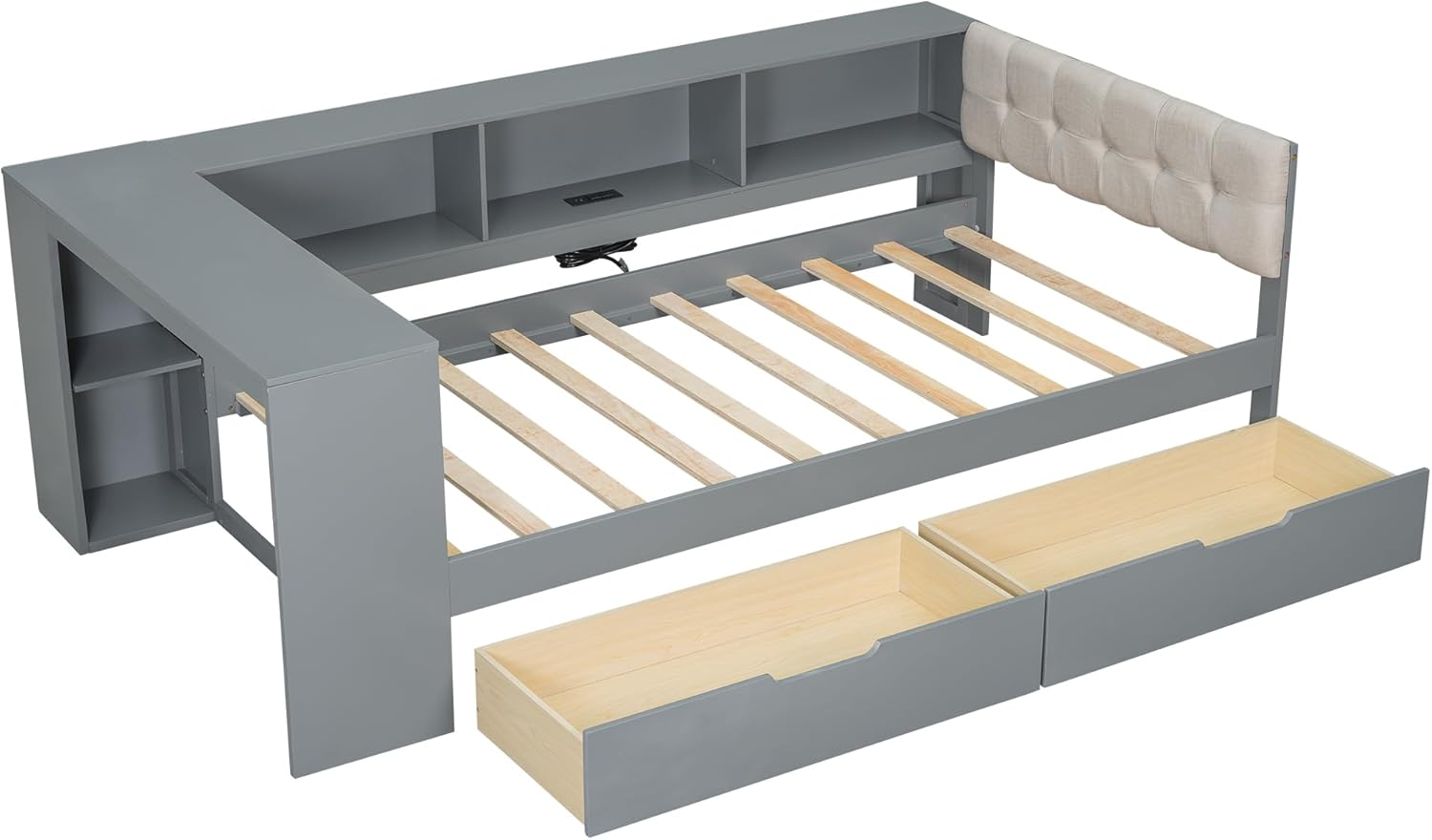
Image: Exploded view of the daybed components, illustrating the main parts including the frame, slats, drawers, and headboard for assembly reference.
Setup and Assembly
Assembly of the daybed requires following the step-by-step installation manual provided in your package. All holes are pre-drilled for ease of assembly. It is recommended to assemble the daybed with two people.
- Unpack and Identify Parts: Lay out all components and hardware. Compare them against the parts list in your manual.
- Assemble the Main Frame: Connect the side rails and end panels using the provided hardware. Ensure all bolts are finger-tightened initially.
- Install Storage Shelves and Study Desk: Attach the shelf and desk components to the main frame as indicated in the manual.
- Attach Upholstered Headboard: Secure the upholstered headboard to the designated section of the frame.
- Insert Bed Slats: Place the wooden slats across the bed frame, ensuring even spacing and secure attachment.
- Assemble and Insert Drawers: Assemble the two under-bed drawers and slide them into their designated compartments.
- Final Tightening: Once all components are in place, fully tighten all bolts and screws using the provided tools. Do not overtighten.
- Connect Charging Station: Plug the charging station's power cord into a wall outlet after the bed is fully assembled and in its final position.

Image: Dimensional diagram of the daybed, providing measurements for overall length, width, height, and specific sections like shelves, desk, and drawers.

Image: Rear view of the daybed frame, showing the integrated charging station and the structure of the bed slats.
Operating Instructions
Charging Station
The daybed includes a built-in charging station with two standard plug outlets and two USB ports located within the storage shelf area. To use:
- Ensure the daybed's main power cord is plugged into a functional wall outlet.
- Connect your electronic devices (laptops, phones, tablets) to the appropriate AC or USB ports.
- Avoid plugging in high-power appliances that may exceed the station's capacity.
Study Desk
A dedicated study desk is integrated at the foot of the bed, providing a convenient workspace. Use it for studying, working on a laptop, or reading. Ensure items placed on the desk do not obstruct movement or pose a falling hazard.

Image: Close-up of the study desk and storage shelves, demonstrating their functional design.
Storage Drawers and Shelves
The daybed features built-in storage shelves above the headboard and two pull-out drawers beneath the bed. These are suitable for storing bedding, books, personal items, and small electronics. Ensure drawers are closed fully when not in use to prevent tripping hazards.

Image: Side view of the daybed, illustrating the under-bed storage drawers and the study desk.
Maintenance
- Cleaning Wood Surfaces: Wipe wooden parts with a soft, damp cloth. Avoid harsh chemicals or abrasive cleaners. Dry immediately.
- Cleaning Upholstered Headboard: Spot clean the linen headboard with a mild fabric cleaner and a soft cloth. Test on an inconspicuous area first. Do not saturate the fabric.
- Hardware Check: Periodically check all bolts and screws to ensure they remain tight. Re-tighten as needed to maintain stability.
- Charging Station: Keep the charging station free of dust and debris. Do not attempt to disassemble or repair the electrical components yourself.

Image: Close-up view of the upholstered linen headboard, highlighting its texture and button-tufted design.
Troubleshooting
| Problem | Possible Cause | Solution |
|---|---|---|
| Bed feels unstable or wobbly. | Loose hardware. | Check and tighten all bolts and screws. Ensure the bed is on a level surface. |
| Drawers do not slide smoothly. | Misalignment or obstruction. | Ensure drawers are assembled correctly and tracks are clear of debris. Check for proper alignment. |
| Charging station not working. | Not plugged in, power outage, or faulty device. | Verify the daybed's power cord is securely plugged into a live wall outlet. Test with a different device. If issues persist, contact customer support. |
| Missing parts during assembly. | Packaging not fully checked. | Carefully re-check all packaging materials. If parts are still missing, contact customer support with your parts list. |
Specifications
- Overall Product Dimensions: 88.29"L x 49.8"W x 29.5"H
- Size: Twin
- Weight Capacity: 250 Pounds
- Material: Pine Wood, MDF, Linen
- Color: Gray-wj
- Style: Modern
- Assembly Required: Yes
- Included Components: Bed frame, upholstered headboard, slats, storage shelves, study desk, 2 drawers, charging station.
Warranty Information
This product comes with a Limited Warranty. Please refer to the warranty card included in your package for specific terms, conditions, and duration of coverage. The warranty typically covers manufacturing defects under normal use.
Customer Support
If you have any questions regarding the assembly, operation, or maintenance of your XD Designs Multi-Functional Twin Size Daybed, or if you encounter any issues, please do not hesitate to contact our customer service representatives. Refer to your purchase documentation for contact details.
We are committed to providing excellent after-sales service and support.