1. Introduction
This manual provides essential information for the Generic replacement remote control designed for use with Predia Touch Swifi and Predia Display 4K HD Creative Touch Interactive Flat Panel LED Displays. This remote is an infrared (IR) replacement unit and does not require any programming or setup. Please ensure your original remote control matches the appearance of this replacement unit for full compatibility.
Important Note: This replacement remote may not offer all functions identical to your original remote. Verify compatibility by comparing your existing remote with the images provided in this manual.
2. Product Overview
The Generic replacement remote control is designed to provide basic and essential control over compatible Predia interactive flat panels. It features standard buttons for power, navigation, volume, channel, and input selection.
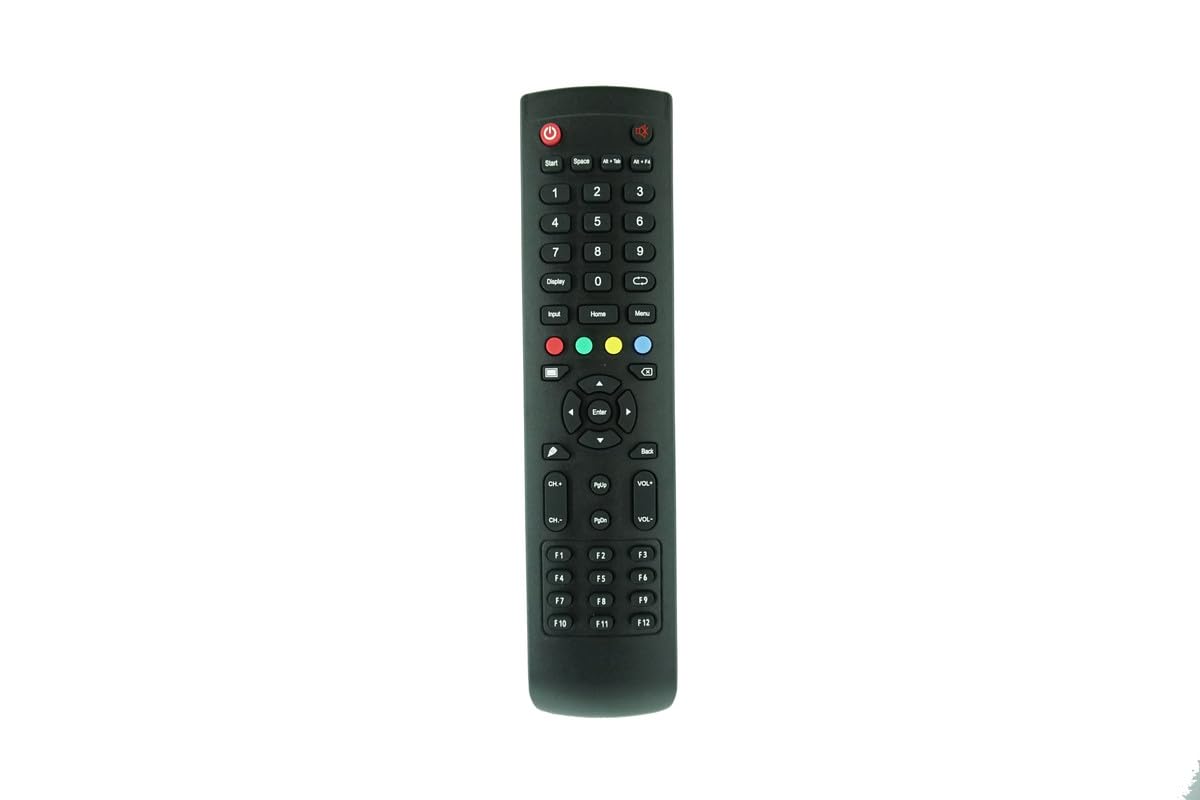
Figure 1: Front view of the remote control, displaying all functional buttons.

Figure 2: Angled front view of the remote control.
3. Setup: Battery Installation
This remote control requires two (2) AAA batteries (not included). Follow these steps to install the batteries:
- Locate the battery compartment on the back of the remote control.
- Slide the battery compartment cover downwards or press the latch and lift to open.
- Insert two AAA batteries, ensuring the positive (+) and negative (-) terminals align correctly with the markings inside the compartment.
- Replace the battery compartment cover by sliding it back into place until it clicks securely.

Figure 3: Back view of the remote control with the battery compartment.

Figure 4: Battery compartment with cover removed, ready for battery insertion.

Figure 5: Close-up of the battery compartment showing correct battery orientation.
4. Operating Instructions
This remote control operates via infrared (IR) signals. Point the remote directly at the IR receiver on your Predia interactive flat panel. No programming or pairing is required for this replacement unit.
- Power Button: Press to turn the display ON or OFF.
- Number Buttons (0-9): For direct channel input or menu navigation.
- Navigation Pad (Up, Down, Left, Right, Enter): Used to navigate menus and confirm selections.
- Volume Up/Down (VOL+/-): Adjusts the audio volume.
- Channel Up/Down (CH+/-): Changes the display channel.
- Input Button: Cycles through available input sources (HDMI, VGA, etc.).
- Menu Button: Accesses the display's main menu.
- Back Button: Returns to the previous menu or screen.
- Home Button: Returns to the display's home screen.
For specific functions not listed, refer to your Predia interactive flat panel's original user manual.
5. Maintenance
- Cleaning: Wipe the remote control with a soft, dry cloth. Do not use liquid cleaners or abrasive materials.
- Battery Replacement: Replace batteries when the remote's response becomes sluggish or stops working. Always replace both batteries at the same time with new AAA batteries.
- Storage: If the remote will not be used for an extended period, remove the batteries to prevent leakage and potential damage.
- Avoid Damage: Do not drop the remote, expose it to extreme temperatures, or immerse it in water.
6. Troubleshooting
| Problem | Solution |
|---|---|
| Remote is not responding. |
|
| Some functions do not work. |
|
| Remote works intermittently. |
|
7. Specifications
- Product Type: Infrared (IR) Replacement Remote Control
- Compatible Devices: Predia Touch Swifi (55, 65, 75, 86, 98 inch) and Predia Display (43, 5, 65, 75, 86 inch) 4K HD Creative Touch Interactive Flat Panel LED Displays
- Power Source: 2 x AAA Batteries (not included)
- Color: Black
- Manufacturer: Easytry
8. Important Notes and Disclaimer
- This remote control is a direct IR replacement and does not require any programming or setup.
- Functionality may vary slightly compared to your original remote. Not all advanced features may be supported.
- Ensure your original remote matches the appearance of this replacement unit for optimal compatibility.
- Batteries are not included with this product.
- For any doubts regarding compatibility or functionality, please contact the seller before purchase.


