
Introduction
Thank you for choosing the VKROBAG P114 Smartwatch. This manual provides essential information for setting up, operating, and maintaining your device. Please read it carefully to ensure optimal performance and longevity of your smartwatch.
Safety Information
- Do not attempt to disassemble or modify the device.
- Keep the device away from extreme temperatures and direct sunlight.
- Avoid exposing the device to strong impacts or drops.
- Consult a medical professional before starting any new exercise regimen, especially if you have pre-existing health conditions.
- This device is not a medical device and should not be used for diagnostic or treatment purposes.
Package Contents
Ensure all items are present in your package:
- VKROBAG P114 Smartwatch
- Charging Cable
- User Manual
Product Overview
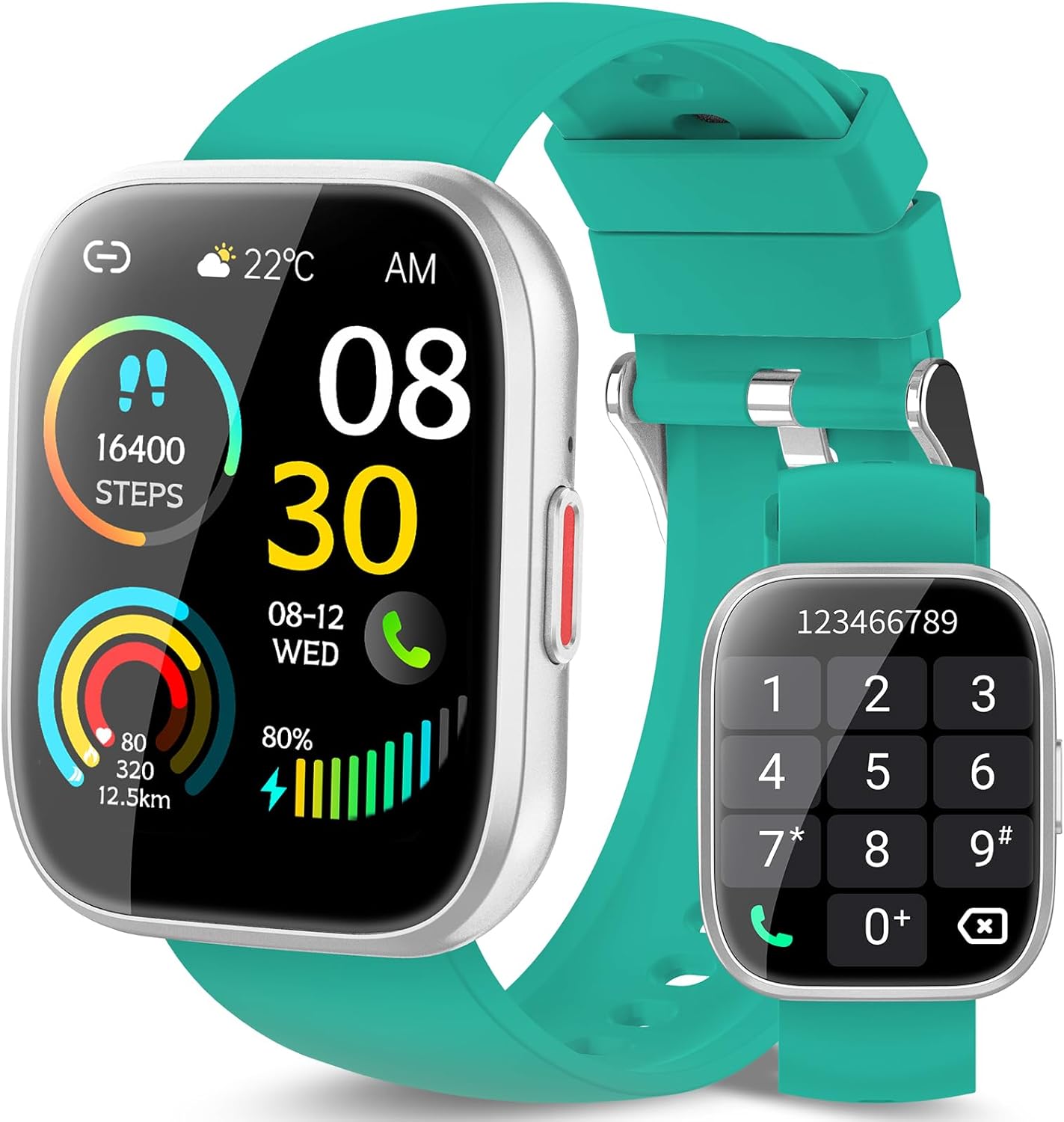
Figure 1: VKROBAG P114 Smartwatch. The display shows the current time (08:30 AM), date (08-12 WED), weather (22°C), step count (16400 steps), heart rate (80 bpm), calories burned (320), distance (12.5 km), and battery level (80%). A separate image shows the dial pad for making calls.
The VKROBAG P114 Smartwatch features a 1.85-inch digital display, a side button for navigation, and a comfortable silicone strap. It integrates various sensors for health and fitness tracking.
Setup
1. Charging the Smartwatch
Before first use, fully charge your smartwatch. Connect the magnetic charging cable to the charging points on the back of the watch and plug the USB end into a standard USB power adapter (not included).
- A full charge typically takes approximately 2 hours.
- The battery icon on the screen will indicate charging status.
2. App Download and Installation
To unlock all features, download the companion app on your smartphone. Scan the QR code provided in the quick start guide (if available) or search for the app name (e.g., "VKROBAG Fit" or similar, check packaging) in your phone's app store (App Store for iOS, Google Play Store for Android).
3. Pairing with Your Smartphone
- Ensure Bluetooth is enabled on your smartphone.
- Open the companion app and follow the on-screen instructions to create an account or log in.
- In the app, navigate to the "Device" or "Add Device" section.
- Select "VKROBAG P114" from the list of available devices.
- Confirm the pairing request on both your smartphone and smartwatch.
Note: For call functionality, you may need to pair the watch separately as a Bluetooth audio device in your phone's Bluetooth settings after the initial app pairing. Look for a device named "P114_Call" or similar.
Operating the Smartwatch
Basic Navigation
- Touch Screen: Swipe left/right, up/down to navigate through menus and features. Tap to select.
- Side Button: Press to wake the screen, return to the home screen, or access the main menu. Long press for power options.
Call Function
With the watch paired for calls, you can make and receive calls directly from your wrist.
- Making a Call: Access the dial pad or contact list on the watch. Enter the number or select a contact and tap the call icon.
- Answering a Call: When a call comes in, tap the green answer icon on the watch screen.
Fitness Tracking
- Steps & Distance: The watch automatically tracks your daily steps, distance, and calories burned. View summaries on the watch face or in the app.
- Heart Rate Monitoring: Access the heart rate function on the watch to measure your current heart rate. The app provides historical data.
- Sleep Monitoring: Wear the watch to bed for automatic sleep tracking. Review sleep patterns (deep sleep, light sleep, awake time) in the app.
- Sports Modes: Select from over 110 sports modes (e.g., running, cycling, walking) to track specific workout data.
Notifications
Receive notifications for calls, messages, and social media apps directly on your smartwatch. Ensure notification permissions are enabled in both your phone's settings and the companion app.
Maintenance
Cleaning
Wipe the watch screen and strap regularly with a soft, dry cloth. For stubborn dirt, use a slightly damp cloth and then dry thoroughly. Avoid harsh chemicals or abrasive materials.
Water Resistance (IP68)
The VKROBAG P114 Smartwatch is IP68 rated, meaning it is resistant to dust and can withstand immersion in water up to 1.5 meters for up to 30 minutes. It is suitable for daily use, hand washing, and light rain. However, it is not recommended for hot showers, saunas, or diving, as steam and high water pressure can compromise the seal.
Battery Care
- Avoid fully discharging the battery frequently.
- Charge the device using the provided cable and a compatible power adapter.
- Store the watch in a cool, dry place if not used for extended periods.
Troubleshooting
- Watch not turning on: Ensure the watch is fully charged. Connect it to the charger for at least 30 minutes.
- Cannot pair with phone:
- Ensure Bluetooth is on for both devices.
- Make sure the watch is within Bluetooth range of your phone.
- Restart both the watch and your phone.
- Forget the device in your phone's Bluetooth settings and try pairing again through the app.
- Inaccurate health data: Ensure the watch is worn snugly on your wrist, not too tight or too loose. Clean the sensors regularly.
- Notifications not appearing: Check app notification permissions on your phone and within the companion app. Ensure the watch is connected via Bluetooth.
Specifications
| Feature | Detail |
|---|---|
| Model | P114 |
| Display Size | 1.85 inches |
| Display Type | Digital |
| Resolution | 320 x 320 |
| Connectivity | Bluetooth |
| Water Resistance | IP68 |
| Battery Type | Lithium-polymer (included) |
| Compatible Devices | Smartphone |
| Input Device | Microphone |
Warranty and Support
For warranty information and customer support, please refer to the documentation included with your purchase or contact the retailer/manufacturer directly. Keep your proof of purchase for warranty claims.
For further assistance, visit the official VKROBAG website or contact their customer service.