
1. Introduction
Thank you for choosing the T.F.SKYWINDINTL 800W 80 Plus Gold ATX Computer Power Supply. This manual provides essential information for the proper installation, operation, and maintenance of your new power supply unit (PSU). Please read this manual thoroughly before installation to ensure optimal performance and safety.
2. Safety Information
WARNING: Improper installation or use can lead to equipment damage, electric shock, or serious injury. Always follow these safety guidelines:
- Ensure the power supply is disconnected from the AC power outlet before installation, removal, or any maintenance.
- This product is designed for internal computer use only. Do not use it in high humidity or extreme temperature environments.
- Do not open the PSU casing. High voltages are present inside, even when disconnected. There are no user-serviceable parts.
- Ensure all cables are correctly connected to their respective components. Loose connections can cause damage.
- Use only the cables provided with the power supply.
- Install the PSU in a well-ventilated area to prevent overheating.
- Keep out of reach of children.
3. Package Contents
Verify that all items are present in your package:
- T.F.SKYWINDINTL 800W ATX Power Supply Unit
- AC Power Cord
- Mounting Screws
- Cable Ties (for management)
4. Product Overview
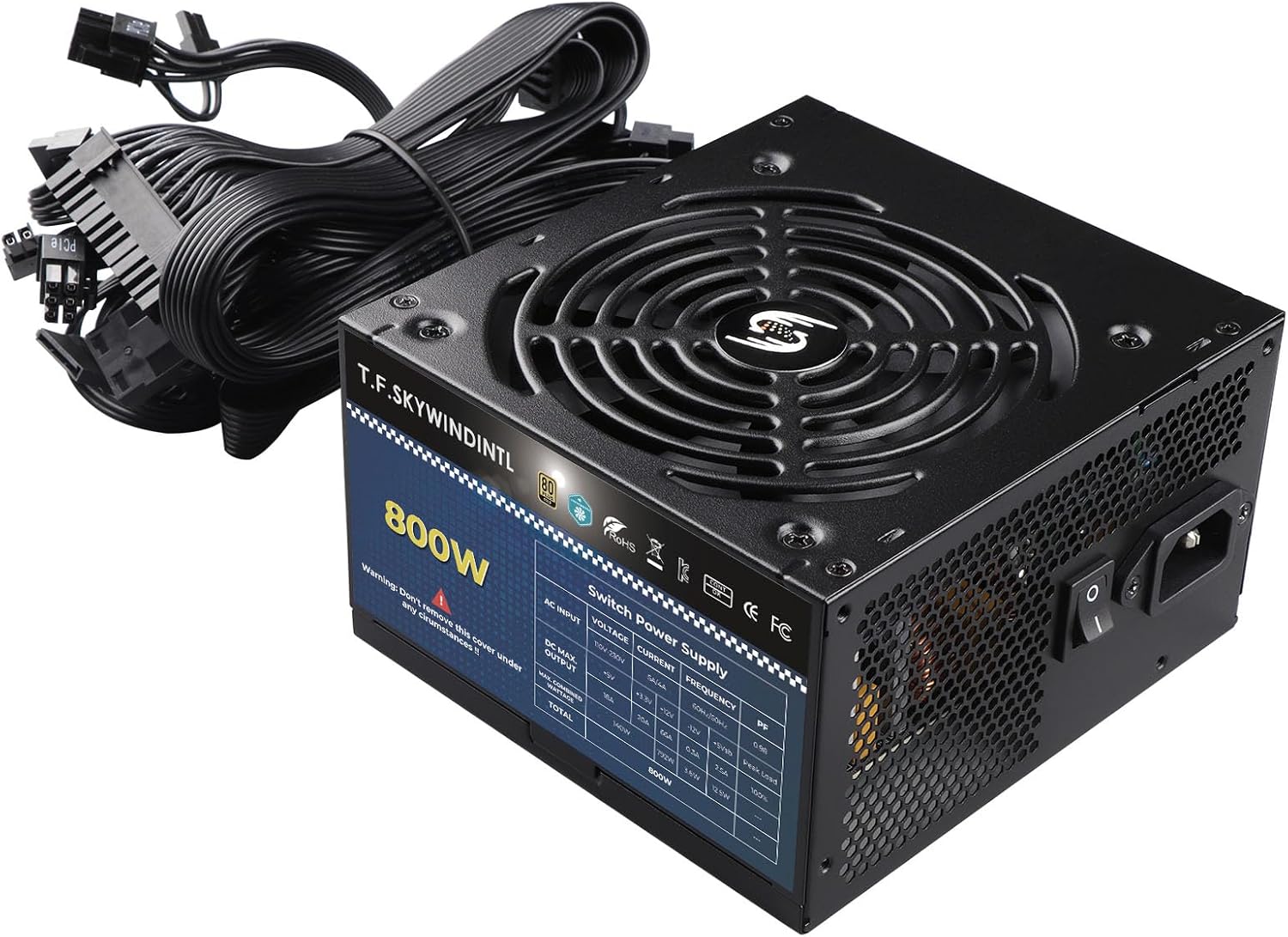
The T.F.SKYWINDINTL 800W Power Supply is an 80 Plus Gold certified unit designed for reliable and efficient power delivery to your desktop PC or server. It features a non-modular design, a quiet FDB fan, and comprehensive protection circuits.
4.1 Key Features
- 80 Plus Gold Certification: Ensures 87% efficiency or higher under typical loads, reducing energy consumption and heat.
- 800W Continuous Power: Provides stable and continuous 800 watts of power.
- 125mm Ultra-Quiet FDB Fan: Features a Fluid Dynamic Bearing fan for low noise operation and extended lifespan.
- Non-Modular Design: All cables are permanently attached to the PSU.
- Full Voltage Support: Compatible with 110-230V input, offering automatic protection in unstable voltage environments.
- Advanced Protections: Includes Over Voltage Protection (OVP), Under Voltage Protection (UVP), Over Current Protection (OCP), Over Power Protection (OPP), Short Circuit Protection (SCP), and Over Temperature Protection (OTP).
4.2 Physical Layout and Dimensions


4.3 Cable Configuration
The T.F.SKYWINDINTL 800W PSU is a non-modular unit, meaning all cables are permanently attached. Below is a diagram illustrating the available connectors and their approximate lengths:

Included Cables:
- 1x Motherboard 20+4PIN (500mm)
- 1x CPU 4+4PIN (560mm)
- 2x PCI-E 6+2PIN (480mm, with 432W carrying power)
- 2x SATA Power (3 connectors per cable, total 6 SATA connectors)
- 1x IDE/Molex 4PIN (3 connectors per cable, total 3 Molex connectors)
5. Specifications
Detailed technical specifications for the T.F.SKYWINDINTL 800W Power Supply:
| Feature | Value |
|---|---|
| Model Name | QW800-G |
| Output Wattage | 800 Watts |
| Form Factor | ATX |
| Efficiency Certification | 80 Plus Gold (87% or higher) |
| Cooling Method | Air (125mm FDB Fan) |
| Input Voltage | 110-230V (Full Voltage) |
| Product Dimensions (L x W x H) | 5.91 x 5.51 x 3.39 inches (150 x 140 x 86 mm) |
| Item Weight | 3.3 pounds (1.5 Kilograms) |
| Protections | OVP, UVP, OCP, OPP, SCP, OTP |
| Compatible Devices | Desktop PC, Gaming Console, Mid Tower PC Case, Personal Computer, mATX PC Case |
6. Installation Guide
Follow these steps to install your T.F.SKYWINDINTL 800W Power Supply into your computer system:
- Prepare Your System:
- Turn off your computer and unplug the AC power cord from the wall outlet.
- Open your computer case.
- If replacing an old PSU, disconnect all cables from the old PSU to your components and remove it from the case.
- Mount the PSU:
- Carefully slide the new T.F.SKYWINDINTL 800W PSU into the designated PSU bay in your computer case.
- Align the screw holes on the PSU with those on the case.
- Secure the PSU using the provided mounting screws.
- Connect Power Cables:
- Motherboard Power (20+4PIN): Connect the large 20+4PIN connector to your motherboard's main power socket. Ensure both parts of the connector are securely latched.
- CPU Power (4+4PIN): Connect the 4+4PIN CPU power connector to the CPU power socket on your motherboard (often located near the CPU socket). Use either 4PIN or 8PIN depending on your motherboard's requirement.
- PCI-E Power (6+2PIN): For graphics cards requiring additional power, connect the 6+2PIN PCI-E connectors. Use one or two connectors as required by your graphics card.
- SATA Power: Connect SATA power connectors to your SATA hard drives, SSDs, and optical drives.
- Molex 4PIN Power: Connect Molex connectors to any legacy devices or case fans that require them.
- Cable Management:
- Organize the cables neatly within your case to improve airflow and aesthetics. Use cable ties if necessary.
- Ensure cables do not obstruct fans or other moving parts.
- Final Checks:
- Double-check all connections to ensure they are firm and correctly seated.
- Close your computer case.
- Plug the AC power cord into the PSU's AC inlet and then into a wall outlet.
7. Operation
Operating your T.F.SKYWINDINTL 800W Power Supply is straightforward:
- Power On: After installation, ensure the power switch on the back of the PSU (next to the AC inlet) is in the 'I' (On) position. Then, press the power button on your computer case.
- Voltage Compatibility: The PSU automatically adjusts to input voltages between 110V and 230V, providing stable power without manual switching.
- Efficiency: The 80 Plus Gold certification ensures high energy efficiency, minimizing wasted power and heat generation.
- Quiet Operation: The 125mm FDB fan is designed to operate quietly, even under load, contributing to a low-noise computing environment.
8. Maintenance
To ensure the longevity and optimal performance of your power supply, periodic maintenance is recommended:
- Dust Removal: Regularly clean the exterior of the PSU and the fan grille to prevent dust buildup. Dust can impede airflow and lead to overheating. Use compressed air or a soft brush.
- Safety First: Always unplug the AC power cord from the wall outlet before performing any cleaning or maintenance inside your computer case.
- Internal Cleaning: Do not attempt to open the PSU casing for internal cleaning. This voids the warranty and exposes you to dangerous high voltages.
- Environmental Conditions: Ensure your computer operates in a clean, dry, and well-ventilated environment to prevent dust and moisture accumulation.
9. Troubleshooting
If you encounter issues with your T.F.SKYWINDINTL 800W Power Supply, refer to the following common problems and solutions:
| Problem | Possible Cause | Solution |
|---|---|---|
| Computer does not power on. | AC power cord not connected. PSU power switch is off. Loose cable connections. Faulty component. | Ensure AC cord is firmly plugged into PSU and wall. Flip PSU switch to 'I' (On). Recheck all internal power connections (20+4PIN, 4+4PIN, PCI-E). Test with minimal components. |
| System powers on but shuts down immediately. | Overload (OPP). Short circuit (SCP). Overheating (OTP). Faulty component. | Reduce system load. Check for short circuits (e.g., loose screws). Ensure adequate ventilation. Verify all components are correctly installed. |
| System is unstable or crashes randomly. | Insufficient power. Loose connections. PSU fault. | Ensure total power draw does not exceed 800W. Recheck all power connections. If possible, test PSU with another system or use a PSU tester. |
| Fan is excessively loud. | Dust buildup. Fan obstruction. | Clean the fan grille and blades (externally). Ensure no cables are obstructing the fan. |
If problems persist after attempting these solutions, please contact customer support.
10. Warranty and Support
T.F.SKYWINDINTL products are manufactured to high-quality standards. For specific warranty terms and conditions, please refer to the warranty card included with your product or visit the official T.F.SKYWINDINTL website. Keep your proof of purchase for warranty claims.
For technical support or customer service inquiries, please contact your retailer or the manufacturer directly. You can find more information about T.F.SKYWINDINTL products and support options by visiting their official store: T.F.SKYWINDINTL Store.