1. Product Overview
The GINTOOYUN USB to 2RCA Digital Optical Audio Converter is designed to convert digital optical audio signals into analog RCA audio. This device allows you to connect modern digital audio sources, such as TVs, gaming consoles, or set-top boxes, to older analog audio systems like amplifiers, speakers, or soundbars that only accept RCA inputs.
Important Note: This converter operates in one direction only: from digital optical input to analog RCA output. It cannot convert analog RCA signals to digital optical signals.
Key Features:
- Converts digital optical audio to analog RCA audio.
- Eliminates electromagnetic noise for clear sound transmission.
- Wide compatibility with various input and output devices.
- Plug and Play functionality, no driver installation required.
- Gold-plated interfaces for enhanced durability and signal integrity.
- Includes a dust plug for the fiber optic socket.
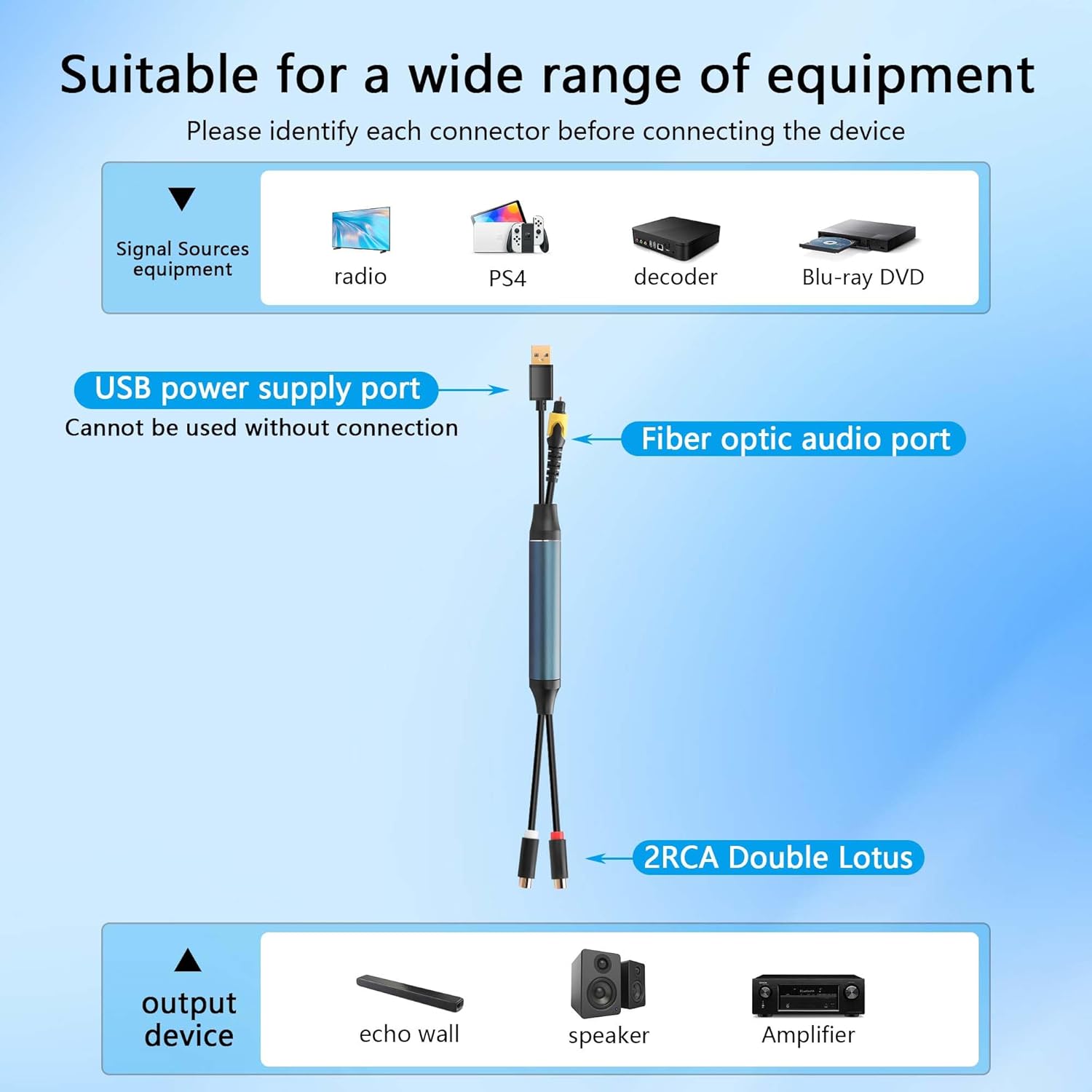
Figure 1: GINTOOYUN USB to 2RCA Digital Optical Audio Converter with labeled ports. This image shows the overall product with its USB power supply port, fiber optic audio port, and 2RCA Double Lotus output.

Figure 2: Detailed view of the converter's interfaces. From left to right: 2RCA (red for right, white for left), Fiber Optic Audio Port (yellow with dust plug), and USB Power Supply Port.
2. Setup Instructions
2.1 Identifying Ports:
Before connecting, identify the optical audio output port on your source device (e.g., TV, PS4) and the RCA input ports (red for right channel, white for left channel) on your audio receiving device (e.g., amplifier, speaker).
2.2 Connection Steps:
- Connect Optical Input: Remove the dust cap from the fiber optic audio port on the converter. Connect the digital optical cable from your source device's optical output to the fiber optic audio port on the GINTOOYUN converter.
- Connect RCA Output: Connect the 2RCA (red and white) connectors from the GINTOOYUN converter to the corresponding RCA input ports on your analog audio device.
- Connect USB Power: Plug the USB-A connector of the GINTOOYUN converter into a USB power source. This can be a USB port on your TV, a USB wall adapter (not included), or any other standard USB power supply. The converter requires power to function.
- Power On Devices: Ensure both your source device and your audio receiving device are powered on.

Figure 3: Example connection with a computer. The computer's optical audio output connects to the converter, which then connects to a speaker system via RCA. The USB port provides power.

Figure 4: Example connection with a TV and soundbar. The TV's optical audio output connects to the converter, which then connects to an echo wall/soundbar via RCA. The USB port provides power.
3. Operating Instructions
Once all connections are made and devices are powered on, the GINTOOYUN converter operates automatically. It is a plug-and-play device, meaning no additional software or drivers are required. The audio signal from your digital source will be converted and transmitted to your analog audio system in real-time.
- Ensure the correct audio output setting is selected on your source device (e.g., PCM/Stereo output for optical audio).
- Adjust the volume on your analog audio system.
- The sound should be synchronized immediately upon connection and playback.
4. Maintenance
To ensure the longevity and optimal performance of your GINTOOYUN audio converter, follow these maintenance guidelines:
- Dust Protection: Always use the provided dust plug for the fiber optic socket when the cable is not connected. This prevents dust and debris from entering the port, which can degrade signal quality.
- Cleaning: Gently wipe the exterior of the converter with a soft, dry cloth. Avoid using liquid cleaners or abrasive materials.
- Handle with Care: Avoid bending or pulling the cables excessively, especially near the connectors, to prevent internal damage.
- Storage: Store the converter in a cool, dry place away from direct sunlight and extreme temperatures when not in use.
5. Troubleshooting
- No Sound Output:
- Ensure the USB power supply is connected and functioning. The converter requires power to operate.
- Verify that the optical cable is securely connected to both the source device and the converter.
- Check that the RCA cables are correctly connected to the analog audio device's input ports.
- Confirm that your source device's audio output settings are configured for optical (TOSLINK) output and set to PCM/Stereo format. Some devices may default to Dolby Digital or DTS, which are not supported by this converter.
- Ensure your analog audio device is set to the correct input source (e.g., AUX, Line In).
- Increase the volume on your analog audio device.
- Distorted or Poor Sound Quality:
- Check for loose connections.
- Ensure the optical cable is not damaged or excessively bent.
- Verify that the dust cap was removed from the optical port before connection.
- Converter Not Working (Directionality):
- This device converts digital optical to analog RCA only. It cannot convert analog RCA to digital optical. If you are attempting to convert analog to digital, this is the incorrect device.
6. Specifications
| Feature | Detail |
|---|---|
| Brand | GINTOOYUN |
| Model | USB to 2RCA Digital Optical Audio Converter |
| Interface Type | USB (Power), Optical (Input), 2RCA (Output) |
| Number of Channels | 2 |
| Material | Alloy, PC, Gold (for connectors) |
| Item Weight | 2.08 ounces |
| Cable Length | Approximately 1.5 feet (46 cm) |

Figure 5: Dimensions of the GINTOOYUN USB to 2RCA Digital Optical Audio Converter. The USB cable length is approximately 22.5 cm, the main body is 11.5 cm, and the RCA cable length is 12 cm.
7. Warranty and Support
7.1 Warranty Information:
Specific warranty details for this product are not provided in this manual. Please refer to the seller or manufacturer's official website for the most current warranty policy and terms.
7.2 Customer Support:
For technical support, troubleshooting assistance, or any product-related inquiries, please contact GINTOOYUN customer service through the platform where the product was purchased or visit the official GINTOOYUN brand store for contact information.