
Sk19
SK19 Sleep Earbuds User Manual
Model: SK19
Introduction
Thank you for choosing the SK19 Sleep Earbuds. These lightweight, in-ear headphones are specifically designed for comfort during sleep, featuring a compact form factor ideal for side sleepers. With advanced Bluetooth 5.3 technology, they provide stable connectivity and clear audio for both music and calls. The included charging case extends usage time significantly, ensuring your audio experience lasts throughout the night.

Image: The SK19 Sleep Earbuds nestled in their charging case, displaying the battery level.
What's in the Box
Please check the package contents to ensure all items are present:
- SK19 Sleep Earbuds (Left and Right)
- Charging Box
Setup
1. Charging the Earbuds and Case
Before first use, fully charge both the earbuds and the charging case. The charging case provides extended battery life for the earbuds.
- Place the earbuds into the charging case. Ensure they are correctly seated in their respective slots.
- Connect the charging case to a USB power source using a compatible charging cable.
- The charging indicator on the case will show charging status. A full charge typically takes approximately 2 hours for the case and earbuds.

Image: The SK19 Sleep Earbuds in their open charging case, highlighting their compact and portable design for easy storage and quick access.
2. Bluetooth Pairing
To connect your SK19 Sleep Earbuds to your device:
- Ensure the earbuds are charged and inside the charging case.
- Open the charging case lid. The earbuds will automatically enter pairing mode.
- On your smartphone or Bluetooth-enabled device, go to the Bluetooth settings.
- Search for new devices. Select "SK19" from the list of available devices.
- Once connected, you will hear a confirmation tone, and the earbuds will be ready for use.

Image: A user wearing the SK19 Sleep Earbuds, demonstrating their comfortable fit. The image also highlights the Bluetooth 5.3 technology for seamless connectivity.
3. Wearing the Earbuds
The SK19 Sleep Earbuds are designed for a comfortable and secure fit, especially for side sleepers.
- Gently insert each earbud into your ear canal.
- Adjust the earbud until it feels snug and comfortable. The mini, lightweight design ensures minimal pressure, even when lying on your side.
- Ensure the earbud is fully seated to optimize sound quality and passive noise isolation.
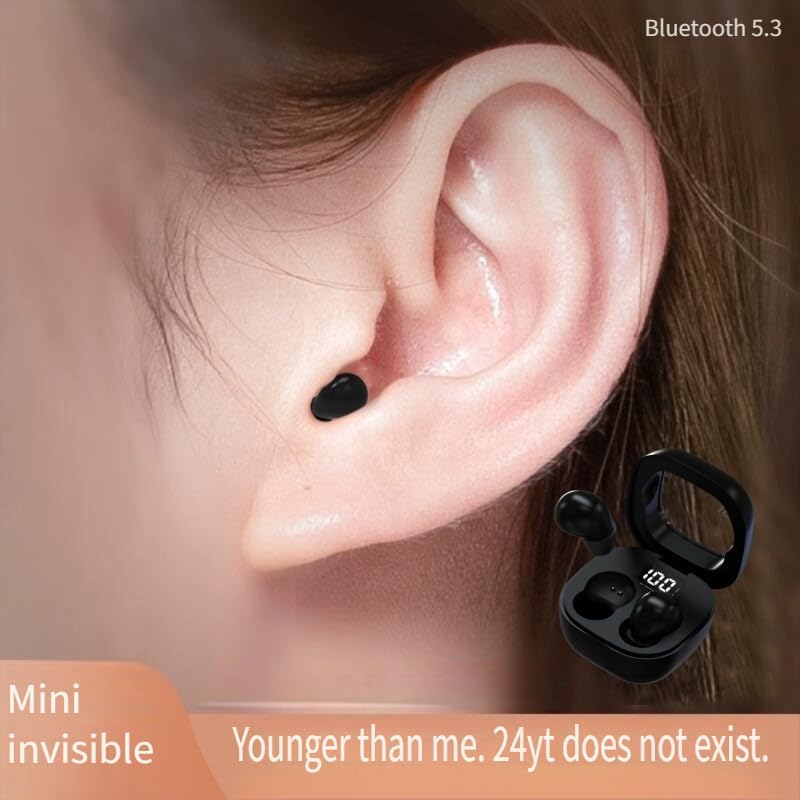
Image: A close-up view of an ear with the SK19 Sleep Earbud, demonstrating its compact and discreet "mini invisible" design when worn.

Image: A user wearing the SK19 Sleep Earbuds, illustrating how small they are and how they can be worn hidden in the ear for extended periods without discomfort.

Image: An SK19 Sleep Earbud shown on a fingertip, demonstrating its tiny size. The image also conveys that the earbuds are designed with skin-friendly silicone for comfortable side sleeping without pressing on the ears.
Operating Instructions
Touch Controls
The SK19 Sleep Earbuds feature intuitive touch controls for easy management of audio and calls. Specific touch gestures may vary slightly, but common functions include:
- Play/Pause: Single tap on either earbud.
- Next Track: Double tap on the right earbud.
- Previous Track: Double tap on the left earbud.
- Answer/End Call: Single tap on either earbud during an incoming call.
- Reject Call: Press and hold on either earbud during an incoming call.
- Activate Voice Assistant: Triple tap on either earbud (if supported by your device).
Audio Playback
Enjoy high-definition original sound for your audio content. The earbuds offer up to 47 hours of playback time with the charging case, ensuring long-lasting use for sleep, relaxation, or daily activities.

Image: An exploded view diagram of the SK19 Sleep Earbud's internal structure, illustrating the custom composite seismic film and upgraded cavity design for enhanced sound quality and low distortion.
Making and Receiving Calls
The built-in microphone ensures crystal-clear call quality, allowing for hands-free conversations without disturbing others.
- When a call comes in, tap either earbud once to answer.
- To end a call, tap either earbud once.
- To reject an incoming call, press and hold either earbud.
Maintenance
Proper care will extend the lifespan of your SK19 Sleep Earbuds.
- Cleaning: Regularly wipe the earbuds and charging case with a soft, dry, lint-free cloth. Do not use harsh chemicals or abrasive materials.
- Water Resistance: The earbuds feature an IPX5 waterproof design, protecting against rain and sweat. Avoid submerging them in water or exposing them to strong jets of water.
- Storage: When not in use, store the earbuds in their charging case to protect them and keep them charged. Store in a cool, dry place away from extreme temperatures.

Image: The SK19 Sleep Earbuds charging case and earbuds depicted with water droplets, signifying their IPX5 waterproof rating for protection against rain and splashing.

Image: The SK19 Sleep Earbuds displayed on a surface, emphasizing their light, small, and user-friendly design that ensures painless wear and long life, alleviating concerns about power running out.
Troubleshooting
If you encounter issues with your SK19 Sleep Earbuds, try the following solutions:
| Problem | Possible Solution |
|---|---|
| Earbuds not pairing |
|
| No sound from earbuds |
|
| Charging issues |
|
Specifications
| Feature | Detail |
|---|---|
| Model Name | Sk19 |
| Brand | Generic |
| Color | White |
| Connectivity Technology | Bluetooth |
| Wireless Communication Technology | Bluetooth |
| Bluetooth Version | 5.3 |
| Ear Placement | In Ear |
| Form Factor | In Ear |
| Earpiece Shape | In-ear |
| Control Method | Touch |
| Charging Time | 2 Hours |
| Playback Time (with case) | Up to 47 Hours |
| Noise Control | Active Noise Cancellation |
| Specific Uses For Product | Sleep, Calls |
| Recommended Uses For Product | Sleep, Calling |
| Included Components | Earbuds, Charging Box |
| Manufacturer | Guangzhou Changhong Huixin Technology Co., Ltd. |
| ASIN | B0DLVCPHZR |
| First Available Date | November 3, 2024 |
| Impedance | 320 Ohm |
| Audio Driver Type | Dynamic Driver |
Warranty and Support
For warranty information and customer support, please refer to the purchase platform or contact the seller directly. Keep your proof of purchase for any warranty claims.
For further assistance or inquiries, please reach out to the manufacturer or retailer where you purchased the SK19 Sleep Earbuds.